

› UKTH forums › 🛜 Wireless Routers & Modems › ASUS & Wireless › ASUS Log – kernel: nf_conntrack: expectation table full ASUS System Log Warning – kernel: nf_conntrack: expectation table full message OK, so I upgraded my RT-AC86U to ASUSWRT-Merlin latest firmware RT-AC86U_384.14_0 I noticed, probable there from previous versions, the...
- This topic has 23 replies, 5 voices, and was last updated 11 months ago by
 UK Sentinel.

- AuthorPosts
- November 20, 2025 at 6:44 pm #40302
Good Afternoon Everyone
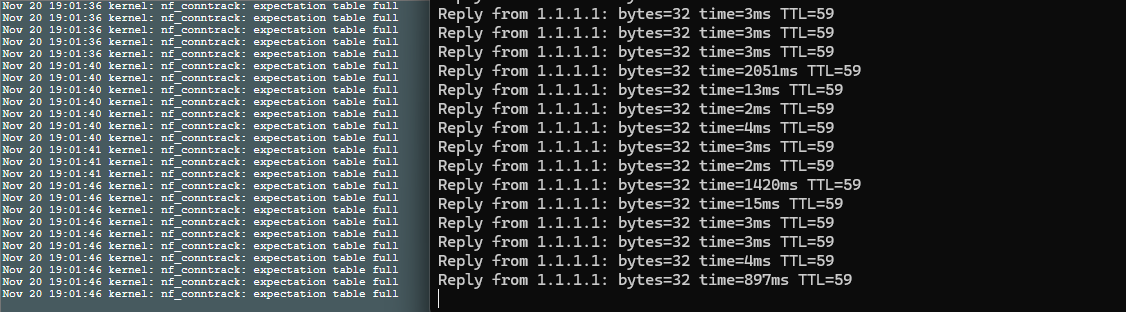
I stumbled onto this forum post after seeing tons of “kernel: nf_conntrack: expectation table full” being spammed into my Asus RT-AX82U’s System Log.
I also started noticing that when the kernel: nf_conntrack: expectation table full messages are getting posted to the log, I get massive ping spikes. Almost like the packets are getting dropped?I SSH’d into my router and used the cat /proc/sys/net/netfilter/nf_conntrack_expect_max command @UK Sentinal provided and it reported back 150
so I then ran the other commands to increase that number “nvram set ct_expect_max=1024
nvram commit
reboot”After the reboot finished, I ran cat /proc/sys/net/netfilter/nf_conntrack_expect_max again and it reported back 1024, so the change is sticking but the kernel: nf_conntrack: expectation table full messages are still getting posted at a crazy rate.
Not sure how to proceed from here and I’m hoping someone can help me out, otherwise I have no choice but to buy a diffrent brand of router
Attachments:
You need to login in order to vote
November 20, 2025 at 7:49 pm #40305Welcome, did you also run the x2 other commands,
nvram commit
rebootIf you did and are still receiving these log messages, give the router another reboot.
Edit: forgot to ask, what Firmware are you running as try updating to latest release and disable FullCone NAT if possible ?
You need to login in order to vote
November 20, 2025 at 8:32 pm #40306Other option to consider if the above changes do not help …
Stock Asus firmware:
WAN → NAT Passthrough
Turn OFF:
SIP Passthrough ← this one is the main offender
Reboot.
AsusWRT-Merlin: (I believe this option is still available)
Go to:
Administration → System → “Enable conntrack helper” → NO
Reboot.
You need to login in order to vote
November 20, 2025 at 10:20 pm #40307I’m on the latest Stock Firmware 3.0.0.4.388_25098
I did do nvram commit
rebootand SIP Passthrough is disabled already.
I’ve been getting the nf_conntrack: expectation table full messages on and off randonmly for the past year, but they never caused me to get ping spikes. It was only the last 2 days where they have been showing up nonstop and causing my latency to spike. So I might just notify my ISP to see if there is an issue with my line.
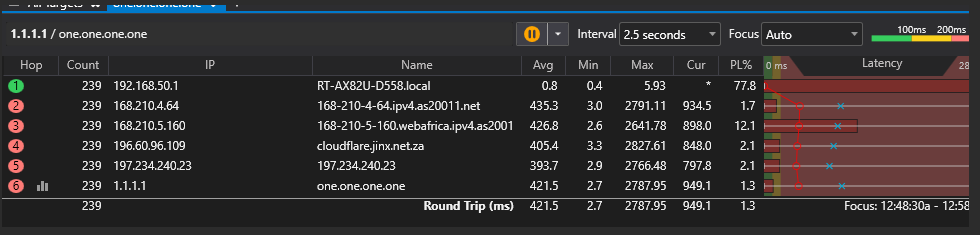
EDIT : Just adding this screenshot of pingplotter targetting 1.1.1.1
Seems it is my router just dropping packets
-
This reply was modified 11 months, 1 week ago by FLAMER283.
You need to login in order to vote
November 20, 2025 at 11:03 pm #40309November 21, 2025 at 6:39 am #40311No guarantee that it would work, but worth a try and just ensure after factory reset, you configure router from scratch and not restore using configs from back-up.
This stops possible Corrupt settings etc being carried forward to the new build.
You need to login in order to vote
November 23, 2025 at 7:46 am #40316November 23, 2025 at 1:37 pm #40320I did not attempt a factory reset, I did want to update my router to Merlin after I spotted a compatible firmware upgrade for my router model, but I was a bit scared to do it in case I brick my router by some chance.
But I also downloaded the original Asus firmware for my router for when I do go forward with the custom firmware upgrade and need to revert.So I took your original command and instead of setting it to “1024” connections, I just said screw it and set the
nf_conntrack_expect_maxto “10240” and thenf_conntrack_maxto “20480”. Which stopped the nf_conntrack: expectation table full messages, but I was still getting ping spikes.At this point, I pulled in Grok AI to assist.
It gave me a command to list all of the connections on the router. I took the thousands of connections and saved it to a text file and then uploaded that text file to Grok.
Here was the result from Grok:Total connections in the file: 1,337
(1,178 TCP + 158 UDP + 1 ICMP)Breakdown by Internal Device (192.168.50.x)Internal IPDevice DescriptionTCP ConnectionsUDP ConnectionsICMPTotal192.168.50.30(Main user device?)280129192.168.50.49Highly suspicious1,13415801,292192.168.50.82Normal device7007192.168.50.8(Possibly Apple device)1001192.168.50.143(Google/XMPP related)2002192.168.50.164(Apple iCloud)1001192.168.50.182Unknown1001Total1,17815811,337As you can see on “192.168.50.49″ it has over a thousand connections. 192.168.50.49 is my Android TV box. My first assumption was that the Android TV box has malware on it that is trying to phone home over and over again, overwhelming the router, therefore causing the ping spikes. But the Odd thing was, even if I turned off the Android TV box or rebooted it, the ping spikes did not stop, and the connections on my router did not get cleared or removed. The Android TV box is purely used for only YouTube and Netflix, no strange or unknown apps were installed on it.
Grok AI thought it was malware as well, so it then gave me a SSH command to count all of the connections just for 192.168.50.49 every 5 seconds, expecting the number of connections to keep growing, but it did not; it just kept steady.
So the AI gave me this command “conntrack -D --orig-src 192.168.50.49"to drop all the connections from 192.168.50.49, I ran that and cleared the router’s Ram Cache “sync && echo 3 > /proc/sys/vm/drop_caches“(Which dropped the Ram from 60mb free to 150mb free)After a reboot, my ping spikes went back to normal.
I’ve been monitoring the connections on my router for a couple of days now and it has not crossed over 700 total connections. So I am unsure as to what the fix was, and at this moment, it does not look like the problem will come back since the TV box’s number of connections remains extremely minimal and steady, not as crazy as it was a few days ago.
Part of me still wants to update the router to Merlin, and maybe I will go forward with that in December when I am on leave from work… or maybe just get a new router but don’t know what to get since I don’t really follow what is the new and greatest router models out there.
Just want to thank you for making this post @UK Sentinel, I don’t think I would’ve ever fixed this issue if it wasn’t for you.
-
This reply was modified 11 months ago by FLAMER283.
-
This reply was modified 11 months ago by FLAMER283.
-
This reply was modified 11 months ago by FLAMER283.
-
This reply was modified 11 months ago by FLAMER283.
Liked by:You need to login in order to vote
November 23, 2025 at 2:10 pm #40325No problem and thank you for your detailed response, most helpful for others hopefully.
Your Android TV box making so many connections is a worry and ASUSWRT-Merlin is a great third party firmware, but is for the more technical oriented, I run it via an ‘GNUton fork on my ASUS DSL-AX82U
Liked by:You need to login in order to vote
- AuthorPosts




- You must be logged in to reply to this topic.