

› UKTH forums › 🛜 Wireless Routers & Modems › ASUS & Wireless › ASUS RT-BE92U – Official Thread
- This topic has 20 replies, 2 voices, and was last updated 3 days, 10 hours ago by
 UK Sentinel.

- AuthorPosts
- July 3, 2026 at 7:42 pm #42937
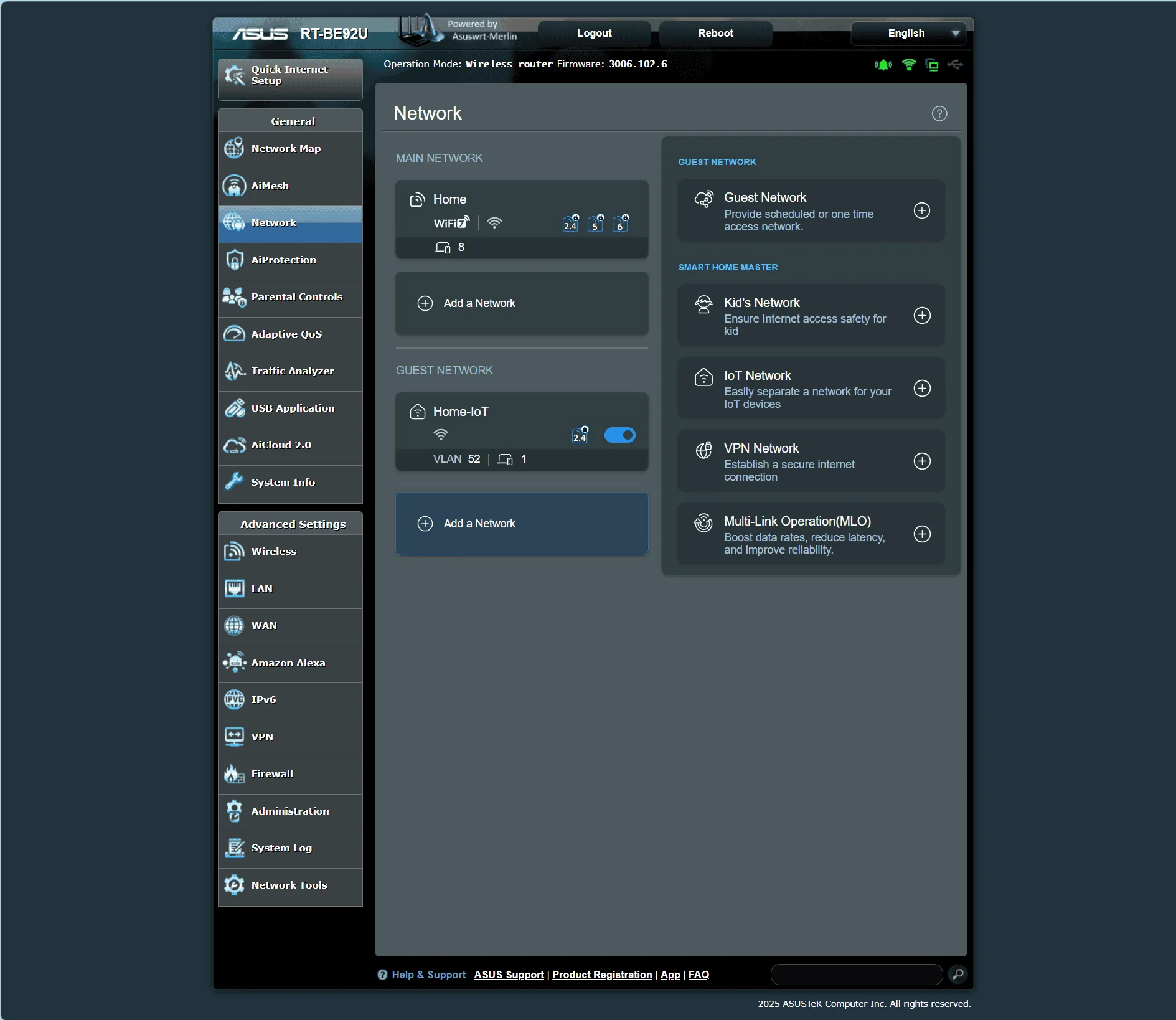
This week, I reconfigured my ASUS RT-BE92U router to better handle my growing collection of smart home gear, including a robotic lawnmower, smart door cameras, a robotic hoover, and security cameras etc. It’s great to see that ASUS’s built-in ‘IoT Network’ feature automatically creates a dedicated VLAN (ID 52) out of the box, making robust network isolation and security separation incredibly easy to deploy
Good to see this work in practice.
In a completely sane world, madness is the only freedom (J.G.Ballard).
You need to login in order to vote
July 6, 2026 at 6:04 pm #42952This is a useful feature. I did the same to isolate iot gear like ring doorbell etc. Dont trust them as they dont get software updates often if at all
You need to login in order to vote
July 6, 2026 at 7:45 pm #42954Very useful, I didn’t mention this earlier as I also enabled the option to place the IoT network on the 192.168.52.0/24 subnet and turned on AP Isolation, ensuring that devices on the IoT network can’t communicate with one another. Combined with the dedicated VLAN, it gives each device its own almost sandboxed environment, which is ideal for limiting lateral movement and keeping less‑trusted IoT gear properly contained.
Sounds good in theory at least, now it’s just down to the firmware staying consistent with the isolation rules.
In a completely sane world, madness is the only freedom (J.G.Ballard).
You need to login in order to vote
July 29, 2026 at 9:25 pm #43096ASUS RT-BE92U Firmware version 3.0.0.6.102_40311
Release: 2026/07/29
New Features:
– LED Lighting Scheduler: Added scheduling support for LED.
– New Time Zone Options: Added “Vancouver, Whitehorse (PST7)” and “Edmonton, Yellowknife (MST6)” time zone options for Canada.
– Added QoE feature to dynamically optimize network traffic for a smoother online experience.Bug Fixes and Enhancements:
– Improved MAC address display logic on the WDS (wireless bridge) page, fixing cases where the band name and its MAC address were shown incorrectly.
– Fixed an issue where Client List sorting could stop working under certain conditions, and removed a duplicate wired device card in the “By Interface” view.
– Optimized the IPv6 address design for Networks.
– Improved handling of unstable network cables.
– Improved stability during the AiMesh node setup process.
– Improved the reconnection process for IPv6 Plus (Japan) after a reboot or disconnect.
– Improved IPv6 Option handling, including network connectivity after a reboot – following a direct firmware upgrade in certain scenarios.
– Fixed an issue where a physical LAN port could disappear after the setup process when – using the automatic WAN type detection mechanism.
– Improved AP Isolation synchronization for Networks profiles that don’t use a dedicated subnet.
– Strengthened firewall rule configuration for UPnP, improving port-forwarding stability and firewall rule restoration reliability.
– Fixed an issue where the URL-forwarding utility could become unresponsive after an internal network component update.Security Fixes:
– Strengthened data handling in Networks configuration functions.
– Improved data validation in Networks rule list processing.
– Fixed a data-handling issue in the DNS query caching component.
– Strengthened verification when a software component downloads external resources, improving connection security.
– Adjusted the information response mechanism of the device discovery service, strengthening protection of device information.
– Fixed a data-handling issue in a firmware component on a specific model.
– Improved data-display handling in a web function to enhance browsing security.
– Strengthened input data validation in a device-pairing web function.
– Improved data validation in the configuration file upload/sync function.
– Improved how the account service restart process is handled.
– Removed a non-essential internal function endpoint, strengthening overall access control.
– Adjusted the debug file access mechanism, strengthening protection of internal data.
– Strengthened data handling in the system logging function.We recommend upgrading to this version to maintain optimal protection.
In a completely sane world, madness is the only freedom (J.G.Ballard).
You need to login in order to vote
August 31, 2026 at 7:49 am #43300Logged into my RT-BE92U this morning and its alerting me that a new ASUSWRT-Merlin firmware – 3006.102.8_4 is available.
Currently I’m running 3006.102.8 and ill have to see these new Fixes have any benefit to myself as currently happy with 3006.102.8.
Changlog: 3006.102.8_4
`3006.102.8_4 (20-Aug-2026)
- UPDATED: OpenVPN to 2.7.6.
- UPDATED: miniupnpd to 2.3.11.
- CHANGED: When downgrading an OVPN server from TLS Encrypt V2
           mode to tls auth mode, the V2 key will be replaced
           with an appropriate V1 key.
- CHANGED: IPv6 address provided as second argumnet to ddns-start
           script (aligns with 3004.388)
- FIXED: Cannot connect to gaming servers if a game forwards
         a port through UPnP (3006.102.8 regression)
- FIXED: A couple of potential security issues in httpd and
         ipsec cert handling
- FIXED: netstat-nat would return an empty list if no option
         is selected on the Netool webui interface`
In a completely sane world, madness is the only freedom (J.G.Ballard).
You need to login in order to vote
October 13, 2026 at 11:10 am #44409ASUS RT-BE92U Firmware Version 3.0.0.6.102_40497
2026/10/12
This update includes a required change for the Speedtest service. If Speedtest is supported on your model, you must install this update to continue using it. Please refer to Speedtest Service Announcement for details.
Supports Surfshark VPN account login for a smoother user experience. (Supported model only)
Security Fixes:
Web management interface: Strengthened data handling for the connected device list and added stricter content checks when importing configuration profiles.Network speed test service: Added allowlist validation for service command parameters, so that only expected values are accepted.
AiCloud: Strengthened the data handling mechanism for the network neighborhood host list.
AiCloud: Improved how share link identifiers are generated, and adjusted the file and disk information query process.
AiCloud: Strengthened authentication and path validation for remote file access.
System protection service: Adjusted address parameter validation and event logging, strengthening access control between local services.Certificate import process: Adjusted file handling and password passing, with stricter parameter validation.
Third-party account authorization: Narrowed the recipients of authorization data to better protect authorization information.
Web management interface: Adjusted the output handling of feedback content.
Notification service: Added identity verification for local connection sources and tightened the related file permission settings.
Mobile device connection authorization: Added a device matching check to strengthen the access token issuance process.
Device discovery service: Removed a non-essential internal function endpoint to strengthen overall access control.
AiMesh: Adjusted data access protection during the node joining process, improving system stability while connections are being established.System temporary directory: Adjusted the default permissions applied at creation time to narrow local file access.
Network diagnostic data query: Strengthened value range checks for time interval parameters.
Network diagnostic data query: Added allowlist validation for query fields.
Internal data query: Improved field matching logic and optimized the memory release process under error conditions.
Time synchronization settings: Strengthened parameter validation for the server name.
File upload handling: Fixed an issue where certain input formats could cause the web management service to become unresponsive.
Wireless channel selection tool: Adjusted the handling of command parameters to prevent unintended command execution.
Certificate upload: Added a pre-check of archive contents to prevent files from being written to unintended locations.
System configuration file generation: Strengthened parameter content checks to prevent abnormal configuration values from affecting network service settings.VPN and account authentication services: Adjusted the handling of connection settings and account data, with stricter parameter validation.
We recommend updating to this version to maintain optimal protection.
In a completely sane world, madness is the only freedom (J.G.Ballard).
You need to login in order to vote
- AuthorPosts


- You must be logged in to reply to this topic.