

› UKTH forums › 📡 Broadband Tech & ISP’s › Sky › Using own Router with Sky Hi all, So, at my place, the TV reception isn’t fantastic and one day the other week I couldn’t get any TV channel to show. So this has got me...
- This topic has 10 replies, 3 voices, and was last updated 3 years, 1 month ago by
 UK Sentinel.

- AuthorPosts
- September 17, 2023 at 8:15 pm #26991
Hi all,
So, at my place, the TV reception isn’t fantastic and one day the other week I couldn’t get any TV channel to show.
So this has got me thinking about IPTV. Seen lots of IPTV services around but never heard of half of them.
I know Sky has the “Sky Puck” but at £26 a month, seems a little steep for my usage, considering I don’t get sport etc, only the default package. However, I see that Sky care offering there FTTP broadband, Sky Puck and Netflix for £39.99.
Now, I’ve never used Netflix as I have Prime (mainly due to the free delivery on ordered from amazon is worth me subscribing for that). So my broadband runs out in March next year and I was going to go PlusNet (like Parents just have recently) but I’ve now seen this and I’m wondering if I should go for this as the Broadband works out about the same price but get the Tv for an extra approx. £10 so might be worth doing.
Does anyone now the answer the the below questions regarding Sky:-
- Do they use the existing BT ONT box or do they need access to run & fit there own cable/box into the property
- Can I use my RT-AX86S with Sky FTTP or am I tied into there own router only?
My alternative is to go Freesat but that requires a dish being fitted etc and tbh I think this is likely relatively short term solution as everything is going to be streamed via internet so not sure I want to have a dish fitted & extra cabling around for a few years and then its redundant.
Thanks
Kev
You need to login in order to vote
September 17, 2023 at 9:28 pm #26999Hi all,
Does anyone now the answer the the below questions regarding Sky:-
- Do they use the existing BT ONT box or do they need access to run & fit there own cable/box into the property
- Can I use my RT-AX86S with Sky FTTP or am I tied into there own router only?
Kev
So your ASUS router or any other router for that fact when using SKY (FTTC-FTTH) will need to support DHCPv4 Option 61 as Sky uses IPoE in the UK for both FTTC & FTTP services – ASUS stock firmware did not use to support Option 61 but ASUSWRT-Merlin alternative does . I have seen over the last few months that a couple of ASUS models support Option 61, but nothing positive.
Both BT and Sky use the OpenReach network (FTTP) to supply their services, so in theory (guess) the ONT will remain as it is owned by OpenReach.
In a completely sane world, madness is the only freedom (J.G.Ballard).
You need to login in order to vote
September 18, 2023 at 10:05 am #27004Thanks, I don’t see the DHCP option 61 on my router so I presume mine doesn’t have that (using stock firmware), guess will have to see if it appears in future firmware or maybe look at something else nearer the time.
Was just an idea.
Thanks!
Kev
You need to login in order to vote
September 18, 2023 at 12:16 pm #27006Shame,
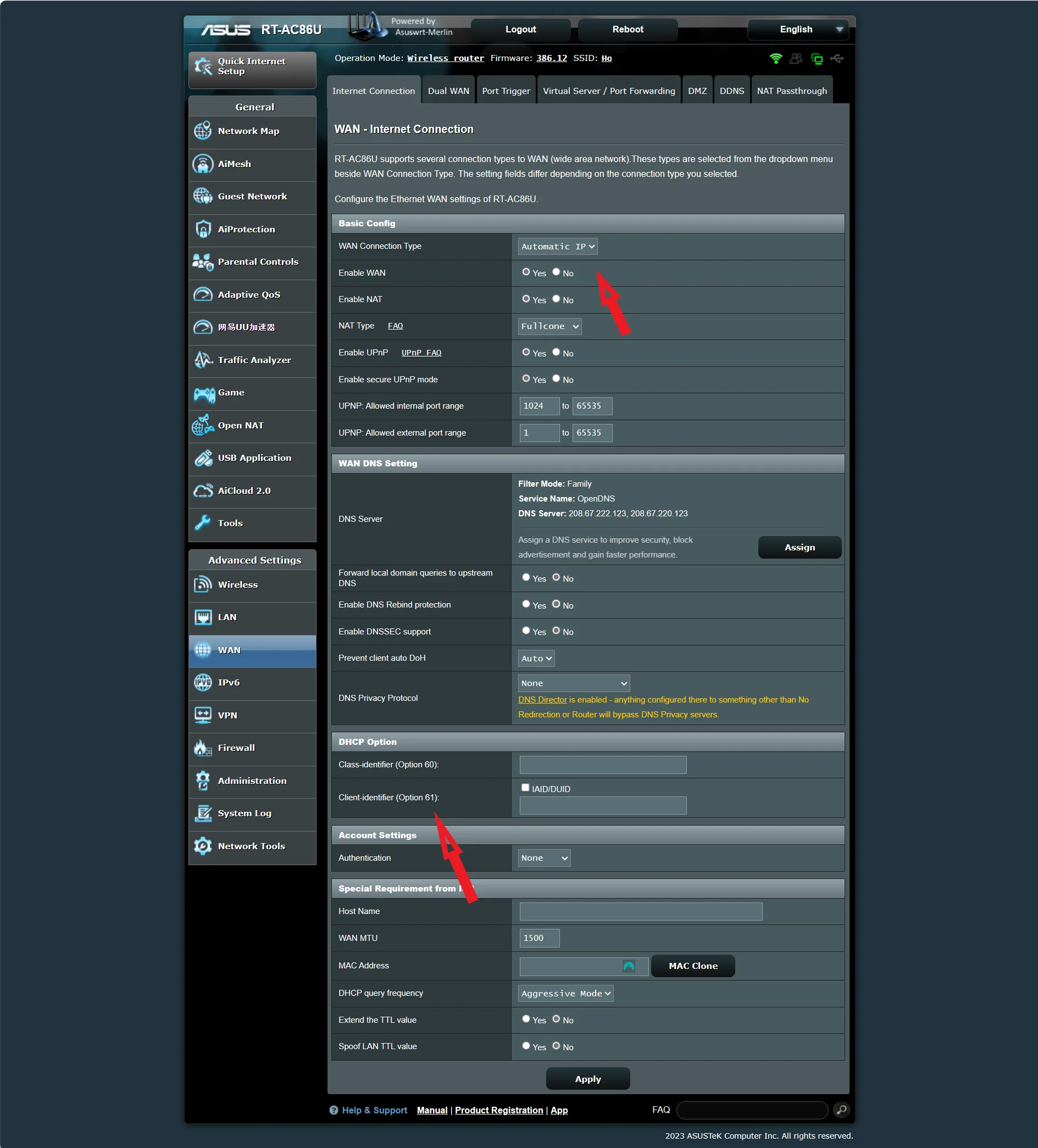
FYI: to check whether the ASUS will support Option 61, you have to go to WAN > Automatic IP and then Option 61 would be available if supported below ?
Attachments:
In a completely sane world, madness is the only freedom (J.G.Ballard).
You need to login in order to vote
September 18, 2023 at 12:36 pm #27008Hi,
Ah interesting. Yes, it seems it does show up if i go to Automatic IP, it lists the option so I presume I could use my router?
Do Sky advise what i need to enter into it or is it automatically assigned?
Thanks
Kev
Liked by:You need to login in order to vote
September 18, 2023 at 1:04 pm #27010I did wonder, but good to see ASUS stock firmware is starting to support SKY Option 61.
client identifier: anything@skydsl|anything (should work)
In a completely sane world, madness is the only freedom (J.G.Ballard).
You need to login in order to vote
September 18, 2023 at 1:17 pm #27013September 18, 2023 at 1:43 pm #27015Correct, it should work with non-modem routers – I believe once BT or the Sky hub is removed and the ASUS router is plugged in, SKY requires about 30 minutes before it will allow ASUS router (or any third party device) to connect and authenticate.
Or remove original sky/BT hub and power down ONT, then plug is ASUS router already configured and wait about thirty minutes before you switch back on ONT and ASUS router. (I think)
In a completely sane world, madness is the only freedom (J.G.Ballard).
Liked by:You need to login in order to vote
September 18, 2023 at 2:15 pm #27017September 18, 2023 at 8:38 pm #27021I’d be curious to see how the Sky wifi 6 router performs can’t find much about it.
I was also thinking of sky as they seem to be pushing the gaming side of it but the dhcp stuff put me off. It seems like you either keep their router and hope range is good enough or Asus merlin. Not much choice compared to a PPPoE provider.
You need to login in order to vote
September 18, 2023 at 8:44 pm #27022Some Netgear Routers also support Option 61, but yes, options are more limited.
Gamers always use Ethernet
In a completely sane world, madness is the only freedom (J.G.Ballard).
Liked by:You need to login in order to vote
- AuthorPosts



- You must be logged in to reply to this topic.