

› UKTH forums › 🎧 PC & Laptop Gaming › Gaming Hardware, etc. › External Hard Drive Eject Issues
- This topic has 28 replies, 3 voices, and was last updated 4 years ago by
 UK Sentinel.

- AuthorPosts
- October 3, 2022 at 10:58 pm #21100
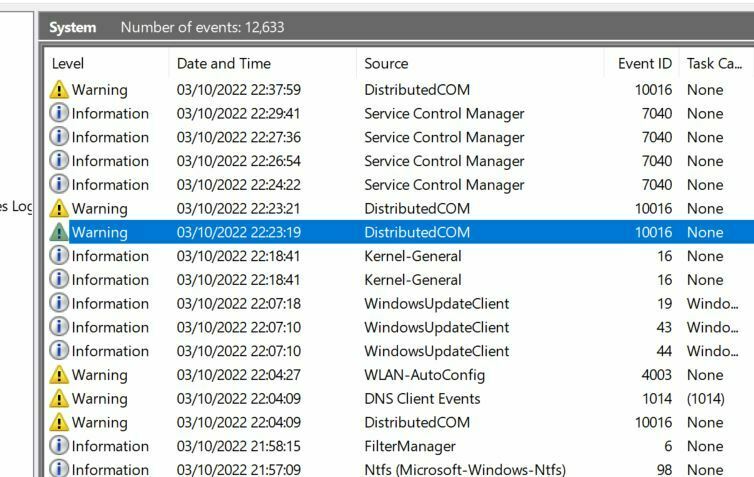
If you want to see exactly what is going on, try… @ Search Bar type “eventvwr” Open up “Windows Logs” then “System” Then plug in or unplug HDD and see if any Warnings are given, then double click on Warning (yellow) Triangle. You can also Right click on “system” to set specific filters etc.
Thanks. Please see attached. I am not sure what these errors are or whether they are connected with the drive. The non-warning ‘NTFS’ entry states therein that the drive is running as it should……
Attachments:
You need to login in order to vote
October 4, 2022 at 6:07 am #21103I assume you plugged in then unplugged USB HDD ?
event id: 10016 can usually be ignored. but it is odd no other Warnings etc !
Q. do you have a second Windows PC/Laptop to see if the issue is the same on second windows device ?
Q1. Try logging onto your PC with Admin account (permisions) to see if this helps ?
Q3. make sure Windows is upto date and update driver for USB HDD to correct version .
I am just wondering if it is some form of AV you are using? I will have a dig today on my laptop to investigate also
Edit; Device Manager -> Disk Drives. Policies, Check the configuration of each device under disk drives. Under one of the options, check if option is available to select between “quick removal” and “performance”. choose performance.
In a completely sane world, madness is the only freedom (J.G.Ballard).
You need to login in order to vote
October 5, 2022 at 11:21 pm #21145<p style=”text-align: left;”>
I assume you plugged in then unplugged USB HDD ? event id: 10016 can usually be ignored. but it is odd no other Warnings etc ! Q. do you have a second Windows PC/Laptop to see if the issue is the same on second windows device ? Q1. Try logging onto your PC with Admin account (permisions) to see if this helps ? Q3. make sure Windows is upto date and update driver for USB HDD to correct version . I am just wondering if it is some form of AV you are using? I will have a dig today on my laptop to investigate also<noscript>
</noscript> Edit; Device Manager -> Disk Drives. Policies, Check the configuration of each device under disk drives. Under one of the options, check if option is available to select between “quick removal” and “performance”. choose performance.</p>
I did, yes.Just tried it on an older laptop and had the same issue, except it didn’t squeal when I shut down.
The logon being used is the admin.
Windows is up to date, and the driver also.
Currently using standard windows security software, which is up to date I believe.
I switched that option to performance. No joy unfortunately, the same thing happens.
I figured out what I was searching wrong in Process Monitor (no back slashes or one too many 🙈). I found that when it is plugged in, Explorer.exe is accessing every folder on the drive, but that is the only process listed. When I eject, I get no results.
It seems like the light goes off after the same idle time every time, and this does not correspond to the eject. The eject function simply isnt working ie not communicating or not over-riding something🤔
Thanks again.
You need to login in order to vote
October 6, 2022 at 7:26 am #21147Just tried it on an older laptop and had the same issue, except it didn’t squeal when I shut down.
That is most odd, I did notice the other day when I was looking at the specs for your Toshiba Canvio 1tb External Hard drive that NTFS filing system was required ?
System Requirements – Formatted NTFS for Microsoft Windows 10, Windows 8.1, Windows 8, Windows 7
In a completely sane world, madness is the only freedom (J.G.Ballard).
You need to login in order to vote
October 6, 2022 at 9:50 am #21149Just tried it on an older laptop and had the same issue, except it didn’t squeal when I shut down.
That is most odd, I did notice the other day when I was looking at the specs for your Toshiba Canvio 1tb External Hard drive that NTFS filing system was required ? System Requirements – Formatted NTFS for Microsoft Windows 10, Windows 8.1, Windows 8, Windows 7
Ntfs is the just the way it is organised on the drive itself is it not? Larger drives are ntfs, smaller USBs are fat32?
You need to login in order to vote
October 6, 2022 at 10:53 am #21151Basically, for Windows devices yes, but NTFS has lots of security enhances over say FAT 32 etc.
Is your External HDD formatted NTFS if not, maybe worth a try to see if this makes the difference ?
In a completely sane world, madness is the only freedom (J.G.Ballard).
You need to login in order to vote
October 9, 2022 at 11:02 pm #21163October 10, 2022 at 10:40 am #21167Ok, to mimic your scenario, I dug out and plugged in my old Toshiba MK3252gsx HDD which is contained within a disk caddy, after selecting the Safely Remove Hardware and Eject media Icon in task bar, then selected Eject USB to ATA/ATAPI Bridge option a Message Appears saying it is Safe to Remove Hardware, but disk caddy Red light is still On and Disk is rotating still even after selecting this option.
Cannot remember if you receive the message stating it is Safe to Remove hardware, but if so, then this must be normal and disk must remain spinning due to power from USB ?
HTH
In a completely sane world, madness is the only freedom (J.G.Ballard).
You need to login in order to vote
October 10, 2022 at 11:19 am #21168And you can have a look how it is integrated into the system, maybe it is dedected as internal disk and not as removable.
Usually they spin down after configurable time (5-30 minutes are mostly set).
You need to login in order to vote
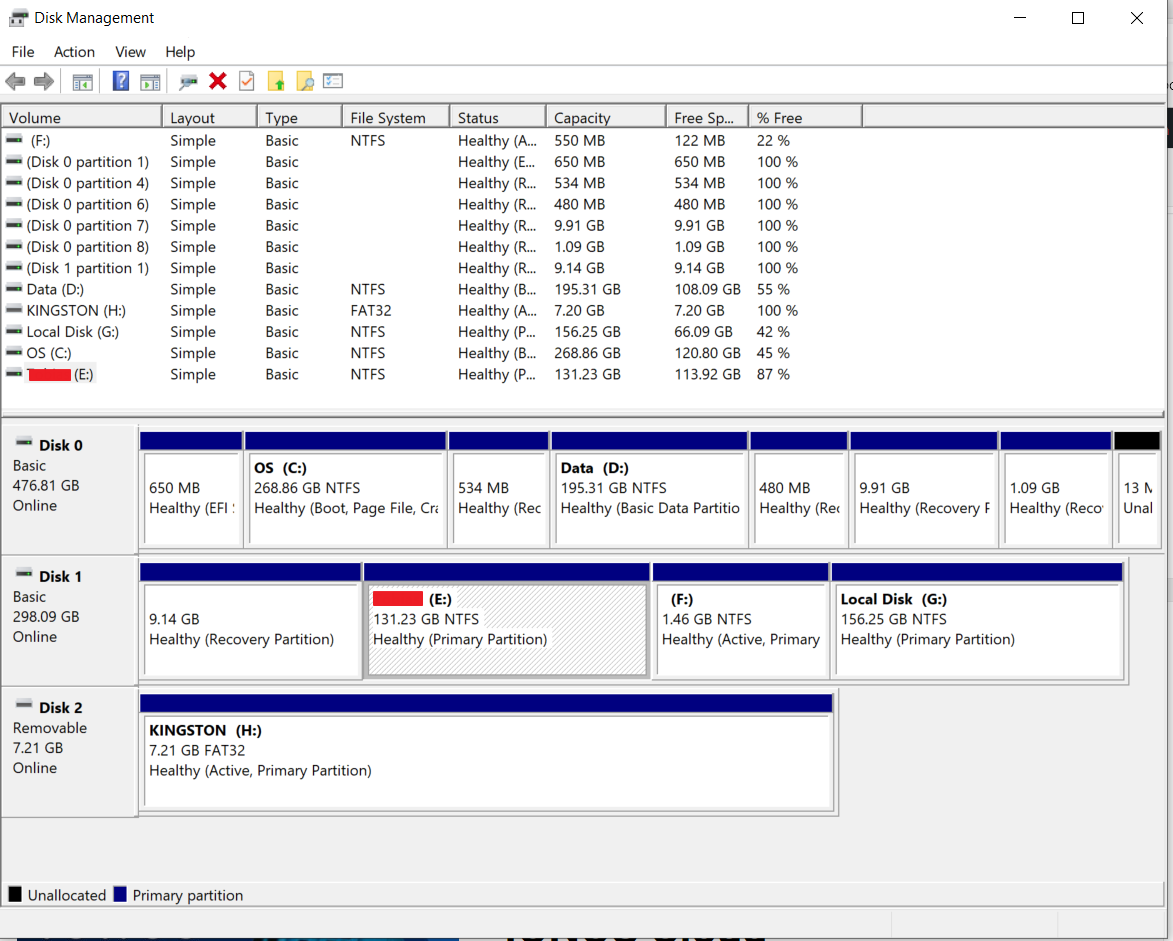
October 10, 2022 at 12:44 pm #21170Took a screen dump of disk management with external Toshiba USB HDD and a Kingston USB flash drive plugged in for comparison.
- My Laptop HDD: Disk o
- Toshiba USB HDD: Disk 1
- Kingston Flash Drive: Disk 2
So look like windows is treating the Toshiba external HDD as a Basic Disk (not removable)
Attachments:
In a completely sane world, madness is the only freedom (J.G.Ballard).
You need to login in order to vote
October 10, 2022 at 12:50 pm #21172Interesting – I will leave Toshiba HDD plugged in but go through the process of ejecting disk, then leave for an hour to see if external HDD or light does turn off etc. (all in the name of science)
In a completely sane world, madness is the only freedom (J.G.Ballard).
You need to login in order to vote
October 10, 2022 at 2:21 pm #21173Alas Toshiba HDD disk caddy light was still on after an hour and 20 minutes and disk was still running.
In a completely sane world, madness is the only freedom (J.G.Ballard).
You need to login in order to vote
October 10, 2022 at 3:59 pm #21174Advanced power settings (might not work for USB-HDD):
or: https://www.youtube.com/watch?v=EorQ-rbVCps
Liked by:You need to login in order to vote
October 10, 2022 at 4:14 pm #21179Nice, had a look and mine was set to 20 minutes, so as you say for USB-HDD does not seem to work.
In a completely sane world, madness is the only freedom (J.G.Ballard).
You need to login in order to vote
- AuthorPosts


 </noscript>

- You must be logged in to reply to this topic.