

› UKTH forums › 🛜 Wireless Routers & Modems › ASUS & Wireless › ASUS DSL-AC55U – G.INP Hey guys, I have a few questions regarding G.INP (G.998.4) on my DSL-AC55U. When I enable just G.INP (or after a factory reset, the G.INP is enabled by default?) the... › Reply To: ASUS DSL-AC55U – G.INP Hey guys, I have a few questions regarding G.INP (G.998.4) on my DSL-AC55U. When I enable just G.INP (or after a factory reset, the G.INP is enabled by default?) the…

Hi guys,
It’s about time to post another update.
First thing first. Your question, Sentinel.
I don’t know.. I don’t know how did he know, but he was right? Maybe he just guessed? I really don’t know.
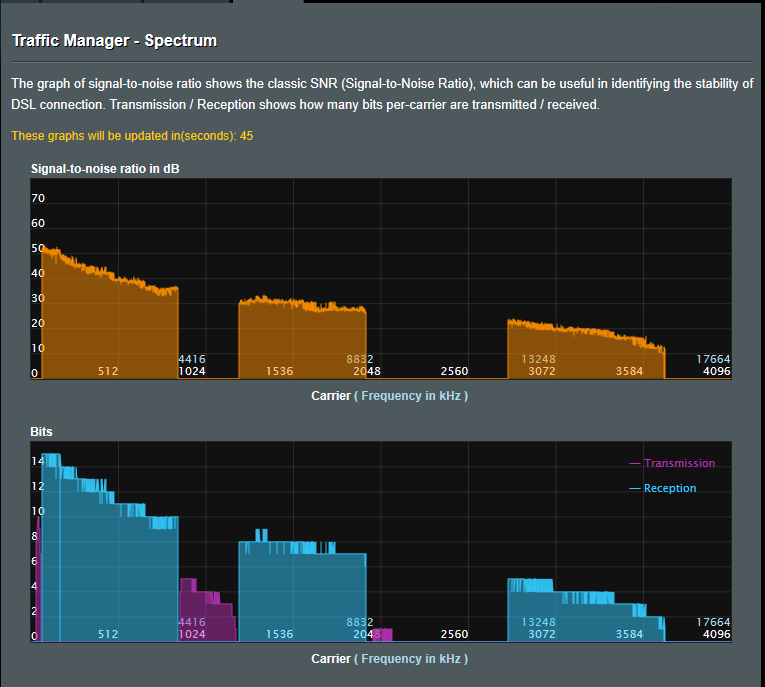
Anyway, after the event I reported about a couple weeks ago, I started to investigate all cabling in my household. I went to a demarcation point in my basement with my modem to plug in to find out better line stats. So I decided to replace the whole length of the cable.
I bought several meters of good quality CAT 6 UTP cable from a reliable retailer and with it, I made new cabling going up from the basement.
The speed improved enough to be safe from dropping the connection again.
I attached screenshots for comparison. You can navigate among them by their naming.
In the end, I am happy with the result. In a certain degree.
Attachments:


You need to login in order to vote