

› UKTH forums › 🛜 Wireless Routers & Modems › ASUS & Wireless › ASUS – DSL-AC88U / DSL-AC3100 Firmwares (beta's) etc. Looks like a new Beta Release for the DSL-AC88U is available, this version has Telnet enabled and improved 2.4GHz wifi (I believe). DSL-AC88U_v9.10.06_build581_debug.w.zip https://www.asuswebstorage.com/navigate/s/604D61534F2541D1B3CE1CC031A697E4Y UK Sentinel In a completely... › Reply To: ASUS – DSL-AC88U / DSL-AC3100 Firmwares (beta's) etc. Looks like a new Beta Release for the DSL-AC88U is available, this version has Telnet enabled and improved 2.4GHz wifi (I believe). DSL-AC88U_v9.10.06_build581_debug.w.zip https://www.asuswebstorage.com/navigate/s/604D61534F2541D1B3CE1CC031A697E4Y UK Sentinel In a completely…

Hi
I’ve just bought this router as my 6+ year old RT-N66U was having a few intermittent WiFi issues and as it had been so good I thought I’d buy the DSL-AC88U as a future proof upgrade for when I get Ultrafast.
I’ve not had the pain most of you have had with the memory leak and other bugs, so thought I was lucky and the issues have been ironed out. When initially setting it up I spotted a FW update to 591, so went ahead with update.
I’ve noticed several issues, firstly I had to set up the WAN as Plusnet + YouView to get IP channels to work with BT + Youview, I know this is documented as a fix on a few forums, but I can’t see what changes are made in the config, the PPPoE and .1q trunking settings look the same to me, along with IGMP. I also notice lack of telnet access so I can’t see the full config applied to see what it’s changing.
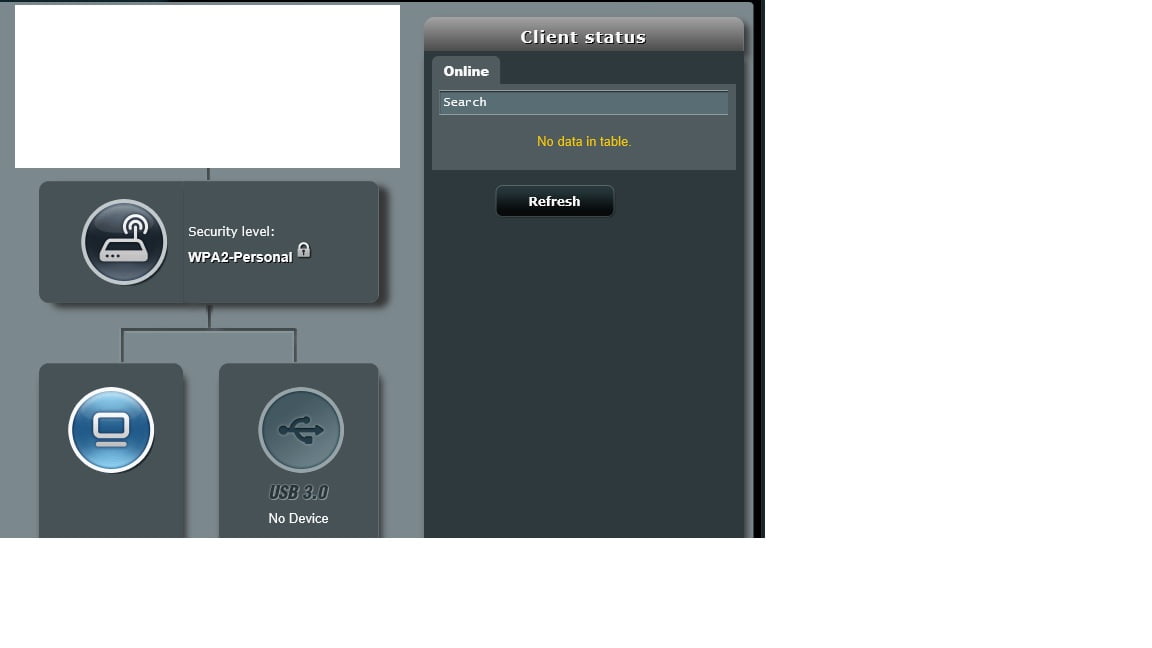
I notice that in the client network map, there were clients showing upon 1st setup, but as soon as I made a change eg. setting 2.4G to 20MHz, the clients list disappeared, including wired. This is on any device I use to log into the router, so appears to be not a browser cache issue.
Has anyone had this same issue and have a fix ?
I also had another strange issue after I rebooted it yesterday, the router wan’t allowing any wired devices to connect, none were getting an IP ADD. I tried several reboots of the router and the issue persisted. All WiFi devices were able to connect fine.
I had to do another factory default (using the reset button on the back) to resolve this and wired devices now work OK again
Has anyone else had these issues and make any suggestions as to what could be wrong
Thanks
Attachments:
You need to login in order to vote