

› UKTH forums › 🛜 Wireless Routers & Modems › ASUS & Wireless › ASUS – DSL-AC88U / DSL-AC3100 Firmwares (beta's) etc. Looks like a new Beta Release for the DSL-AC88U is available, this version has Telnet enabled and improved 2.4GHz wifi (I believe). DSL-AC88U_v9.10.06_build581_debug.w.zip https://www.asuswebstorage.com/navigate/s/604D61534F2541D1B3CE1CC031A697E4Y UK Sentinel In a completely...
- This topic has 1,438 replies, 106 voices, and was last updated 5 months, 3 weeks ago by
 alt.james.

- AuthorPosts
- December 17, 2018 at 9:13 pm #1807
For ASUS NAT Acceleration (CTF) I believe (I think) the speeds was around 150Mbps , but as you correctly say, AiProtection disables (CTF) and thus cpu maxis out. I will chat with ASUS and see what they say?
Yes that will be good to hear what they say
I have a friend that is near and is willing to let me test out the theory of the NAT acceleration with ai protection on and off tomorrow, he has same ISP as me but is on 80/20 package, so i’ll report back to see if it has any difference How did your 80/20 test go?
In a completely sane world, madness is the only freedom (J.G.Ballard).
You need to login in order to vote
December 17, 2018 at 11:33 pm #1808Went very well indeed, with ai on and off achieved full download speeds with low cpu usage, no stutter etc
So to confirm speeds over 100Mbps and ai protection on this cpu is too weak to handle the demand of inspecting packets. Other than that and the IPV6 issue the firmware is fine for me as long as ai is off.
Yes we already know about the Nat being disabled when ai is on, i was just merely stating since i see no other user other than myself on G.Fast which is affected more by this. That’s why i asked if other users on lower speeds experienced what i did when ai is enabled, and as above my friend who is on 80/20 not affected in anyway when ai is on with Nat being disabled.
You need to login in order to vote
December 18, 2018 at 12:35 am #1809Went very well indeed, with ai on and off achieved full download speeds with low cpu usage, no stutter etc So to confirm speeds over 100Mbps and ai protection on this cpu is too weak to handle the demand of inspecting packets. Other than that and the IPV6 issue the firmware is fine for me as long as ai is off. @cozak Yes we already know about the Nat being disabled when ai is on, i was just merely stating since i see no other user other than myself on G.Fast which is affected more by this. That’s why i asked if other users on lower speeds experienced what i did when ai is enabled, and as above my friend who is on 80/20 not affected in anyway when ai is on with Nat being disabled.
They won’t be on the wan bandwidth as the cpu only maxes out when you have in excess of approximately 130mbps on the downstream. I have vdsl, 80 down 20 up and there is no reduction in speed (although cpu use is very high).
However as stated before this is all a moot point when ai protection brings local lan traffic to a crawl making it completely useless regardless of wan bandwidth.
Wan speeds also fall to snails pace if you start a local file copy whilst downloading. Try this for yourself with ai on, start a file download and note speed. Then start a file transfer from a wireless device (eg laptop) to an ether net connected device (eg NAS) and watch as the file download speed drops to pitiful levels.
You need to login in order to vote
December 18, 2018 at 8:40 am #1810@KitsuneDave – thanks for the testing with 80/20, and good to confirm at lower speeds <100Mbps, the AiProtection / CPU works as expected like mine does on an 50/10 service.
(My mission before Xmas is to get ASUS to sort out/acknowledge issues with IPv6 /56 and AiProtection) / halfway there we are.
………. and do my day job ;-)
In a completely sane world, madness is the only freedom (J.G.Ballard).
You need to login in order to vote
December 19, 2018 at 11:44 am #1812Two days in with 591 and I’ve had a random reboot, the result of which being my printer has lost the network. Before this happened things were looking good. RAM usage was stable, though there did seem to be more CPU activity than on previous builds. A reboot so soon after flashing firmware surely isn’t a good sign. The last firmware stayed up for 28 days. I don’t know what caused it and didn’t notice it had happened – despite working online – until I attempted to print something.
You need to login in order to vote
December 19, 2018 at 12:25 pm #1813Two days in with 591 and I’ve had a random reboot, the result of which being my printer has lost the network. Before this happened things were looking good. RAM usage was stable, though there did seem to be more CPU activity than on previous builds. A reboot so soon after flashing firmware surely isn’t a good sign. The last firmware stayed up for 28 days. I don’t know what caused it and didn’t notice it had happened – despite working online – until I attempted to print something.
Does the DSL log give a clue, hopefully just a DSLAM/Exchange resynch?
In a completely sane world, madness is the only freedom (J.G.Ballard).
You need to login in order to vote
December 19, 2018 at 2:00 pm #1814No, no clues about anything in the log, just a load of info about the VPN. I can’t make much out from the DSL log, it’s synced back at the same speed, so that’s OK. It’s been up 30secs less than the router. The last firmware dropped the connection once, but it didn’t reboot the whole router as is the case this time.
You need to login in order to vote
December 19, 2018 at 4:18 pm #1815No, no clues about anything in the log, just a load of info about the VPN. I can’t make much out from the DSL log, it’s synced back at the same speed, so that’s OK. It’s been up 30secs less than the router. The last firmware dropped the connection once, but it didn’t reboot the whole router as is the case this time.
just have to wait to see if it does it again………
In a completely sane world, madness is the only freedom (J.G.Ballard).
You need to login in order to vote
December 21, 2018 at 3:51 pm #1816@kitsunedave – thanks for the testing with 80/20, and good to confirm at lower speeds <100Mbps, the AiProtection / CPU works as expected like mine does on an 50/10 service. (My mission before Xmas is to get ASUS to sort out/acknowledge issues with IPv6 /56 and AiProtection) / halfway there we are. ………. and do my day job
Alas no news yet from ASUS regarding DSL-AC88U and AiProtection causing slow WAN/LAN transfer speeds.
They have gone very quiet, so will chase again early next week.
In a completely sane world, madness is the only freedom (J.G.Ballard).
You need to login in order to vote
December 22, 2018 at 4:15 pm #1817To be fair i think we’ve hit the point like we did on the previous DSL routers especially like the 68u, where there is lack of support/consistency of stable firmware’s etc. This however could be down to a multitude of things, the main one being is they have a poor team developing the firmware and have no idea on how to fix the problems even after various users submitting feedback. The other thing could be they’re trying to ride out these problems but are concentrating more on their next DSL flagship.. does anyone know if the latter is true or false?
Also @UK Sentinel i admire your persistence and determination in dealing with the Asus team ;)
You need to login in order to vote
December 22, 2018 at 6:18 pm #1818To be fair i think we’ve hit the point like we did on the previous DSL routers especially like the 68u, where there is lack of support/consistency of stable firmware’s etc. This however could be down to a multitude of things, the main one being is they have a poor team developing the firmware and have no idea on how to fix the problems even after various users submitting feedback. The other thing could be they’re trying to ride out these problems but are concentrating more on their next DSL flagship.. does anyone know if the latter is true or false? Also @UK Sentinel i admire your persistence and determination in dealing with the Asus team
does anyone know if the latter is true or false?
False, regarding the latter, they are stuck with Broadcom producing blobs, that are far from perfect, especially for ADSL, which I assume is why Netgear with the D7000-100uks using BCM63138 DSL chipset also introduced the D7000-200uks using Lantiq.??????
The DSL-AC68U had the ECONET Chipset from MediaTeK, which for ADSL and short, quiet lines worked reasonable well, but as we all know, for everything else, was a real challenge. so more chipset issues rather than ASUS workmanship directly. but do agree, more Q and A (testing) etc. from ASUS would not go amiss.
Also @UK Sentinel i admire your persistence and determination in dealing with the Asus team
Thanks, when I closed my WhatsYourRouter.com forum, the ASUS Team amongst others asked my not to, so they must love me nagging them and come the ‘Bandwidth Riots’ (Ready Player One) I will be there also ;)
In a completely sane world, madness is the only freedom (J.G.Ballard).
You need to login in order to vote
December 24, 2018 at 2:00 pm #1822Had a communication with ASUS, ‘a little vague it was’ but is appears they are looking at in particular the Hardware Acceleration aspect relating to AiProtection as a means to increasing Throughput speeds WAN > LAN and LAN > LAN
I have asked for clarity if AiProtection will be able to fully support G.fast speeds (WAN > LAN) with the DSL-AC88U when they have finished and am awaiting a reply ;-)
In a completely sane world, madness is the only freedom (J.G.Ballard).
You need to login in order to vote
December 25, 2018 at 9:45 am #1829Hi
I’ve just bought this router as my 6+ year old RT-N66U was having a few intermittent WiFi issues and as it had been so good I thought I’d buy the DSL-AC88U as a future proof upgrade for when I get Ultrafast.
I’ve not had the pain most of you have had with the memory leak and other bugs, so thought I was lucky and the issues have been ironed out. When initially setting it up I spotted a FW update to 591, so went ahead with update.
I’ve noticed several issues, firstly I had to set up the WAN as Plusnet + YouView to get IP channels to work with BT + Youview, I know this is documented as a fix on a few forums, but I can’t see what changes are made in the config, the PPPoE and .1q trunking settings look the same to me, along with IGMP. I also notice lack of telnet access so I can’t see the full config applied to see what it’s changing.
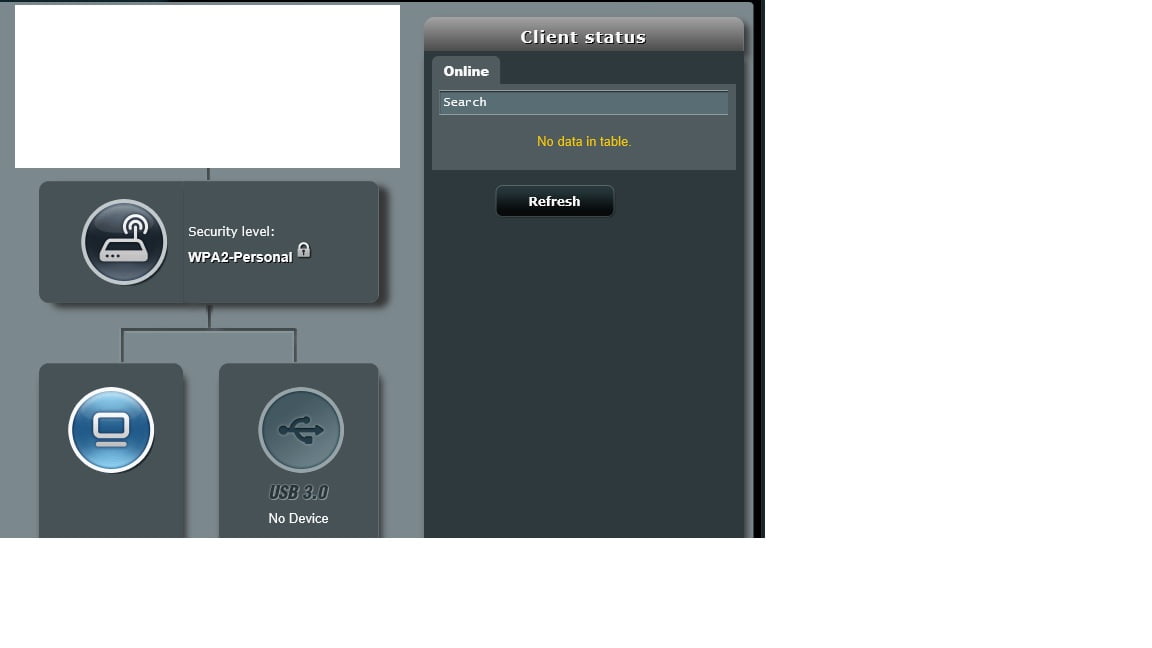
I notice that in the client network map, there were clients showing upon 1st setup, but as soon as I made a change eg. setting 2.4G to 20MHz, the clients list disappeared, including wired. This is on any device I use to log into the router, so appears to be not a browser cache issue.
Has anyone had this same issue and have a fix ?I also had another strange issue after I rebooted it yesterday, the router wan’t allowing any wired devices to connect, none were getting an IP ADD. I tried several reboots of the router and the issue persisted. All WiFi devices were able to connect fine.
I had to do another factory default (using the reset button on the back) to resolve this and wired devices now work OK againHas anyone else had these issues and make any suggestions as to what could be wrong
ThanksAttachments:
You need to login in order to vote
December 25, 2018 at 2:30 pm #1832Welcome, the firmware for DSl-AC88U are far from perfect, but you are using a relatively good version, try disabling AirTime Fairness (Wireless > Professional) for both 2.4 and 5 GHz) and for the UI not looking correct, try a different browser. like Chrome etc.
Try to get out of habit of rebooting router to many times as this will upset your DSL connection and cause a reduction in DSL speed.
Is the Router a new one or secondhand and are your using IPv4 or IPv6??
Note: your post got marked as SPAM, hence why delay (apologies)
In a completely sane world, madness is the only freedom (J.G.Ballard).
You need to login in order to vote
December 26, 2018 at 12:49 am #1833Hi
Regarding the delay, no need to apologise, thanks for the response on XMAS day, I wasn’t expecting that.
The router is 2nd hand and is a 2017 Model, from speaking to the seller it sounds like the guy sold it due to compatibility issues with Sky Q.
I’m using IPv4, using the default 192.168.1.0/24, class C mask/subnet, IPv6 is disabled and shows it’s disabled in the IPv6 system log.RE: Rebooting, I’m on full Infinity ramming speed 80 20, I have the DSLAM cabinet next door, next to it is the Pole and drop wire into my house, so have never noticed any train up or speed issues, but will bear rebooting in mind, it’s not something I do regularly, only when there are problems.
I’ve tried IE, Chrome & Edge on my PC and Chrome & MIUI browser on my phone and when the client status shows nothing it’s the same on them all, so I think the browser software & a single device GUI issue can be ruled out and it’s definitely the router not displaying correctly.
I’ve noticed when I disabled WiFi with the physical button on the front, the LAN devices show as connected clients and stay there even when I navigate to multiple other menu’s, re-enable WiFi again and all clients disappear.
I then hit Quick internet setup and cancel any changes, both the Wired & WiFi clients showed up then disappeared again when I navigated to a different menu and back again.
During the times no clients show up there are no DHCP leases shown in the system log, but the WiFi logs shows clients connected.I already had AirTime Fairness disabled on 2.4G, I’ve now disabled it on 5G, but the clients are still not on the list. I’d seen no issues with it enabled on 5G (not fully tested), but definitely had issues on 2.4G with distant devices dropping, hence why I had it disabled on that radio.
After making this change no matter what I do now the connected clients don’t show
It just seems extremely buggy to me and I don’t know why
You need to login in order to vote
- AuthorPosts

 I have a friend that is near and is willing to let me test out the theory of the NAT acceleration with ai protection on and off tomorrow, he has same ISP as me but is on 80/20 package, so i’ll report back to see if it has any difference


- You must be logged in to reply to this topic.