

› UKTH forums › 🛜 Wireless Routers & Modems › ASUS & Wireless › ASUS ZenWiFi AX Whole Home Tri-Band Mesh WiFi 6 System Not sure if this is the right place to ask…. I am thinking of upgrading my Google Mesh wifi to the above. Has anyone used this and does it...
- This topic has 1,416 replies, 25 voices, and was last updated 1 month, 1 week ago by
 UK Sentinel.

-
AuthorPosts
-
January 31, 2023 at 10:07 pm #22570
Thanks UK Sentinel, much appreciated. I am pretty sure ASUS know people have been complaining about this.
Liked by:
You need to login in order to vote
February 1, 2023 at 9:28 am #22571I did read that for Wireless connections, manually selecting WPA2 does seem to help with node stability as does manually selecting Channel Bandwidth 80MHz for wireless backhaul has helped ?
But in reality, this is just tinkering with a buggy solution, so hopefully ASUS will address this and I will keep chasing them
In a completely sane world, madness is the only freedom (J.G.Ballard).
You need to login in order to vote
February 1, 2023 at 10:37 am #22575I’ve been running 3.0.0.4.388_22068 for ages now and not had any issues at all. Can’t even remember the last time I saw the mesh node dropping to 2.4GHz. RAM usage seems fine and so too is the USB flash drive I have hooked up to the main router to share a selection of movies to smart TVs.
I have forced 80MHz backhaul and gave up on 160MHz because it seems that with that enabled, I get the problems. As ever, you can never be 100% certain that changing a setting has helped when also changing the firmware, but with this version it is very much a case of ‘set it and forget it’. I too have WPA2-Personal and have a fixed channel rather than auto.
Liked by:
You need to login in order to vote
February 1, 2023 at 12:08 pm #22577I have forced 80MHz backhaul and gave up on 160MHz because it seems that with that enabled, I get the problems. As ever, you can never be 100% certain that changing a setting has helped when also changing the firmware, but with this version it is very much a case of ‘set it and forget it’. I too have WPA2-Personal and have a fixed channel rather than auto.
Thanks for letting us know and good to see the WPA2-personnel and 80MHz backhaul settings are proving reliable for the XT8 3.0.0.4.388_22068 release .
In a completely sane world, madness is the only freedom (J.G.Ballard).
You need to login in order to vote
February 3, 2023 at 2:41 pm #22641I’ve been running 3.0.0.4.388_22068 for ages now and not had any issues at all. Can’t even remember the last time I saw the mesh node dropping to 2.4GHz. RAM usage seems fine and so too is the USB flash drive I have hooked up to the main router to share a selection of movies to smart TVs. I have forced 80MHz backhaul and gave up on 160MHz because it seems that with that enabled, I get the problems. As ever, you can never be 100% certain that changing a setting has helped when also changing the firmware, but with this version it is very much a case of ‘set it and forget it’. I too have WPA2-Personal and have a fixed channel rather than auto.
I just decided to try the same as you. Upgraded back to latest official 388 release. WPA2_Personal. Wireless backhaul to 80 only. No more auto for channel selection on all bands. Let’s see how stable we are.
Liked by:
You need to login in order to vote
February 3, 2023 at 3:28 pm #22642I am pretty sure that setting 80MHz on the wireless backhaul and WPA2 with fixed channels will ‘resolve’ most of the issues. I am on 386.49873 for nearly 2 weeks with my normal settings and 160MHz backhaul, it has been virtually flawless throughout. It is my go to FW when I encounter issues.
Liked by:
You need to login in order to vote
February 3, 2023 at 3:29 pm #22643Nice to see folks trying 80Mhz backhaul. I haven’t had any issues with 3.0.0.4.388_22068
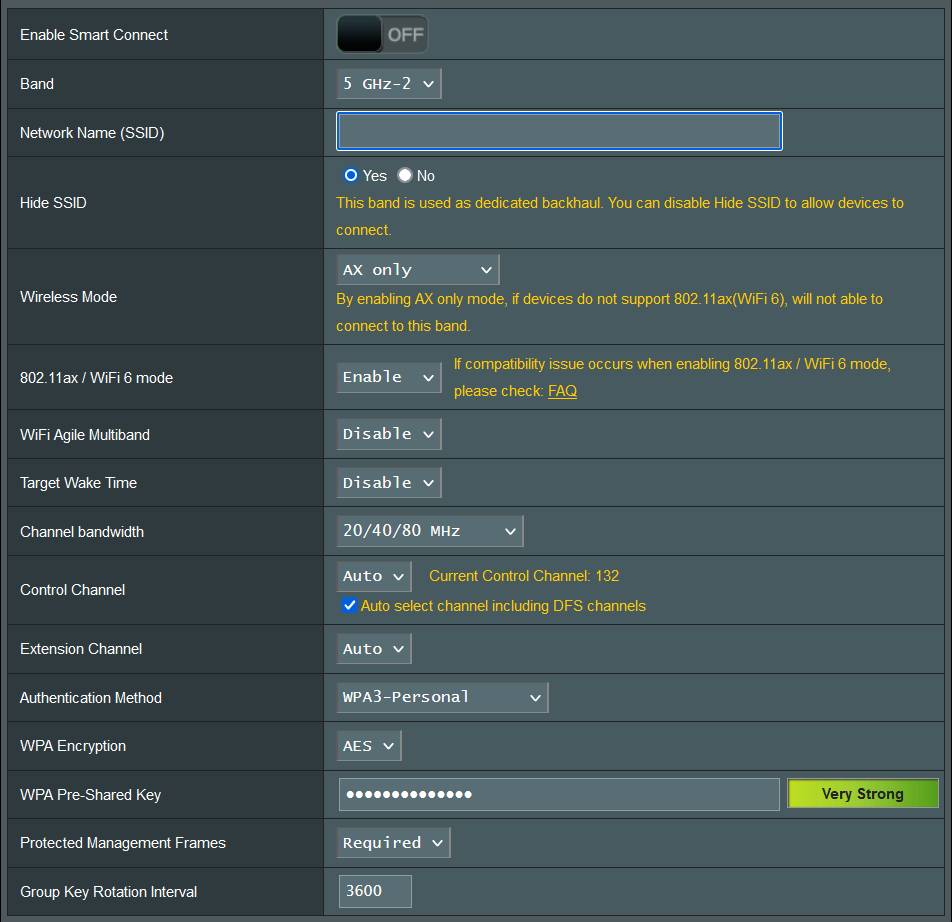
Current backhaul connect time 349 hours. WPA3/AX Only/80Mhz/Auto. Free ram 163 MB
Edit: As per screenshot, I have backhaul set to 20/40/80, so that device can respond to unexpected interference, but I have yet to see it drop off 80Mhz
Attachments:
You need to login in order to vote
February 3, 2023 at 6:03 pm #22647Good to see 80MHz backhaul seems to be the key for 388 builds
In a completely sane world, madness is the only freedom (J.G.Ballard).
You need to login in order to vote
February 3, 2023 at 7:50 pm #22648I do not have the option for 20/40/80 MHz on 5GHz-2. Mine is 20/40/80/160 MHz. Am I missing something? This is on 22068
edit. Worked it out. Disabled 160MHz now.
Liked by:
You need to login in order to vote
February 3, 2023 at 8:20 pm #22652I do not have the option for 20/40/80 MHz on 5GHz-2. Mine is 20/40/80/160 MHz. Am I missing something? This is on 22068 edit. Worked it out. Disabled 160MHz now.
being brave moving to 3.0.0.4.388_22068 are you 😉
In a completely sane world, madness is the only freedom (J.G.Ballard).
Liked by:
You need to login in order to vote
February 3, 2023 at 8:39 pm #22653I will give it a try with 80MHz, in the name of science
. Speedtest has gone down from 490Mbps to 340Mbps. Lets see what happens.Liked by:
You need to login in order to vote
February 3, 2023 at 8:54 pm #22654I will give it a try with 80MHz, in the name of science<noscript>
</noscript>. Speedtest has gone down from 490Mbps to 340Mbps. Lets see what happens.Speedtest from a device connected to that node or from the GUI? I know in my case, 80mhz on 802.11ax provides more than enough bandwidth for my 500/20 Spectrum connection at max speed (I speedtest out around 590/24 during “quiet” times).
Liked by:
You need to login in order to vote
February 3, 2023 at 9:19 pm #22655My setup is – ISP Router – XT8 router – XT8 Node 1 – XT8 Node 2 – XT8 Node 3
Wireless speedtest from device connected to Node 1 is basically full speed 750Mbps+. The one in my room is Node 2. From there I get 490Mbps with 160MHz and 340Mbps with 80MHz.
Liked by:
You need to login in order to vote
February 3, 2023 at 9:33 pm #22656My setup is – ISP Router – XT8 router – XT8 Node 1 – XT8 Node 2 – XT8 Node 3 Wireless speedtest from device connected to Node 1 is basically full speed 750Mbps+. The one in my room is Node 2. From there I get 490Mbps with 160MHz and 340Mbps with 80MHz.
I only have a 1 router, 1 node XT8 system. Wonder if it’s the daisy chaining that slows things down? Have you manually selected a backhaul channel that seems clear of any other interference?
I’m just surprised that being an extra hop away would slow things down that much. Not that 340Mbps isn’t enough for just about anything ^_^.
Liked by:
You need to login in order to vote
February 4, 2023 at 1:41 am #22659dodgydrains wrote:
My setup is – ISP Router – XT8 router – XT8 Node 1 – XT8 Node 2 – XT8 Node 3 Wireless speedtest from device connected to Node 1 is basically full speed 750Mbps+. The one in my room is Node 2. From there I get 490Mbps with 160MHz and 340Mbps with 80MHz.Very interesting, with the network idling, I speedtest around 650-750, router and node: WPA3/AX Only/80Mhz/Auto
Attachments:
You need to login in order to vote
-
AuthorPosts



 . Speedtest has gone down from 490Mbps to 340Mbps. Lets see what happens.
- You must be logged in to reply to this topic.