

› UKTH forums › 🛜 Wireless Routers & Modems › ASUS & Wireless › ASUS ZenWiFi AX Whole Home Tri-Band Mesh WiFi 6 System Not sure if this is the right place to ask…. I am thinking of upgrading my Google Mesh wifi to the above. Has anyone used this and does it...
- This topic has 1,416 replies, 25 voices, and was last updated 1 month, 3 weeks ago by
 UK Sentinel.

-
AuthorPosts
-
August 7, 2025 at 9:24 pm #39010
I’ll be biting the bullet this weekend. I’ll let you know how it goes🤞
Liked by:
You need to login in order to vote
August 9, 2025 at 1:06 pm #39023. UK Sentinel Said:You might need something a little stronger
I think @Grisu mentioned something similar above, might be worth you taking a backup copy of your current config, then upgrade to new firmware and then take a backup of the new config.
Then factory reset and apply latest backup config, reboot and see how that goes ?
might save some time and let us know if this work ?
As an interesting thought, if you had “auto update” enabled on your XT8’s, I assume this would have updated your XT8’s automatically and by passed the factory reset advise given in the changelog
In a completely sane world, madness is the only freedom (J.G.Ballard).
Well the deed has been done. Just one bottle of beer and noting in the swear box. All the iMesh nodes are there, all the devices have connected with their correct IP addresses and the routes are intact. Let’s see how things go.
I just need to register the AUSU cert for the https:// login, but that can wait.
Liked by:
You need to login in order to vote
August 9, 2025 at 1:46 pm #39024Congrats, did you dirty flash or rebuild from scratch ?
In a completely sane world, madness is the only freedom (J.G.Ballard).
You need to login in order to vote
August 9, 2025 at 5:14 pm #39025I did a dirty upgrade using the method both you and @Grisu mentioned.
One thing I have noticed though, before I upgraded I got the “The router cannot connect to ASUS server to check for the firmware update. Please download the latest firmware from ASUS Product Support Site and do manually upgrade. Check on FAQ for more instructions.” message, so I downloaded it using the link in one of the previous posts and I am still getting it with this version. I’m also getting “Signature update failed.”?
-
This reply was modified 1 year, 1 month ago by Nicky.
You need to login in order to vote
August 9, 2025 at 8:22 pm #39027The “Signature update failed” error on the Asus router relates I think it relates to the Trend Micro security components (like AiProtection or parental controls).
Could be a few reasons, is the Routers time set correctly for your region and Trend Micro Signatures issues is fairly common.
Edit: Forget to say, Go to Advanced Settings > Administration > Firmware Upgrade and scroll down to Firmware Version and see if there is an update for Trend.
In a completely sane world, madness is the only freedom (J.G.Ballard).
You need to login in order to vote
August 9, 2025 at 10:05 pm #39028The Time and date are correct and I’m not seeing any updates for Trend. I did disable “AiProtection” and reenabled it, now I’m not getting the “The router cannot connect to ASUS server …” error and it’s telling me that the firmware is up to date on my Mesh devises.
But I’m still getting the “Signature update failed.” message. It will be interesting to see if anyone else is having issues with the Signature update?
I also had four devices not reconnect to the network via WiFi (2G & 5G), so I rebooted them and all OK now.
Liked by:
You need to login in order to vote
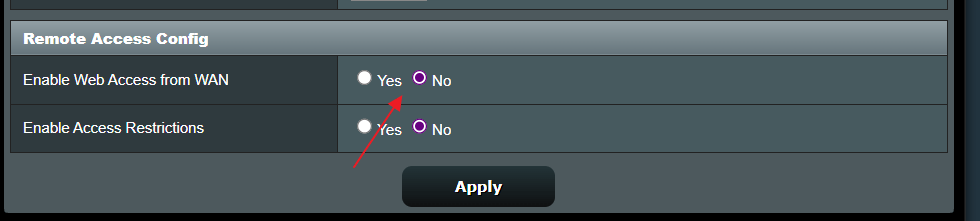
August 10, 2025 at 10:23 pm #39031Well it’s been 33 hours and no further issues other than someone trying to log in to the router, so I’ve disabled Web access from WAN, which must have been turned on when I upgraded.
You need to login in order to vote
August 11, 2025 at 6:23 am #39032Great news, has you Wifi and LAN speeds remanded good as I have seen online that some did have issues with speeds decreased until they did a factory reset.
Web access from WAN enabled on upgrade, that’s not good especially if your not using the App.
In a completely sane world, madness is the only freedom (J.G.Ballard).
You need to login in order to vote
August 11, 2025 at 7:45 am #39033. UK Sentinel Said:Great news, has you Wifi and LAN speeds remanded good as I have seen online that some did have issues with speeds decreased until they did a factory reset.
Web access from WAN enabled on upgrade, that’s not good especially if your not using the App.
In a completely sane world, madness is the only freedom (J.G.Ballard).
I don’t know if Web access gets turned on by default by the upgrade, but it was strange it was on after?
I’ve done the speed checks on both the WAN & LAN and I’m not seeing any speed drops.
Also, the Signature updated this morning
-
This reply was modified 1 year, 1 month ago by Nicky.
Liked by:
You need to login in order to vote
August 11, 2025 at 8:14 am #39035August 17, 2025 at 10:40 am #39134Hello, where do I check if “Web access from WAN” is enabled? Thanks!
You need to login in order to vote
August 17, 2025 at 11:19 am #39137On your ASUS XT8, login via your browser and …
-
Go to Administration
-
From the left-hand menu, select Administration.
-
-
Find System tab
-
Inside Administration, click the System tab.
-
-
Check “Enable Web Access from WAN”
-
Look for the option “Enable Web Access from WAN” (sometimes just “Enable Web Access from WAN (HTTP/HTTPS)”).
-
If it’s Enabled, that means your router’s web interface is accessible externally (not recommended unless you use strong security).
-
Attachments:
In a completely sane world, madness is the only freedom (J.G.Ballard).
You need to login in order to vote
August 17, 2025 at 11:31 am #39140August 17, 2025 at 11:43 am #39142Exactly, In AP mode I believe you’ll only see settings related to LAN, Wi-Fi, and system administration etc.
In a completely sane world, madness is the only freedom (J.G.Ballard).
You need to login in order to vote
August 26, 2025 at 10:20 pm #39348Well today was not a good day. 2Ghz devises started to randomly disappear and reappear from my network. I rebooted the whole system, No change. I reinstalled the latest firmware, done a factory reset, reinstalled the CFG file and within minutes it started to happen all over again. So I’ve had to regress back to FW_ZENWIFI_XT8_300438824710 and I’ve had no issues for the past 12 hours.
I know I should have pulled the logs, but I forgot too, I was so focused on getting the system back up and running. I’ll try again when I get a moment.
You need to login in order to vote
-
This reply was modified 1 year, 1 month ago by
-
AuthorPosts


- You must be logged in to reply to this topic.