

› UKTH forums › 🛜 Wireless Routers & Modems › ASUS & Wireless › help needed with asus tuf ax4200 Hi i have the asus tuf ax4200 would like to use it as a replacement for my eero6+ router supplied by giffgaff on a 500 mbps plan. signal slows to...
- This topic has 17 replies, 2 voices, and was last updated 4 months ago by
 UK Sentinel.

- AuthorPosts
- June 6, 2026 at 10:08 am #42772
Hi i have the asus tuf ax4200 would like to use it as a replacement for my eero6+ router supplied by giffgaff on a 500 mbps plan. signal slows to 50mbps as i move around the house due to frquency changing from 5ghz to 2.4ghz.
I think giffgaff require Vlan setting 911. Is there a workaround such as putting eero6+ in bridge mode or should i change asus router entirely
You need to login in order to vote
June 6, 2026 at 10:32 am #42775Welcome, Your ASUS TUF‑AX4200 will work fine as a full replacement for the Eero 6+ if you set VLAN ID 911 on the WAN.
Giffgaff broadband runs on the same platform as Virgin Media O2 wholesale FTTP services and typically requires VLAN ID 911 on the WAN connection and WAN Connection Type is set to Automatic IP (DHCP)
Not sure on you specific router model, but generally ASUS routers have the following option;
check:
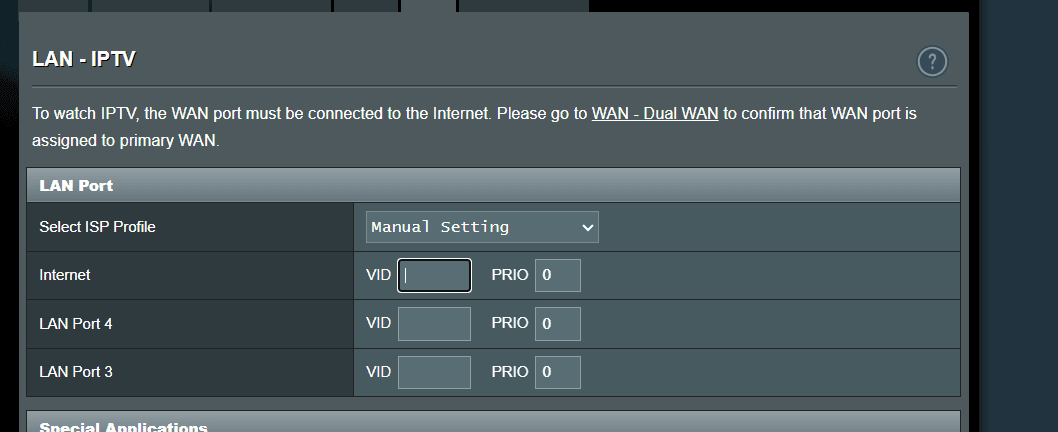
LAN → IPTV settings
Look for:
- ISP Profile = Manual
- Internet VLAN ID = 911
-
This reply was modified 4 months ago by UK Sentinel. Reason: WAN reference changed to LAN
In a completely sane world, madness is the only freedom (J.G.Ballard).
You need to login in order to vote
June 6, 2026 at 10:36 am #42776hi, no such setting on this asus tuf ax4200 cant change to Vlan911
You need to login in order to vote
June 6, 2026 at 10:39 am #42777Apologies, I meant LAN → IPTV settings
Attachments:
In a completely sane world, madness is the only freedom (J.G.Ballard).
You need to login in order to vote
June 6, 2026 at 10:57 am #42781June 6, 2026 at 11:20 am #42783Sounds like your router is set to Access Point mode, not Router mode.
Need to change it back to Router mode,
Administration > Operation Mode > Wireless Router Mode, click apply and reboot.
In a completely sane world, madness is the only freedom (J.G.Ballard).
You need to login in order to vote
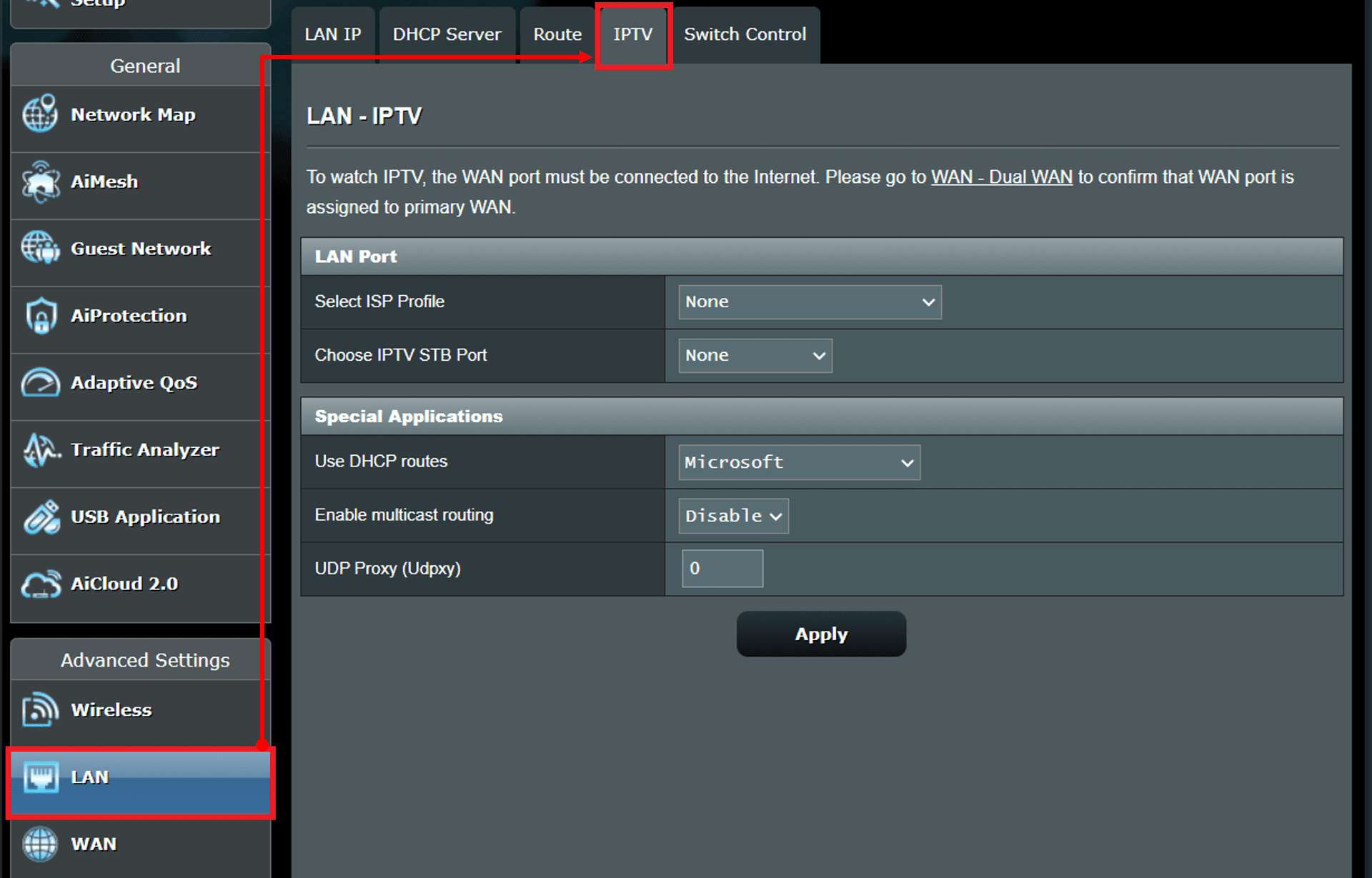
June 6, 2026 at 1:21 pm #42784June 6, 2026 at 1:39 pm #42786Strange as the ASUS specs details IPTV is supported, does your Advanced Settings / LAN page look like anything like this ?
Attachments:
In a completely sane world, madness is the only freedom (J.G.Ballard).
You need to login in order to vote
June 6, 2026 at 2:13 pm #42788June 6, 2026 at 2:21 pm #42789This video shows the ASUS TUF AX4200 and go to 14:25 minuites and you can see the LAN page options.
If you cannot see these on your router and your are running the latest ASUS firmware for this router, a factory reset is advisable.
In a completely sane world, madness is the only freedom (J.G.Ballard).
You need to login in order to vote
June 6, 2026 at 2:40 pm #42790hi thanks for the video i will go through it all later on. One problem i see straight away is on set up …connecting to the internet. I cant without Vlan setting. firmware is 3.0.0.4.388_34011 which i think is too old and does not support Vlan
think i need 3.0.0.6 firmware
-
This reply was modified 4 months ago by reptile11.
You need to login in order to vote
June 6, 2026 at 3:07 pm #427933.0.0.4 firmware as per the video supports IPTV which is where you will add 911.
Giffgaff is not preset on ASUS routers wizard as a preset option unlike Sky and BT, you have to in essence bypass the setup wizard and enter the VLAN ID via IPTV manually.
Personally I would just run through the ASUS setup Wizard via computer browser (not app) and configure it with your SSID’s etc, and configure it for say BT, which uses no VLAN’s for Full Fibre connections , after you have configured the router, quickly go to the LAN page > IPTV and add 911
I.e.
- Add; LAN → IPTV → Internet VLAN ID → 911
- Apply
- Change; WAN → Automatic IP (DHCP) (was set to PPPOE after BT setup)
- Apply
- Reboot router
ISP Network WAN Type VLAN Required? Notes BT FTTP Openreach PPPoE ❌ No ONT strips VLANs; router receives untagged PPPoE Giffgaff FTTP CityFibre Automatic IP (DHCP) ✅ Yes (911) No PPPoE, no Option 61, no credentials In a completely sane world, madness is the only freedom (J.G.Ballard).
You need to login in order to vote
June 6, 2026 at 7:26 pm #42794wow thanks just to be clear the process is as follows:
disconnect eero router
connect asus router with ethernet cable then connect router to laptop with ethernet cable
search for 192.168.50.1 online ( if i can get access to the internet)
then set up router
is this correct?
rep
You need to login in order to vote
June 6, 2026 at 7:57 pm #42795Yes, in essence,
1. Disconnect the Eero completely
Unplug its Ethernet from the ONT.
2. Connect the ASUS to the ONT
- ONT → ASUS WAN port (blue port)
3. Connect your laptop to the ASUS Router
Use Ethernet into any LAN port (yellow ports). (Wi‑Fi also works, but Ethernet is safer during setup.)
4. Open your browser and go to:
192.168.50.1 This works without internet, it’s the router’s local address.
If it doesn’t load, try:
In a completely sane world, madness is the only freedom (J.G.Ballard).
You need to login in order to vote
June 6, 2026 at 8:55 pm #42801Hi great help I’ve got to here
Full Fibre connections , after you have configured the router, quickly go to the LAN page > IPTV and add 911
Think I’ve configured it clicked: advanced>lLAN>IPTV
what do I do now, sadly can’t see in video on phone
You need to login in order to vote
- AuthorPosts



- You must be logged in to reply to this topic.