

› UKTH forums › 🛜 Wireless Routers & Modems › ASUS & Wireless › Moved: Reply To: ASUS – DSL-AC88U Home Network Moved Topic! UK Sentinel wrote: Chris wrote: I may change out to a draytek modem or something, The DSL-AC88U doesn’t even support BTs IPv6. Trendy paperweight Haha yep, and...
- This topic has 32 replies, 4 voices, and was last updated 4 years, 5 months ago by
 Chris.

- AuthorPosts
- April 27, 2022 at 7:23 am #18836
Definitely the best option to get underlying issue fixed
DrayTeK , very reliable Yeah I was going to go for the just the basic modem option for G.fast the 160 model, but would mean getting another router or moving the RTAX82U I have and then getting a 2nd one for here. but the difference between the Modem only and the full router with wireless unit was only something like an extra £30. Plus im looking forward to actually using a workable QoS and IPv6 again!. Glad to be rid of this AC88U, and with full telnet access and it supports FTTP it’s a no brainer to switch coming from this lemon.
Saw plenty for sale on ebay, but I couldn’t sell it to somebody else and screw them over. instead Amazon can take it up with Asus.
Bt G.Fast | Draytek Vigor 2766AC | RT-AX82u
i9 10900k @ 5.3GHz | 32GB DDR4 4000MHz CL16 | Aorus Xtreme 3080ti 2100MHz | LG 3840x1600 175Hz | X34a 3440x1440 100Hz |
http://www.3dmark.com/spy/23655081You need to login in order to vote
April 27, 2022 at 7:56 am #18838In a completely sane world, madness is the only freedom (J.G.Ballard).
You need to login in order to vote
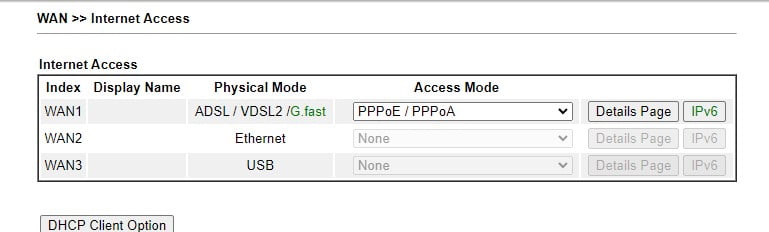
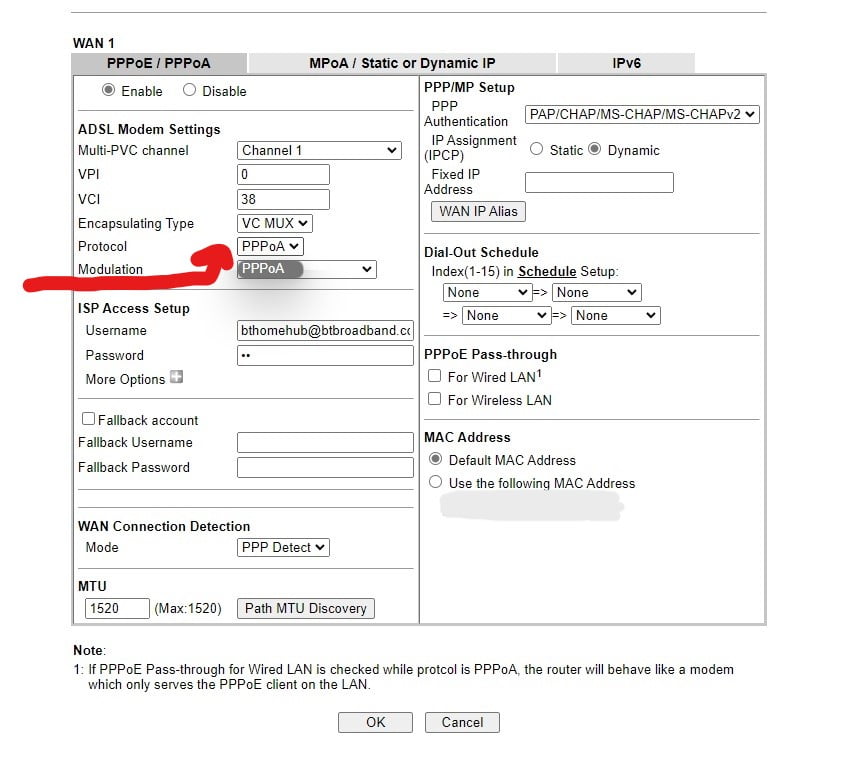
May 5, 2022 at 7:41 pm #18926Well little update, I played with the Draytek before I went back to the Homehub – mean with the constant drops DLM had already beat my line into submission I figured whats the worst that could happen right lol. The draytek connected on the latest recommended BT firmware, but I noticed it auto detected G.fast and when I put the VLAN ID in as 101 for openreach, It’s showing PPPoA with no option to change (even though it does come under settings of PPPoE/PPPoA) would this be an issue? There was connection established and internet access, but before I redid my entire network I decided to go back to the HH as if I try anything via BT it says “we cant find your hub”.
tldr; draytek connects as PPPoA when I thought it should be PPPoE, is this an issue?
Hope every one is well!
Bt G.Fast | Draytek Vigor 2766AC | RT-AX82u
i9 10900k @ 5.3GHz | 32GB DDR4 4000MHz CL16 | Aorus Xtreme 3080ti 2100MHz | LG 3840x1600 175Hz | X34a 3440x1440 100Hz |
http://www.3dmark.com/spy/23655081You need to login in order to vote
May 5, 2022 at 8:01 pm #18929tldr; draytek connects as PPPoA when I thought it should be PPPoE, is this an issue?
PPPoE is the one and VLAN ID is 101
In a completely sane world, madness is the only freedom (J.G.Ballard).
You need to login in order to vote
May 5, 2022 at 8:23 pm #18932PPPoE is the one and VLAN ID is 101
Yep what I thought, but weirdly theres no option to change it the drop down is PPPoA only in the list and it connects as that. It’s strange, also the online manual hasn’t been updated for a while so it doesn’t reflect the latest firmware and options. im just plugging it in now (minus actual dsl connection) just to show the settings pages.
Bt G.Fast | Draytek Vigor 2766AC | RT-AX82u
i9 10900k @ 5.3GHz | 32GB DDR4 4000MHz CL16 | Aorus Xtreme 3080ti 2100MHz | LG 3840x1600 175Hz | X34a 3440x1440 100Hz |
http://www.3dmark.com/spy/23655081You need to login in order to vote
May 5, 2022 at 8:39 pm #18937Comes under the PPPoE/PPPoA details page,even though it says ADSL settings, that’s where the manual shows to change G.fast settings / VDSL settings too. Theres no specific option for PPPoE as annotated in the pic. However it does establish connection, gives me an IP and has internet access but under stats it shows G.Fast PPPoA. Weird one eh Draytek support havnt got back to me and theres little info about it anywhere.
Attachments:
Bt G.Fast | Draytek Vigor 2766AC | RT-AX82u
i9 10900k @ 5.3GHz | 32GB DDR4 4000MHz CL16 | Aorus Xtreme 3080ti 2100MHz | LG 3840x1600 175Hz | X34a 3440x1440 100Hz |
http://www.3dmark.com/spy/23655081You need to login in order to vote
May 5, 2022 at 9:15 pm #18944If forget, are you using the Draytek Vigor 2766AC as modem/router or just modem (bridged) ?
Can you screen dump how you set up VLAN ID ?
and is the DSL LED blinking Slowly / Quickly or always On ?
In a completely sane world, madness is the only freedom (J.G.Ballard).
You need to login in order to vote
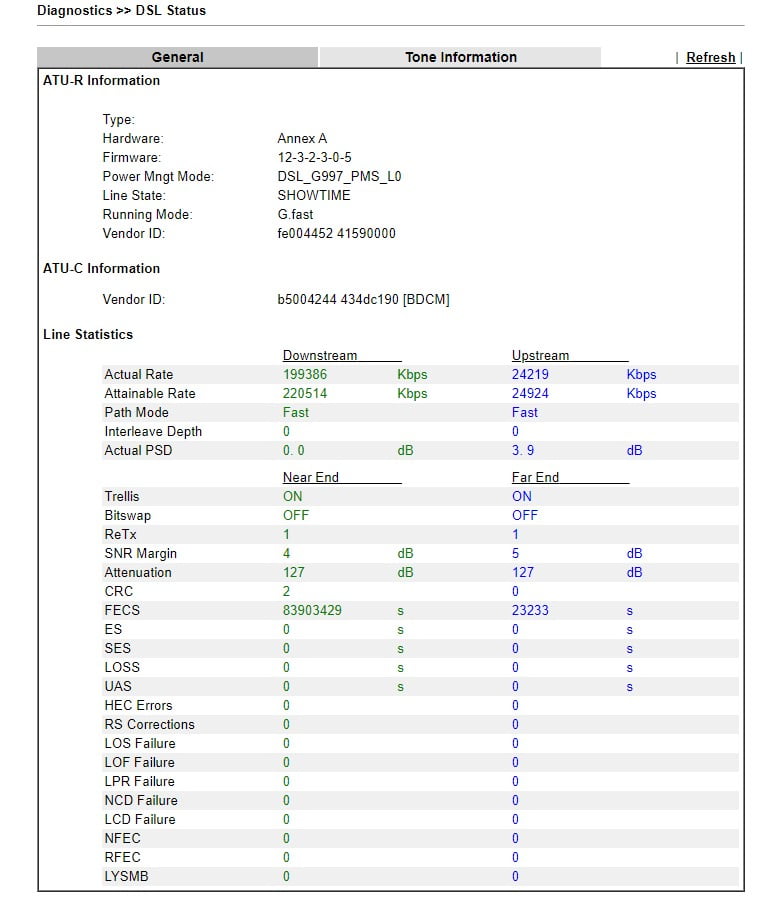
May 7, 2022 at 8:01 pm #18949I’ve connected the Draytek Vigor back up as the homehub was working fine for a few days, until it updated itself – interestingly my Signal attenuation shows as 0.0 / 0.0 db on the HH not the 39ish that the Asus shown, and the draytek Shows 127db for line attenuation now. I’m assuming they use different algorithms to work it out or its a ridiculous glitch.
The Draytek is running in Modem and Router mode not a bridge (but I can’t connect any wired devices just yet) So I’m running wifi connection, managed to get IPv6 working as the Asus was incompatible with BT / Openreach’s implementation of IPv6 /56 I believe.
I’m fully connected and VLAN is 101, DSL light does the usual blink until its connected and then steady.
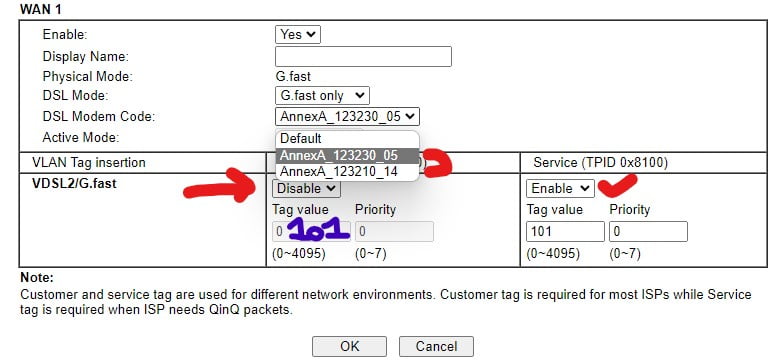
Here’s the VLAN TAG page (note it has customer TPID 0x8100 and Service TPID 0x8100 sections, which only one works at a time, I’ve made successful connection using both – the Service VLAN 101 was the default enabled VLAN Tag which according to draytek is the one to use as its BT only firmware once it detects the G.fast Line)
I’ve also got an option for the Modem Code, it connects using either of these and I can’t see any information regarding the correct one or a difference infact if i manually change them. (highlighted in red also)
Attachments:
Bt G.Fast | Draytek Vigor 2766AC | RT-AX82u
i9 10900k @ 5.3GHz | 32GB DDR4 4000MHz CL16 | Aorus Xtreme 3080ti 2100MHz | LG 3840x1600 175Hz | X34a 3440x1440 100Hz |
http://www.3dmark.com/spy/23655081You need to login in order to vote
May 7, 2022 at 8:33 pm #18953the draytek Shows 127db
Something not correct with that value and using the wrong Modem Code could cause a higher Attenuation
Good to see you have the option for G.fast and Line stats look good apart from Attenuation, does the actual DrayTeK now work without being connected to HH ?
The draytek annexA_123230_05 is a modem code etc, and this is the default (try first) option ?
In a completely sane world, madness is the only freedom (J.G.Ballard).
You need to login in order to vote
May 7, 2022 at 8:47 pm #18954Something not correct with that value Good to see you have the option for G.fast and Line stats look good apart from Attenuation, does the actual DrayTeK now work without being connected to HH ?
Yep the draytek worked from the start – I just plugged in the HH for BT to run some “tests” as they couldnt see a HH connected so they were basically unable to do anything from their end. They also marked my line having a fault but theres no resolution or predicted resolution on the fault status. I was going to leave the HH, but it performed an update in the middle of the night, and basically the logs were showing 0.0db for everything and disconnects started happening again. I’m not quite ready to get an engineer out and pay that silly fee again like last time.
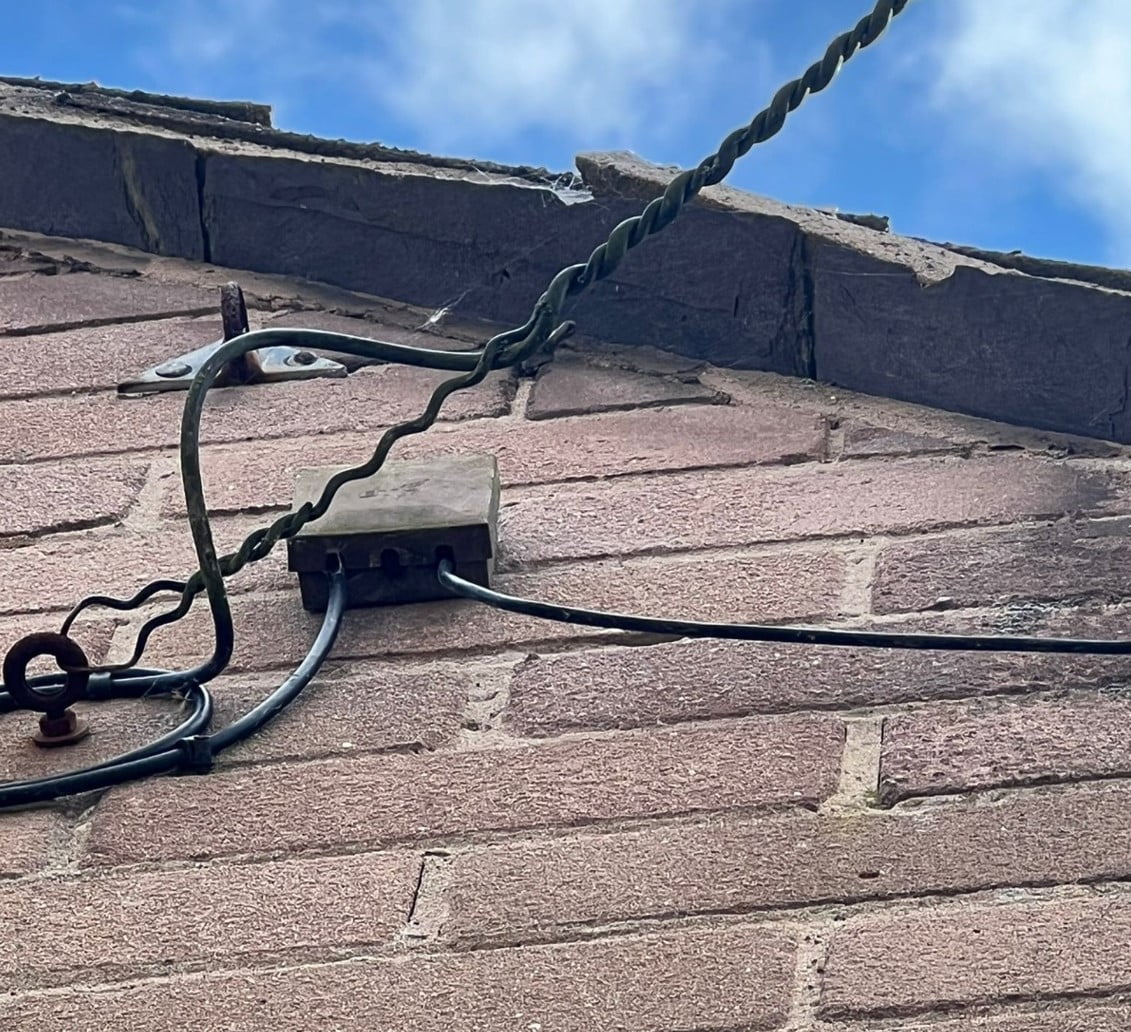
I’m not sure if I shown this before but I’m wondering if this is the cause of some issue as well…..
It’s been a fair while since BT16A junction boxes were used right lol. It’s not even under an eaves its just on the side of the house exposed.
Attachments:
Bt G.Fast | Draytek Vigor 2766AC | RT-AX82u
i9 10900k @ 5.3GHz | 32GB DDR4 4000MHz CL16 | Aorus Xtreme 3080ti 2100MHz | LG 3840x1600 175Hz | X34a 3440x1440 100Hz |
http://www.3dmark.com/spy/23655081You need to login in order to vote
May 7, 2022 at 8:52 pm #18956Nothing wrong with this box, but maybe inside there are bad contacts, you could open it and have a look inside for verification.
Maybe reconnect wires could help if there is a fault.But they should be able to measure such things from network side.
You need to login in order to vote
May 7, 2022 at 8:58 pm #18957BT16A junction boxes – old school
I assume you have telephone poles connecting G.fast to your house, Did BT Engineer open the BT16A junction box at all, just wondering how old the crimped joints are etc ?
Edit: @GRISU always types faster than myself
, maybe try a quiet line test to see if any noise on line etc.In a completely sane world, madness is the only freedom (J.G.Ballard).
You need to login in order to vote
May 7, 2022 at 9:18 pm #18960Nope original G.fast install was just a Master socket change and a G.fast faceplate filter. I’m borrowing a telescopic ladder to get up and check the jelly crimps myself just waiting for a friend to drop the ladder off.
Yep, telephone pole about 10m dropwire to the junction box on the house, and then about 6-8m of CW1308 cable to the inside. I’ve got 2 cabinets both roughly 100m as the crow flies, both under 200m if you follow the roadways assuming thats where the ducting is, so the signal attenuation makes no sense to me, especially with a clear phone noise test in the test socket.
My contract with BT is up in 20 days according to the website, and they’re now only offering VDSL by the looks of it (see attached)… I’m assuming there’s external factors here that are far out of my control. Their fibre promise is laughable as “G.fast is available in this area, its not a fibre priority so 2026 is the target installation date”.
Attachments:
Bt G.Fast | Draytek Vigor 2766AC | RT-AX82u
i9 10900k @ 5.3GHz | 32GB DDR4 4000MHz CL16 | Aorus Xtreme 3080ti 2100MHz | LG 3840x1600 175Hz | X34a 3440x1440 100Hz |
http://www.3dmark.com/spy/23655081You need to login in order to vote
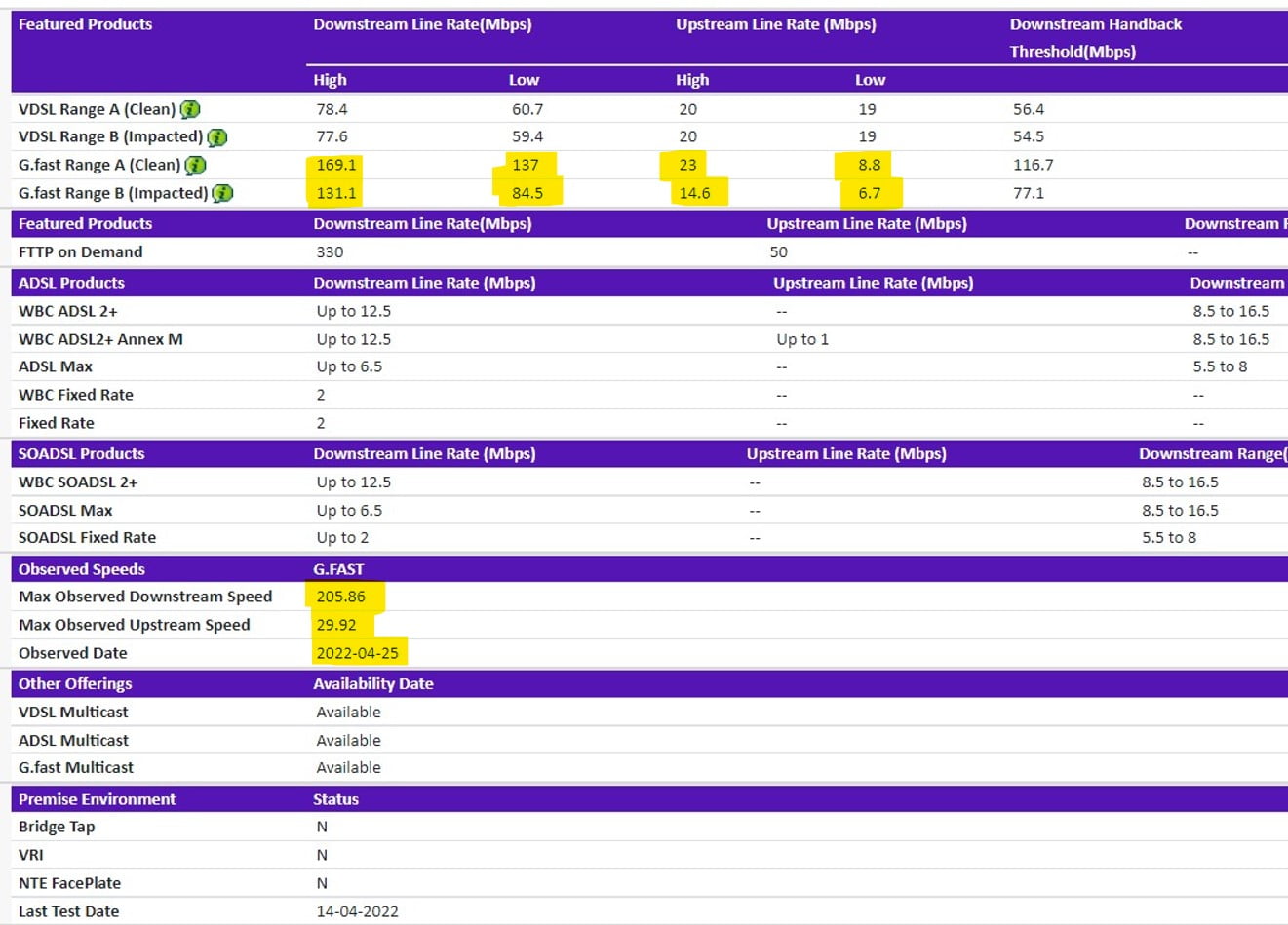
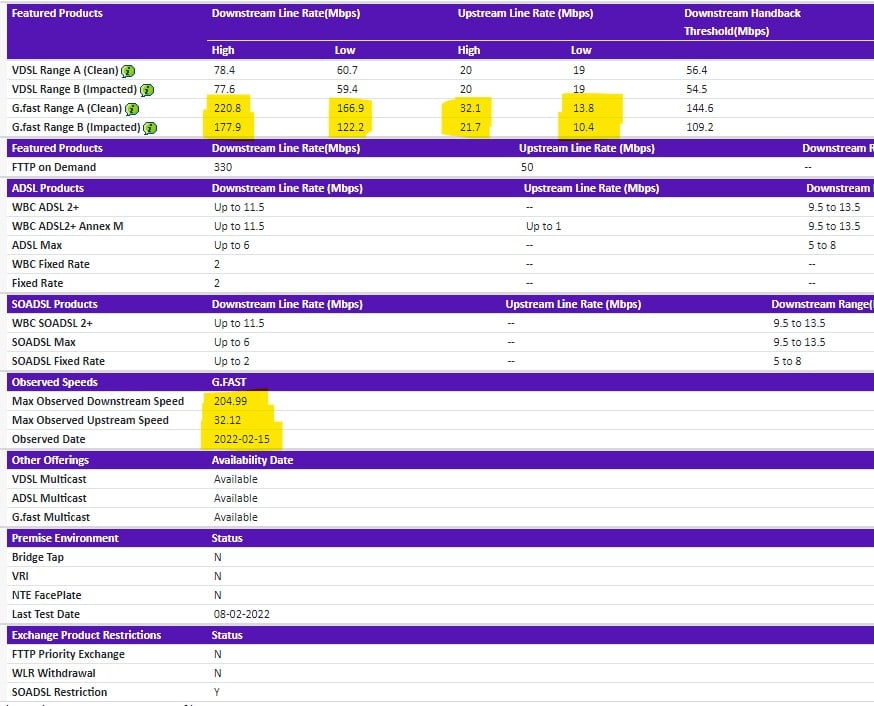
May 7, 2022 at 9:45 pm #18962What does BT Wholesale Offer ?
https://www.broadbandchecker.btwholesale.com/#/ADSL
In a completely sane world, madness is the only freedom (J.G.Ballard).
You need to login in order to vote
May 7, 2022 at 9:51 pm #18963I posted these not long ago, the first one was when I was told my contract was coming to an end so I checked the wholesale, the 2nd is current results. To note as well, I assume all ISPs use the wholesale checker as Shell was offering me 250mb+ a month ago with a better speed guarantee, now Shell is offering me 80mb max too and other G.fast providers have also lowered their packages on offer.
Attachments:
Bt G.Fast | Draytek Vigor 2766AC | RT-AX82u
i9 10900k @ 5.3GHz | 32GB DDR4 4000MHz CL16 | Aorus Xtreme 3080ti 2100MHz | LG 3840x1600 175Hz | X34a 3440x1440 100Hz |
http://www.3dmark.com/spy/23655081You need to login in order to vote
- AuthorPosts
 DrayTeK , very reliable



 , maybe try a quiet line test to see if any noise on line etc.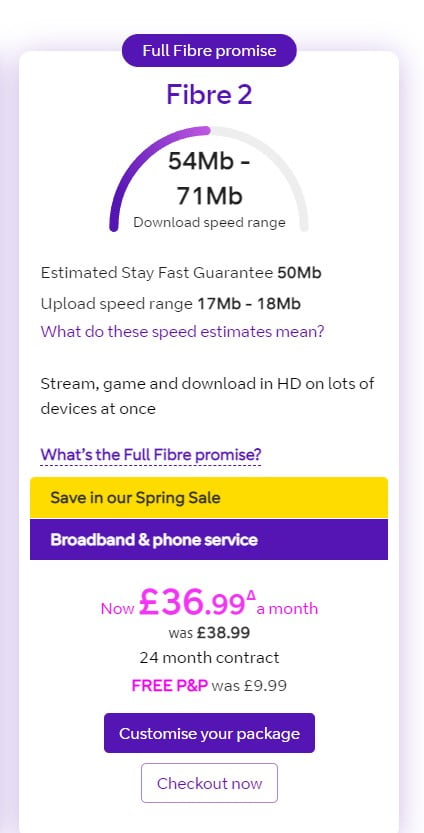
- You must be logged in to reply to this topic.