Forum Replies Created
-
AuthorPosts
-
Just change on the router to try google dns ?
On my pc and other devices I’ve got static ips ans always use this dns which is 1.1.1.1.
Leave that and the router will overide it?
I was out earlier this afternoon and it disconnected again.
(I deleted the attachment as it contained MAC addresses etc) UK Sentinel
You need to login in order to vote
Would it be better you think to use connect to dns server automatically under wan internet connection.
That would mean inputting individual dns on every device on the lan wouldn’t it?
Which is basically what I used to do with the homehub.
Is the router log showing it’s a dns problem then?
You need to login in order to vote
Not sure why it showing 8.8.8.8 it those modem screenshots when I’ve set dns on the router wan to 1.1.1.1. Shoulkd it be set up on the router lan page as well?
I’m really confused by this I’ve changed the dns so where is it getting 8.8.8.8 from?
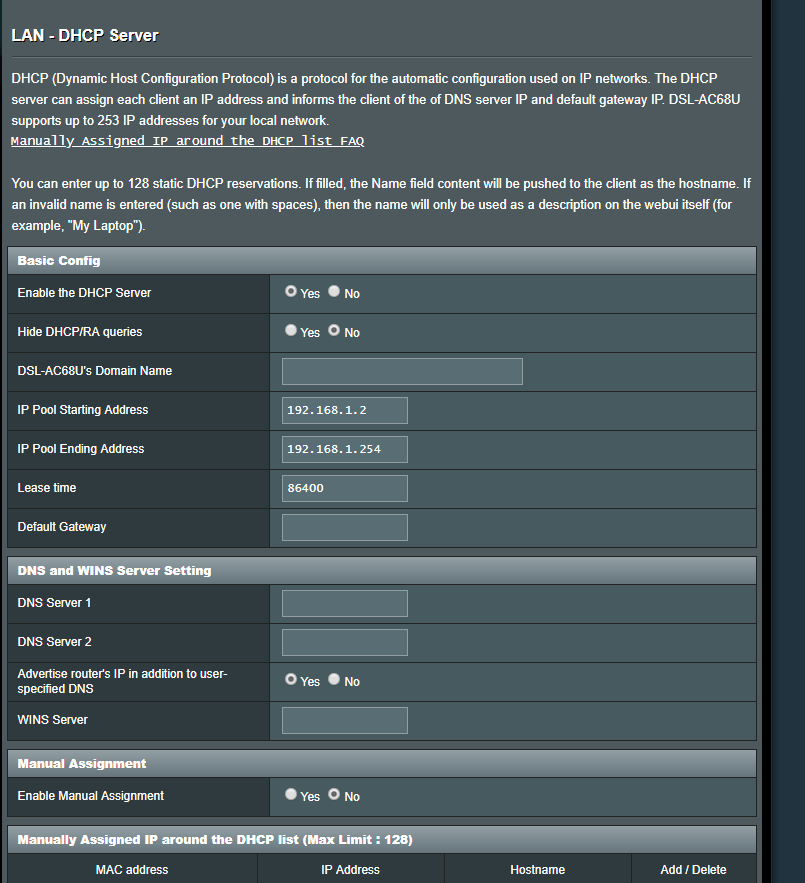
I’ll upload a screenshot of the router lan dns page
Attachments:
You need to login in order to vote
Never had a problem with cloudfare on the homehub,I’ve got the dns set to 1.1.1.1 on the modem too.
I could try changing it if that could cause issues though,my devices all connect on static ips I’m guessing that’s the best way?
And all my settings look good?
Also is it ok to have my modem and router plugged into a surge protector with my pc ?
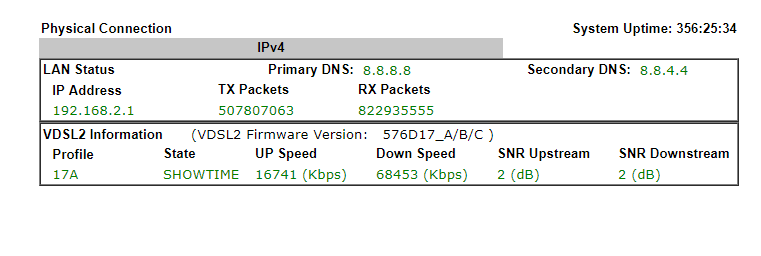
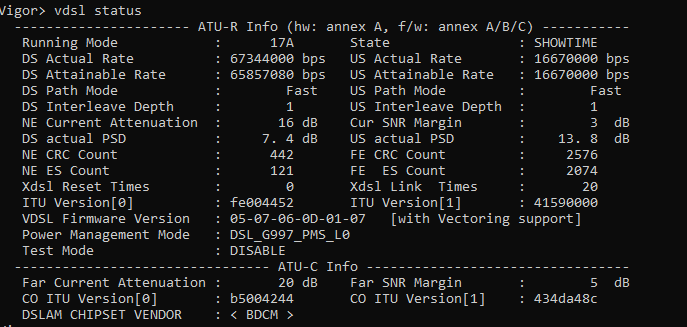
It’s the router losing connection to the modem,I checked the modem up time.
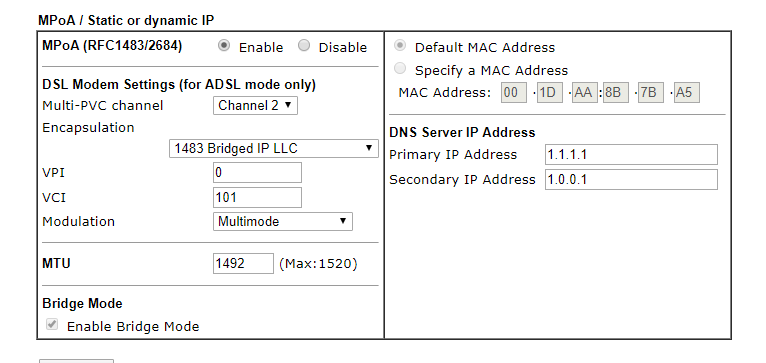
Just noticed on the mpoa page (first screenshot) it says 1.1.1.1 but second screen shot (which shows system uptime which shows it was the router losing connection to the modem)
It shows the dns as google dns also the snr keeps fluctuating conctantly between 2 and 3 snr.
System staus screenshot also shows google dns.
You need to login in order to vote
I haven’t changed anything since I posted about getting the modem set up in bridge mode correctly.
All my modem settings are the same as on the previous page of this thread.
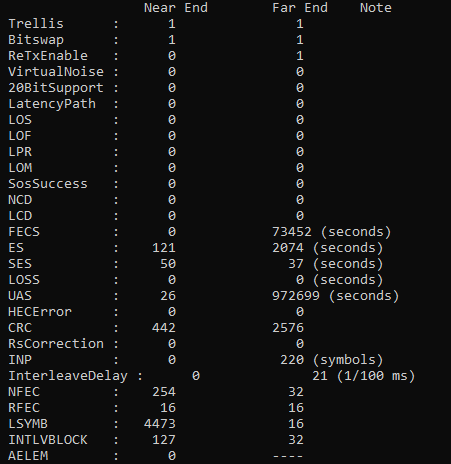
I’ve noticed (probably due to the disconnects ) that interleave delay has gone up to 20 1/100ms on the far end.
What is that ?
I know I’m on fast path,if this goes up further do I get put to interleaved again?
You need to login in order to vote
I’ve been ok for a couple of weeks and now I’ve had several disconnections ,the modem stays connected but the router loses connection to it.
Any ideas?
Attachments:
You need to login in order to vote
Have filled in the dns settings in the right place on the router? Don’t understand why the internet shut off and now the speed is up and down.
You need to login in order to vote
Also could the modem dns be why?
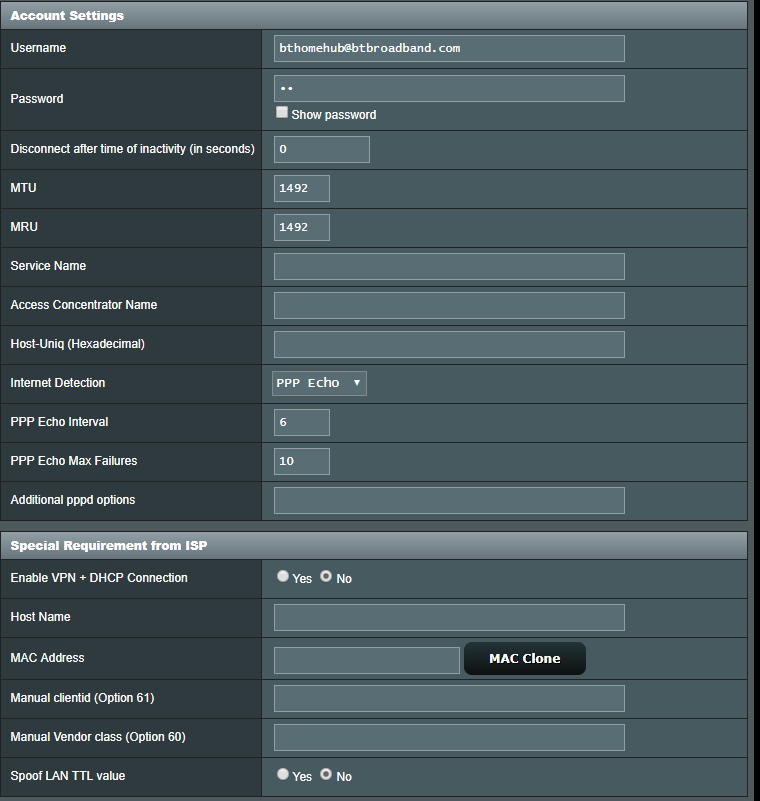
I’m confused on the page that I uploaded in my last post I’ve set the dns to 1.1.1.1 but on this page it’s google dns.
Also on the router lan page it has settings for dns,not sure what I should have set or not!
Internet speed has gone really slow again
The strange thing is my son was watching youtube with no buffering at all,yet on all other devices it was at a crawl including speed test.
With an 80/20 connection it shoudln’t do this,my router/settings or Bt ? Although if the modem says the speeds I posted I’m getting the right speed I guess.
You need to login in order to vote
I just thought I’d update the thread in case anyone else is doing the same thing.
Everything was going well, speeds going up and my connection is on fast now on up and down.
All until last night when I lost connection,looking into things this morning the modem was still connected but the router wasn’t.
After turning the power off it came back up but at really low speeds for a few minutes,back to normal atm,but why would it do this?
Also what’s odd is if I run speed tests it makes my son lag badly on games or kicks him form the network completely,he was the first to lose connection last night
I should have said I now have my Draytek set up correctly in bridge mode,could I have anything set up wrong in my router to cause this behaviour?
Hopefully just a one off,but wanted to check.
I’ve added a screenshot of the Draytek set up,I’ve changed the Mtu to 1492 which it was on the Bt home hub and changed the dns to 1.1.1.1 same as the router (not sure if I need to do both)
Thanks in advance for any help,Asus support were useless said factory reset and if that didn’t work I can only email for more help for level 2 support.
Attachments:
You need to login in order to vote
I’ve managed to get the speed up a bit by disbling dhcp on the modem and I forgot I’d enabled qos.
Turning it off changed the speed test a bit.
Now my speeds are an average of 60
Still lower than the modem though
Attachments:
You need to login in order to vote
The dlm has now put me onto fast path and the Draytek says I’m getting 69mbps but on speedtests I’m getting 52mbps max why is this?
The speedtests were done when the internet was not being used.
You need to login in order to vote
I meant to ask before should I have dhcp enabled on the modem?
Or doesn’t it matter?
It’s on at the moment.
Attachments:
You need to login in order to vote
-
AuthorPosts