

› UKTH forums › 🛜 Wireless Routers & Modems › ASUS & Wireless › Asus DSL AC 68U downstream interleaved Hi Guys, Wondering if anyone can help me I recently bought the Asus Dsl Ac68U to use instead of the useless Bt Homehub. It’s a busy household with lots of...
- This topic has 91 replies, 4 voices, and was last updated 7 years, 4 months ago by
 SH.
SH.

-
AuthorPosts
-
June 18, 2019 at 11:21 am #3393
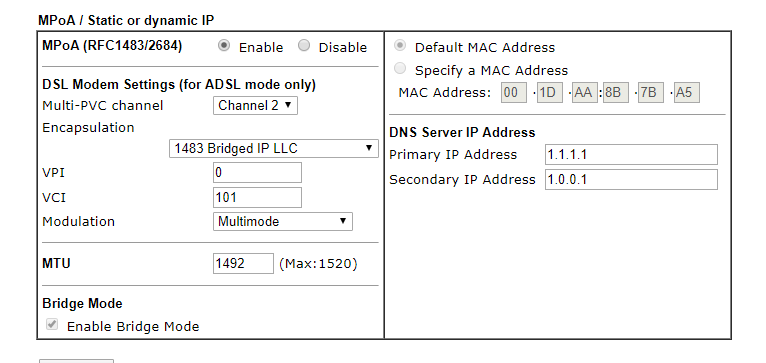
As your DrayTeK 130 is set to bridge mode, then the DNS settings do not matter on the DrayTek, all DNS is done via you ASUS router, all traffic that passes thru the Draytek 130 goes straight thru.
Running q speedtest should not disconnect you kids gaming, but if you do it a couple of times, then this could cause game stability issues. (I have the same problems)
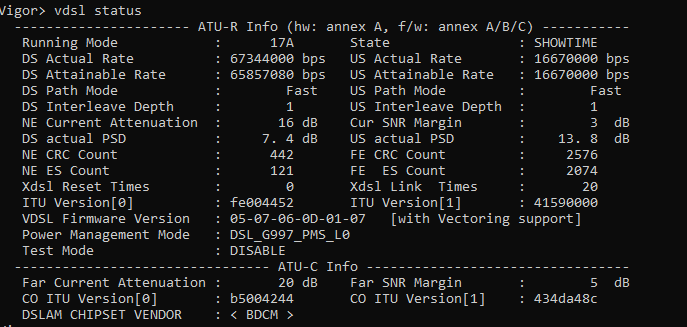
The DrayTeK is reporting 70/17 Mbps so stats looks really good to myself.
Edit: I forgot to say, as you are running BT specific firmware, I believe (not 100%) certain parameters in the DrayTek UI are hard coded, so if you make a change, upon re-boot it will revert back to what is was previously
You need to login in order to vote
June 18, 2019 at 11:58 am #3394Have filled in the dns settings in the right place on the router? Don’t understand why the internet shut off and now the speed is up and down.
You need to login in order to vote
June 18, 2019 at 12:21 pm #3395[quote quote=3394]Have filled in the dns settings in the right place on the router? Don’t understand why the internet shut off and now the speed is up and down.[/quote]
Maybe worth while restarting router from within UI, just incase it got confused, otherwise whatever caused the original issue (mains power spike) could have damaged ASUS router / firmware/ settings etc and a factory reset maybe required ?
You need to login in order to vote
June 29, 2019 at 1:46 am #3439I’ve been ok for a couple of weeks and now I’ve had several disconnections ,the modem stays connected but the router loses connection to it.
Any ideas?
Attachments:
You need to login in order to vote
June 29, 2019 at 8:05 am #3444Have you made any changes to the ASUS router in the last 2 weeks, if not then it looks like the logs are suggesting the ASUS router is loosing connection to WAN for IP address,
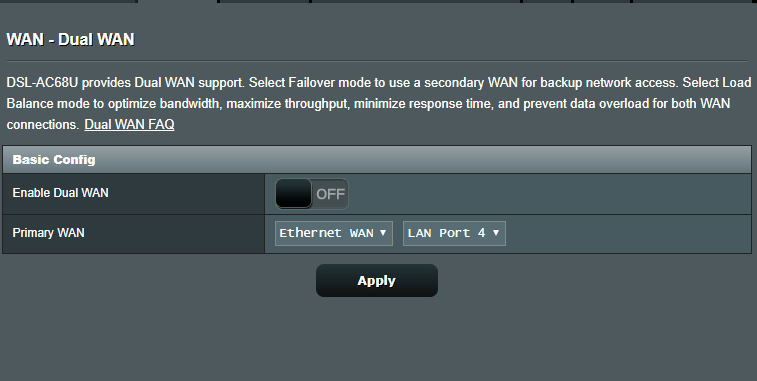
Very likely an issue with ASUS router, and maybe the way you have it set up (Dual WAN) try changing Primary WAN > Ethernet WAN > LAN Port 1 or other number ?
Not sure what you have set-up in this area already – can you screen dump the Dual wan page
You need to login in order to vote
June 29, 2019 at 10:10 am #3448I haven’t changed anything since I posted about getting the modem set up in bridge mode correctly.
All my modem settings are the same as on the previous page of this thread.
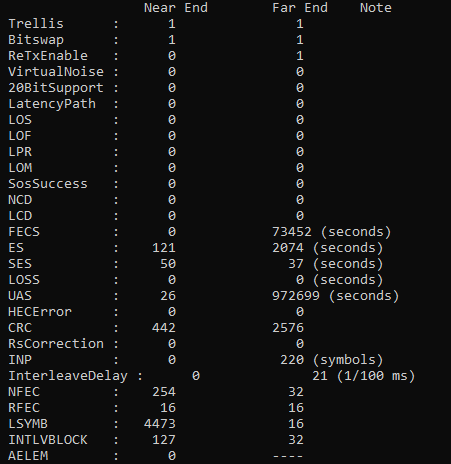
I’ve noticed (probably due to the disconnects ) that interleave delay has gone up to 20 1/100ms on the far end.
What is that ?
I know I’m on fast path,if this goes up further do I get put to interleaved again?
You need to login in order to vote
June 29, 2019 at 11:16 am #3452You may lose Fastpath if discontents (modem) are actually happening.
On you ASUS, is there a reason why you have selected DNS to NO and used 1.1.1.1 and 1.0.0.1 (Cloudfare) ?
Try using Googles, 8.8.8.8 and 8.8.4.4 as this maybe why connection is intermittent ?
You need to login in order to vote
June 29, 2019 at 12:33 pm #3453Never had a problem with cloudfare on the homehub,I’ve got the dns set to 1.1.1.1 on the modem too.
I could try changing it if that could cause issues though,my devices all connect on static ips I’m guessing that’s the best way?
And all my settings look good?
Also is it ok to have my modem and router plugged into a surge protector with my pc ?
It’s the router losing connection to the modem,I checked the modem up time.
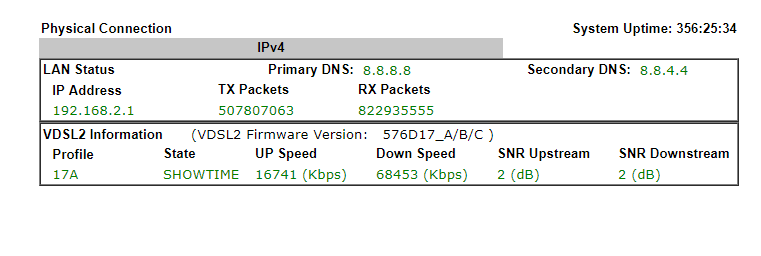
Just noticed on the mpoa page (first screenshot) it says 1.1.1.1 but second screen shot (which shows system uptime which shows it was the router losing connection to the modem)
It shows the dns as google dns also the snr keeps fluctuating conctantly between 2 and 3 snr.
System staus screenshot also shows google dns.
You need to login in order to vote
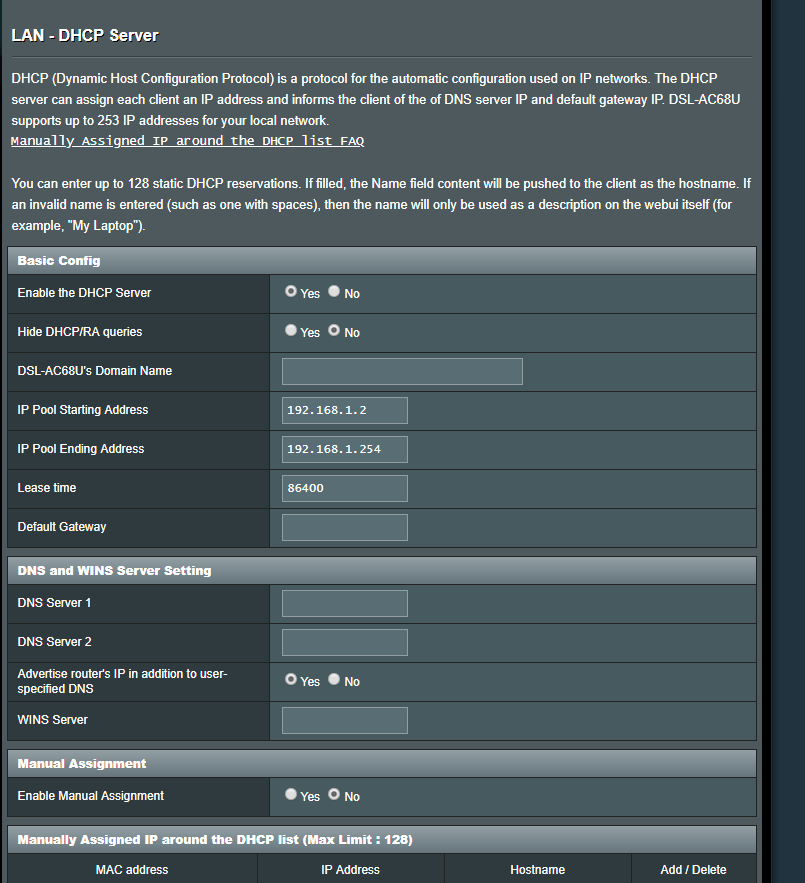
June 29, 2019 at 12:40 pm #3457Not sure why it showing 8.8.8.8 it those modem screenshots when I’ve set dns on the router wan to 1.1.1.1. Shoulkd it be set up on the router lan page as well?
I’m really confused by this I’ve changed the dns so where is it getting 8.8.8.8 from?
I’ll upload a screenshot of the router lan dns page
Attachments:
You need to login in order to vote
June 29, 2019 at 1:31 pm #3459I believe for the DrayTeK 130 running BT firmware, certain section of the UI values is hard coded, so not changeable,I believe this is true for the DNS 8.8.8.8 etc.
LAN > DNS Server fields should be left blank and only DNS entries via WAN > Internet Connection > WAN DNS Settings is where the Google DNS entries should be added.
Also under WAN, change LAN Port from 4 to 1 (unsure if it has always been 4) so Ethernet port 1 is acting as WAN port
ASUS units are fun ;-)
You need to login in order to vote
June 29, 2019 at 3:25 pm #3460Would it be better you think to use connect to dns server automatically under wan internet connection.
That would mean inputting individual dns on every device on the lan wouldn’t it?
Which is basically what I used to do with the homehub.
Is the router log showing it’s a dns problem then?
You need to login in order to vote
June 29, 2019 at 3:35 pm #3461The DNS could be the issue, a little trial-and-error I am afraid, hence worth changing to Googles to see if issue remains
Also change LAN Port 4 to 1 and see if that helps?
If DNS entries are entered via WAN – and you choose Automatic option as Select YES, then the router will find nearest DNS Server (usually you ISP’s) which can be flaky. It is why best to manually enter Google DNS servers under WAN, more reliable.
You need to Select NO, and manually enter Google DNS addresses
Local Clients using DHCP will automatically point all DNS queries to Router and router will then forward DNS query to Google DNS Servers.
Remember, this is just for testing as DNS can be real problematic
You need to login in order to vote
June 29, 2019 at 3:49 pm #3462I would usually power off and on again after a minute.
But dont know how it is acting with your fastpath.
You need to login in order to vote
June 29, 2019 at 4:16 pm #3463Just change on the router to try google dns ?
On my pc and other devices I’ve got static ips ans always use this dns which is 1.1.1.1.
Leave that and the router will overide it?
I was out earlier this afternoon and it disconnected again.
(I deleted the attachment as it contained MAC addresses etc) UK Sentinel
You need to login in order to vote
June 29, 2019 at 4:19 pm #3465[quote quote=3462]I would usually power off and on again after a minute. But dont know how it is acting with your fastpath. We dont have this funny thing causing only troubles, is there any reason for BT to have it?[/quote]
I also tried turning the router off and on again and it still continues to do it randomly
You need to login in order to vote
-
AuthorPosts







- You must be logged in to reply to this topic.