Forum Replies Created
-
AuthorPosts
-
September 3, 2019 at 7:55 am in reply to: ASUS – DSL-AC88U / DSL-AC3100 Firmwares (beta's) etc. Looks like a new Beta Release for the DSL-AC88U is available, this version has Telnet enabled and improved 2.4GHz wifi (I believe). DSL-AC88U_v9.10.06_build581_debug.w.zip https://www.asuswebstorage.com/navigate/s/604D61534F2541D1B3CE1CC031A697E4Y UK Sentinel In a completely... #4130September 2, 2019 at 3:25 pm in reply to: ASUS – DSL-AC88U / DSL-AC3100 Firmwares (beta's) etc. Looks like a new Beta Release for the DSL-AC88U is available, this version has Telnet enabled and improved 2.4GHz wifi (I believe). DSL-AC88U_v9.10.06_build581_debug.w.zip https://www.asuswebstorage.com/navigate/s/604D61534F2541D1B3CE1CC031A697E4Y UK Sentinel In a completely... #4128
@UK Sentinel Can i Have ASUS DSL-AC88u telnet firmware. thanks
PM Sent
HI, I cant find any PM
Edit: Thanks i found it
You need to login in order to vote
September 2, 2019 at 2:06 pm in reply to: ASUS – DSL-AC88U / DSL-AC3100 Firmwares (beta's) etc. Looks like a new Beta Release for the DSL-AC88U is available, this version has Telnet enabled and improved 2.4GHz wifi (I believe). DSL-AC88U_v9.10.06_build581_debug.w.zip https://www.asuswebstorage.com/navigate/s/604D61534F2541D1B3CE1CC031A697E4Y UK Sentinel In a completely... #4126February 8, 2019 at 8:40 pm in reply to: ASUS – DSL-AC88U / DSL-AC3100 Firmwares (beta's) etc. Looks like a new Beta Release for the DSL-AC88U is available, this version has Telnet enabled and improved 2.4GHz wifi (I believe). DSL-AC88U_v9.10.06_build581_debug.w.zip https://www.asuswebstorage.com/navigate/s/604D61534F2541D1B3CE1CC031A697E4Y UK Sentinel In a completely... #2181@rolllin – I see, as you have errors/fault on your line (I assume) , maybe worth getting that fixed first, regarding Attenuation, best send ASUS a feedback form and mention you been speaking with UK Sentinel and hopefully they may respond. Personally, I think your DSL stats will not change until we are allowed to have Telnet enabled Firmware and make certain changes ourselves, but no idea when this firmware option will be available via STOCK firmware? Likewise, given your DLINK and ASUS use different DSL chipsets (Triductor and Broadcom), they will never be similar in terms of Attenuation/SNR values so other option maybe is to use a Modem/router that is not Broadcom or see if the DLINk supports Bridge Mode/PPPoE passthrough so you can use it as a modem and use the DSL-AC88U as a router only?
Thanks for the help I already sent them twice about month before, I will probably will do as u said DLINK to be bridge and ASUS router but ASUS does not have QOS unfortunately because I have 7 device connected.
You need to login in order to vote
February 8, 2019 at 12:26 pm in reply to: ASUS – DSL-AC88U / DSL-AC3100 Firmwares (beta's) etc. Looks like a new Beta Release for the DSL-AC88U is available, this version has Telnet enabled and improved 2.4GHz wifi (I believe). DSL-AC88U_v9.10.06_build581_debug.w.zip https://www.asuswebstorage.com/navigate/s/604D61534F2541D1B3CE1CC031A697E4Y UK Sentinel In a completely... #2178@UK Sentinel Is there any way to lower line attenuation in ASUS DSLAC88U to be same as DLINK2888A because when I re plugged the DLINK I can see always getting lower line attenuation which I think why I’m getting better sync speed than ASUS DSL AC88U also I noticed when I re plugged ASUS DSL AC88U I see it didn’t use VDSL BAND STATUS D1 like DLINK2888A so if u can contact ASUS about that. Thanks
Telnet is disabled on all current builds for the DSL-AC88U, so no options to reduce SNR/Attenuation etc.
I didn’t mean telnet I mean if ASUS can update the vdsl driver to get best line attenuation / snr
You need to login in order to vote
February 7, 2019 at 7:49 pm in reply to: ASUS – DSL-AC88U / DSL-AC3100 Firmwares (beta's) etc. Looks like a new Beta Release for the DSL-AC88U is available, this version has Telnet enabled and improved 2.4GHz wifi (I believe). DSL-AC88U_v9.10.06_build581_debug.w.zip https://www.asuswebstorage.com/navigate/s/604D61534F2541D1B3CE1CC031A697E4Y UK Sentinel In a completely... #2175@UK Sentinel
Is there any way to lower line attenuation in ASUS DSLAC88U to be same as DLINK2888A because when I re plugged the DLINK I can see always getting lower line attenuation which I think why I’m getting better sync speed than ASUS DSL AC88U also I noticed when I re plugged ASUS DSL AC88U I see it didn’t use VDSL BAND STATUS D1 like DLINK2888A so if u can contact ASUS about that. Thanks
You need to login in order to vote
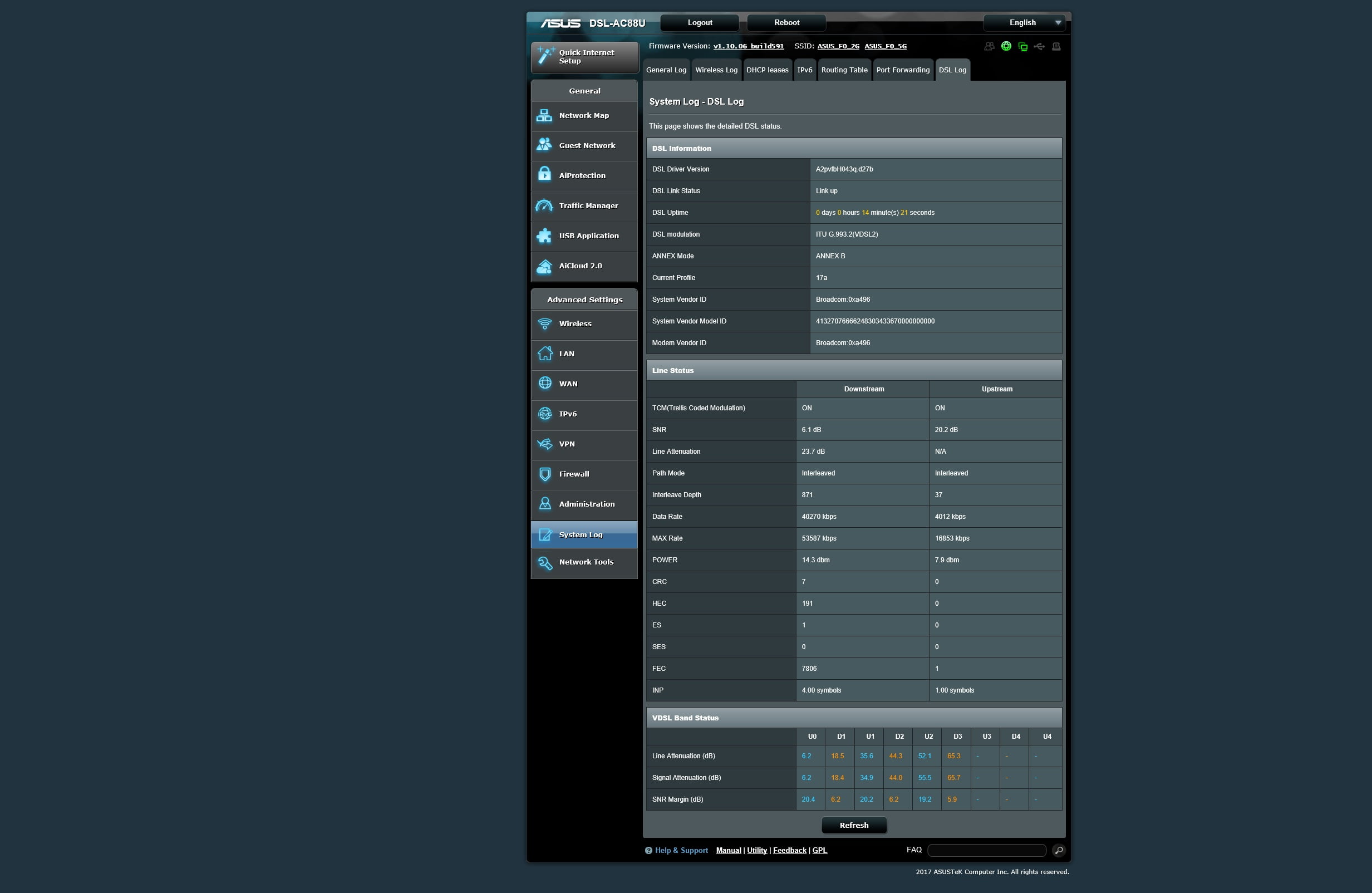
February 6, 2019 at 8:33 pm in reply to: ASUS – DSL-AC88U / DSL-AC3100 Firmwares (beta's) etc. Looks like a new Beta Release for the DSL-AC88U is available, this version has Telnet enabled and improved 2.4GHz wifi (I believe). DSL-AC88U_v9.10.06_build581_debug.w.zip https://www.asuswebstorage.com/navigate/s/604D61534F2541D1B3CE1CC031A697E4Y UK Sentinel In a completely... #2157Next time you plug in yourDSL-AC88U, can you screen dump (again) the DSL Stats, It is looking like this is all you are going to get from the DSL-AC88U, which is unfortunate for you ;-( I assume ISP in Egypt could not get line any better?
Hi, I called my ISP they told me there is still physical problem on the line and its not affect me only
i attached new ASUS status
Attachments:
You need to login in order to vote
February 6, 2019 at 12:07 am in reply to: ASUS – DSL-AC88U / DSL-AC3100 Firmwares (beta's) etc. Looks like a new Beta Release for the DSL-AC88U is available, this version has Telnet enabled and improved 2.4GHz wifi (I believe). DSL-AC88U_v9.10.06_build581_debug.w.zip https://www.asuswebstorage.com/navigate/s/604D61534F2541D1B3CE1CC031A697E4Y UK Sentinel In a completely... #2147January 24, 2019 at 10:29 pm in reply to: ASUS – DSL-AC88U / DSL-AC3100 Firmwares (beta's) etc. Looks like a new Beta Release for the DSL-AC88U is available, this version has Telnet enabled and improved 2.4GHz wifi (I believe). DSL-AC88U_v9.10.06_build581_debug.w.zip https://www.asuswebstorage.com/navigate/s/604D61534F2541D1B3CE1CC031A697E4Y UK Sentinel In a completely... #2055Different chipsets – DLINK is TriDuctor VSPM340 and ASUS is BCM63138. ASUS plan not to add Adaptive QoS, but unsure regarding QoS for Download, but I can add it to my list to ask ASUS? Hope that helps?
Yes thanks i know about chipsets but its kind surprising that normal dsl router perform better than high end router and sure i will be thankful to add it to your list to ask
You need to login in order to vote
January 24, 2019 at 6:40 pm in reply to: ASUS – DSL-AC88U / DSL-AC3100 Firmwares (beta's) etc. Looks like a new Beta Release for the DSL-AC88U is available, this version has Telnet enabled and improved 2.4GHz wifi (I believe). DSL-AC88U_v9.10.06_build581_debug.w.zip https://www.asuswebstorage.com/navigate/s/604D61534F2541D1B3CE1CC031A697E4Y UK Sentinel In a completely... #2052@UK Sentinel so the engineer visit me and found there is issue with MSAN Cabinet he tried to fix it but the speed not the same but it got improved from 30 mbps to 50 mbps some time getting little lower but this on ASUS DSL AC88U but once i plug the DLINK I got stable 50 mbps and attainable rate 59 mbps also iam getting better Line Attenuation with DLINK 16 db compared to ASUS DSL AC88U which is 24db also getting better SNR on DLINK than ASUS DSL AC88U so im waiting to see when they will finish fix the issue on MSAN Cabinet.
Thanks for update and it is good the ASUS and DLINK speeds are closer than before, let us know if Engineer fixes last bit?
But why DLINK have better line attenuation and SNR compared to ASUS DSL AC88U, Is this firmware related or hardware.
Also is there any news for adding QOS for download.
You need to login in order to vote
January 24, 2019 at 2:14 am in reply to: ASUS – DSL-AC88U / DSL-AC3100 Firmwares (beta's) etc. Looks like a new Beta Release for the DSL-AC88U is available, this version has Telnet enabled and improved 2.4GHz wifi (I believe). DSL-AC88U_v9.10.06_build581_debug.w.zip https://www.asuswebstorage.com/navigate/s/604D61534F2541D1B3CE1CC031A697E4Y UK Sentinel In a completely... #2048@UK Sentinel so the engineer visit me and found there is issue with MSAN Cabinet he tried to fix it but the speed not the same but it got improved from 30 mbps to 50 mbps some time getting little lower but this on ASUS DSL AC88U but once i plug the DLINK I got stable 50 mbps and attainable rate 59 mbps also iam getting better Line Attenuation with DLINK 16 db compared to ASUS DSL AC88U which is 24db also getting better SNR on DLINK than ASUS DSL AC88U so im waiting to see when they will finish fix the issue on MSAN Cabinet.
You need to login in order to vote
January 21, 2019 at 6:55 am in reply to: ASUS – DSL-AC88U / DSL-AC3100 Firmwares (beta's) etc. Looks like a new Beta Release for the DSL-AC88U is available, this version has Telnet enabled and improved 2.4GHz wifi (I believe). DSL-AC88U_v9.10.06_build581_debug.w.zip https://www.asuswebstorage.com/navigate/s/604D61534F2541D1B3CE1CC031A697E4Y UK Sentinel In a completely... #2032That is good as in the 30b is doing what I thought it would. Unfortunately, I have no idea why you achieve higher synch on the DLINK than compared to the ASUS, unless ASUS hardware is faulty, the DSL-AC88U has a Broadcom DSL chipset, which is not very good wit ADSL, but works well with VDSL and VDSL2? Is you DSL-AC88U new? maybe if engineer visits and says line is good, you need to replace DSl-AC88U? or try ASUS at friends house who has good connection (for testing) Sorry ;-(
Thanks for help but when iam back to 17a profile my line attenuation increased again to 30db , My DSL AC88U is new on the back of the router production year is 2018
In DSL LOG page there is VDSL Band Status U0 and U1 what does it mean because i see lower line attenuation in U0 and U1.
You need to login in order to vote
January 20, 2019 at 10:38 pm in reply to: ASUS – DSL-AC88U / DSL-AC3100 Firmwares (beta's) etc. Looks like a new Beta Release for the DSL-AC88U is available, this version has Telnet enabled and improved 2.4GHz wifi (I believe). DSL-AC88U_v9.10.06_build581_debug.w.zip https://www.asuswebstorage.com/navigate/s/604D61534F2541D1B3CE1CC031A697E4Y UK Sentinel In a completely... #2029I see, Egypt, only a guess, but under DSL Settings, change VDSL Profile to 30a and reboot router? I had a quick look but could not find specify details around which speeds are supported by which VDSL profile for your region by Telecom Egypt?
Hi,
Sorry for late replay i changed VDSL Profile to 30a and i got lower speed also line attenuation changed form 30db to 23db
You need to login in order to vote
January 19, 2019 at 9:07 pm in reply to: ASUS – DSL-AC88U / DSL-AC3100 Firmwares (beta's) etc. Looks like a new Beta Release for the DSL-AC88U is available, this version has Telnet enabled and improved 2.4GHz wifi (I believe). DSL-AC88U_v9.10.06_build581_debug.w.zip https://www.asuswebstorage.com/navigate/s/604D61534F2541D1B3CE1CC031A697E4Y UK Sentinel In a completely... #2027Can I ask, are you in UK ? stats look 8Mbps and 60Mbps but the differences (downstream) between ASUS and DLINK are large, on the asus, try disable the g.vector option and see if that helps? If you are in UK are you on 50/10 service?
No im not in UK im in EGYPT and my plan is 100/25
I tried to disable g.inp and g.vector nothing changed same values
You need to login in order to vote
January 19, 2019 at 7:31 pm in reply to: ASUS – DSL-AC88U / DSL-AC3100 Firmwares (beta's) etc. Looks like a new Beta Release for the DSL-AC88U is available, this version has Telnet enabled and improved 2.4GHz wifi (I believe). DSL-AC88U_v9.10.06_build581_debug.w.zip https://www.asuswebstorage.com/navigate/s/604D61534F2541D1B3CE1CC031A697E4Y UK Sentinel In a completely... #2024That is most odd, I can understand that you are only you are getting the speeds you say, given the line stats/interleaving etc, the bit that I do not understand is when you plug in your DLINK, you get much better speeds. Are you using the same DSL cable for the ASUS as you are for the DLINK? Can I ask, next time you plug in DLINK, can you screen dump those stats, so we can have a look and if needed, I can pass back to ASUS to have a look at ?
Yes its the same cable, i called my ISP and they will send technician to see whats the problem its should be tomorrow after that will plug DLINK and send you the stats because they ask to keep router connected
Edit: I do not have screenshot for the stats but i have it copied form old text file
UpLink / DownLink
SNR Margin (0.1 dB):218 / 158
Attenuation (0.1 dB):64 / 161
Output Power (0.1 dBm):72 / 145
Attainable Rate (Kbps):16242 / 75608
Rate (Kbps):8016 / 59999
You need to login in order to vote
-
AuthorPosts