

› UKTH forums › 🛜 Wireless Routers & Modems › ASUS & Wireless › Advice needed on what ASUS router (or other)
- This topic has 85 replies, 4 voices, and was last updated 3 years, 7 months ago by
 UK Sentinel.

- AuthorPosts
- January 27, 2023 at 8:02 pm #22533
[quote quote=22532]I saw threads where people were getting thousands of CRC per day and people said it was completely fine[/quote]
No chance, maybe FEC are ok (ish) at the level, but CRC’s at that level means there is a problem on the line and this will have an impact on gaming.
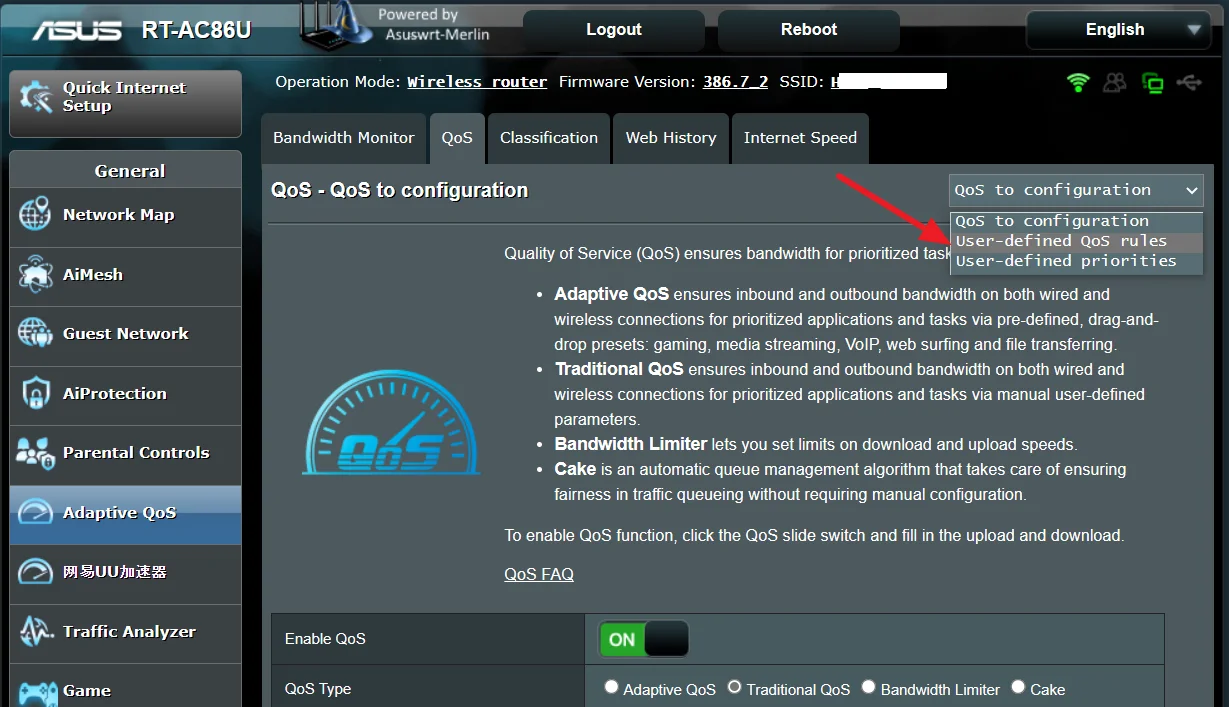
How have you configured traditional QoS ?
You need to login in order to vote
January 27, 2023 at 8:25 pm #22536[quote quote=22533]How have you configured traditional QoS ?[/quote]
You need to login in order to vote
January 27, 2023 at 8:32 pm #22537ASUS Traditional QoS has option for User-Defined QoS Rules
Attachments:
You need to login in order to vote
January 27, 2023 at 8:41 pm #22539Ah I did not know that. I’ll let the line settle for another day and see what I can come up with. Still think I’ll just bang on cake though lol.
You need to login in order to vote
January 27, 2023 at 8:59 pm #22540[quote quote=22539]Ah I did not know that. I’ll let the line settle for another day and see what I can come up with. Still think I’ll just bang on cake though lol.[/quote]
You need to login in order to vote
January 28, 2023 at 7:21 am #22541When you have a moment, take a look at ASUS guide relating to Traditional QoS, should be of some use.
https://www.asus.com/uk/support/FAQ/1010951/
You need to login in order to vote
January 29, 2023 at 4:32 am #22546Update time. Installed the custom firmware and ran Cake.
I selected VDSL2 PPPoE PTM as I think this is correct. This gave me a WAN packet overhead of 30.
Fast.com is basically fixed in loaded ms now:
However as you can see, the download speeds are much lower now. Upload also barely goes above 7 here.
Bufferbloat also A+
Anything to change?
Edit: I realised what’s likely going on with the speed decrease. Am I supposed to input basically my 100% speed in the first screenshot (e.g. 44 download) instead of the 40 value I have inputted as this is the value post 90% being taken off?
You need to login in order to vote
January 29, 2023 at 7:25 am #22548[quote quote=22546]Bufferbloat also A+[/quote]
Good to see Bufferbloat is A+ so you original objective has been met.
As you line speed is so low, not sure why as you are on ECI cab but do have G.inp enabled, only time will tell if line speed will increase naturally.
Maybe worth while to reducing throttling from 10% to 5% and test to see how that goes.
FYI, if you have no throttling, then congestion can occur at the cab and bufferbloat increase may occur.
You need to login in order to vote
January 29, 2023 at 9:29 am #22549Oh I’m hard capped anyway. My package from BT is ~45. This happened when I recontracted. Early last year I was getting 60. They said they don’t offer higher than my current speed in my area. Even questioned retentions about it. I did get to haggle down to £26.99 so it’s not too bad.
I just saw this (apparently only Merlin firmware shows it?):
The router is running at 62c while not really doing anything… this is Scotland in Winter. I can’t imagine what an Australian summer would do.
Do you think having 30 packet overhead is okay or should I try lower? It seems fine right now but I don’t know what to check for if I do try 27 or something.
Liked by:You need to login in order to vote
January 29, 2023 at 11:18 am #22551[quote quote=22549]Oh I’m hard capped anyway. My package from BT is ~45. This happened when I recontracted. Early last year I was getting 60. They said they don’t offer higher than my current speed in my area. Even questioned retentions about it. I did get to haggle down to £26.99 so it’s not too bad.[/quote]
Good to know, and glad you haggled for price reduction.
Temps are fine, even when router is at idle, I always assume 50-50-70 ‘my rule’ and I know all is good, 50-60°C for Wifi radios and 70-80°C for CPU.
Obviously hotter countries this range can increase, but for UK, this seems OK for DSL-AX82U.
WAN 30 packet overhead is worth a try for a week, and then drop down to 27 and see if any issue. 30 is safe, 27 works for myself on my Broadcom cab (Huawei) but you are on ECI (Infineon) so no guarantees.
Trial and error I am afraid if you wish to tinker.
You need to login in order to vote
January 29, 2023 at 9:50 pm #22553Is there any benefit to lowering from 30 to 27?
I know I’m getting pretty ridiculous right now but even with Cake I still have an issue where if I ping something in cmd like bbc.co.uk, I’ll have a ping spike for 1-2 ping responses when I go to fast.com. It’s only about 10-20ms so nothing bad but still annoying. Is this expected behaviour? The thing is it’s not too consistent. Sometimes it will happen for 1 ping and then some tries it won’t impact the ping by more than say 2ms.
Also while I’m here I got abit lost when configuring DNS:
Is this DNS over TLS needed?
You need to login in order to vote
January 30, 2023 at 8:24 am #22560DNS over TLS – DNS queries are sent in plaintext, which means anyone can read them. DNS over HTTPS and DNS over TLS encrypt DNS queries and responses to keep user browsing secure and private. However, both approaches have their pros and cons, but a nice to have generally for the more security focus users especially if used with the ‘opportunistic’ option to give a little more flexibility.
You need to login in order to vote
January 30, 2023 at 10:37 am #22562Would you be able to try to see if your SQM implementation does the same as mines? i.e. ping a known server with -t going then open fast.com. See if any spikes happen.
fast.com tells me my loaded ping only went up like 4ms but the bbc.co.uk ping clearly went up by like 25 or something for 1-2 packets.
You need to login in order to vote
January 30, 2023 at 3:02 pm #22564CMD line Ping can be unpredictable and only good as a guide as so much goes on behind the scenes.
My ping -t www . bbc . co . uk was around 10ms and once it jumped to 25ms.
Run tracert www . bbc . co . uk and let us know what this show ?
FYI: Try not getting bog down with specifics as DSL is far from perfect, have a look at the below for the bigger picture. https://www.ghostgb.co.uk/ping-vs-latency-vs-jitter/
You need to login in order to vote
January 31, 2023 at 9:10 am #22566Yeah I think it’s just some weird cmd line ping. If dslreports and waveform show A+ and fast.com shows that I have a loaded ping less than 5ms from unloaded I can’t complain. It’s leaps and bounds better than what I had. Definitely a strong purchase.
If you want to see my tracert:
I was testing some DNS providers. I was choosing based off ping. Unfortunately for me, Quad9 has an Edinburgh resolver but since BT doesn’t peer to it I’m always stuck resolving to London. I would have been able to have a like 3ms dns resolver. :(
I did like Quad9 due to the good malware blocking but it seems like I have to choose between Google and CloudFlare. Both ping at 16ms but Quad9 is at 18ms.
You need to login in order to vote
- AuthorPosts




- You must be logged in to reply to this topic.