

› UKTH forums › 🛜 Wireless Routers & Modems › ASUS & Wireless › ASUS DSL-AX82U IPv6 Issue Current FW Version : 3.0.0.4.388_22048-gf313579 When I activate IPv6, the device does not detect the Internet presence and blocks the internet access of other devices (DHCP passive access point). The...
- This topic has 67 replies, 3 voices, and was last updated 3 years, 6 months ago by
 Black Bird.

- AuthorPosts
- March 21, 2023 at 10:54 am #23273
[quote quote=23270]If you want to hear my beautiful voice, you should check out the video I’ve prepared :)[/quote]
I will
You need to login in order to vote
April 2, 2023 at 9:56 pm #23544When I import a Wireguard profile, it becomes a problem when it is saved as both an IPv4 and an IPv6 address, but Wireguard only works when I save it with IPv4 entries. How can I configure IPv6 addresses?
Otherwise, the situation becomes complicated like this.
[Interface]
PrivateKey = sAj…
Address = 172.16.0.2/32
Address = 2606:4700:xxxx:xxxx:xxxx:xxxx:xxxx:xxxx/128
DNS = 1.1.1.1
MTU = 1280
[Peer]
PublicKey = bmX…
AllowedIPs = 0.0.0.0/0
AllowedIPs = ::/0
Endpoint = engage.cloudflareclient.com:2408Attachments:
You need to login in order to vote
April 3, 2023 at 8:50 am #23548[quote quote=23544]Otherwise, the situation becomes complicated like this.[/quote]
I will touch base with ASUS to see if any know issues with Wireguard and IPv6, can you confirm the latest firmware for DSL-AX82U is being used ?
Version 3.0.0.4.388_22048
You need to login in order to vote
April 3, 2023 at 3:09 pm #23559April 3, 2023 at 3:36 pm #23561I have dropped ASUS the question around Wireguard and Co-usage of IPv4 and IPv6 for the DSL-AX82U – will let you know what they say.
Alas, I do not have my DSL-AX82U plugged in currently, so cannot check if IPv4 and Ipv6 is supported.
For reference: https://www.asus.com/support/FAQ/1048280/
Liked by:You need to login in order to vote
April 5, 2023 at 12:21 am #23579[quote quote=23561]I have dropped ASUS the question around Wireguard and Co-usage of IPv4 and IPv6 for the DSL-AX82U – will let you know what they say. Alas, I do not have my DSL-AX82U plugged in currently, so cannot check if IPv4 and Ipv6 is supported. For reference: https://www.asus.com/support/FAQ/1048280/[/quote]
It is possible to enter an IPv6 address, but it is not possible to enter both an IPv4 and an IPv6 address at the same time, which is causing issues with the VPN not working properly. When I tried to enter them separated by a comma, it accepted the input, but still, the IPv6 VPN is not working.
And the MTU option is also not visible.[Interface]
Address = 172.16.0.2/32 (IPv4)
Address = 2606:aaaa:bbbb:cccc:dddd:eeee:bbbb:ffff/128 (IPv6)[Peer]
AllowedIPs = 0.0.0.0/0 (IPv4)
AllowedIPs = ::/0 (IPv6)Liked by:You need to login in order to vote
April 5, 2023 at 2:46 pm #23589ASUS are currently on a public holiday until the 6th, so should hopefully hear back from them over the next couple of days
Liked by:You need to login in order to vote
April 6, 2023 at 7:12 am #23591So ASUS have come back and said….
——
The user could setup both IPv4 and IPv6 like the following, separated by a comma.
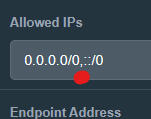
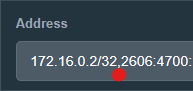
Address = 172.16.0.2/32,2606:aaaa:bbbb:cccc:dddd:eeee:bbbb:ffff/128
AllowedIPs = 0.0.0.0/0,::/0
——
You need to login in order to vote
April 6, 2023 at 8:19 am #23592April 6, 2023 at 8:34 am #23594ASUS VPN’s are not by strong area of knowledge can I ask, why do you wish to use both IPv4 and Ipv6, cannot you use just IPv6 on its own ?
and if you visit whatismyipaddress.com what does this say regarding IPv4/v6
You need to login in order to vote
April 6, 2023 at 8:48 am #23596Using a VPN is necessary to increase privacy and access some inaccessible websites. In this case, Cloudflare WARP works well. I want both my IPv4 and IPv6 addresses to be hidden. I am not very knowledgeable about these issues, but VPNs are really important where we live. Instead of installing a program on a PC or smartphone, when we enter the VPN address into the modem, the entire network works through the VPN.
…
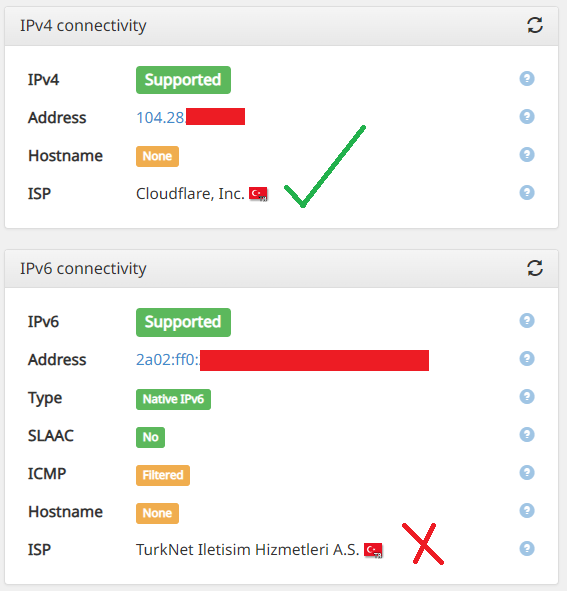
The website whatismyipaddress.com is also showing my IPv4 address as the Cloudflare VPN and my IPv6 address as my direct TurkNet address.
Attachments:
You need to login in order to vote
April 6, 2023 at 9:51 am #23600Understood, does IPv6 work as it should if you remove the IPv4 entries ?
also:
So it sounds like you are trying to set-up a WireGuard server using the ASUS DSL-AX82U as the VPN server.
if so..
Check Under WireGuard > Advanced, have you enabled IPv6 NAT ?
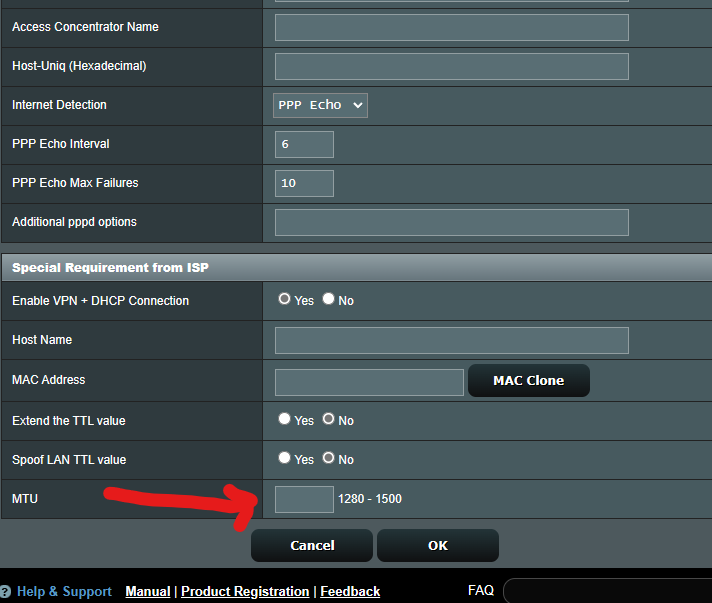
Note: Does not seem an option to change WireGuard MTU directly, maybe try changing WAN MTU. go to Advanced Settings > WAN > Internet Connection and see if that helps ?
You need to login in order to vote
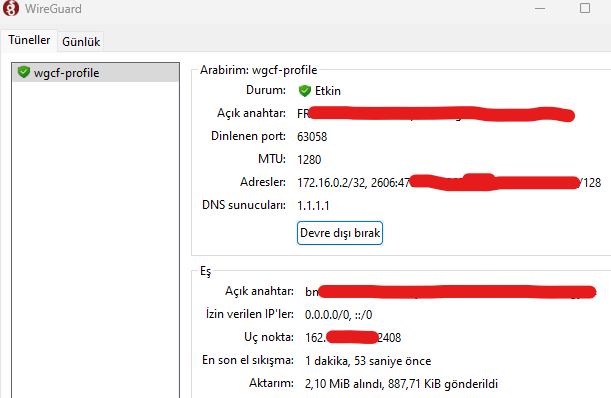
April 6, 2023 at 5:47 pm #23607I am not setting up a server, I am connecting to an already active Cloudflare account. IPv4 is working as expected. When I use the same account with a Wireguard client independently from the modem, IPv6 connectivity is also established.
You need to login in order to vote
April 6, 2023 at 5:54 pm #23611Probable best to send a feedback form to ASUS and see if they can advise, your settings from what I can see look good, if you have checked the IPv6 NAT and changed WAN MTU and still not working, ASUS maybe able to advise better.
You need to login in order to vote
April 6, 2023 at 6:02 pm #23612 - AuthorPosts







- You must be logged in to reply to this topic.