

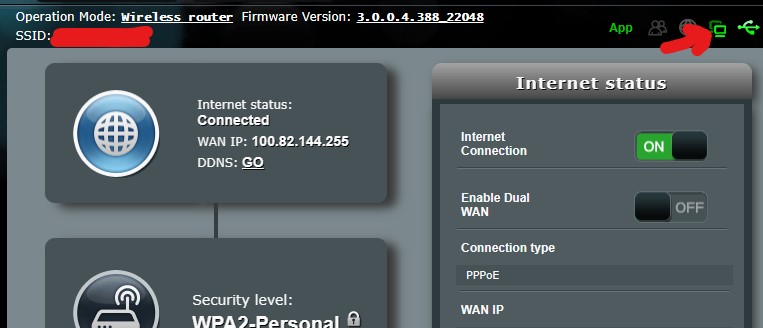
› UKTH forums › 🛜 Wireless Routers & Modems › ASUS & Wireless › ASUS DSL-AX82U IPv6 Issue Current FW Version : 3.0.0.4.388_22048-gf313579 When I activate IPv6, the device does not detect the Internet presence and blocks the internet access of other devices (DHCP passive access point). The...
- This topic has 67 replies, 3 voices, and was last updated 3 years, 5 months ago by
 Black Bird.

- AuthorPosts
- January 2, 2023 at 9:23 pm #22203
I had tried testing on an old ZTE modem a while ago and it worked, so I don’t think this has to do with the ISP. It’s only on Asus that it doesn’t detect the presence of the internet and it prevents it from working.
In a completely sane world, madness is the only freedom (J.G.Ballard).
You need to login in order to vote
January 3, 2023 at 9:10 am #22204I wanted to share the settings that are working in the interface of a different device.
GUA: DHCPv6
Gateway: SLAACYou need to login in order to vote
January 3, 2023 at 10:46 am #22205I wanted to share the settings that are working in the interface of a different device. GUA: DHCPv6 Gateway: SLAAC
Thank you, I will share this with ASUS also
In a completely sane world, madness is the only freedom (J.G.Ballard).
You need to login in order to vote
January 3, 2023 at 3:12 pm #22206January 3, 2023 at 3:23 pm #22210Sam suggested this and solved the problem
Glad Sam was able to advise – Do you know if DNS Query with firmware that worked with IPv6 was also disabled?
In a completely sane world, madness is the only freedom (J.G.Ballard).
You need to login in order to vote
January 3, 2023 at 3:38 pm #22211I wasn’t changing the default so this option was being checked.
Attachments:
You need to login in order to vote
January 3, 2023 at 3:56 pm #22214I wasn’t changing the default so this option was being checked.
Good to know and thanks for sharing this useful information from ASUS
Hope users on forum.turk.net will benefit from this also for IPv6
In a completely sane world, madness is the only freedom (J.G.Ballard).
Liked by:You need to login in order to vote
January 3, 2023 at 5:27 pm #22215I wasn’t changing the default so this option was being checked.
Good to know and thanks for sharing this useful information from ASUS
Hope users on forum.turk.net will benefit from this also for IPv6 I will share this with the turknet forum and a few other places related to the modem.
Liked by:You need to login in order to vote
January 3, 2023 at 5:34 pm #22217I will share this with the turknet forum and a few other places related to the modem
Don’t forget to put in a good word for UKTechHub.com
In a completely sane world, madness is the only freedom (J.G.Ballard).
Liked by:You need to login in order to vote
January 5, 2023 at 8:44 am #22273Please turn off “Network Monitoring > DNS Query” first.
Has disabling “Network Monitoring > DNS Query” for your DSL-AX82U fix still working for your IPv6 issue in Turkey ?
(note: I removed a couple of our above posts as not really useful as was general chat)
In a completely sane world, madness is the only freedom (J.G.Ballard).
You need to login in order to vote
January 5, 2023 at 8:15 pm #22283Yes, after these operations, it is still working.
Attachments:
Liked by:You need to login in order to vote
January 5, 2023 at 8:53 pm #22291Great news, thanks for letting us know
In a completely sane world, madness is the only freedom (J.G.Ballard).
Liked by:You need to login in order to vote
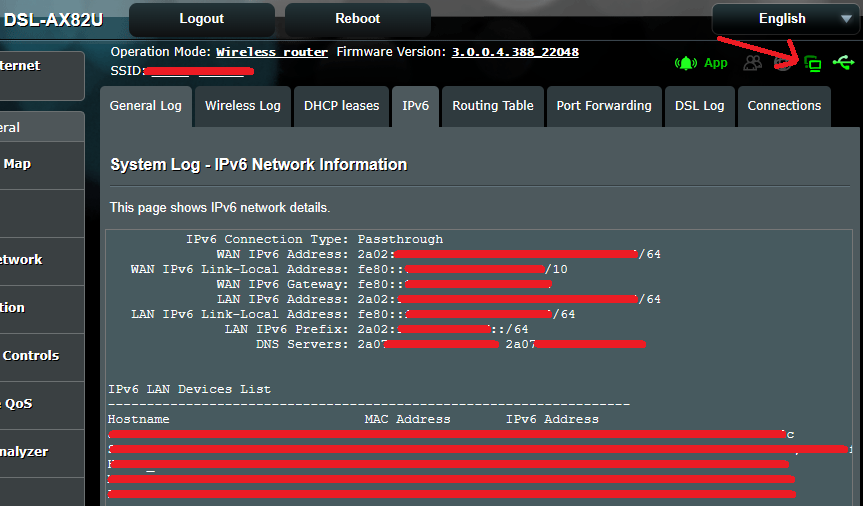
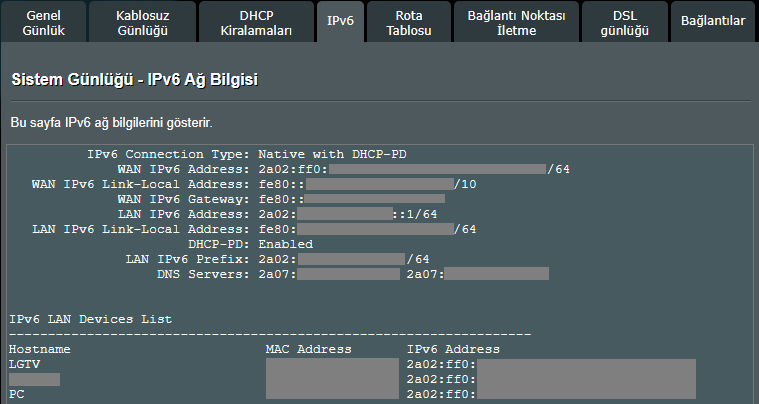
March 20, 2023 at 6:17 pm #23148That is interesting as the norm for PPPoE is IPv6 Native not Passthrough, but obviously a special feature with Turknet Broadband as you detailed above
I will chat with ASUS and hopefully they can help >Internet Connection> WAN Connection Type set [PPPoE], please select IPv6 Connection type set [Native] https://www.asus.com/support/FAQ/113990You are right about this because I have been using Native mode for 2 days without any problems. As a result of the backup restore (I had reset the device while shooting a narration video) the already selected Passthrough WAN did not receive the IP. For a change, I switched to Native mode and noticed that it started working. I haven’t changed it for 2 days and it continues to work.
The inconsistent way of working is caused by FW, it has absolutely nothing to do with operator support.Attachments:
You need to login in order to vote
March 20, 2023 at 8:43 pm #23259You are right about this because I have been using Native mode for 2 days without any problems.
Good to know and thanks for the update
“shooting a narration video” a budding voice actor
In a completely sane world, madness is the only freedom (J.G.Ballard).
You need to login in order to vote
March 21, 2023 at 10:21 am #23270You are right about this because I have been using Native mode for 2 days without any problems.
Good to know and thanks for the update “shooting a narration video” a budding voice actor
silent modem setup video :)
Liked by:You need to login in order to vote
- AuthorPosts







- You must be logged in to reply to this topic.