

› UKTH forums › 🛜 Wireless Routers & Modems › ASUS & Wireless › ASUS DSL-AX82U IPv6 Issue Current FW Version : 3.0.0.4.388_22048-gf313579 When I activate IPv6, the device does not detect the Internet presence and blocks the internet access of other devices (DHCP passive access point). The...
- This topic has 67 replies, 3 voices, and was last updated 3 years, 6 months ago by
 Black Bird.

- AuthorPosts
- December 31, 2022 at 5:59 pm #22157December 31, 2022 at 6:11 pm #22161
Understood, can you send a Administration – Feedback and explain IPv6 issue and put in comments box ‘UK Sentinel’ and then I can speak with ASUS next week ?
When sending feedback, can you use the same email address as you use for this forum registration
Liked by:You need to login in order to vote
December 31, 2022 at 6:15 pm #22163[quote quote=22161]Understood, can you send a Administration – Feedback and explain IPv6 issue and put in comments box ‘UK Sentinel’ and then I can speak with ASUS next week ? When sending feedback, can you use the same email address as you use for this forum registration
[/quote]I will do what you said in a moment.
I did this.
Liked by:You need to login in order to vote
December 31, 2022 at 6:44 pm #22164[quote quote=22163]I will do what you said in a moment.[/quote]
Liked by:You need to login in order to vote
January 2, 2023 at 9:19 am #22175So for the last couple of days I have had my DSL-AX82U plugged directly into my external (Draytek 130) modem using the DSL-AX82U WAN port and enabling IPv6.
First day I was running firmware 3.0.0.4.386.48378 and IPv6 was stable and worked as expected.
Second day I upgraded to firmware 3.0.0.4.388_22048 and after 24 hours IPv6 was still working well with my DSL-AX82U set up using WAN port and DSL-AX82U acting as a Router only.
A few screen shots of my DSL-AX82U showing the IPv6 settings I used (for others incase they need it).
DSL-AX82U IPv6 Splash Screen
DSL-AX82U IPv6 Splash Screen Internet Status
DSL-AX82U IPv6 WAN Settings
DSL-AX82U IPv6 Settings Page
DSL-AX82U IPv6 Dual Wan Settings
DSL-AX82U IPv6 System Log IPv6
You need to login in order to vote
January 2, 2023 at 9:27 am #22176[quote quote=22163]I will do what you said in a moment[/quote]
Can you just double check you Settings are simular to mine as above, then we know for sure issue is with Turknet Broadband and IPv6 etc.
You need to login in order to vote
January 2, 2023 at 6:34 pm #22177For me, the correct IPv6 setting is “Passthrough”, we previously determined this through testing with Sam Wen(温仁孝) and I was able to use IPv6 perfectly all year. The only change made was upgrading the modem to version 3.0.0.4.388_22048 fw. If I revert back to version 9.0.0.4_388_21184 beta fw, it does not work directly (I used IPv6 for almost two months with this version), but if I reset to factory settings and set it up, it works 9.0.0.4_388_21184 fw. The problem with IPv6 only occurs with version 3.0.0.4.388_22048. I also tried the “Native” option shown in your screenshots instead of “Passthrough”, but the situation did not change.”
You need to login in order to vote
January 2, 2023 at 6:42 pm #22182I know the settings of the modem that are definitely working and have checked them again:
IPv6
Connection type: Passthrough
Interface: PPPDual WAN
Auto Network Detection: Detect Interval Every 8 seconds (this is necessary)You need to login in order to vote
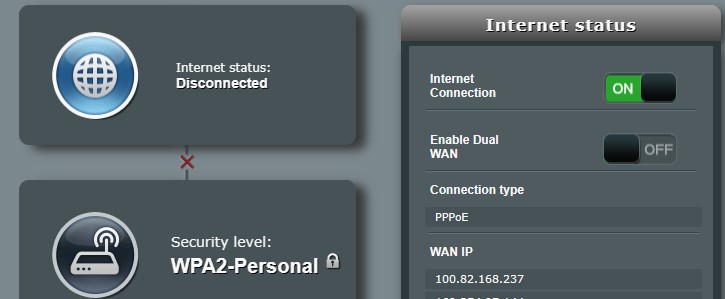
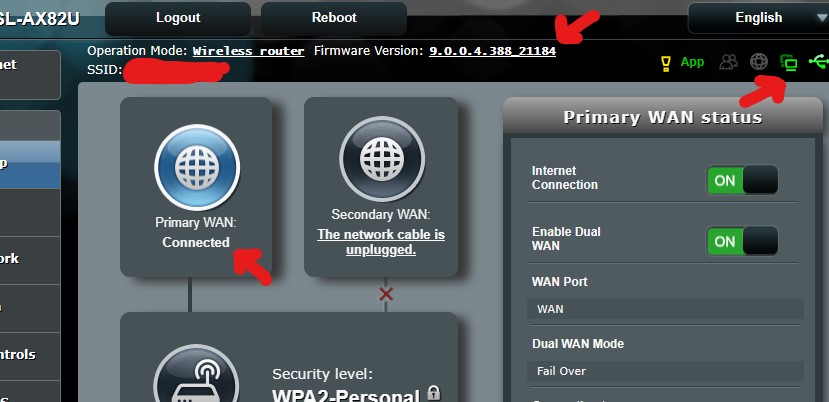
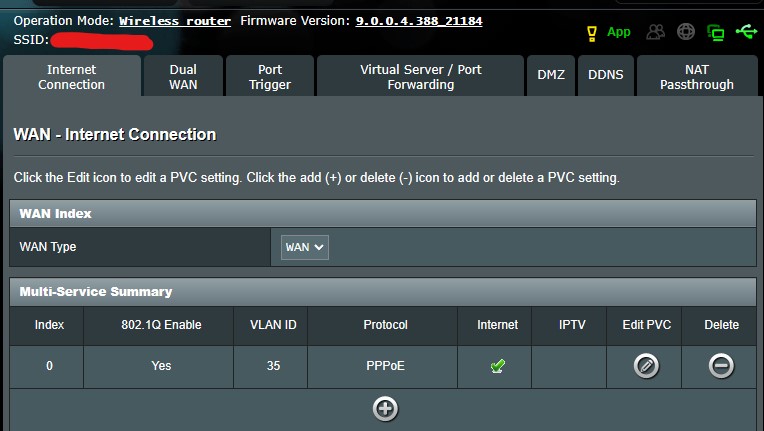
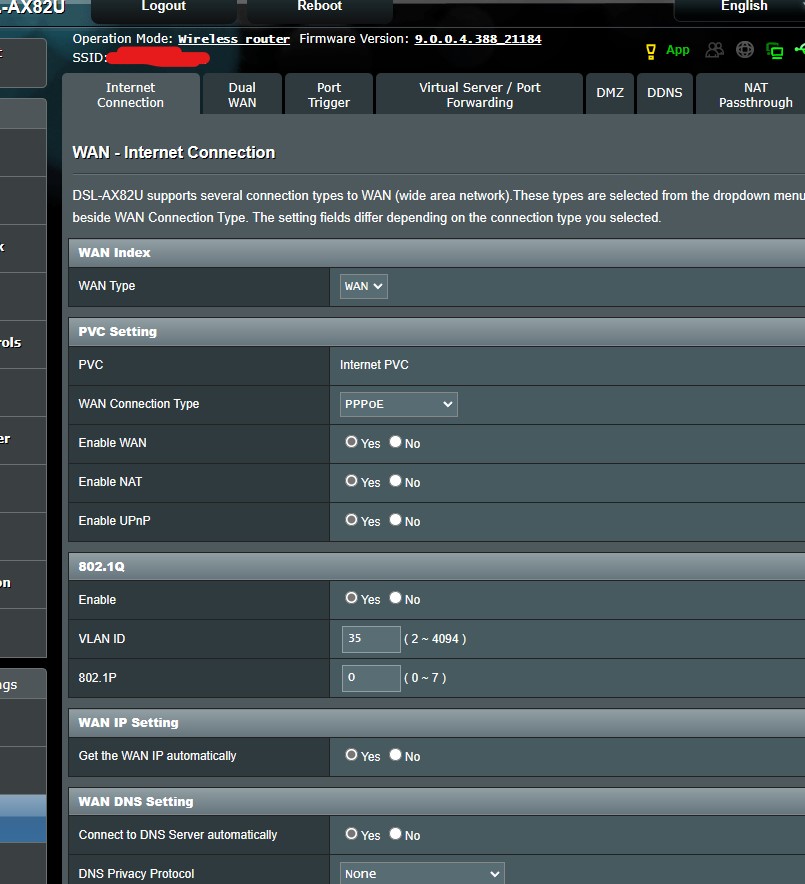
January 2, 2023 at 7:14 pm #22184I will show you again that IPv6 is working in the beta version (9.0.0.4.388_21184), please take a look at the screenshots I have attached. I always take these screenshots in real time, not old ones.
You need to login in order to vote
January 2, 2023 at 8:03 pm #22192[quote quote=22177]For me, the correct IPv6 setting is “Passthrough”, we previously determined this through testing with Sam Wen[/quote]
Did SAM suggest IPV6 Pasthrough for DSL-AX82U when you was using DSL or FTTH ?
BTW – What is your setting for WAN >Internet Connection> WAN Connection Type ?
You need to login in order to vote
January 2, 2023 at 8:28 pm #22193[quote quote=22192]
For me, the correct IPv6 setting is “Passthrough”, we previously determined this through testing with Sam Wen
Did SAM suggest IPV6 Pasthrough for DSL-AX82U when you was using DSL or FTTH ? BTW – What is your setting for WAN >Internet Connection> WAN Connection Type ?[/quote]
Yes, we tested with SAM and he said that I need to use the “Passthrough” option because my ISP does not support DHCP-PD, maybe you remember it. I had been using the “Passthrough” option smoothly for a long time, but after the last update, it started not detecting the internet.
Attachments:
You need to login in order to vote
January 2, 2023 at 8:37 pm #22196[quote quote=22193]Yes, we tested with SAM and he said that I need to use the “Passthrough” option because my ISP does not support DHCP-PD, maybe you remember it[/quote]
I forget
If you Click, Edit PVC, what is WAN Connection Type ?
You need to login in order to vote
January 2, 2023 at 8:40 pm #22197January 2, 2023 at 9:01 pm #22199That is interesting as the norm for PPPoE is IPv6 Native not Passthrough, but obviously a special ‘feature’ with Turknet Broadband as you detailed above
I will chat with ASUS and hopefully they can help and fix
‘WAN >Internet Connection> WAN Connection Type set [PPPoE], please select IPv6 Connection type set [Native]’
https://www.asus.com/support/FAQ/113990
You need to login in order to vote
January 2, 2023 at 9:20 pm #22200[quote quote=22199]That is interesting as the norm for PPPoE is IPv6 Native not Passthrough, but obviously a special feature with Turknet Broadband as you detailed above <noscript>
</noscript> I will chat with ASUS and hopefully they can help <noscript></noscript> WAN >Internet Connection> WAN Connection Type set [PPPoE], please select IPv6 Connection type set [Native] https://www.asus.com/support/FAQ/113990[/quote]When I select [Native], it does not work in the beta version (9.0.0.4.388_21184) and in older versions as well.
I had tried testing on an old ZTE modem a while ago and it worked, so I don’t think this has to do with the ISP. It’s only on Asus that it doesn’t detect the presence of the internet and it prevents it from working.
Attachments:
Liked by:You need to login in order to vote
- AuthorPosts










- You must be logged in to reply to this topic.