

› UKTH forums › 🛜 Wireless Routers & Modems › ASUS & Wireless › Asus RT-AX86S Failover Hi All, I believe it is possible to setup a WAN failover on the RT-AX86S? If so, does anyone have any recommendations of what to use? I was thinking of...
- This topic has 20 replies, 2 voices, and was last updated 3 years, 3 months ago by
 kev2021.

-
AuthorPosts
-
April 15, 2023 at 7:16 pm #23769
Hi All,
I believe it is possible to setup a WAN failover on the RT-AX86S? If so, does anyone have any recommendations of what to use? I was thinking of a USB Dongle 4g/5g one BUT not sure about leaving it plugged in constantly to USB so wondering if you can get a 4g/5g dongle that would work via a LAN port?
Reason being I’ve recently had a issue whereby I lost access to everything (Nest, cameras, unable to VPN to the router) so I thought the problem was:-
A) Power outage
B) Internet outage
C) Router issue
Checking websites for A&B mentioned above and no reported issues in my area.
So after arriving home after work to investigate what was up, it turned out that power was fine and it seemed to be the router itself. I turned the router off, back on and it came up, could then access things off wifi on my phone to minic as if not at home.
So not entirely sure what happened, either the router hung or internet went down and came back but the router didn’t re-connect.
So I’m considering a backup scenario now of having a secondary WAN for failover and just seeing what my options are.
Ideally I’d sooner by something with xGB of data pre-loaded that doesn’t expire and lasts until it has all been used. There isn’t much data that would take place over it, I don’t transfer files or large data, its only mainly small stuff like accessing a camera to check on things for a minute or 2 or accessing nest to turn heating on/off etc so I suspect 2Gb or 5GB data would last me a good while, maybe even a year or 2. I’m trying to avoid the pay x every month for it as I doubt I’d use the GB allowance each month as it would only be in use when the primary WAN link went down).
Thanks for any advice/guidance. Not sure this would help if router locked up but might be worth exploring?
Kev
You need to login in order to vote
April 15, 2023 at 7:23 pm #23770Also, what is recommended in terms of the detect interval as 5seconds seems a bit too frequent to be checking?
would once an hour be ok to check? I read some isp’s will disconnect you if too many pings as it considers it an attack, not sure if this happens in UK.
Thanks
Kevin
You need to login in order to vote
April 15, 2023 at 8:04 pm #23773ASUS Dual WAN Supports, WAN, USB and Ethernet LAN so a few options available.
Detect interval as 5 second is the default but can only be adjusted to a maximum 9 I believe, there is another setting called Failover Trigger Condition which detects how many times the Detect Interval fails and then switches over to Secondary WAN/USB or Ethernet LAN etc.
depending on how important internet availability is to yourself, anything from 5 to 15 minutes (Detect Interval x Failover Trigger Condition) sounds reasonable and maybe suitable for yourself.
Do you have a second line (DSL) available in the property, or are you only considering a USB 4G dongle type device only.
In a completely sane world, madness is the only freedom (J.G.Ballard).
You need to login in order to vote
April 15, 2023 at 8:33 pm #23776Hi,
Don’t have a DSL line, just have FTTP so thought getting a dongle would be easiest and hopefully cheapest option.
ah ok, i’m sure I read someone set there’s to check every 6 hours or something but maybe that was a different setting…
Any recommendations? Not found much atm…
Thanks
Kev
You need to login in order to vote
April 15, 2023 at 8:48 pm #23777Would this possibly work? Netgear LM1200 ? The instructions seem to imply you use the LM1200 to do the failover but I’d sooner use the Asus router to do the failover so not sure it would trigger the use of the LM1200 or get it to connect, unless it remains connected 24/7 but no traffic goes over it until primary goes down?
Seems a bit pricey too for what i would use it for..
Kev
You need to login in order to vote
April 15, 2023 at 8:57 pm #23779Any recommendations? Not found much atm…
Something like as you suggested should work as it connects via Ethernet, rather than USB. Definitely best to allow ASUS router to fail over and back again and as you say the LM1200 would need to be on 24/7, never tried this way of connection before.
If you want, I can touch base with ASUS and ask them what USB LTE modems are supported ?
In a completely sane world, madness is the only freedom (J.G.Ballard).
You need to login in order to vote
April 15, 2023 at 9:03 pm #23781Hi,
Thanks, sure if you have time and don’t mind.
Many thanks for your help.
Yes it looks like it will work but as the instruction don’t show making it the secondary WAN, I’m not sure if Asus can tell it to “connect” or if it is just permanently connected but no traffic goes over it until the primary fails and Asus will switch to it..
Bit price to get as a “try and hope” too – was hoping something cheaper.
Only fear with USB Dongle is – it would literally sit plugged into the router permanently so might get a bit hot. I think originally these were intended to plug into laptops, you connect do what you need then disconnect/unplug them or shut the computer down, not sure they were designed to be plugged into the back of the router and be left plugged in permanently year in year out. Don’t want it to get hot and melt the port or cause a fire etc…
Kev
Liked by:
You need to login in order to vote
April 16, 2023 at 8:29 am #23782Yes it looks like it will work but as the instruction don’t show making it the secondary WAN, I’m not sure if Asus can tell it to “connect” or if it is just permanently connected but no traffic goes over it until the primary fails and Asus will switch to it..
Best if your RT-AX86s handles the failover and just keep the LM1200 set to 24/7 ON, as no real way for ASUS to failover to secondary WAN and then tell the LM1200 to switch ON etc.
The ASUS will also keep testing the original WAN connection, so if ever your FTTP connection is restored, then ASUS router will switch back to Primary WAN for internet access.
USB Dongle should be Ok, as long as its on an USB extension cable so it is away from main heat source of ASUS router.
Attachments:
In a completely sane world, madness is the only freedom (J.G.Ballard).
You need to login in order to vote
April 16, 2023 at 10:13 am #23786Thanks, good call the USB extension lead.
So I just checked the RT-AX86S web interface and under the dual WAN, it only has 2 options:-
WAN
USBNo ethernet LAN.
I’m running firmware 3.0.0.4.386_46061, was the Ethernet lan option added in newer firmware or is it just not a option on the RT-AX86S?
I’ve also checked the RT-AX86U, running same firmware and it only has the below options:
WAN
USB
2.5g WANNo Ethernet Lan also.
I’ve also seen some different manufacturers have a built in sim card slot you can insert a sim card into and I presume then it fails over from primary to sim card if required, does Asus do anything similar? Just weighing up my options.
Thanks
Kev
You need to login in order to vote
April 16, 2023 at 12:42 pm #23787So much for consistency across the ASUS Router range (DSL-RT).
So looks like you are stuck with a USB type solution.
Screen dump below of my DSL-AX82U Dual WAN Settings, which includes Ethernet LAN.
Attachments:
In a completely sane world, madness is the only freedom (J.G.Ballard).
You need to login in order to vote
April 16, 2023 at 12:49 pm #23789I’m running firmware 3.0.0.4.386_46061, was the Ethernet lan option added in newer firmware or is it just not a option on the RT-AX86S?
Just had a quick look through the RT-AX86S changelog and could not note any changes relating to WAN / Fail Over etc.
Below is link for ASUS officially supported 3G/4G USB Adapter Compatibility list, but will chat with ASUS and this list is/has been always out of date, old kit etc.
https://www.asus.com/support/FAQ/1047044/
In a completely sane world, madness is the only freedom (J.G.Ballard).
You need to login in order to vote
April 16, 2023 at 4:03 pm #23794Thanks, how strange, wonder why the DSL has ethernet over lan option but the RT version doesn’t, wonder what the reason is. Was expecting it to be the same across all the newer models at least.
Yes, I think some of those model dongles have been discontinued now :(
Kev
You need to login in order to vote
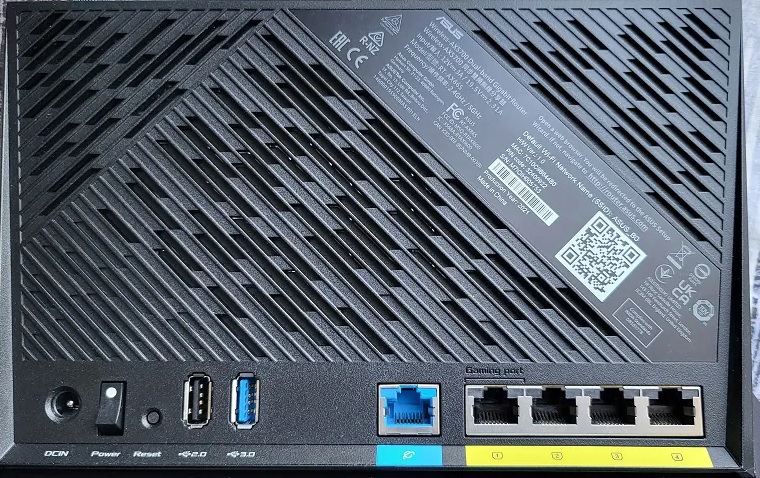
April 16, 2023 at 4:49 pm #23796Ok, so had another look at the RT-AX86s specs and does seem that it has a 1G gaming port, so I assume this means that gaming port could be used as dual WAN failover ?
No idea why 1g is not showing with the 86s but is showing 2.5g with your other 86U, might be worth a firmware update to see if that produces the 1g port option ?
From ASUS Website for RT-AX86S:
Multi-Gig: Ability to aggregate two Gigabit LAN ports and two Gigabit WAN ports (configurable) concurrently.
In a completely sane world, madness is the only freedom (J.G.Ballard).
You need to login in order to vote
April 16, 2023 at 9:34 pm #23798Hi,
Well I’m confused, I just looked the manual for the AX86S and it says under dual wan:-
There are WAN, USB, Ethernet LAN and 2.5G Wan for your options.
Now clearly this is a mistake as the AX86S doesn’t have a 2.5G port.
So do they mean can use the gaming port OR do they mean Dual wan only between WAN port and USB dongle?
It seems like the manual is basically the same as for the AX86U :( and Ethernet lAN doesn’t show on my AX86U so mystery.
I’ll take a look at updating the firmware and see what that shows when i get some time, just slightly hesitant given i use it alot for accessing when not at home. Parents one been very stable on current firmware, never gone gown and everything works, no issues so don’t want to introduce any issues.
Will try mine when I get some time, its been fine on existing firmware up to recently (the potential lockup of router) first time its done that. Last power outage was at xmas, twice in same day only for a few seconds so it has been effectively rebooted and no power outages since then (nest protect shows any power outages so can be sure none have happened whilst at work etc).
As opposed to the AX86U parents have – that’s been up for over a year. Only occasional issue is one of the LEDs comes on (I have all lights off) and I simply press the LED button to turn lights on, then press again to turn off and that’s it. randomly happens every so often but been good few months since last time I happened.
Overall been pleased with them so far.
Here a pic of the back of a RT-AX86S
Kev
Attachments:
Liked by:
You need to login in order to vote
April 17, 2023 at 7:38 am #23801Now clearly this is a mistake as the AX86S doesn’t have a 2.5G port.
As you know, the AX86S has a 1G Gaming port, the AX86U has a 2.5G port.
Yes updating firmware could help identify if any LAN/1g ports can be used for second WAN ‘hopefully’
In a completely sane world, madness is the only freedom (J.G.Ballard).
Liked by:
You need to login in order to vote
-
AuthorPosts





- You must be logged in to reply to this topic.