

› UKTH forums › 🛜 Wireless Routers & Modems › ASUS & Wireless › ASUS ZenWiFi AX Whole Home Tri-Band Mesh WiFi 6 System Not sure if this is the right place to ask…. I am thinking of upgrading my Google Mesh wifi to the above. Has anyone used this and does it...
- This topic has 1,416 replies, 25 voices, and was last updated 2 months ago by
 UK Sentinel.

- AuthorPosts
- February 19, 2023 at 8:05 am #22826
with a factory reset you will lose your login username and account password, defaults are ‘admin’ – ‘admin’ is the usual for username and password for ASUS routers .
Default SSID password is usually written on label on the underside of the router .
In a completely sane world, madness is the only freedom (J.G.Ballard).
You need to login in order to vote
February 19, 2023 at 10:01 am #22827If you do a factory reset I recommend to do it with reset button as sometimes there might some things wont be reset by GUI.
Liked by:You need to login in order to vote
February 21, 2023 at 9:32 pm #22838It’s been 7 days now with no issues that I have seen with my setup.
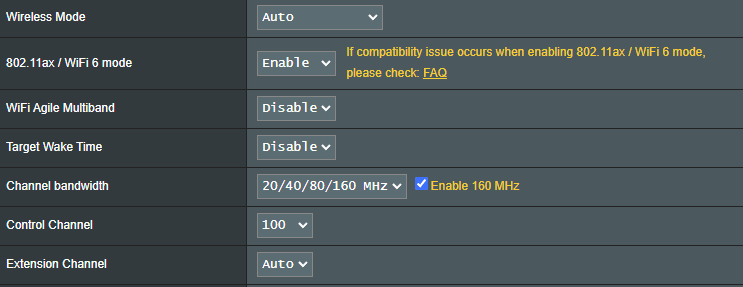
Only thing different I had to do, was manually set 160MHz on 5GHZ-2 wireless backhaul. Otherwise setting it to 20/40/80/160 it settled at 80MHz and remained there.
You need to login in order to vote
February 21, 2023 at 9:54 pm #22839Interesting, I assume as you have manually set 160MHz on 5GHZ-2 wireless backhaul, then if any issues with DFS, no chance of dropping to lower channels.
Or did you disable the include DFS channels option to remove this possibility ?
In a completely sane world, madness is the only freedom (J.G.Ballard).
You need to login in order to vote
February 21, 2023 at 10:59 pm #22840@dodgydrains given that the 160MHz is overkill for my 80/20 fttc line, I’ve never had the need to benchmark or bench test it so to speak.
But I have noticed a quirk with regards to it’s behaviour on my setup,
On 5GHz-2, 20/40/80/160 enabled & channel set to auto, (always defaulted to 100) & bandwidth always 80MHz)
But setting a manual channel of 120 & then 100 it did sustain a 160 bandwidth, admittedly I didn’t give the manual selection of channel 100 any time to fully bed in & maybe roll back to 80MHz, but having settled on channel 124, it’s been solid on the 160 bandwidth under it’s own steam, (goes without saying ymmv)
A quirk with respect to Asus, or local environmental conditions here, that’s 1 finding I could never nail down 1 way or the other.
Edit: 4 got 2 mention, always had ethernet connection from node & now running a pair of XT9’s instead of xt8’s
Tom…
Liked by:You need to login in order to vote
February 22, 2023 at 4:38 am #228433.0.0.4.388_22525 went down this evening (PST) at 7 days and a few minutes of up time.
I could still connect to the gui via IP address, from ethernet connected computer, and there was nothing unusual in the logs (forgot to look at free ram
). According to Network Map page, WAN was up, and while WiFi was visible and mesh was connected, wireless devices dropped and couldn’t reconnect.Up until this happened, everything had been working normally, and after router/node manual reboot, all devices are back online.
Liked by:You need to login in order to vote
February 22, 2023 at 6:41 am #22845On 5GHz-2, 20/40/80/160 enabled & channel set to auto, (always defaulted to 100) & bandwidth always 80MHz) But setting a manual channel of 120 & then 100 it did sustain a 160 bandwidth, admittedly I didn’t give the manual selection of channel 100 any time to fully bed in & maybe roll back to 80MHz, but having settled on channel 124, it’s been solid on the 160 bandwidth under it’s own steam, (goes without saying ymmv)
That is interesting
In a completely sane world, madness is the only freedom (J.G.Ballard).
You need to login in order to vote
February 22, 2023 at 8:03 am #22846Interesting, I assume as you have manually set 160MHz on 5GHZ-2 wireless backhaul, then if any issues with DFS, no chance of dropping to lower channels. Or did you disable the include DFS channels option to remove this possibility ?
Just manually set it to 160MHz, so only issue will be that it will never revert to 80MHz
Attachments:
You need to login in order to vote
February 22, 2023 at 8:12 am #22847@dodgydrains On 5GHz-2, 20/40/80/160 enabled & channel set to auto, (always defaulted to 100) & bandwidth always 80MHz)
I had noticed this too
@dodgydrains But setting a manual channel of 120 & then 100 it did sustain a 160 bandwidth
I might try this
You need to login in order to vote
February 22, 2023 at 8:21 am #228503.0.0.4.388_22525 went down this evening (PST) at 7 days and a few minutes of up time.
I could still connect to the gui via IP address, from ethernet connected computer, and there was nothing unusual in the logs (forgot to look at free ram
. According to Network Map page, WAN was up, and while WiFi was visible and mesh was connected, wireless devices dropped and couldn’t reconnect. Up until this happened, everything had been working normally, and after router/node manual reboot, all devices are back online.I take it you have wireless backhaul? Might be worth checking if the backhaul had gone down next time it happens. I haven’t noticed your specific behaviour before.
Liked by:You need to login in order to vote
February 22, 2023 at 3:08 pm #22854Backhaul/Mesh was online according to the gui, 169hr and no drops in the logs, but no internet routing, and wifi was visible but wouldn’t connect on the router or node, very strange.
Liked by:You need to login in order to vote
February 26, 2023 at 2:20 am #22871@dodgydrains But setting a manual channel of 120 & then 100 it did sustain a 160 bandwidth
I might try this
I have tried this and confirm the same. Setting control channel to Auto, it always connects at 80MHz regardless which channel it automatically connects at. Manually selecting control channel to 100 it connects at 160MHz.
Liked by:You need to login in order to vote
February 26, 2023 at 10:35 am #22875@dodgydrains But setting a manual channel of 120 & then 100 it did sustain a 160 bandwidth
I might try this
I have tried this and confirm the same. Setting control channel to Auto, it always connects at 80MHz regardless which channel it automatically connects at. Manually selecting control channel to 100 it connects at 160MHz.
Best practice was to always set channel selection to auto & let the router do it’s own thing,
That thinking doesn’t hold out on the 2.4GHz band these days,
but with the characteristic of 5GHz, auto mode would have been the sensible default option,so stumbled upon this little quirk by accident.
Hopefully this opens up maximum bandwidth with fallback capabilities if needed,
Altho that’s down to the coding by Asus! so only time will tell.Tom…
You need to login in order to vote
February 26, 2023 at 11:10 am #22876It looks like the only way for me to get full bandwidth (160MHz) on the 5GHz-2 backhaul is to either set channel bandwidth 160MHz, or manually select a control channel.
This behaviour is different to any previous FW I have used or tested.
Liked by:You need to login in order to vote
February 27, 2023 at 9:06 am #22881It looks like the only way for me to get full bandwidth (160MHz) on the 5GHz-2 backhaul is to either set channel bandwidth 160MHz, or manually select a control channel.
This is exactly the behaviour that I found.
Which is the better setting to fix manually for a reliable connection, the bandwidth or channel?
Liked by:You need to login in order to vote
- AuthorPosts


 ). According to Network Map page, WAN was up, and while WiFi was visible and mesh was connected, wireless devices dropped and couldn’t reconnect.



- You must be logged in to reply to this topic.