

› UKTH forums › 🛜 Wireless Routers & Modems › ASUS & Wireless › ASUS ZenWiFi AX Whole Home Tri-Band Mesh WiFi 6 System Not sure if this is the right place to ask…. I am thinking of upgrading my Google Mesh wifi to the above. Has anyone used this and does it...
- This topic has 1,416 replies, 25 voices, and was last updated 2 months ago by
 UK Sentinel.

-
AuthorPosts
-
February 15, 2023 at 8:30 am #22798
took the plunge and am on 3.0.0.4.388_22525 since yesterday evening.
no trouble so far, already 3 Teams calls over Company VPN without interruptions this morning…
Remote desktop session also stable (for now)…
Question : How can i check and/or change wireless backhaul frequency ?
Liked by:
You need to login in order to vote
February 15, 2023 at 11:54 am #22800Not sure on your set-up, If you are running the 5GHz-2 as your backhaul, check on your AiMesh Primary to see what your Channel bandwidth is currently running, if 80MHz, then try 160 MHz.
Advanced Settings > Wireless > General > Channel bandwidth
In a completely sane world, madness is the only freedom (J.G.Ballard).
You need to login in order to vote
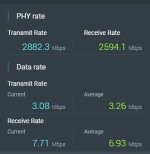
February 15, 2023 at 2:20 pm #22801You can also check under the logs section I think. There is a tab for wireless. Scroll down to 5GHz-2 and see if it stays something like 100/160 or 100/80.
Also check PHY rate.
Attachments:
Liked by:
You need to login in order to vote
February 17, 2023 at 7:41 pm #22810How’s the new 3.0.0.4.388_22525 build holding out, I did read that Web & Apps Filters was causing issues with stability ?
In a completely sane world, madness is the only freedom (J.G.Ballard).
You need to login in order to vote
February 17, 2023 at 8:09 pm #22811How’s the new 3.0.0.4.388_22525 build holding out, I did read that Web & Apps Filters was causing issues with stability ?
So far, stable for me. Uptime only 2 days 12 hours though so time will tell. I don’t use any of the filtering.I have backhaul at 160mhz only and have manually selected channels for all bands.
I removed my twice a week scheduled reboot (which kept things crash free but was annoying).
Liked by:
You need to login in order to vote
February 17, 2023 at 8:17 pm #22812My setup is also stable for 3 days now. I only use time scheduling under parental control.
For me, the instability on previous 388 fw started after a week. So, too early to say anything.
Liked by:
You need to login in order to vote
February 17, 2023 at 8:52 pm #22813Good news so far then, so 7 days is the key
In a completely sane world, madness is the only freedom (J.G.Ballard).
You need to login in order to vote
February 17, 2023 at 10:39 pm #22814Are all your devices showing on your list with 3.0.0.4.388_22525. I’m getting devices not showing, both wireless and wired, even though they are operating properly and I’m also getting devices dropping off the list and reappearing moments later, but they too are all operating normally?
You need to login in order to vote
February 17, 2023 at 11:16 pm #22815Are all your devices showing on your list with 3.0.0.4.388_22525. I’m getting devices not showing, both wireless and wired, even though they are operating properly and I’m also getting devices dropping off the list and reappearing moments later, but they too are all operating normally?
Not something that I have noticed. I did do a full factory reset in the evening after the intial dirty flash update.
You need to login in order to vote
February 17, 2023 at 11:53 pm #22817Are all your devices showing on your list with 3.0.0.4.388_22525. I’m getting devices not showing, both wireless and wired, even though they are operating properly and I’m also getting devices dropping off the list and reappearing moments later, but they too are all operating normally?
Not something that I have noticed. I did do a full factory reset in the evening after the intial dirty flash update.
Are all your devices showing on your list with 3.0.0.4.388_22525. I’m getting devices not showing, both wireless and wired, even though they are operating properly and I’m also getting devices dropping off the list and reappearing moments later, but they too are all operating normally?
Not something that I have noticed. I did do a full factory reset in the evening after the intial dirty flash update.
That’s something I’ve not done yet because it can be such a ball ache, but something I know I will eventually need to do.
You need to login in order to vote
February 18, 2023 at 7:24 am #22818Are all your devices showing on your list wit
Probable need to try a factory reset, to see if this resolves the issue (a bug) or revert back to previous firmware and sit this release out
In a completely sane world, madness is the only freedom (J.G.Ballard).
You need to login in order to vote
February 18, 2023 at 3:57 pm #22820new firmware is running ok so far, no issues what so ever.
Did a factory reset because traffic analyser wasn’t working anymore (due to some dirty up and downgrades, i guess)
after the factory reset, everything is working fine. fingers crossed
Liked by:
You need to login in order to vote
February 18, 2023 at 5:13 pm #22821after the factory reset, everything is working fine. fingers crossed
Great news
In a completely sane world, madness is the only freedom (J.G.Ballard).
You need to login in order to vote
February 19, 2023 at 2:41 am #22823after the factory reset, everything is working fine. fingers crossed
Great news<noscript>
</noscript>Is doing a factory reset from the GUI option the same as any other method? When you do the reset, what is the username/password to login to router or is that preserved?
You need to login in order to vote
February 19, 2023 at 7:43 am #22824I do factory reset via GUI by also ticking ‘Initialize all the settings and clear all the data’.
I then do a hard factory reset on each:
https://www.asus.com/support/FAQ/1046973/#:~:text=1.,and%20turn%20the%20router%20on.
I then setup the whole mesh network from scratch. You can use the app or the GUI which prompts you to set new username and password during the setup.
May be overkill, but works for me.
You need to login in order to vote
-
AuthorPosts




- You must be logged in to reply to this topic.