

› UKTH forums › 🛜 Wireless Routers & Modems › ASUS & Wireless › ASUS ZenWiFi AX Whole Home Tri-Band Mesh WiFi 6 System Not sure if this is the right place to ask…. I am thinking of upgrading my Google Mesh wifi to the above. Has anyone used this and does it...
- This topic has 1,416 replies, 25 voices, and was last updated 2 months ago by
 UK Sentinel.

- AuthorPosts
- July 1, 2023 at 6:34 pm #25363
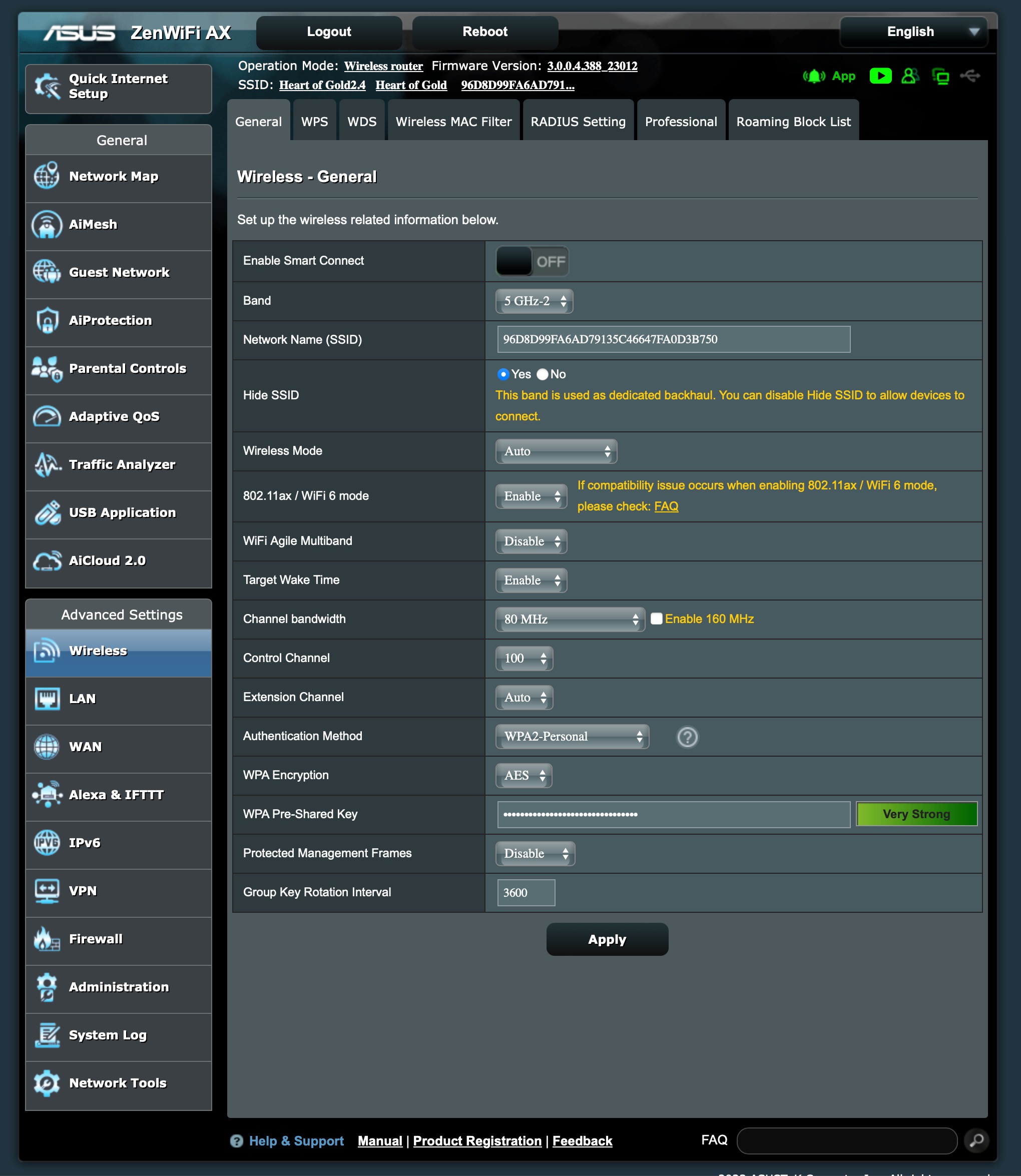
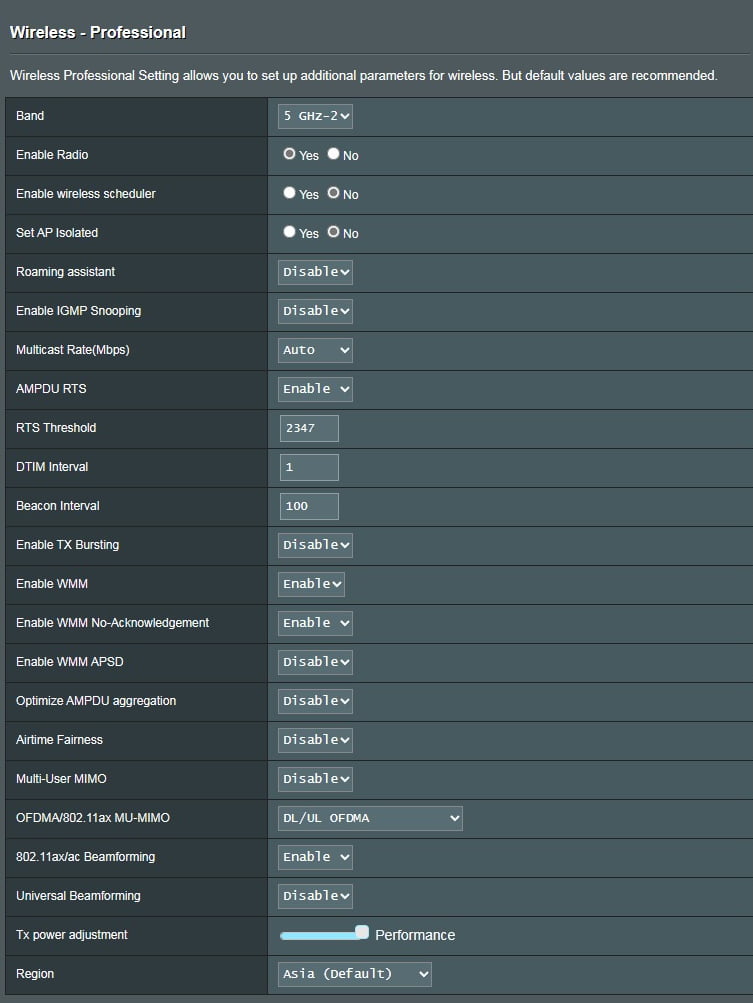
Running Firmware Version:3.0.0.4.388_23012, I have the same problem – the node will drop back to 2.4GHz once or twice per week. Id like to know more about your comment re. DFS channels, unticking the include box, and Smart Connect. What do you recommend and how do these settings affect the node dropping back to 2.4 GHz?
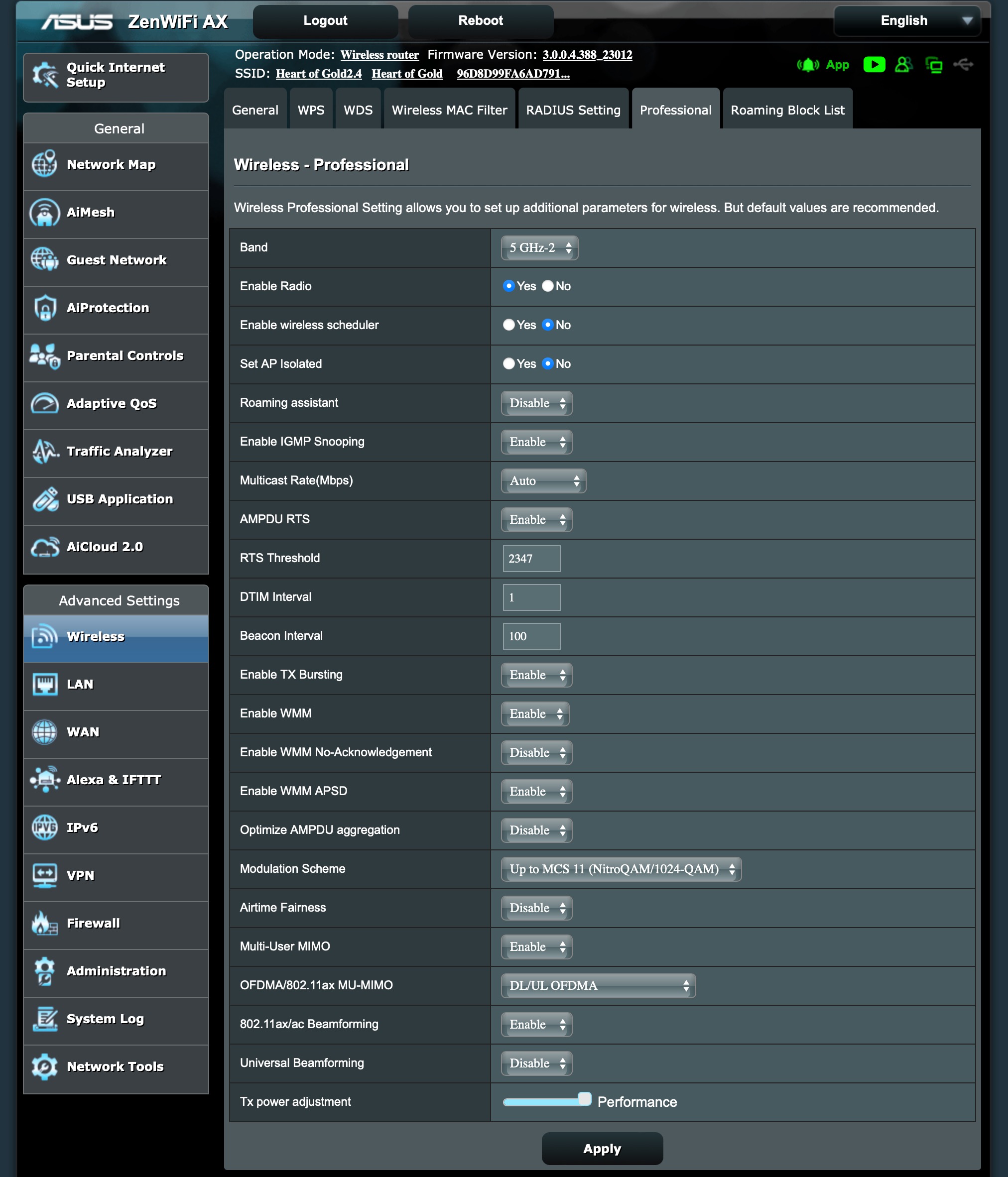
Here are some of my backhaul settings – if anyone spots something amiss, please let me know!
Attachments:
Liked by:You need to login in order to vote
July 1, 2023 at 7:05 pm #25366Welcome, might be good if you could check your system log and see if there is any mention of ‘Radar detected‘ as this would indicate DFS radar detection is in action.
You might try the latest firmware version 3.0.0.4.388.23285 on AiMesh master and nodes, response from others is mixed:
- Hard factory reset all and build from scratch (not back-up config)
https://www.asus.com/support/FAQ/1046973/#:~:text=1
Then try the below one at a time and test.
- Set 80 MHz on the backhaul if possible
- Select Non DFS channel 5GHz-2 for backhaul
- Disable Smart Connect
- Disable guest network
- Disable WMM APSD (automatic power save delivery)
- Disable 5Ghz roaming assistant
Most of this you have already achieved and another option to consider is Modulation Scheme could be lowered depending on what you main connections speeds are.
Only other area to check is the 5GHz-2 backhaul wifi signal strength between the AiMesh nodes to ensure the value of -50 to -60dBm shows a good connection but anything higher and the AiMesh node maybe to far away for stable connection.
Note: If you do wish to persist with 160Mhz, set protected management frames to capable.
In a completely sane world, madness is the only freedom (J.G.Ballard).
You need to login in order to vote
July 3, 2023 at 6:26 pm #25388Hello UK Sentinel,
Thank you for your detailed reply. I checked my General Log and found no indication of DFS or Radar. But when I checked my Wireless Log, I found the following (but I’m afraid I don’t know how to interpret this):
Following are details for 2.4 GHz:
SSID: “Heart of Gold2.4”
noise: -87 dBm Channel: 10
BSSID: D4:5D:64:8B:61:20 Capability: ESS ShortSlot RRM
Supported Rates: [ 1(b) 2(b) 5.5(b) 6 9 11(b) 12 18 24 36 48 54 ]
HE Capable:
Chanspec: 2.4GHz channel 10 20MHz (0x100a)
Primary channel: 10
HT Capabilities: 40Mhz SGI20 SGI40
Supported HT MCS : 0-15
Supported VHT MCS:
NSS1 Tx: 0-11 Rx: 0-11
NSS2 Tx: 0-11 Rx: 0-11
Supported HE MCS:
80 Mhz:
NSS1 Tx: 0-11 Rx: 0-11
NSS2 Tx: 0-11 Rx: 0-11Interference Level: Acceptable
Mode : AP OnlyFollowing are details for 5 GHz-1:
SSID: “Heart of Gold”
noise: -88 dBm Channel: 44/80
BSSID: D4:5D:64:8B:61:24 Capability: ESS RRM
Supported Rates: [ 6(b) 9 12 18 24(b) 36 48 54 ]
HE Capable:
Chanspec: 5GHz channel 42 80MHz (0xe22a)
Primary channel: 44
HT Capabilities: 40Mhz SGI20 SGI40
Supported HT MCS : 0-15
Supported VHT MCS:
NSS1 Tx: 0-11 Rx: 0-11
NSS2 Tx: 0-11 Rx: 0-11
Supported HE MCS:
80 Mhz:
NSS1 Tx: 0-11 Rx: 0-11
NSS2 Tx: 0-11 Rx: 0-11Interference Level: Acceptable
Mode : AP OnlyDFS status: state IDLE time elapsed 0ms radar channel cleared by DFS none</p>
Following are details for the backhaul 5 GHz-2:
SSID: “96D8D99FA6AD79135C46647FA0D3B750”
noise: -88 dBm Channel: 100/80
BSSID: D4:5D:64:8B:61:28 Capability: ESS RRM
Supported Rates: [ 6(b) 9 12(b) 18 24(b) 36 48 54 ]
HE Capable:
Chanspec: 5GHz channel 106 80MHz (0xe06a)
Primary channel: 100
HT Capabilities: 40Mhz SGI20 SGI40
Supported HT MCS : 0-31
Supported VHT MCS:
NSS1 Tx: 0-11 Rx: 0-11
NSS2 Tx: 0-11 Rx: 0-11
NSS3 Tx: 0-11 Rx: 0-11
NSS4 Tx: 0-11 Rx: 0-11
Supported HE MCS:
80 Mhz:
NSS1 Tx: 0-11 Rx: 0-11
NSS2 Tx: 0-11 Rx: 0-11
NSS3 Tx: 0-11 Rx: 0-11
NSS4 Tx: 0-11 Rx: 0-11
160 Mhz:
NSS1 Tx: 0-11 Rx: 0-11
NSS2 Tx: 0-11 Rx: 0-11
NSS3 Tx: 0-11 Rx: 0-11
NSS4 Tx: 0-11 Rx: 0-11Interference Level: Acceptable
Mode : AP OnlyDFS status: state In-Service Monitoring(ISM) time elapsed 53676600ms radar channel cleared by DFS channel 100/80 (0xE06A)
Channel Information
—————————————-
Channel 100 A Band, RADAR Sensitive
Channel 104 A Band, RADAR Sensitive
Channel 108 A Band, RADAR Sensitive
Channel 112 A Band, RADAR Sensitive
Channel 116 A Band, RADAR Sensitive, Passive
Channel 120 A Band, RADAR Sensitive, Passive
Channel 124 A Band, RADAR Sensitive, Passive
Channel 128 A Band, RADAR Sensitive, Passive
Channel 132 A Band, RADAR Sensitive, Passive
Channel 136 A Band, RADAR Sensitive, Passive
Channel 140 A Band, RADAR Sensitive, Passive
Channel 144 A Band, RADAR Sensitive, Passive
Channel 149 A Band
Channel 153 A Band
Channel 157 A Band
Channel 161 A Band
Channel 165 A Band
Channel 169 A Band
Channel 173 A Band
Channel 177 A BandStations List
—————————————-
idx MAC Associated Authorized RSSI PHY PSM SGI STBC MUBF NSS BW Tx rate Rx rate Connect Time
24:4B:FE:74:01:B8 Yes Yes -52dBm ax No Yes Yes Yes 4 80M 1621.3M 1621.3M 14:52:47============================================================
I’m afraid there’s much I don’t understand about how to configure this mesh system! It would be really great if there were a book/tutorial for configuring wifi networks using 5 GHz and mesh.
I’ve not yet updated the firmware or made the changes you suggest, but will follow up when I do.
Best Regards,
Jim
You need to login in order to vote
July 3, 2023 at 7:34 pm #25390@Dodgydrains over to you hopefully as you are our resident XT8 guro
In a completely sane world, madness is the only freedom (J.G.Ballard).
You need to login in order to vote
July 3, 2023 at 9:02 pm #25400I am no expert, just like tinkering around and updating my XT8’s
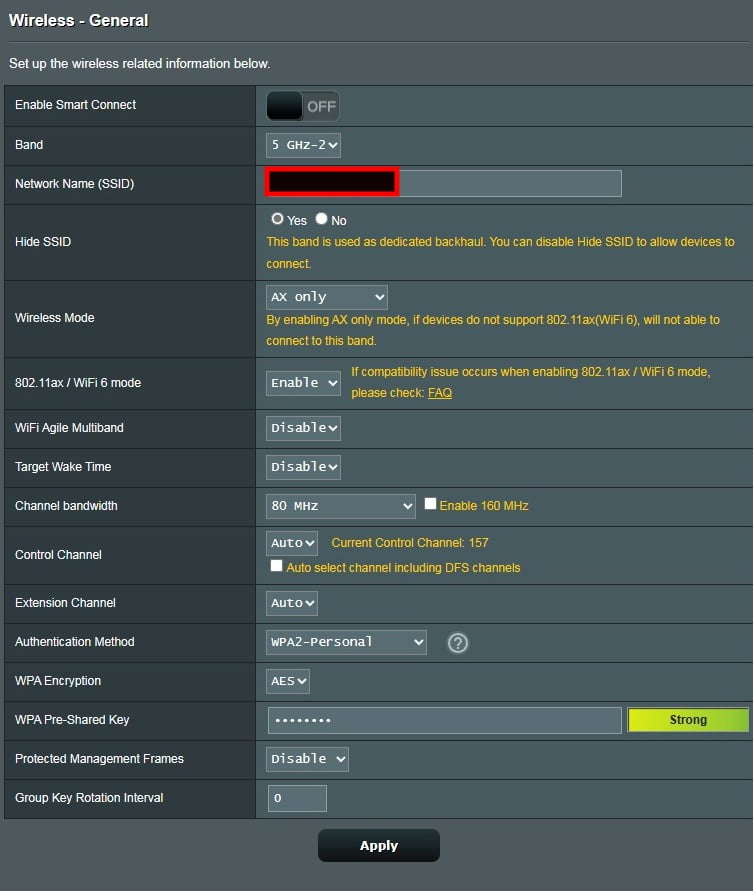
. I am not very upto speed on these logs. Do you live in the UK, the reason I ask is that you seem to have additional channels on the 5GHz-2 that I think are only available in the US model.Have you tried checking your PHY rate? (see attachment). All mine have a PHY rate above 2,000Mbps.
My XT8’s were previously dropping to 2.4GHz due to placement of one of my XT8 next to a fridge which was most probably causing interference. Also due to a damaged extenstion cord.
Can you check on the android/ios app check the RSSI. I made sure all my XT8’s have RSSI below 65 dBm. This also stabilised my mesh, so much so that I am now on 36 days 18 hour(s) 25 minute(s) 31 seconds on 160MHz – Channel 100 wothout a single hiccup that I have noticed. This is on FW 23285.
Attachments:
You need to login in order to vote
July 17, 2023 at 10:28 am #25847July 17, 2023 at 3:26 pm #25852In a completely sane world, madness is the only freedom (J.G.Ballard).
You need to login in order to vote
July 23, 2023 at 12:55 pm #26023After around 57 days devices were able to connect wirelessly to the mesh network but no web pages were loading ‘connected-no internet’. Could not even log into the router UI to check stats.
Restarted the main node and everything was fine again. Anything I should look out for in the logs? It happened between 11am-12.30pm.
You need to login in order to vote
July 23, 2023 at 1:21 pm #26027In a completely sane world, madness is the only freedom (J.G.Ballard).
You need to login in order to vote
July 23, 2023 at 1:39 pm #26028No mention of radar in the logs. I am more than happy with 50+days uptime on 160MHz mesh connection.
Liked by:You need to login in order to vote
July 23, 2023 at 3:53 pm #26030Maybe worth looking in log also incase there are entries like ‘failed to write’ or ‘No space left on device’ which may give a clue.
In a completely sane world, madness is the only freedom (J.G.Ballard).
You need to login in order to vote
July 23, 2023 at 3:57 pm #26031July 23, 2023 at 4:03 pm #26032In a completely sane world, madness is the only freedom (J.G.Ballard).
You need to login in order to vote
July 23, 2023 at 6:51 pm #26035I received you logs, thanks and does look like a mem type issue or very high CPU usage that caused a service not to work correctly.
If OK with yourself, can I send the logs to ASUS so they can add it to their list
In a completely sane world, madness is the only freedom (J.G.Ballard).
You need to login in order to vote
July 23, 2023 at 8:57 pm #26036 - AuthorPosts




 . I am not very upto speed on these logs. Do you live in the UK, the reason I ask is that you seem to have additional channels on the 5GHz-2 that I think are only available in the US model.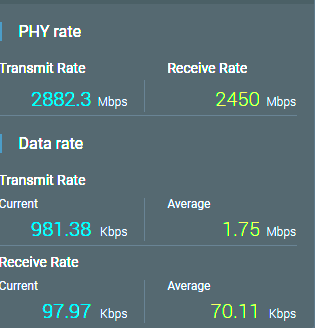


- You must be logged in to reply to this topic.