

› UKTH forums › 🛜 Wireless Routers & Modems › ASUS & Wireless › ASUS ZenWiFi AX Whole Home Tri-Band Mesh WiFi 6 System Not sure if this is the right place to ask…. I am thinking of upgrading my Google Mesh wifi to the above. Has anyone used this and does it...
- This topic has 1,416 replies, 25 voices, and was last updated 2 months ago by
 UK Sentinel.

- AuthorPosts
- July 23, 2023 at 9:18 pm #26037
In a completely sane world, madness is the only freedom (J.G.Ballard).
You need to login in order to vote
September 2, 2023 at 12:29 am #26711@UKSentinel, just came back from a months holiday abroad. Did you hear anything from Asus on the logs I sent them? I have had no reply from them directly.
Also, any ideas if Asus have any plans to add the additional channels like they did to the US XT8 models?
You need to login in order to vote
September 2, 2023 at 6:57 am #26715In a completely sane world, madness is the only freedom (J.G.Ballard).
You need to login in order to vote
September 2, 2023 at 9:05 am #26717I was referring to the unii-4 channels. I think I read somewhere the EU had approved these, not sure where I read it though.
Liked by:You need to login in order to vote
September 2, 2023 at 10:30 am #26719I remember now, even though ASUS devices such as the Asus ROG Rapture GT6, ZenWifi XT9 and ZenWifi XT8 etc, support the capability of using UNII-4 from a hardware perspective. As we (UK) are classed as EU, UNII-4 in EU has not been approved (I believe).
US has approved the use of UNII-4, EU has not, EU has not even UNII-3 general approval from what I recall.
The UK has approved UNII-3 a while ago, but because we are classed as EU, we follow their standards and so do not have access to UNII-3 standards either from an ASUS perspective.
Alas no idea for timelines when 5.9G UNII4 will be considered for use in EU/UK.
In a completely sane world, madness is the only freedom (J.G.Ballard).
You need to login in order to vote
September 6, 2023 at 3:02 pm #26772In a completely sane world, madness is the only freedom (J.G.Ballard).
Liked by:You need to login in order to vote
September 8, 2023 at 4:21 am #26790Just checking in. 3.0.0.4.388_23285 has been rock solid for me, with a 49 day up-time and an system log that spans 14 days, mostly just firmware update checks and device connect/disconnects. (Up-time would be longer but restart was due to power outage).
@UKSentinel any new firmware in the pipeline? It was a long time ago, June 19th, that Asus dropped their security advisory, which included XT8 and advised everyone to immediately update, but then they didn’t actually release the new firmware for XT8.
19 June 2023 – Asus Security Advisory
You need to login in order to vote
September 8, 2023 at 6:53 am #26792September 11, 2023 at 7:39 am #26842Ok, so ASUS have come back and said they are expecting to release the next firmware for the XT8 in QTR 4 this year. So very likely around Xmas time.
ASUS have also said, regarding the security advisory, all major CVE’s have already been addressed in current or previous firmware releases and none outstanding relating to the above security advisory.
ASUS did also say, they often fix CVE’s but don’t list them all in change-log, so that does make life interesting .
In a completely sane world, madness is the only freedom (J.G.Ballard).
Liked by:You need to login in order to vote
September 16, 2023 at 4:58 am #26975UK Sentinel, Thanks for following up on this, much appreciated!
Cheers,
Rob
Liked by:You need to login in order to vote
October 15, 2023 at 2:57 am #27527Similar to Parental Control ‘Time Scheduling’, is there a way to put a wireless network on ‘Time Scheduling’ other than to manually turn the network off?
You need to login in order to vote
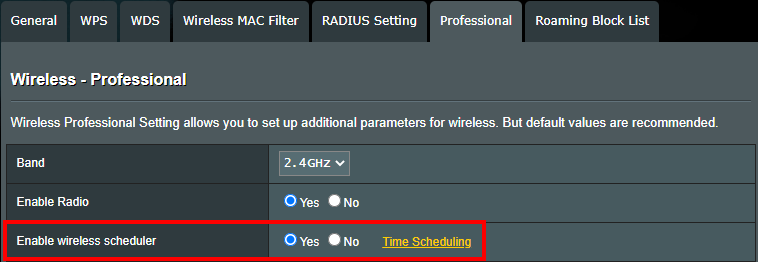
October 15, 2023 at 7:58 am #27529ASUS routers (most models) do support what is called ‘Wireless scheduler’ -(time scheduling) which can be found under Wireless > Professional.
‘If you want to switch the WiFi signal at a specific time, like turn off 2.4G and 5G WiFi before bed time and turn WiFi back on in the morning, you can use the Wireless scheduler function in ASUS router to set the time when WiFi is turned on or off’.
https://www.asus.com/support/FAQ/1043425/
In a completely sane world, madness is the only freedom (J.G.Ballard).
Liked by:You need to login in order to vote
October 15, 2023 at 10:05 am #27530I will have a check. Thanks
Is it possible on the Guest network? I want to have a seperate 5GHz-1 network where I can use Time Schedule for that isolated network.
You need to login in order to vote
October 15, 2023 at 6:36 pm #27532You need to login in order to vote
October 15, 2023 at 9:51 pm #27535The only way without custom scripts (I believe) using ASUS Stock firmware is via Guest Network – either 2.4GHz or 5GHz-1 or 5GHz-2 and dedicate one of those bands for the Guest wifi, then under Wireless > Professional > Enable wireless scheduler for the same dedicated band you designated in Guest Network at set your variables, this then will by default turn off Wireless band that is dedicated to the Guest Wifi.
Never tried this, but does seem the only way to achieving a Guest Wifi that turns On – Off when required.
In a completely sane world, madness is the only freedom (J.G.Ballard).
You need to login in order to vote
- AuthorPosts


- You must be logged in to reply to this topic.