

› UKTH forums › 🛜 Wireless Routers & Modems › ASUS & Wireless › Latest Beta Firmwares for DSL-AC51 to DSL-N66U incl. DSL-AC750 Latest DSL ASUSWRT firmware v9.1.2.3_502-g2bdb05b now available. (latest firmware’s are at end of threads) For following ASUS DSL Modem Routers: DSL-AC51 DSL-AC52U DSL-AC55U DSL-AC56U DSL-AC750 DSL-N10-C1 – (extended beta support...
- This topic has 1,129 replies, 77 voices, and was last updated 1 year, 6 months ago by
 UK Sentinel.

- AuthorPosts
- April 25, 2021 at 6:28 am #12952
Thank you @osman, As you say English only please for @necatiakbulut otherwise we cannot help
You need to login in order to vote
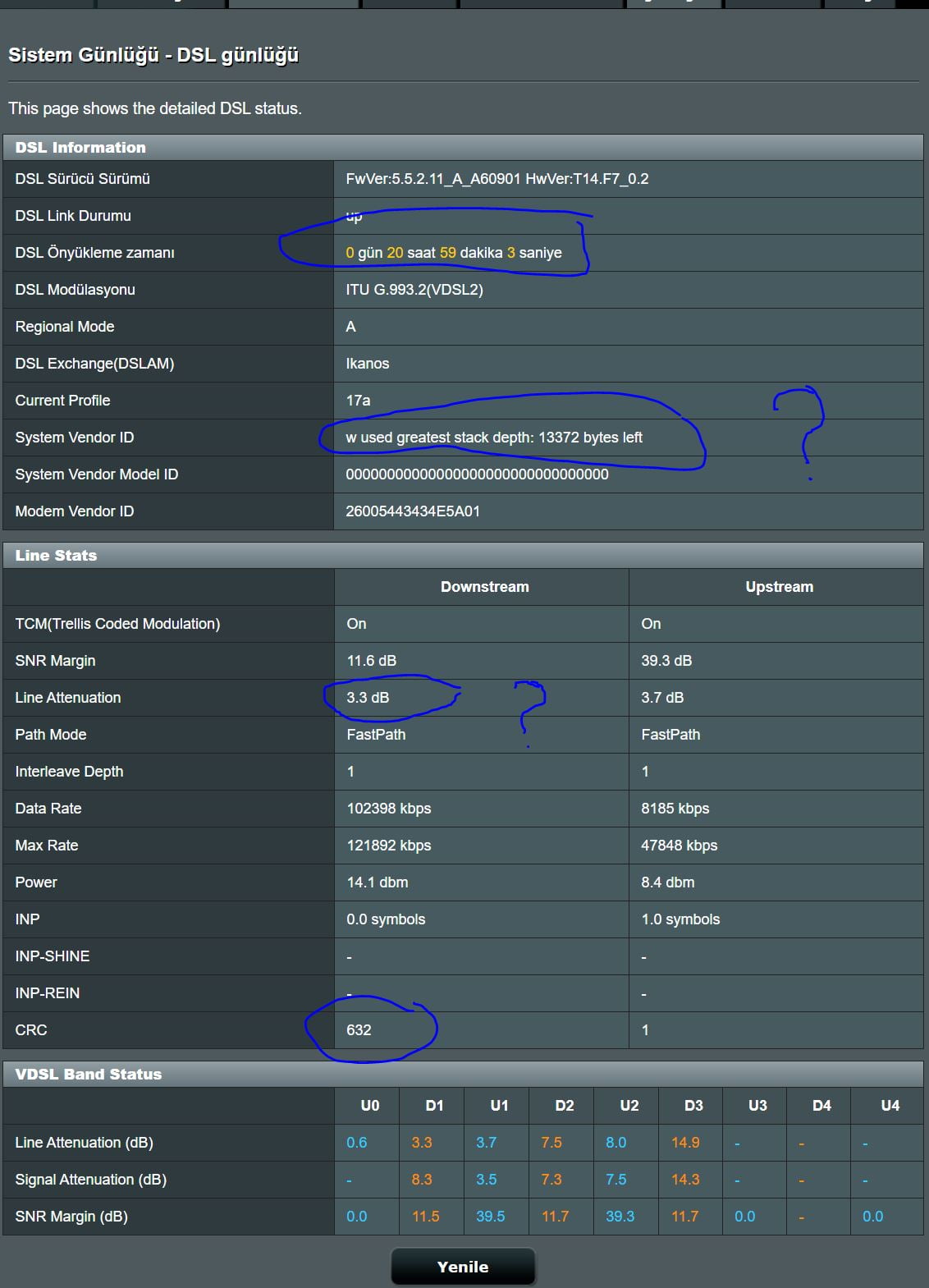
April 25, 2021 at 9:24 am #12962ASUS AC51 I am experiencing breaks with these values in the pictures I have attached, the CRC rises and breaks, I made the recommended settings from the DSL settings, again, these values are normal or the breaks continue, in the meantime, next to our ISP plant building with a cat6 cable ASUS authorizations for Turkish net DSL-AC51_1.1.2.3_473 firmware They said use it by doing and the result did not change. I updated DSL-AC51_1.1.2.3_790 The pictures of two different modem interfaces are attached for now, but the CRC 900 has been added. ASUS modems always have such a problem, stop my problem, it usually bothered me. Line Attenuation values 3.3 very bad or good Also DSL-AC51_v9.1.2.3_928- what is the update that I came across in this forum, is it correct? Is anyone using it for ASUS ac51 thanks
Attachments:
You need to login in order to vote
April 25, 2021 at 10:25 am #12969April 25, 2021 at 8:50 pm #12974DSL-AC51_v9.1.2.3_928 How does anyone use this software? Is it healthy?
You need to login in order to vote
April 26, 2021 at 9:59 am #12975[quote quote=12936]
i hope there will be new firmware soon, its getting annoying to reset modem every night :D
I will ask ASUS for any news on a new update
[/quote]I have asked ASUS for any news on updates for firmware, No plans currently but ASUS have said if you have any problems, please send feedback form and mention ‘UK Sentinel’ in message and they will look at your problem
However, ASUS have said that some DSL-AC51 owners are experiencing 5Ghz wifi issues, fix below via Beta firmware and usual UKTH Terms & Conditions apply – let us know if this does fix 5GHz wifi so I can inform ASUS
[download id="12976"]
Liked by:You need to login in order to vote
April 27, 2021 at 2:49 am #12988[quote quote=12974]DSL-AC51_v9.1.2.3_928 How does anyone use this software? Is it healthy?[/quote]
Have been using beta v9.1.2.3_886 for months. Its stable, however I dont use 5G WiFi.
Liked by:You need to login in order to vote
May 6, 2021 at 3:42 am #13130Hello there, I use my Asus ac750 modem in router mode. Does the dsl settings I made have any effect on the modem in bridge mode?
You need to login in order to vote
May 6, 2021 at 5:33 am #13131[quote quote=13130]Hello there, I use my Asus ac750 modem in router mode. Does the dsl settings I made have any effect on the modem in bridge mode?[/quote]
If you change your DSL-AC750 from Router Mode to Bridge Mode, then the DSL-AC750 will not be able to use wifi or the other services to access the internet, the DSL-AC750 will only be a modem ? and a separate router will be needed for wifi and allow access to internet etc. (DHCP – IP – DNS ) etc.
Is that what you mean ?
You need to login in order to vote
May 6, 2021 at 6:59 am #13132I may have been misunderstood from the translation. zyxel vmg3312-b10b I am using this modem as a bridge. I use the ac750 modem as a router as pppoe. I installed the ac750 without any settings. When I set it up as an ac750 modem I was making some adjustments for CRC errors. Now it is only in router mode. What I want to learn is that the settings I will make through the Dsl settings in this situation will have an effect on the quality of the line. Sorry, it could be a problem because I used translation. I hope I could explain.
You need to login in order to vote
May 6, 2021 at 7:40 am #13133No problem and I understand now
Any changes you make the the DSL Setting on the DSL-AC750 will not have any effect, as now your zyxel vmg3312-b10b effects CRC’s and line synch etc.
All DSL changes that effect your DSL line (CRC’s) will have to be done via your zyxel vmg3312-b10b
You need to login in order to vote
May 6, 2021 at 9:18 am #13135[quote quote=13133]Sorun değil ve şimdi anlıyorum
DSL-AC750’de DSL Ayarında yaptığınız herhangi bir değişikliğin, artık zyxel vmg3312-b10b’niz CRC’leri ve hat senkronizasyonunu vb. Etkilediği için herhangi bir etkisi olmayacaktır. DSL hattınızı (CRC’ler) etkileyen tüm DSL değişiklikleri, zyxel vmg3312-b10b’niz aracılığıyla yapılmalıdır. [/quote]Thank you.
Liked by:You need to login in order to vote
June 10, 2021 at 10:55 am #13823This is the last firmware for my modem / router dsl 66u -> DSL-N66U_v9.1.2.3_790-g61d41b5
I want to know if in that firmware, on DDNS function, there are the possibility to add lets encrypt certificate.
Anyone can verify that (in the last stable firmware 1.1.1.3 there are possibility to add ddns service but there aren’t the checkbox for set certificate)?You need to login in order to vote
June 10, 2021 at 1:06 pm #13827[quote quote=13823]This is the last firmware for my modem / router dsl 66u -> DSL-N66U_v9.1.2.3_790-g61d41b5 I want to know if in that firmware, on DDNS function, there are the possibility to add lets encrypt certificate. Anyone can verify that (in the last stable firmware 1.1.1.3 there are possibility to add ddns service but there aren’t the checkbox for set certificate)?[/quote]
I checked with the ASUS DSL team and lets encrypt certificate it is not supported
You need to login in order to vote
June 10, 2021 at 1:46 pm #13828[quote quote=13827]
This is the last firmware for my modem / router dsl 66u -> DSL-N66U_v9.1.2.3_790-g61d41b5 I want to know if in that firmware, on DDNS function, there are the possibility to add lets encrypt certificate. Anyone can verify that (in the last stable firmware 1.1.1.3 there are possibility to add ddns service but there aren’t the checkbox for set certificate)?
I checked with the ASUS DSL team and lets encrypt certificate it is not supported[/quote]
thanks for reply ;)
You need to login in order to vote
June 16, 2021 at 5:02 am #13893DSL ASUSWRT Beta firmware v9.1.2.3_944-g6c7194d now available, this version addressed the Live Update issue you raised earlier plus other bug fixes/ enhancements.
2021_06_10_v9.1.2.3_944-g6c7194d
https://www.asuswebstorage.com/navigate/a/#/s/AA0C8BCB95D1477C9E087AF607926A5BY
Changelog:
- [MT7592][MT7610][MT7612] FragAttacks WiFi Security Vulnerabilities patch adopted.
- [MT7592] Update profile for Wifi driver. Sometimes 2.4G Wireless cannot use iPhone Airplay to Apple TV.
- Fixed the issue that lpd crashed caused by nmap attack.
- Update DSL PTM ISP list. Add Australia ISP into QIS VDSL WAN profile.
- Fixed web server related issue.
- Fixed Web UI related issues.
- Fixed ASUScomm.com DDNS cannot work issue.
- [MT7610] EDCCA fine tune patch. Fixed some customers might not be able to connect to WiFi 5G again after using it for a long time. They must reboot before they can connect to WiFi 5G again.
- GUI: Add help message to ‘G.INP Stability Adjustment’ option for VDSL.
- QIS.ppp: Set pre-filled ppp login/password for United Kingdom/Scotland/Ireland ISP : BT braodband & BT Business & BT infinity.
Note: usual UKTH ASUS Beta T&C’s apply, (top of forum)
Edit: Note 1: please see below post (↓)
You need to login in order to vote
- AuthorPosts


 [/quote]
- You must be logged in to reply to this topic.