Forum Replies Created
-
AuthorPosts
-
So will the @GNUton firmware bring wired imesh backhall to my 2 DSL-AC68U routers? If so do you need the firmware update on both routers and do you have a direct link to the latest @GNUton firmware as I am not sure where is is.
I know it’s been a long time since my last post but the wired imesh backhaul wasn’t a priority so I left it unchanged, I now need the extra VPN options of @GNUton (mainly for routing only some devices through a VPN).
You need to login in order to vote
Hi all, changing the subject slightly I don’t know why they can’t convert one of the Lan ports into a Wan port on the DSL-AC68U to get the wired Imesh to work. They can manage this for plugging in an external modem. It’s a pity there’s no custom firmware to support this.
You need to login in order to vote
Fwiw I don’t think mine smoked when I lost the DSL part of the router. In the end I got a replacement DSL-AC68U from ebay and converted my old router to RT-AC68U firmware and used it as an extender.
Ironically I left my BT (huawei HG612) plugged into my replacement DSL-AC68U since, despite it’s age, is still a better modem than the integrated one and still holds it’s own with even the latest modems.
They are still selling for under £15 on ebay so if you can’t get the DSL part of the router working and you don’t mind a 2 box solution then it’s a quick fix.
You need to login in order to vote
Ironically since I have been running a two box solution of my old router using the external EchoLife HG612 modem I’ve realised it still is a better modem than the integrated one. When I got the new router with working modem going it looked like the HG612 had purged the DSL connection over the last month. When my original router was fully working I had to drop the D/L SNR to and reduce the uplink power to achive a 50/8 speed. The errors and interleave was high. After running the HG612 for a monthI could get 52/10 with fastpath and low errors. When I got the replacement router working with integrated DSL the connection quickly adjusted back interleave again and struggled to get the DL/UL speeds. It just proves that the HG612 is still a good modem, especially if it’s has modded firmware with G vector capability. I’m now tempted to convert both routers to RT now. So despite the last month of me trying to get the DSL part working I’m now tempted to ditch it on the new router. At least I have a choice now of going integrated or not, which I no longer had with the old router.
You need to login in order to vote
Yes, my old DSL-AC68U does think its a DSL although I though both my DSL-AC68U routers support imesh in the stock Asus firmware now so I assumed they would work together. I might change my old DSL-AC68U as an RT again and set it as a node and try again.
Edit: I changed my old DSL-AC68U to a RT-AC68U and it worked. I didn’t realise you can only use the DSL-AC68U as a primary router in Aimesh. It’s a pity I couldn’t seem to fix my old router but after trying everything I could think of I was resigned to unit not being fixed. At least I have a use for it now. Thanks everyone for all your help.
You need to login in order to vote
I actually loaded the CFE over the weekend using the method used to change TM1900 to the RT version using the mtd-write2 command to flash the CFE. It seems to go well changing the CFE from BL version 1.0.0.2 to 1.0.0.5. I thought everything would spring into life again but no such luck. The reflash didn’t fix anything . Then I thought I might just use it as an imesh node instead but when I use the new router to search for my old router it doesn’t see it. Following the asus instructions for imesh I also found out my old router keeps its wifi settings if I set factory default from the “Restore/Save/Upload Setting” from the Advanced tab. I can only set it to factory setting via Telnet or Power on/WPS method.
I might try the dd method you described above to see if it makes any difference but I think I have exhausted all options now. At least the ebay one I bought works but my old router seems pretty useless now without DSL or imesh.
You need to login in order to vote
That would be great if you could do that for me. I’ll hold fire until I hear back from you. Once again than you all for your support.
You need to login in order to vote
Not exactly but there’s is a youtube vid on changing the TM to a RT so I have assumed it would be very similar. I managed to copy over my cfe onto a USB stick using the same instructions. If you have details for doing it for the DSL-AC68U then I would like to have them just to satisfy that i’m doing the right thing. I don’t want to break any forum rules though but I don’t think I am just doing a legit restore of a router.
You need to login in order to vote
Yes,
Just the issue of getting the DSL part of things working now. I’m still none the wiser that the DSL firmware and drivers are missing. I’m now leaning towards that some sort of corruption occurred when updating the firmware after all, knocking out the DSL part.
I’m getting an old DSL-AC68U from ebay now. Options are to just convert my broken router into the RT version or maybe do a cfe dump of the ebay one, modify the mac codes and secret number to match my broken router and reflash the cfe. I think I will make sure I know what I’m doing before I attempt that though.
You need to login in order to vote
Hi Zigzag,
Thanks for the post. I did back up a config file back in 2015 and loaded it up but it didn’t restore the connection, the PVC settings were all there though after the restore but they didn’t work.
Indecently I found out why chrome was showing a spoof profile. It seemed that it was autofilling a username on the “+” icon of the PVC setting icon. I have no idea why. I guess I should have looked at the router web interface on another PC as this would have stopped me barking up the wrong tree.
You need to login in order to vote
Hi Zigzag,
Thanks for replying. The firmware difference is due to trying experimenting with lots off different firmwares, new and old. I spotted 3.0.0.4.384_56087 a few weeks ago as a beta in the whirlpool.net.au forum so thought I might give it a go but alas no joy.
I’ve updated this post after a few hours of work. It looks like the NVram seems to clear the system after all . I have since discovered that “booji” is just there instead of the “+” icon for adding PVC. I thought this was a corruption that was surviving an NVram set but it’s not the case. When viewed in IE it shows the “+” icon. It seems Chrome is displaying the word “booji” over the “+” icon. I’m not sure why but it’s a problem with chrome so for now I’m not worried. I also thought that a username and password field was surviving a nvram reset since it was displaying a username and password profile when openVPN server was enabled. This has now been dispelled as it now seems that the router automatically sets a username/password the same as the router username and password. It threw me a bit since it only does this for openvpn server and not PPTP server. I also mentioned that I could only get the router working if I uploaded an existing profile but this is not the case now. From a NVram clear I can get the router working on an external modem set to Ethernet Wan to Lan 1 and plug in a HG612 modem into it.
So having dispelled the 2 supposed anomalies it seems the only fault I have is that the router is not detecting the DSL modem and not loading the DSL drivers.
One thing I have managed to do was to export a copy my CFE bootloader and use a hex editor. I did this a few days ago to search for the word “booji” but since I have found out tonight that “booji” is just a chrome thing it can now be discounted.
I am now leaning towards the failed firmware upgrade may have stuffed parts of the CFE after all resulting in blocking the DSL part of the router. I would like a copy of the CFE bootloader for the DSL-AC68U so if anyone could supply me with a copy then I would be grateful although if this is against forum rules then please let me know.
I’m toying with buying a second hand DSL-AC68U from ebay and maybe just setting up this one as a repeater or add it to aimesh (if Asus ever get it working properly)
Other than that I might ditch Asus altogether and get a new router . I like the look of the FRITZ!Box 7590 but haven’t seriously been looking for replacements yet until I’ve exhausted all attempts at getting my router back.
You need to login in order to vote
Yes I posted again!
Was told that 30-30-30 resets don’t work on on asus routers as they go into recovery mode instead but hey, worth a try.
will try the others too but pretty sure they just came up as an error, then again nothing to loose.
I think the next plan would be rather drastic ie reloading the CME boot loader. I read on a few forums about people doing it on the RT-AC68U but nothing on the DSL version. I would have find the firmware to do it though. BTW is there a way of reading the config file it might have some clue as to how the booji bit got there.
You need to login in order to vote
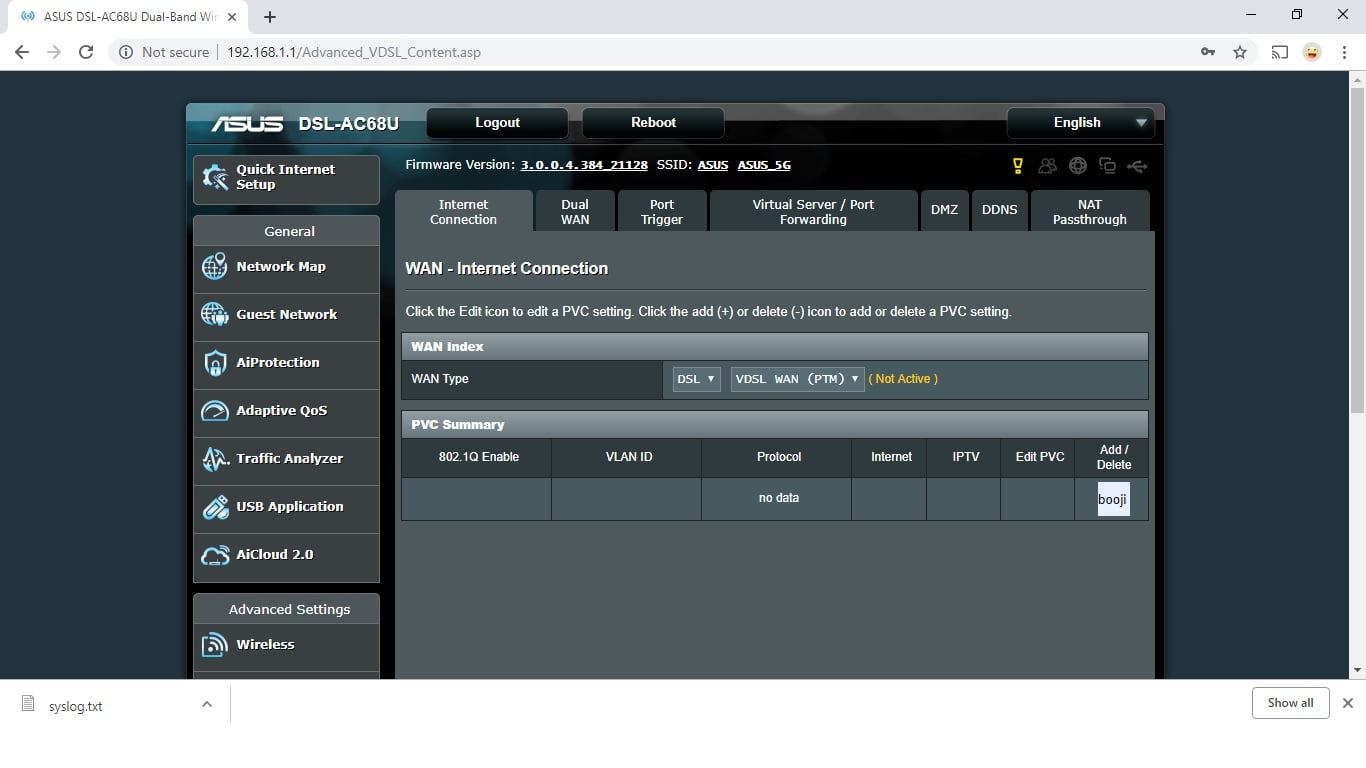
Ok, I’m back so have been doing a bit more digging. The mtd-erase2 nvram followed by power off seems to set everything to default settings except the “booji” setting in still in the PVC summary under Wlan (see pic). I can’t delete this profile or add another profile. As I mentioned in an earlier post this stuck “booji” does not have all the options (such as username/password) when the Primary is set to DSL. When the Primary is set to Ethernet wan I still can’t to get the router working on the external modem even though all the settings can be entered. So basically I cant get the internal or external modem working when set to factory settings.
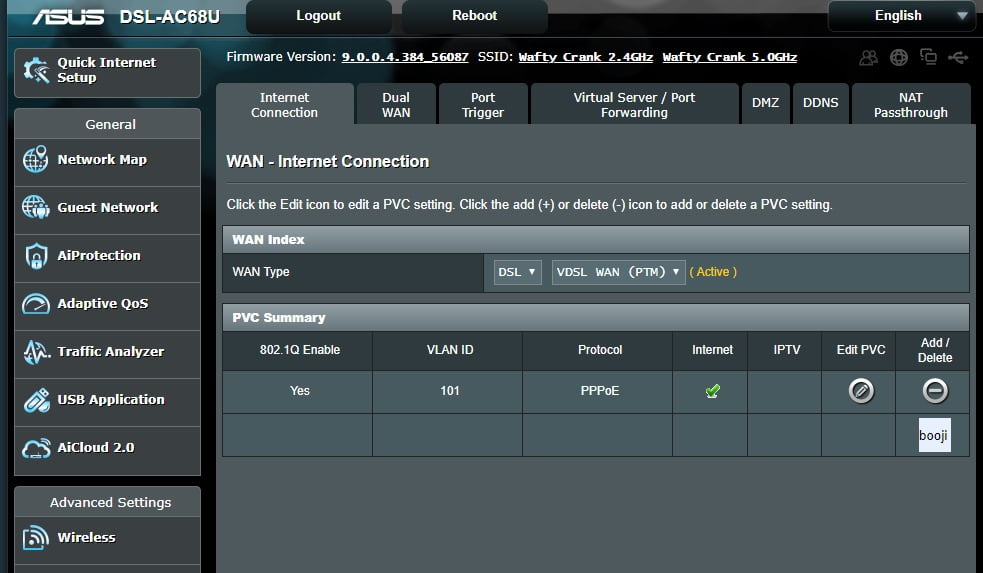
The only way I can get the router to limp into action is to load an old profile. This adds a PVC profile which contains all the settings (including username password) for the Primary DSL (see other pic). Now if I change the Primary WAN to ethernet Wan it seems to use this PVC profile to fire up the external modem. I also noticed that an openVPN server username/password that I must have used in this config cannot be deleted or though I can add others.
One other thing worth mentioning is when Primary Wan is set to DSL it shows the PVC summary page where you the have to click in the profile to see the modem settings whereas if the Primary Wan is set the Ethernet Wan it just goes directly to the router settings page (no PVC summary page). This may be normal but I’m not sure.
I’m begging to think this corruption was present before I attempted to upload the wrong firmware. Maybe uploading this firmware wirelessly and it reporting a bad firmware upload was just a trigger point. The Merlin firmware wasn’t even uploaded (otherwise I would have seen it). Maybe the router just recognising the a bad upload triggered it to exposing the “booji” profile already there.
You need to login in order to vote
Done a little bit more playing. The mtd-erase2 nvram command set all my settings to default except the “booji” setting is still in the PVC summary still remains. I can’t add a PVC profile or delete the “booji” profile.
The “booji” setting in the openvpn sever profile can be deleted so it seems the only setting thats stuck is in the PVC summary. The “booji” pvc seems broken as if I set it to DSL not all the options (such as username/password) isn’t there. If I set primary wan to ethernet wan I still can’t get the router to work on an external modem either even though I can see all the settings. I also noticed that when the primary is set to ethernet wan instead is DSL then there is no PVC summary page. Advanced Settings>wan takes you directly to the WAN – Internet Connection page (whether this is normal or not I’m not sure). So as its stands when I set to factory settings I can’t get the router to work with the internal modem or external modem.
The only way I can get my router to limp into action is to load an old config file. When the router is set to primary DSL the PVC summary page still shows “booji” but also has a DSL profile. Even though the internal modem doesn’t work when the primary is DSL if I set the Primary to Wan it seems to use the config file setting to work with the external modem. This config loads the mysterious booji password/username setting on OpenVPN server which can’t be deleted.
So its a bit of a headscratcher. It seems corrupt settings have crept in that an NRAM erase doesn’t wipe. I know its a bit dangerous but would re flashing the CME be the only other option to get rid of “booji” in the PVC.
Attachments:
You need to login in order to vote
Yes it accepted the command and no errors but I checked after with an nvram show and it still listed settings. Maybe I’ll try again and switch the router off straight after the command when I return home.
Edit: just to confirm there was just the entering the command there was no acknowledgement, just the command prompt again.
You need to login in order to vote
-
AuthorPosts