

› UKTH forums › 🛜 Wireless Routers & Modems › ASUS & Wireless › Converting DSL-AC68U to RT-AC68U for use as AiMesh Node – Solved I’m sure there were a series of posts on the old forum about hacking a DSL-AC68U to make it into an RT-AC68U. Sadly those posts are lost and not cached...
- This topic has 198 replies, 13 voices, and was last updated 2 years, 3 months ago by
 UK Sentinel.

-
AuthorPosts
-
March 17, 2019 at 6:18 pm #2416
Thought so
booji’s is set to zero
So that’s another setting that needs to be corrected.
The rest of the differences I’ve found seem on the face of it to be easily explainable, Mac, config etc.
So I’d try and set those three that I’ve found and see if they survive a hard reboot.
Though I have to say the dsl_enable would be my favourite culprit.
You need to login in order to vote
March 17, 2019 at 6:25 pm #2417indeed, dsl_enable=0 means the DSL aspect (PPPoE) of the DSL router has not yet been set-up (configured). I believe.
@Booji needs to factory reset router and run thru QiS, and see if router connects to internet and strange text disappears, when he/she has timeIn a completely sane world, madness is the only freedom (J.G.Ballard).
You need to login in order to vote
March 17, 2019 at 6:30 pm #2418I have dsl_enable=1 too, unfortunately my internet connection has been hijacked by cbeebies so I can’t do anything!
You need to login in order to vote
March 17, 2019 at 6:34 pm #2420It was set at zero on the version you posted. OK so maybe rule that out.
You need to login in order to vote
March 17, 2019 at 6:35 pm #2421I have dsl_enable=1 too, unfortunately my internet connection has been hijacked by cbeebies so I can’t do anything!
I remember those days with my kids, Cbeebies and Teletubbies, such fun, no rush and hopefully the above will fix discrepancy after running thru QiS?
Update, is DSL-AC68U plugged into a seperate modem currently?
In a completely sane world, madness is the only freedom (J.G.Ballard).
You need to login in order to vote
March 17, 2019 at 8:41 pm #2428NVram you have has never gone though any setup so that probably explains dsl_enable=0.
Yes I have a bt extenal modem plugged into LAN1 with primary Lan set to Ethernet WAN.
When I boot the router with the default settings (and booji still lurking in there) I’ve recently found out I cant even set up to work with the external modem either. I have to load an old config file from 2015 and set it to Ehernet Wan and it springs into life. So it looks other bits and bobs are stuck in the router stopping it from working properly. I noticed that I have a vpn profile as well I cant delete. I’m out of the UK for a few days so will pick this up when I get back. I don’t want to start messing about now since I want to VPN to my router while I’m away. I’ll catch up on my return. Thanks a lot both of you for trying to help me out.
You need to login in order to vote
March 18, 2019 at 7:08 pm #2445OK can you try a couple more things before making any of the above changes.
Power down the router, hold the WPS button in, power up, wait 5 -10 seconds and then release WPS button. Allow to boot and check if weird setting are still there.
If that fails to get rid of them, then enable telnet, open a terminal connection, login and enter the command mtd-erase2 nvram. It is important that you power down the router immediately after doing this. Do not do anything else, especially a soft reboot. Power back on. Then again check to see if your weird settings are still there.
You need to login in order to vote
March 18, 2019 at 9:40 pm #2446I’ve already tried the WPS power (quick blinking led) a few weeks ago and also mtd-erase2 nvram but no joy. Originally with the mtd-erase2 nvram I didn’t power off but I read on another forum that powering off after the telnet command should stop any backing up of nvram. I tried this briefly a few days ago and it still didn’t work but I think I should give this a few more tries when I get back home in a few days time.
You need to login in order to vote
March 18, 2019 at 10:50 pm #2447March 18, 2019 at 11:32 pm #2448Yes it accepted the command and no errors but I checked after with an nvram show and it still listed settings. Maybe I’ll try again and switch the router off straight after the command when I return home.
Edit: just to confirm there was just the entering the command there was no acknowledgement, just the command prompt again.
You need to login in order to vote
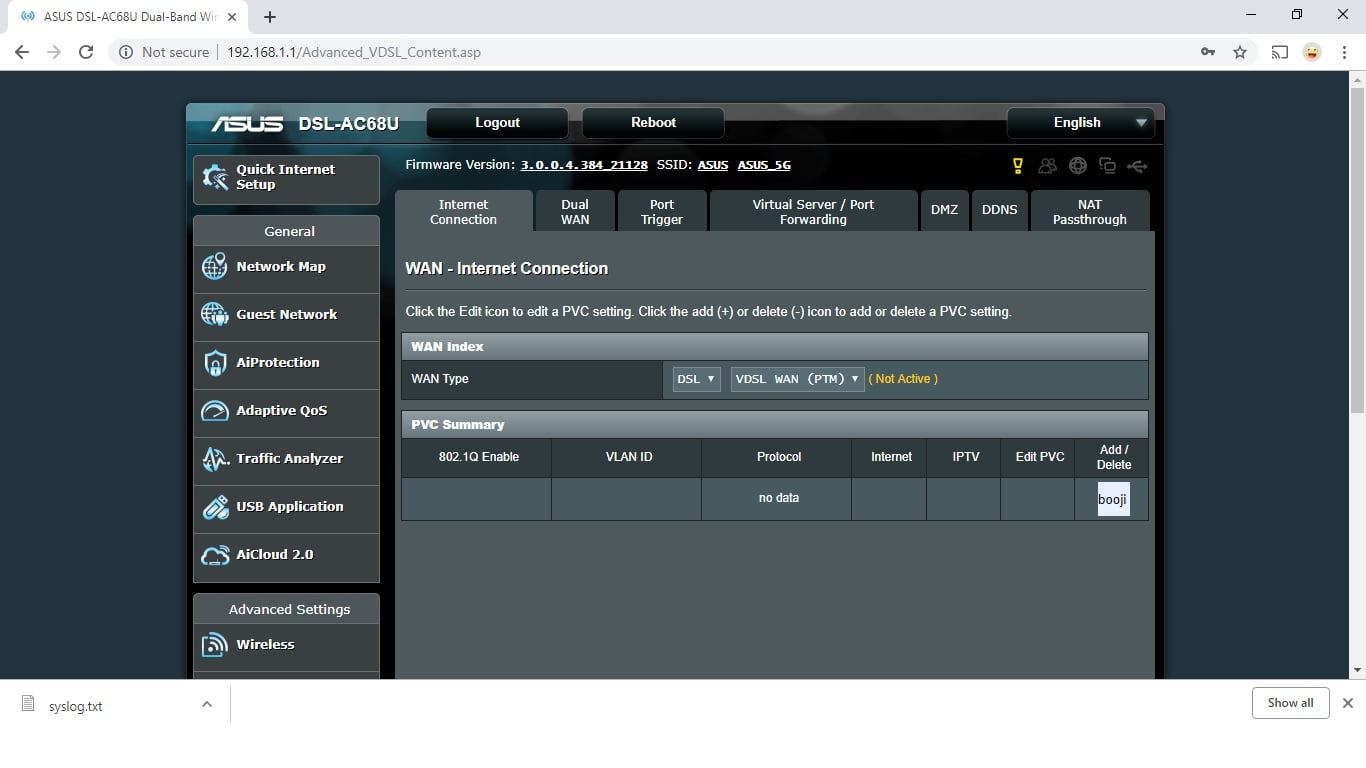
March 20, 2019 at 9:50 pm #2459Done a little bit more playing. The mtd-erase2 nvram command set all my settings to default except the “booji” setting is still in the PVC summary still remains. I can’t add a PVC profile or delete the “booji” profile.
The “booji” setting in the openvpn sever profile can be deleted so it seems the only setting thats stuck is in the PVC summary. The “booji” pvc seems broken as if I set it to DSL not all the options (such as username/password) isn’t there. If I set primary wan to ethernet wan I still can’t get the router to work on an external modem either even though I can see all the settings. I also noticed that when the primary is set to ethernet wan instead is DSL then there is no PVC summary page. Advanced Settings>wan takes you directly to the WAN – Internet Connection page (whether this is normal or not I’m not sure). So as its stands when I set to factory settings I can’t get the router to work with the internal modem or external modem.
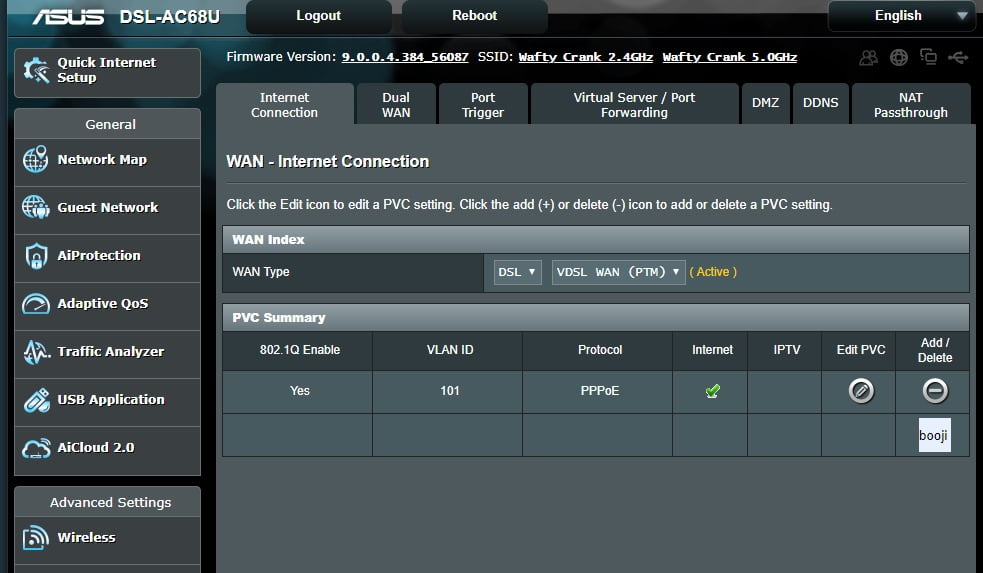
The only way I can get my router to limp into action is to load an old config file. When the router is set to primary DSL the PVC summary page still shows “booji” but also has a DSL profile. Even though the internal modem doesn’t work when the primary is DSL if I set the Primary to Wan it seems to use the config file setting to work with the external modem. This config loads the mysterious booji password/username setting on OpenVPN server which can’t be deleted.
So its a bit of a headscratcher. It seems corrupt settings have crept in that an NRAM erase doesn’t wipe. I know its a bit dangerous but would re flashing the CME be the only other option to get rid of “booji” in the PVC.
Attachments:
You need to login in order to vote
March 20, 2019 at 10:35 pm #2462Ok, I’m back so have been doing a bit more digging. The mtd-erase2 nvram followed by power off seems to set everything to default settings except the “booji” setting in still in the PVC summary under Wlan (see pic). I can’t delete this profile or add another profile. As I mentioned in an earlier post this stuck “booji” does not have all the options (such as username/password) when the Primary is set to DSL. When the Primary is set to Ethernet wan I still can’t to get the router working on the external modem even though all the settings can be entered. So basically I cant get the internal or external modem working when set to factory settings.
The only way I can get the router to limp into action is to load an old profile. This adds a PVC profile which contains all the settings (including username password) for the Primary DSL (see other pic). Now if I change the Primary WAN to ethernet Wan it seems to use this PVC profile to fire up the external modem. I also noticed that an openVPN server username/password that I must have used in this config cannot be deleted or though I can add others.
One other thing worth mentioning is when Primary Wan is set to DSL it shows the PVC summary page where you the have to click in the profile to see the modem settings whereas if the Primary Wan is set the Ethernet Wan it just goes directly to the router settings page (no PVC summary page). This may be normal but I’m not sure.
I’m begging to think this corruption was present before I attempted to upload the wrong firmware. Maybe uploading this firmware wirelessly and it reporting a bad firmware upload was just a trigger point. The Merlin firmware wasn’t even uploaded (otherwise I would have seen it). Maybe the router just recognising the a bad upload triggered it to exposing the “booji” profile already there.
You need to login in order to vote
March 20, 2019 at 10:37 pm #2465Got an email with your post in it but can’t see it on the forum.
Guessing the spam filters are doing overtime again.
Can you try a 30 30 30 reset?
Pain to do, needs to be done properly no guessing. Suggest you get yourself comfortable holding in the rest button for 90 seconds is a pain.
With the power on using a ball point pen press the reset button in for 30 seconds.
Keep holding it in and power off, keep reset button held for another 30 seconds.
Keep holding it in and power on, keep reset button held for another 30 seconds.
If that doesn’t work then start trying variations on nvram erase like (at your own risk):
mtd-erase -d nvram
nvram erase
erase nvram
mtd -r erase nvram
You need to login in order to vote
March 21, 2019 at 6:44 pm #2467Yes I posted again!
Was told that 30-30-30 resets don’t work on on asus routers as they go into recovery mode instead but hey, worth a try.
will try the others too but pretty sure they just came up as an error, then again nothing to loose.
I think the next plan would be rather drastic ie reloading the CME boot loader. I read on a few forums about people doing it on the RT-AC68U but nothing on the DSL version. I would have find the firmware to do it though. BTW is there a way of reading the config file it might have some clue as to how the booji bit got there.
You need to login in order to vote
March 21, 2019 at 7:01 pm #2468 -
AuthorPosts


- You must be logged in to reply to this topic.