Forum Replies Created
-
AuthorPosts
-
December 26, 2018 at 10:27 am in reply to: ASUS – DSL-AC88U / DSL-AC3100 Firmwares (beta's) etc. Looks like a new Beta Release for the DSL-AC88U is available, this version has Telnet enabled and improved 2.4GHz wifi (I believe). DSL-AC88U_v9.10.06_build581_debug.w.zip https://www.asuswebstorage.com/navigate/s/604D61534F2541D1B3CE1CC031A697E4Y UK Sentinel In a completely... #1835
Hi
I do have a NAS and smart TV’s but never had issues on the old RT-N66U.
DHCP Server is disabled on my NAS and I set up the router with the TV’s off, so couldn’t have been issuing IP ADD’s when the problem is apparent even if they were which I doubt as they are client based devices and have had no issues previously.
With the settings I’ve implemented on WiFi, everything appears stable, other than the issue I had the other day where no wired devices would pick up an IP ADD, but WiFi was OK.Are you suggesting rolling back to 585, with a default config and then upgrading to 591 twice all while the config is defaulted. Or do you mean rollback to 585, configure the device and then flash twice to 591.
Do you see any DHCP leases in your System Log > DHCP leases as I don’t see any, despite clients getting an IP ADD from the router, which I can see in the System Log > General Log
Cheers
You need to login in order to vote
December 26, 2018 at 12:49 am in reply to: ASUS – DSL-AC88U / DSL-AC3100 Firmwares (beta's) etc. Looks like a new Beta Release for the DSL-AC88U is available, this version has Telnet enabled and improved 2.4GHz wifi (I believe). DSL-AC88U_v9.10.06_build581_debug.w.zip https://www.asuswebstorage.com/navigate/s/604D61534F2541D1B3CE1CC031A697E4Y UK Sentinel In a completely... #1833Hi
Regarding the delay, no need to apologise, thanks for the response on XMAS day, I wasn’t expecting that.
The router is 2nd hand and is a 2017 Model, from speaking to the seller it sounds like the guy sold it due to compatibility issues with Sky Q.
I’m using IPv4, using the default 192.168.1.0/24, class C mask/subnet, IPv6 is disabled and shows it’s disabled in the IPv6 system log.RE: Rebooting, I’m on full Infinity ramming speed 80 20, I have the DSLAM cabinet next door, next to it is the Pole and drop wire into my house, so have never noticed any train up or speed issues, but will bear rebooting in mind, it’s not something I do regularly, only when there are problems.
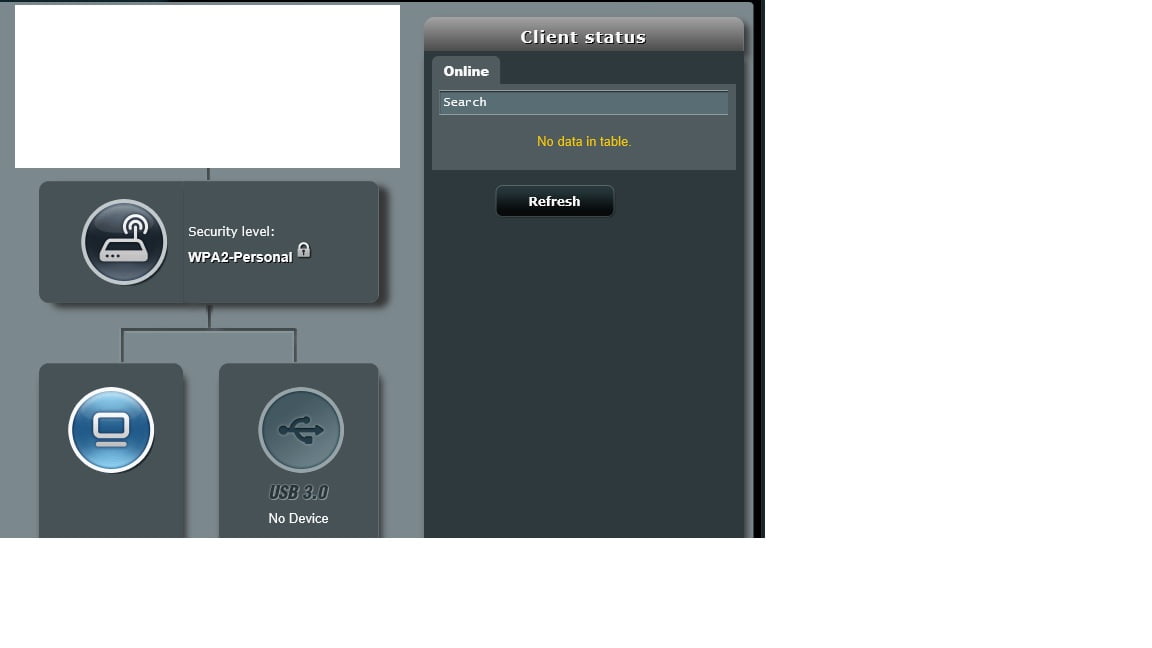
I’ve tried IE, Chrome & Edge on my PC and Chrome & MIUI browser on my phone and when the client status shows nothing it’s the same on them all, so I think the browser software & a single device GUI issue can be ruled out and it’s definitely the router not displaying correctly.
I’ve noticed when I disabled WiFi with the physical button on the front, the LAN devices show as connected clients and stay there even when I navigate to multiple other menu’s, re-enable WiFi again and all clients disappear.
I then hit Quick internet setup and cancel any changes, both the Wired & WiFi clients showed up then disappeared again when I navigated to a different menu and back again.
During the times no clients show up there are no DHCP leases shown in the system log, but the WiFi logs shows clients connected.I already had AirTime Fairness disabled on 2.4G, I’ve now disabled it on 5G, but the clients are still not on the list. I’d seen no issues with it enabled on 5G (not fully tested), but definitely had issues on 2.4G with distant devices dropping, hence why I had it disabled on that radio.
After making this change no matter what I do now the connected clients don’t show
It just seems extremely buggy to me and I don’t know why
You need to login in order to vote
December 25, 2018 at 9:45 am in reply to: ASUS – DSL-AC88U / DSL-AC3100 Firmwares (beta's) etc. Looks like a new Beta Release for the DSL-AC88U is available, this version has Telnet enabled and improved 2.4GHz wifi (I believe). DSL-AC88U_v9.10.06_build581_debug.w.zip https://www.asuswebstorage.com/navigate/s/604D61534F2541D1B3CE1CC031A697E4Y UK Sentinel In a completely... #1829Hi
I’ve just bought this router as my 6+ year old RT-N66U was having a few intermittent WiFi issues and as it had been so good I thought I’d buy the DSL-AC88U as a future proof upgrade for when I get Ultrafast.
I’ve not had the pain most of you have had with the memory leak and other bugs, so thought I was lucky and the issues have been ironed out. When initially setting it up I spotted a FW update to 591, so went ahead with update.
I’ve noticed several issues, firstly I had to set up the WAN as Plusnet + YouView to get IP channels to work with BT + Youview, I know this is documented as a fix on a few forums, but I can’t see what changes are made in the config, the PPPoE and .1q trunking settings look the same to me, along with IGMP. I also notice lack of telnet access so I can’t see the full config applied to see what it’s changing.
I notice that in the client network map, there were clients showing upon 1st setup, but as soon as I made a change eg. setting 2.4G to 20MHz, the clients list disappeared, including wired. This is on any device I use to log into the router, so appears to be not a browser cache issue.
Has anyone had this same issue and have a fix ?I also had another strange issue after I rebooted it yesterday, the router wan’t allowing any wired devices to connect, none were getting an IP ADD. I tried several reboots of the router and the issue persisted. All WiFi devices were able to connect fine.
I had to do another factory default (using the reset button on the back) to resolve this and wired devices now work OK againHas anyone else had these issues and make any suggestions as to what could be wrong
ThanksAttachments:
You need to login in order to vote
-
AuthorPosts