

› UKTH forums › 🛜 Wireless Routers & Modems › ASUS & Wireless › ASUS – DSL-AC88U / DSL-AC3100 Firmwares (beta's) etc. Looks like a new Beta Release for the DSL-AC88U is available, this version has Telnet enabled and improved 2.4GHz wifi (I believe). DSL-AC88U_v9.10.06_build581_debug.w.zip https://www.asuswebstorage.com/navigate/s/604D61534F2541D1B3CE1CC031A697E4Y UK Sentinel
- This topic has 1,438 replies, 106 voices, and was last updated 6 months, 2 weeks ago by
 alt.james.

- AuthorPosts
- December 26, 2018 at 9:28 am #1834
very odd indeed, so apart from clients not showing in the UI, both Wired and Wireless connections are stable?
Do you have a smart TV connected, or a NAS etc, as does sound a little like some other device is issuing DHCP addresses, i.e. TV etc.
if not then it does sound like it maybe worth going back to firmware verion Version 1.10.06_Build585 and flash twice to see if same issue happens again?
You need to login in order to vote
December 26, 2018 at 10:27 am #1835Hi
I do have a NAS and smart TV’s but never had issues on the old RT-N66U.
DHCP Server is disabled on my NAS and I set up the router with the TV’s off, so couldn’t have been issuing IP ADD’s when the problem is apparent even if they were which I doubt as they are client based devices and have had no issues previously.
With the settings I’ve implemented on WiFi, everything appears stable, other than the issue I had the other day where no wired devices would pick up an IP ADD, but WiFi was OK.Are you suggesting rolling back to 585, with a default config and then upgrading to 591 twice all while the config is defaulted. Or do you mean rollback to 585, configure the device and then flash twice to 591.
Do you see any DHCP leases in your System Log > DHCP leases as I don’t see any, despite clients getting an IP ADD from the router, which I can see in the System Log > General Log
Cheers
You need to login in order to vote
December 26, 2018 at 11:17 am #1836roll back to 585 and flash twice with 585, just for testing purposes and see if issue remains after factor rest and all default settings etc.
Other option is disconnect all devices from wifi, then change Router IP to 192.168.50.1 and LAN DHCP pool/range to say 192.169.50.10 – 200 and then see if clients are indeed getting DHCP from Router or another device.?
I do not have my DSL-AC88U running as I use Netgear XR500 and ASUS RT-AC86U, but in my System Log > General Log, its says –
c 25 21:53:47 dnsmasq-dhcp[11726]: DHCPOFFER(br0) 192.168.50.240 xx:xx:xx:xx:xx:xx
Such fun ;-)
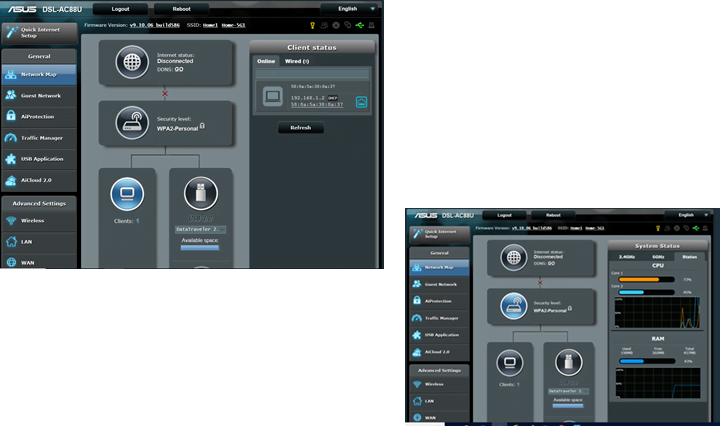
Edit: I have just plugged back in my DSL-AC88U to test, and with firmware’s 591 and 586 it showed a single client connecting and all seemed OK (see below)
Hope that helps?
Attachments:
You need to login in order to vote
January 1, 2019 at 3:49 pm #1841I have owned this router for over a year.
The reason I keep it is that I’m on a long line and I get a decent speed boost on VDSL using this device over the plusnet home hub.
I have tried every firmware and am currently using the 591 release.
I have done a factory reset via the red button on the back and flashed this firmware twice, before manually reentering all my settings.
I have 2 main problems that have been consistent since I started using this device.
- When i use the initial setup the router can’t seem to deal automatically with my plusnet account. I have to enter the details manually.
- The port forwarding for my QNAP NAS and Foscam ip cameras has never worked properly. One of my 3 cameras has worked very occasionally, but never consistently.
Previously I have used Tplink vdsl router with no problems and the plusnet home hub with no problems. I’d go back to one of these routers if it weren’t for the speed boost I get using the Asus. I have tried contacting customer support but get no response. Any ideas?
You need to login in order to vote
January 1, 2019 at 4:13 pm #1845When you use the ASUS DSL-AC88U QiS to setup initial configuration for the router, parameters like PlusNet Username Name and Password does have to be entered Manually
For port Forwarding are cameras on (static IP) and are they IPV4 / v6?
I recall from back in July last year it was mentioned that there appeared to be no way to limit which external source IP addresses can connect in via port forwarding/firewall rules.
Is this still the case with latest firmware?
Also, for testing only. try disabling firewall, this use to be a big issue with ASUS routers as Port forwarding did work, but after a few hours, stopped and may help explain cause of issue?
You need to login in order to vote
January 2, 2019 at 3:45 am #1846Hi UK Sentinel
Here is some feedback to the testing you suggested.My job involves networking on corporate networks, & was pretty sure there was no other DHCP server on my network, so checked with wireshark to be sure.
I upgraded/downgraded and cleared all config, but the clients disappearing issue was still apparent, so set about bringing devices online 1 by 1, these same devices that were all connected to my N66U previously. So after hours and hours of testing, I have found these issues appear to be caused by suspected DHCP issues/bugs.ISSUE 1. Devices disappearing from the Network Map > Clients section & System Log > DHCP leases, showing no entries.
This was caused by a several devices on my network trying to join with an apostrophe in the name, For Example my Xioami Phone: MI8-Yoz’sMi8 & My Yamaha Amplifier: Yoz’s-Amp. As soon as I took these devices offline the other devices showed in the clients list again. Funnily enough my LG Phone: Marks’s LG G3, joined as ‘android-xxxxxxxx’ so didn’t exhibit the problem.
I never had this issue on the N66U. but have got around it by renaming the devices on the devices themselves. I can see other people having this issue, without knowing.
There is also no View List under the number of clients in this firmware like with my previous router.ISSUE2. Only 32 devices are able to get static IP ADD’s despite the GUI saying “Manually Assigned IP around the DHCP list (Max Limit : 64)” in the LAN > DHCP Server section.
You are able to add more than 32 devices to the list, but anything after 32 does not pick up the manual IP ADD that is assigned in the list.
Regardless of whether anyone believes manual assignment is the right way to go in a home network, that is outside the scope of this issue, as it should be able to do 64 statics from the DHCP Pool.
I suspect also a part of this same problem is that once 32 Devices have also been named/assigned, you then can’t manually change the name of the device, by clicking on the device in Network Map > Clients. Change the device name of client 33 and it has no effect and reverts to whatever it was previously.
Also I believe at the same time, the System Log > Wireless Log shows no devices connected to either Radio, once I ensure the manual addresses configured are 32x or below and clients show in the Wireless Log.Issue3. DHCP stops providing IP ADD’s on LAN interfaces.
I am not 100% sure what causes this issue fully as yet as I have been unable to recreate it after seeing it 3 times previously, but normally happens after a reboot. I can get my PC an ip add by using the secondary LAN port on my PC, but I have to default the router for devices connected to the router on LAN port 1 & 4 to pick up IP ADD’s again. With only LAN 1 or 4 connected, the LAN LED on the front of the router remained unlit.
It could be caused by my CCTV camera registering as ‘LocalHost’ in the System Log > DHCP Leases section. I renamed the Camera within the clients section, but it doesn’t change it in DHCP leases. During one of the times there was a problem, I removed the camera from the DHCP manually assigned addresses and then re-added it and the issue was resolved.
I have logged onto the camera and it’s a Linux Busybox, there is no option to change the hostname on the device itself as it’s read only OS,
This may not specifically be an issue with ASUS itself as LocalHost should ideally not be used, but I’ve seen some discussions that Merlin and perhaps ASUS, when you changed the device name in GUI either it also changed it to match in the DHCP Lease section or there was an option to change the DHCP lease name too.
It also may not even be related to the CCTV Camera. these were just my thoughts.
It could be the attempt to add more than 32 statics to the router that then breaks it upon reboot regardless if these are then deleted. I can’t figure out the cause from the router logsIssue4. The System Log > General Log is not large enough
From the System Logs the DHCP Software appears to be an out of date release 4.1.1-P1
Jan 1 03:56:48 DSL-AC88U daemon.info dhcpd: Internet Systems Consortium DHCP Server 4.1.1-P1, https://www.isc.org/software/dhcp/
The latest release is 4.4.1 and there have been many bug fixes, but I am unsure what version the other ASUS routers are running.
https://ftp.isc.org/isc/dhcp/4.4.1/dhcp-4.4.1-RELNOTESI understand you’re possibly in direct contact with ASUS, so would appreciate if these issues can be flagged to them, to resolve the bugs in new firmware releases
I’ll also use the feedback section and see if I get a response.
Cheers
MarkYou need to login in order to vote
January 2, 2019 at 11:52 am #1849Hi Yos
I will pass to ASUS your detailed list so ASUS can have a look at your findings and hopefully fix in future releases
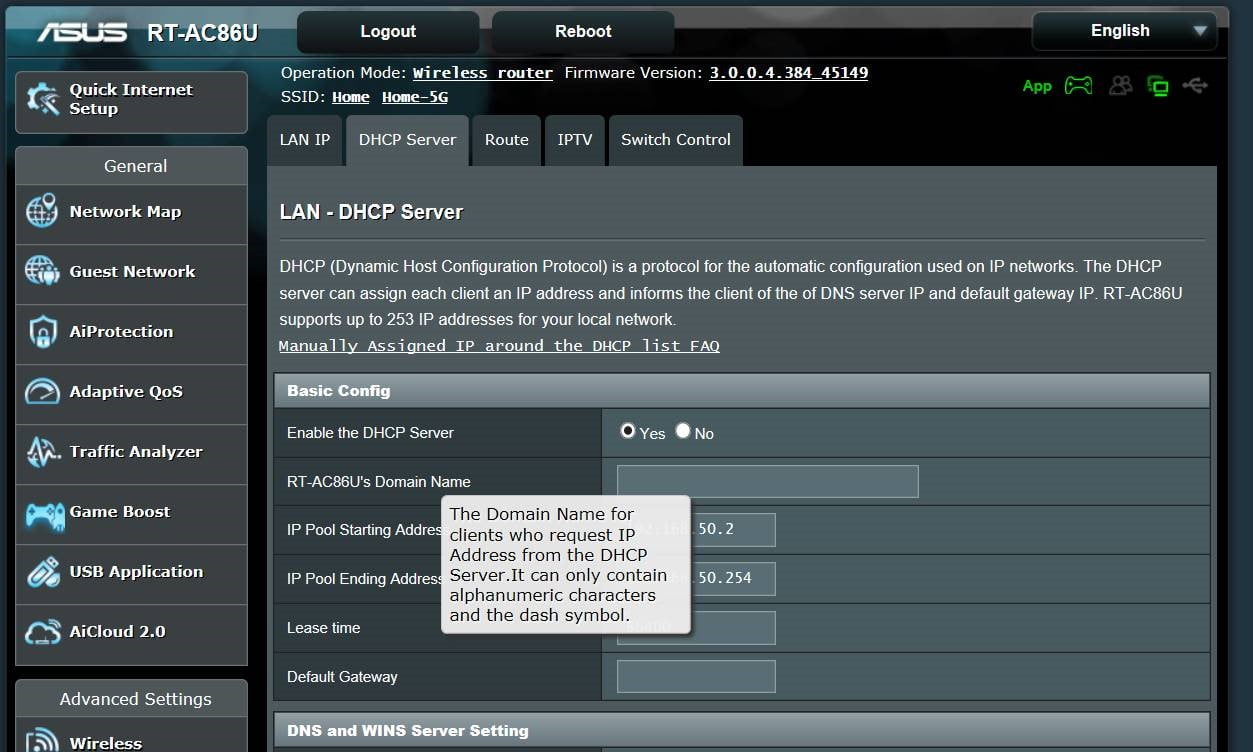
Regarding Issue 1: my RT-AC86u does state in LAN > DHCP: Only Alphanumerical and dashes characters are allowed as is USB Application (Samba Share) etc. I assume this is enforced in other areas also regarding naming conventions etc. and TBH, using apostrophe within a naming convention is a little (non- standard) ;-)
Can I just clarify, was these findings generally with Firmware 591?
Glad to see you have been busy 😉
UK Sentinel
Attachments:
You need to login in order to vote
January 2, 2019 at 3:15 pm #1851Hi
On the DSL-AC88U, there isn’t any text regarding illegal characters in LAN > DHCP but I agree about an apostrophe in the DHCP hostname as outside of the standard. However this is just naming the device itself on the phone/amp & then this appears be be forwarded in the DHCP request, so perhaps a manufacturer issue as the LG didn’t have the same problem as configured name wasn’t in the DHCP offer. But I have no idea why it was working on the RT-N66U.
I can see others having this same problemIssue 1 was also apparent on 585 also, but all other testing was on 591.
I have 39 devices in total on my home network with more smart lighting and plugs in the post, I like to give bands of IP ADD’s from the scope for certain things hence the manually configured addresses and the router should be able to do this. I know I could do this with subnetting on another layer2&3 device, or disable DHCP on the router and enable the DHCP server on my NAS but the router should be able to do this.
At the moment it is working with 29 statics, I would reboot again to test issue3, but I’m sick of having to set everything up everytime there is an issueCheers
You need to login in order to vote
January 2, 2019 at 4:30 pm #1852I have dropped ASUS (DSL Team) an email to have a look at your findings and totally agree the manual IP assignments should easily exceed 32, so I am keen also for ASUS to address.
Your time and efforts will not be in vain and thanks for you efforts on this.
When I hear back from ASUS, I will of course post here so others can view also
ASUS for routers are a little like Marmite, you either love it., or hate it ;-)
UK Sentinel
You need to login in order to vote
January 2, 2019 at 6:16 pm #1853Hi, I’ve had this router for about a week and initially was very pleased but then got WiFi drop outs. I have therefore disabled airtime fairness but also wondered if there were any other settings or tweaks I should be aware of. TBH the DHCP seems flaky and now I am worried I made the right decision in going for another Asus!
Any help would be appreciated.
Cheers in advance
You need to login in order to vote
January 2, 2019 at 7:00 pm #1854ASUS will fix any DHCP issues, If it is just Wifi that you are having fun with, and have a typical set-up (unlike) @Yoz – then try also upgrading router to latest official firmware – Version 1.10.06_Build591 and under Wireless > General, change Group Key Rotation to 0 or 86400 and see if this helps?
For 2.4GHz issues, if you are not using Smart Connect (if available), try changing Channel Bandwidth to 20 MHz and Control Channel to say 3 or 7
If issues are a particular device, ANDROID – then let us know and we can advise?
Alas the biggest issue with ASUSWRT is there are so so many options, but likewise, this is why ASUSWRT is so good ;-)
You need to login in order to vote
January 2, 2019 at 10:47 pm #1855Thanks I’ll give those a go and report back.
I like asuswrt as I used to use ddwrt. The flexibility is usually great.
Just been disappointed so far and getting it in the neck from the family!!!
You need to login in order to vote
January 3, 2019 at 2:37 am #1856[quote quote=1854]ASUS will fix any DHCP issues, If it is just Wifi that you are having fun with, and have a typical set-up (unlike) @yoz – then try also upgrading router to latest official firmware – Version 1.10.06_Build591 and under Wireless > General, change Group Key Rotation to 0 or 86400 and see if this helps? For 2.4GHz issues, if you are not using Smart Connect (if available), try changing Channel Bandwidth to 20 MHz and Control Channel to say 3 or 7 If issues are a particular device, ANDROID – then let us know and we can advise? Alas the biggest issue with ASUSWRT is there are so so many options, but likewise, this is why ASUSWRT is so good
[/quote]I was having a few issues on 2.4G to start with.
I disabled Airtime Fairness set my 2.4G SSID to 20Mhz and used channel 13 (same as previously on my N66U) and this now seems to be OK.
Using WiFi analyzer software on my phone I could see some numpty near me has set their 2.4G to 40MHz on channel 9, so I will get a bit of interference. But Channel 1 is overpopulated.
One thing I did notice though, was the AC88U doesn’t seem to be quite as powerful as the N66U. This shouldn’t be the case as I would think the regulatory maximum power should be applied with Tx Power Adjustment set to Performance) But I have a WiFi RGB controller for my decking lights and the controller now struggles to stay connected, looks like it drops off about -80dB. I’m thinking of using my N66U in bridging mode to provide more coverage, but I’m trying not to do anything else at the moment with all the DHCP issues I’ve been having, also like @Manzaboy I am getting it in the neck too from the other half as I’ve spent so much time messing around.You need to login in order to vote
January 3, 2019 at 7:53 am #1857Yes, family and no Wifi, I have been there myself many times, The DSL-AC88U does not yet support MU-MIMO, so hopefully this will help when eventually introduced in all areas for wifi.
You need to login in order to vote
January 3, 2019 at 9:46 am #1858[quote quote=1841]
- When i use the initial setup the router can’t seem to deal automatically with my plusnet account. I have to enter the details manually.[/quote]
I am currently with PlusNet and my password contains a comma at the end and it’s not saved by the router so it’s never able to connect automatically – I have to go into the WAN settings and add a comma at the end and then it works. This has NEVER worked (even 503) – ASUS are aware of it and have a fix for it lined up.
You need to login in order to vote
- AuthorPosts



 [/quote]
- You must be logged in to reply to this topic.