

› UKTH forums › 🛜 Wireless Routers & Modems › ASUS & Wireless › ASUS ZenWiFi AX Whole Home Tri-Band Mesh WiFi 6 System Not sure if this is the right place to ask…. I am thinking of upgrading my Google Mesh wifi to the above. Has anyone used this and does it...
- This topic has 1,416 replies, 25 voices, and was last updated 1 month, 1 week ago by
 UK Sentinel.

-
AuthorPosts
-
November 24, 2022 at 3:25 pm #21813
Not such a good day today. The router done a random reboot at 15:11 (GMT) and then wouldn’t connect to all wireless devices, so I had to power cycle the router. All seems ok for the moment.
I’ve sent to logs to ASUS via the feedback tab.
The system setup is: 2x ZenWiFi XT8 (1x main router, 1x node) Firmware Version:3.0.0.4.388_21617 + 2x ZenWiFi Mini AX1800 (2x nodes) Firmware Version 3.0.0.4.386_49599 with hardwire Backhaul to all nodes.
Liked by:
You need to login in order to vote
November 24, 2022 at 3:29 pm #21814I’ve sent to logs to ASUS via the feedback tab.
Hopefully just a blip
In a completely sane world, madness is the only freedom (J.G.Ballard).
You need to login in order to vote
November 24, 2022 at 3:38 pm #21815I will see what ASUS say, I am sure it is nothing to worry about and more annoying keep seeing that repetitive log message and would be interesting if others are seeing this also. But as you say, RMerlin is probable correct and relates to NAT accelerator and is meaningless to us users, but no harm in checking
That’s great! Thanks!
I was surprised that no one else chimed in experiencing this.
There is couple reports about it from last year but no real answers.
Liked by:
You need to login in order to vote
November 24, 2022 at 9:42 pm #21825I will see what ASUS say, I am sure it is nothing to worry about and more annoying keep seeing that repetitive log message and would be interesting if others are seeing this also. But as you say, RMerlin is probable correct and relates to NAT accelerator and is meaningless to us users, but no harm in checking
That’s great! Thanks! I was surprised that no one else chimed in experiencing this. There is couple reports about it from last year but no real answers. https://www.snbforums.com/threads/asus-xt8-kernel-error-after-running-newest-beta-xt8-9-0-1-4-386_46197_gfc5aa34_nodpi-for-1-week.75946/
I do not get this continuously, which is why I haven’t taken notice at all. Twice in the log in 2 hours (again no idea what it means though):
Nov 24 20:38:22 kernel: ^[[0;33;41m[ERROR archer] archer_mcast_activate,577: ADD_PORT: WLAN SSID has already been added: egress_port 7, current 0x0002, new 0x0002^[[0m
Nov 24 20:47:01 kernel: ^[[0;33;41m[ERROR archer] archer_mcast_activate,577: ADD_PORT: WLAN SSID has already been added: egress_port 7, current 0x0002, new 0x0002^[[0m
Liked by:
You need to login in order to vote
November 25, 2022 at 12:45 am #21826I will see what ASUS say, I am sure it is nothing to worry about and more annoying keep seeing that repetitive log message and would be interesting if others are seeing this also. But as you say, RMerlin is probable correct and relates to NAT accelerator and is meaningless to us users, but no harm in checking
That’s great! Thanks! I was surprised that no one else chimed in experiencing this. There is couple reports about it from last year but no real answers. https://www.snbforums.com/threads/asus-xt8-kernel-error-after-running-newest-beta-xt8-9-0-1-4-386_46197_gfc5aa34_nodpi-for-1-week.75946/
I do not get this continuously, which is why I haven’t taken notice at all. Twice in the log in 2 hours (again no idea what it means though): Nov 24 20:38:22 kernel: ^[[0;33;41m[ERROR archer] archer_mcast_activate,577: ADD_PORT: WLAN SSID has already been added: egress_port 7, current 0x0002, new 0x0002^[[0m Nov 24 20:47:01 kernel: ^[[0;33;41m[ERROR archer] archer_mcast_activate,577: ADD_PORT: WLAN SSID has already been added: egress_port 7, current 0x0002, new 0x0002^[[0m
Thanks for posting this!
There is periods where it calms down on my router as well but then it goes nutz
Can’t wait to se what ASUS techs explanation is.
You need to login in order to vote
November 25, 2022 at 5:24 pm #21838Happy to test. Thanks. What is different between the offline and the online 21617 available here?
After I spoke with ASUS, the new Offline seems pointless, (older revision number and less improvements) and ASUS agreed
Are you still able to share that new offline beta for testing?
The new release is proving to be very problematic for me with wireless backhaul connection issues once a day.
You need to login in order to vote
November 25, 2022 at 5:49 pm #21840I am out tonight but just checked the link ASUS sent myself and it is no longer valid for that particular firmware.
Sometimes to go forward you have to go back 😉
In a completely sane world, madness is the only freedom (J.G.Ballard).
You need to login in order to vote
November 25, 2022 at 7:46 pm #21841I am out tonight but just checked the link ASUS sent myself and it is no longer valid for that particular firmware. Sometimes to go forward you have to go back
Thanks, if it the link is gone I will revert to the last offline beta you shared. Come on ASUS, get your act together……
Liked by:
You need to login in order to vote
November 25, 2022 at 7:56 pm #21842In a completely sane world, madness is the only freedom (J.G.Ballard).
You need to login in order to vote
November 25, 2022 at 8:31 pm #21843Decided to test gnuton 388.1 alpha 1, cannot be any worse than official 21617…..
Liked by:
You need to login in order to vote
November 26, 2022 at 1:09 am #218443.0.0.4.388_21617 from Asus XT8 site
I’m sitting at 72 hours of up-time, 173MB free ram and no wireless backhaul disconnects.
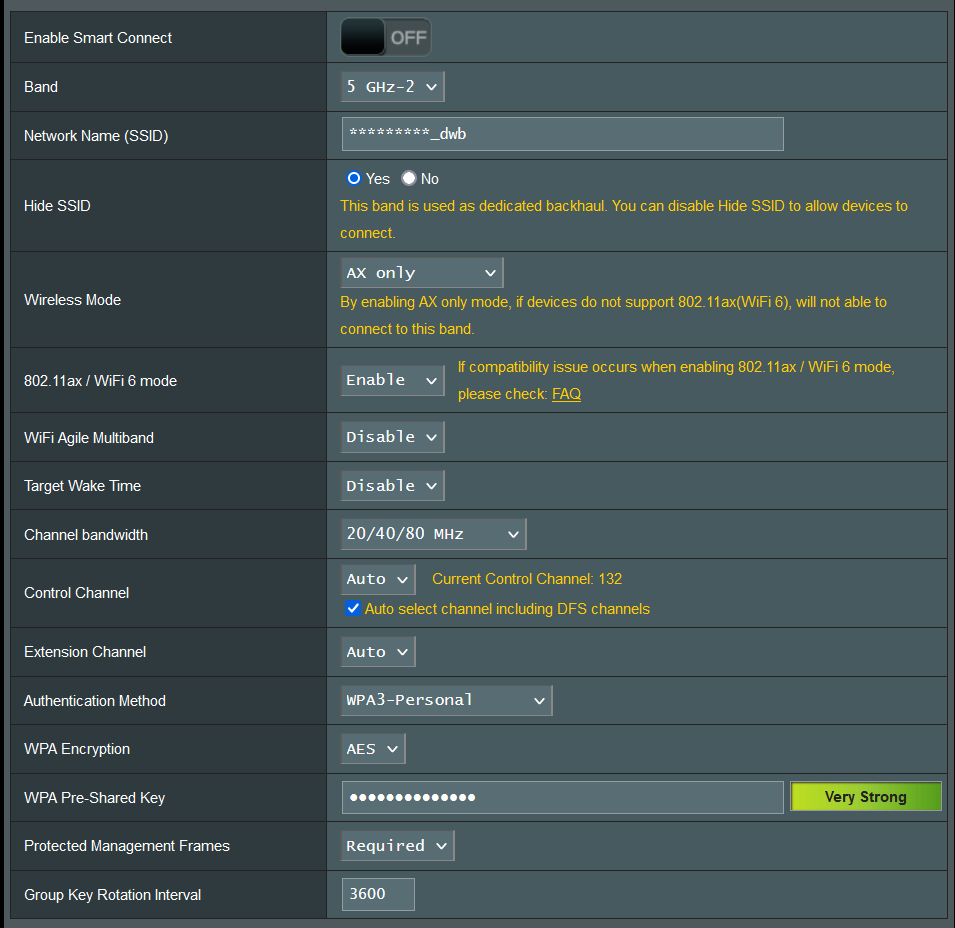
I’ve attached a screenshot of my backhaul setup. The only “controversial” setting may be channel bandwidth @20/40/80, but I’ve found since owning the XT8 that if you give it the opportunity to fall back to 20/40 if needed, it’ll never drop off 5G, that being said I’ve never actually noticed the backhaul drop below 80Mhz. When I had it locked to 80Mhz, it did fallback to 2.4 a few times on older fw.
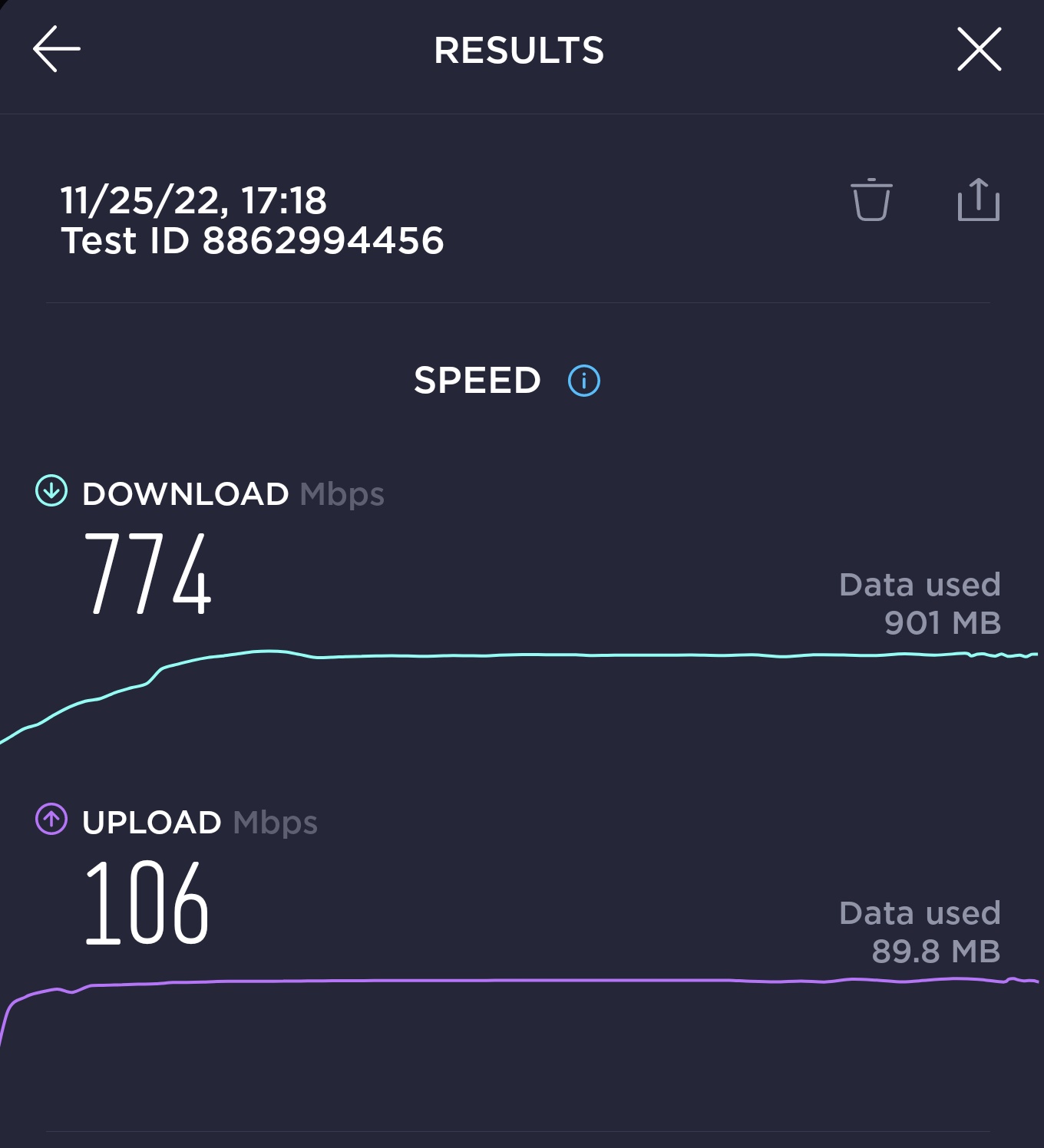
The router and node connections generally speed test above 700mbps on my 1000×100 connection.
Edit: attached current router and node speedtest results
Attachments:
You need to login in order to vote
November 26, 2022 at 5:57 am #21851I’ve attached a screenshot of my backhaul setup. The only “controversial” setting may be channel bandwidth @20/40/80, but I’ve found since owning the XT8 that if you give it the opportunity to fall back to 20/40 if needed, it’ll never drop off 5G, that being said I’ve never actually noticed the backhaul drop below 80Mhz. When I had it locked to 80Mhz, it did fallback to 2.4 a few times on older fw.
That is very interesting especially the @20/40/80 setting, thanks you for sharing
In a completely sane world, madness is the only freedom (J.G.Ballard).
You need to login in order to vote
November 26, 2022 at 11:46 am #21852Can’t wait to se what ASUS techs explanation is.
I have not had anything back from ASUS as yet, hopefully should have feedback early next week
In a completely sane world, madness is the only freedom (J.G.Ballard).
Liked by:
You need to login in order to vote
November 26, 2022 at 11:50 am #21853Can’t wait to se what ASUS techs explanation is.
I have not had anything back from ASUS as yet, hopefully should have feedback early next week<noscript>
</noscript>Thank you! :)
You need to login in order to vote
November 26, 2022 at 10:23 pm #21854I’ve had another router crash this evening and when it recovered a number of my 2.4GHz devices refused to connect. I done a power cycle of the router and all the nodes and still they wouldn’t connect, so I regreased back from “3.0.0.4.388_21617 ” to “3.0.0.4.386_49873-g72159cc” and everything came back online?
Looks like I’ll be sticking with “3.0.0.4.386_49873-g72159cc” until Asus sort things out.
Just a though, but up until now all the firmware upgrades had been stable, until they added the new VPN and wire guard settings. Could that be the issue?
Liked by:
You need to login in order to vote
-
AuthorPosts



- You must be logged in to reply to this topic.