

› UKTH forums › 🛜 Wireless Routers & Modems › ASUS & Wireless › Converting DSL-AC68U to RT-AC68U for use as AiMesh Node – Solved
- This topic has 198 replies, 13 voices, and was last updated 2 years, 5 months ago by
 UK Sentinel.

- AuthorPosts
- March 13, 2019 at 12:18 pm #2362
Thanks for doing that, saved me some work.
So it would seem that it’s moving back from Merlin’s fork that is the issue.
You need to login in order to vote
March 13, 2019 at 12:24 pm #2363[quote quote=2362]Thanks for doing that, saved me some work. So it would seem that it’s moving back from Merlin’s fork that is the issue.[/quote]
I didn’t think of that variation, I will try this also today….
You need to login in order to vote
March 13, 2019 at 1:56 pm #2364Put DSL-AC68U into recovery mode and flashed with RMerlin (RT-AC68U) firmware and run the following telnet (ssh)commands
nvram set odmpid=”RT-AC68U”
nvram set asuscfeodmpid=”RT-AC68U”
nvram set asuscfecommit=1
nvram commit
factory reset router and it still thinks it is an ASUSWRT-Merlin (RMerlin) router.
Then put DSL-AC68U into recovery mode, flashed back to DSL-AC68U firmware and factory reset.
Router correctly reports all DSL functionality and DSL options which was not available when DSL-AC68U was flashed with RMerlin firmware ;-)
Hopefully the link to the firmware I supplied in earlier post will assist @booji
You need to login in order to vote
March 13, 2019 at 2:01 pm #2365Which is exactly what I would expect to happen, with the recovery completely wiping everything back to factory settings with the latest firmware.
So Mr Booji what are you doing that is different?
You need to login in order to vote
March 13, 2019 at 2:32 pm #2366Even though your issue is not related to the previous guides provided by @Six and myself in this thread, maybe for your particular issue, when you load the firmware, make sure you use the ASUS utility/restoration tool, put router into recovery mode and then load firmware via ASUS utility/restoration tool using an ethernet connection.
Once router has rebooted (10 mins) then go thru the basic setup and then factory reset (via UI)router and hopefully you should have your DSL back again
DSL-AC68U_9.0.0.4_384_21126-fix01_DSL_1.0.4.6.trx.zip
https://www.asuswebstorage.com/navigate/a/#/s/58B75732687142A9A91B350C9373EC024You need to login in order to vote
March 13, 2019 at 8:48 pm #2371[quote quote=2365]Which is exactly what I would expect to happen, with the recovery completely wiping everything back to factory settings with the latest firmware. So Mr Booji what are you doing that is different?[/quote]
I wish I knew, you would think the recovery would wipe all the settings
Hi Guys,
Sorry about the delay in reply, while i’m trying stuff out on this damned router I have no internet. At the moment I’ve got the internet by connecting to my old HG616 moden via Lan port 1 so each time I experiment I have to undo everything then redo everything after.
I did try and turn my DSL-AC68U to RT-AC68U last night using the latest asus stock RT firmware and it worked. doing the telnet commands set to to the right web interface.I couldn’t get it working with my bt HG612 modem though but it more the fact that I wasn’t sure how to do it since it seemed to differ slightly from the DSL-AC68U version.
So I reverted back to the DSL-AC68U by putting into recovery mode, flashed back to DSL-AC68U firmware and factory reset.
Unlike your attempt you mentioned earlier even though it went back to the DSL-AC68U it still displayed it as a RT-AC68U in the top right hand corner and also on device ID (and still no DSL drivers loaded).
I managed to get it back to the right settings by telnet with the complete opposite commands.
nvram set odmpid=”DSL-AC68U”
nvram set asuscfeodmpid=”DSL-AC68U”
nvram set asuscfecommit=1
nvram commit
This got me back to my original DSL broken router again. At 2.30am I gave up.
I got read your other posts today (at work) and tried with the old 21126-fix01 firmware you gave a link to ealier. This is exactly what I did.
1/ Reset the router NVram (WPS button/Power on)
2/ Boot into recovery (Reset/power on until LED blinks slowly)
3/ Load firmware over Ethernet using Asus recovery tool. (unit reboots after recovery)
4/ Reset the router NVram (WPS button/Power on)
4/ Plug in DSL connection and reboot. The router fires up in setup mode. do the minimum of setting username and leave wireless open (just enough to get into the router GUI).
5/ Load 21126-fix01 firmware over Web GUI and reboot
6/ repeat set 5 (as asus recommend doing this twice)
Waited with bated breath on reboot and…….no DSL no DSL driver loaded! Aaaarrrgh.
So even using the tried and tested 21126-fix01 hasnt worked either.
I have now reconfigured with the HG616 moden just to send this message. One thing I have though about and that not ALL parts of the NV are cleared during the reset. After all when you coverted your DSL-AC68U to RT-AC68U even though you did a factory restore some elements of the NVram still remained since , even after updating firmware, you had to telnet to change the ID. Now maybe I could have had a partly corrupted bad flash that knock out something in the NV ram and this still survives a WPS button/Power on NV ram clear. This might explain why not all is cleared.
So I thought I would do a NVRam text dump with a router with minimal settings (ie just user admin/admin123, wireless open and telenet enabled). If I could compare this with another DSL-AC68U nv ram dump I may be able to spot any differences. What do you think?
Another odd thing I noticed last light was if you manually set the VDSL link there is no username/password box on the GUI but there is for ADSL. I have no idea why this is. I had previously restored an old (pre router fail) config file to set the DSL setting up and this has the username/password box after the config is loaded. Look at the router info on a clean reconfigured router and it’s not there.
You need to login in order to vote
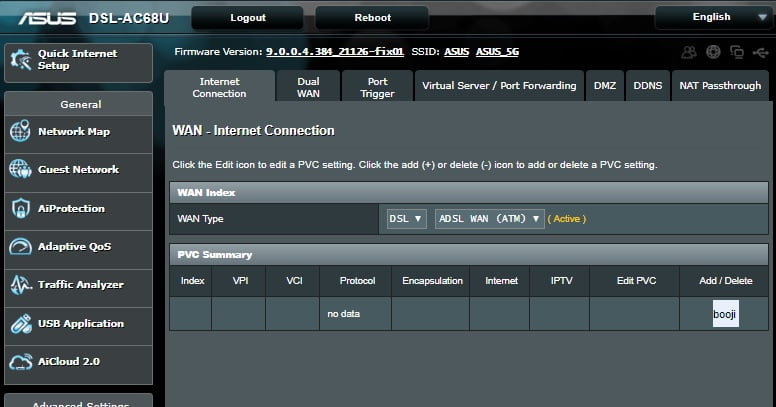
March 13, 2019 at 9:03 pm #2372Edit, no problem with delay in response, we all have day jobs, can you screen dump a picture of your UI when you log in like in the Screen dump below ? via a different browser from the one you are currently using ?
Also, you detail – Reset the router NVram (WPS button/Power on) – at this stage is unwise, a soft reset is what I did (via User Interface) try this option instead.?
Also, you may have a stubborn Cache on your PC, just maybe worth trying this whole process on a different PC, but I am clutching at straws a little and looks like you might just have to use it as a RT-AC68U only?
This is most odd and I am sure it is not a damaged NVRAM ;-)
Attachments:
You need to login in order to vote
March 13, 2019 at 9:55 pm #2374back in the room…eventually.
After a bit of digging i’m pretty sure things are surviving factory restore/firmware upload.
I have uploaded a few pages. These pages are captured after a full Asus firmware tool restore and hard NVreset. As you can see on the WAN/PVC summary page there is a section called “booji” this was a username with previous DSL settings that have somehow survived the cleaning process. Now if I go into the booji setting it shows a VDSL section without a username or password. The ADSL setting (picture not included) has a username and password box. I didn’t notice these pages before since I restored my config from an older version so didn’t spot it. It sort of explain why my router is confused since there’s part of the router settings that hasn’t been cleared out.
You need to login in order to vote
March 13, 2019 at 10:02 pm #2378It does and it looks good (better), some of your settings for DSL are in the Advanced Settings > Administrative Tab also.
Also, best not to load old settings from backup- as this will confuse router even further ;-)
You need to login in order to vote
March 13, 2019 at 10:14 pm #2379I will recheck to see if these settings survive tomorrow as the whole process takes a few hours from start to end. If these settings surviving are indeed a cause for the router being confused the next step would be finding a way to clear them. I can always supply an NVram status tomorrow which might show a bit more of what’s going on.
You need to login in order to vote
March 15, 2019 at 12:32 am #2383I can confirm that after a factory reset/firmware upload the “booji” setting seems to survive. I did an nvram search and the word “booji” did not crop up but I would assume it is somewhere in memory. I would assume it’s probably in a file that can be removed so if anyone could point me in the right direction I would appreciate it.
You need to login in order to vote
March 15, 2019 at 7:37 am #2384[quote quote=2383]I can confirm that after a factory reset/firmware upload the “booji” setting seems to survive. I did an nvram search and the word “booji” did not crop up but I would assume it is somewhere in memory. I would assume it’s probably in a file that can be removed so if anyone could point me in the right direction I would appreciate it.[/quote]
Try just running thru the ASUS QiS, Quick Internet Setup. to see if this gets rid of the odd reference?
Alas, I have no idea which file to modify
You need to login in order to vote
March 15, 2019 at 7:24 pm #2385The ‘booji’ text on those screen shots makes absolutely no sense whatsoever.
If this survives a hard reset it indicates that you have been meddling with things that you don’t understand. I can’t think of a single reason why your own name would appear in the configuration apart from a failed attempt to vanity name either the router or some of it’s settings.
I’m finding it very very hard to believe that the only thing you have done is accidentally flash Merlin RT firmware on this router.
Please be honest if you’ve done something else it would be useful to know what it is so that we can help you reverse it.
Please do a hard reset of the router then enable telnet, connect to it and post the entire results of the command NVRAM show.
You need to login in order to vote
March 16, 2019 at 9:32 pm #2386[quote quote=2385]If this survives a hard reset it indicates that you have been meddling with things that you don’t understand.[/quote]
Why on earth would I make things up and lie to you? If I meddled I would have told you. I did nothing more than foolishly upload the wrong firmware and I am as mystified as you why this “booji” anomaly has happened. The only reason why I have tried to ask for help on forums is that I realise that is that this has got me stumped. My forte in engineering is more of an electronic nature and I left the computer world in the days of the commodore pet and programming machine code into an 8080 processor by just using a hex keyboard. I have no doubt things have moved on since!
If you don’t believe me then it’s your choice and I respect that considering the fact that this makes no sense. However If you do want to see the contents of the NVram then I’m happy to post it.
You need to login in order to vote
March 16, 2019 at 10:14 pm #2387 - AuthorPosts




- You must be logged in to reply to this topic.