

› UKTH forums › 🛜 Wireless Routers & Modems › ASUS & Wireless › Latest Beta Firmwares for DSL-AC51 to DSL-N66U incl. DSL-AC750 Latest DSL ASUSWRT firmware v9.1.2.3_502-g2bdb05b now available. (latest firmware’s are at end of threads) For following ASUS DSL Modem Routers: DSL-AC51 DSL-AC52U DSL-AC55U DSL-AC56U DSL-AC750 DSL-N10-C1 – (extended beta support...
- This topic has 1,129 replies, 77 voices, and was last updated 1 year, 6 months ago by
 UK Sentinel.

- AuthorPosts
- October 29, 2019 at 4:44 am #4899
Thanks ! updated DSL-AC51 to beta _790. After the update from beta_783, router did not come up by itself. Had to put it in rescue mode. After another power-cycle it came back ON again.
You need to login in order to vote
October 29, 2019 at 8:39 am #4900[quote quote=4899]Thanks ! updated DSL-AC51 to beta _790. After the update from beta_783, router did not come up by itself. Had to put it in rescue mode. After another power-cycle it came back ON again.[/quote]
Let us know if the RAM usage issue is fixed in this latest firmware ;-)
You need to login in order to vote
October 29, 2019 at 11:33 am #4901Hello, beta _790. are you satisfied?
Is there a problem?
When is Official published?
You need to login in order to vote
October 29, 2019 at 11:41 am #4902[quote quote=4901]Hello, beta _790. are you satisfied? Is there a problem? When is Official published?[/quote]
Usually Official is released 10 days after beta released, hopefully others using the latest firmware can comment if any problems
You need to login in order to vote
October 29, 2019 at 3:44 pm #4903I guess beta _790 for DSL-N17U also doesn’t have too much improvement?
You need to login in order to vote
October 29, 2019 at 4:19 pm #4905[quote quote=4903]I guess beta _790 for DSL-N17U also doesn’t have too much improvement?[/quote]
not many improvements, the DSL-N17U is a basic model, so only small changes
You need to login in order to vote
October 30, 2019 at 1:43 am #4907[quote quote=4901]Hello, beta _790. are you satisfied? Is there a problem? When is Official published?[/quote]
Too early to tell. But I will update here if it has improved.
Still many issues that need to be addressed, like System Log – General Log erratic behavior. But the memory leak issues are the most important to me.
DSL-AC51 running Beta_790 – runtime 1 day – Free RAM 7 MB – stable
You need to login in order to vote
October 30, 2019 at 2:54 am #4910Hi, just stumbled onto this thread. I’m having some trouble updating from stock 1.1.1.3 to one of the beta firmwares on my DSL-N66U. It gives me the message Invalid Firmware then reboots, is there a particular order of updates I need to do, or a mod of some kind? Last one I tried was DSL-N66U_v9.1.2.3_790-g61d41b5. Cheers
You need to login in order to vote
October 30, 2019 at 6:58 am #4911[quote quote=4910]Hi, just stumbled onto this thread. I’m having some trouble updating from stock 1.1.1.3 to one of the beta firmwares on my DSL-N66U. It gives me the message Invalid Firmware then reboots, is there a particular order of updates I need to do, or a mod of some kind? Last one I tried was DSL-N66U_v9.1.2.3_790-g61d41b5. Cheers[/quote]
Welcome, I have sent ASUS an email asking if the firmware they give me is suitable for the DSL-N66U based in your region (different wifi standards) etc.
The file downloaded from the link is in a compressed state and needs to be unzipped. (extracted)
Maybe worth trying an earlier firmware version (below) and double check to ensure you router is DSL-N66U ? (rectangular box mounted vertically with no external aerials) ?
v9.1.2.3_783
https://www.asuswebstorage.com/navigate/a/#/s/8DF21FF35D4E46F092D567B3B305AA7BY
Edit: ASUS say firmware is suitable for your region and they have run a dummy install and for them (ASUS) firmware installed correctly.
Liked by:You need to login in order to vote
October 30, 2019 at 7:01 pm #4914Hi, I’ve installed the beta_790 version, I’m testing it doesn’t have any problems right now …
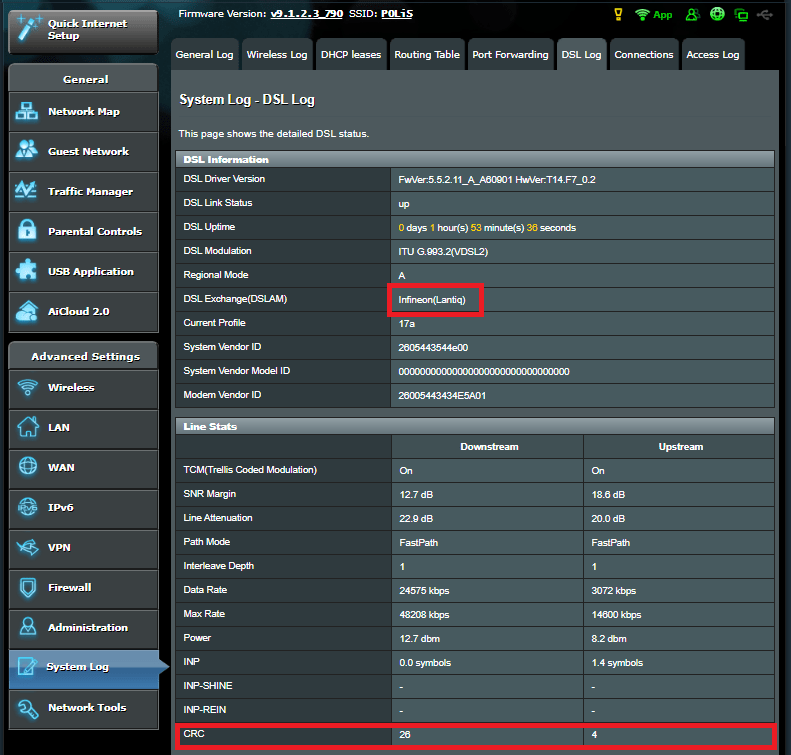
There are a few questions I’d like to ask you.* What’s the difference between Broadcom or Lantiq? and which is the most stable DSL?
* CRC errors occur, around 3000 daily, does this create problems and what exactly does CRC errors do?
Thank you…
My regards.Attachments:
You need to login in order to vote
October 30, 2019 at 8:18 pm #4917Broadcom vs Lantiq (DSL) a very big subject with just as many opinions as there could be.
My view Below:
Broadcom (DSL) are good on long lines which are prone to noise and offers good synch rate.
Lantiq (now owned by Intel) started poorly but has improved and is a good all rounder (DSL) chipset. As owned by INTEL, early days yet but initial reports for there (DSL) chipset are looking good.
Broadcom chipsets (hardware) is good, but over the recent years (Netgear D7000 v1 – ASUS DSL-AC88U) used the latest Broadcom 63138 and have suffed from very poor coding from chipset manufactures (my view).
Lantiq – such as within DrayTeK , Fritz!Box and certain TP-Link models seems to be work well and be reliable, but the (DSL) chipset do tend to have a slightly lower synch rate compared to the Broadcom DSL chipset.
Personnely as a Gamer, I find that Lantiq DSL chipset used in conjuction with a router that has Qualcomm wifi/Ethernet Switch etc. seems to produce a better image and higher quality sound (my view) – yes I tried a Broadcom Modem to compare with Lantiq Modem and Lantiq seemed to be an improvement. (I have tried them all)
Broadcom DSL chipset and Broadcom Wifi still is good, but for those pesky campers, image quality is everything
On your Screen dump, you are connecting to an Exchange / Cabinet which has the Infineon (Lantiq) chipset, these work OK but as you DSL-N66U has a Ralink (DSL) chipset, then this maybe why your CRC count is high and changing to a Broadcom/Lantiq based modem could help ?
3000 CRC errors a day is not bad, but not ideal, any CRC errors are not ideal, the fact that those are near end means they are errors the modem picks up on the incoming signal – meaning that the frames coming into the modem are damaged in some way and the modem must request they be resent, which could slow down your connection.
A quick overview (mine) and hopefully helpful
You need to login in order to vote
October 31, 2019 at 9:44 am #4930Thank you very much, for your perfect expression …
I’m using DSL-N17U … :) I think what you’re saying is valid in this modem …
I’m in beta_790, testing it …do you think beta_783, beta_790 more up to date?
You need to login in order to vote
October 31, 2019 at 10:36 am #4932[quote quote=4930]Thank you very much, for your perfect expression … I’m using DSL-N17U … :) I think what you’re saying is valid in this modem … I’m in beta_790, testing it …
do you think beta_783, beta_790 more up to date?[/quote]Yes more upto date firmware is _790, the DSL-N17U has a MediaTeK DSL Chipset (Ralink was Brought by MediaTeK) and not as good as Broadcom / Lantiq (my view) for VDSL.
MediaTeK works well (high synch) on short DSL lines with no line noise etc. DSL for ADSL is very tweakable with MediaTeK chipsets.
You need to login in order to vote
November 19, 2019 at 2:24 am #5065Took a bit longer than expected due to a power outage, but router is now running 14 days stable with beta_790, surpassing the old record of max 12 days. Memory usage is slowly creeping up, so will have to see how many more days it will last.
DSL-AC51 running Beta_790 – runtime 1 day – Free RAM 7 MB – stable
DSL-AC51 running Beta_790 – runtime 14 days – Free RAM 5 MB – stable
You need to login in order to vote
November 19, 2019 at 9:13 am #5068 - AuthorPosts




- You must be logged in to reply to this topic.