


Forum Replies Created
-
AuthorPosts
-
Is this device now EOL? No updates from Asus for 7 months now.
i hope not…
but to their credit, the last update has been great for me. i think the last 3 months or so, i’ve never had any issues at all. only thing i do every week is to make sure to reset (by schedule) both nodes, the main and the 2nd one. No drop offs in speed, never had that problem anymore where the 2nd node’s wifi backhaul reverts to the slow 2.4Ghz – yellow led light.
been a happy customer here.
Liked by:
You need to login in order to vote
same here… Asus Asia (Philippines) has no driver/firmware page for the XT8 also
Liked by:
You need to login in order to vote
Running Firmware Version:3.0.0.4.388_23012, I have the same problem – the node will drop back to 2.4GHz once or twice per week. Id like to know more about your comment re. DFS channels, unticking the include box, and Smart Connect. What do you recommend and how do these settings affect the node dropping back to 2.4 GHz?
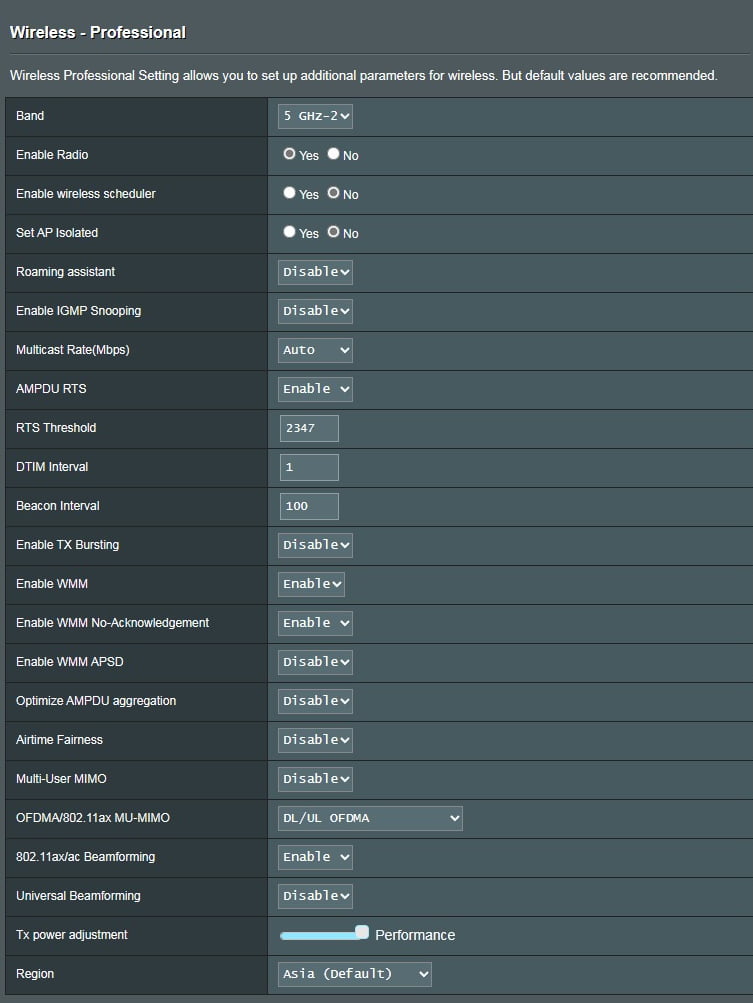
Here are some of my backhaul settings – if anyone spots something amiss, please let me know!
Hi Jim. Had the same pesky problem for months until I’ve found the most stable settings that worked for me.
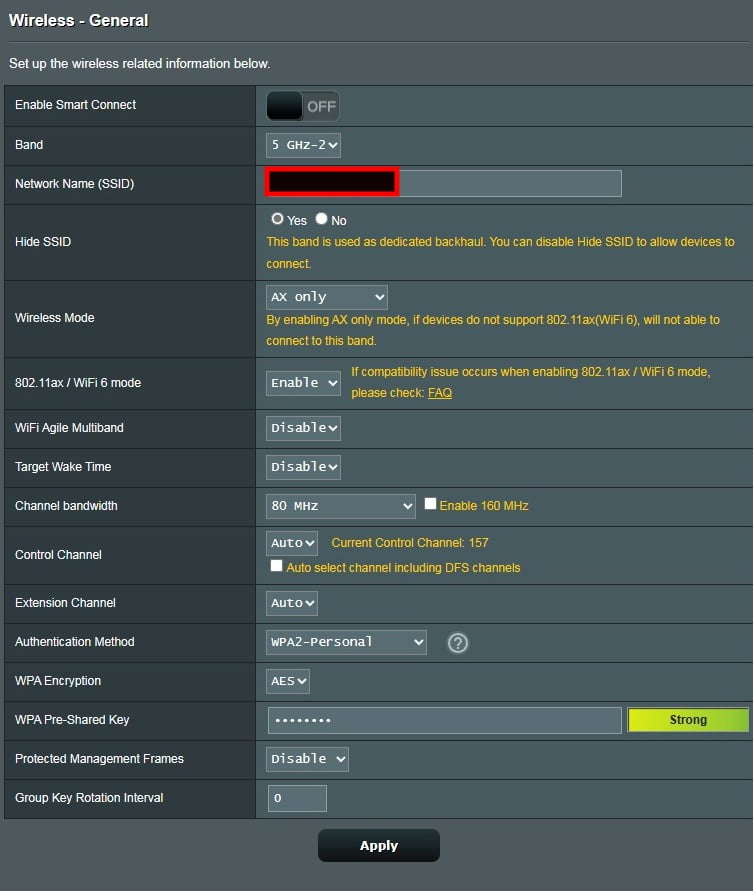
I’ve set up my 5ghz-2 settings to:
- AX only
- Wifi6 enabled
- Channel Bandwidth 80mhz
- Control Channel Auto
Btw, am using the latest firmware and this setting works perfectly (at least for me). Been over a month and the 2nd node never reverted to 2ghz (weak signal).
Hope this helps
Please refer to the screenshot below for a better view:
Attachments:
Liked by:
You need to login in order to vote
Had to downgrade back to 22525. Seems much more stable than the latest one. Both main and node keep dropping clients or passing users to each other like a hot potato. Client won’t stick to a closer node even if the user is not moving. Weird. At least in 22525, i’ve solved my backhaul problem by auto restarting the node every other day, that way keeps it refreshed and ram cleared i assume.
this latest fw is a no-no for me.
You need to login in order to vote
[quote quote=23717]Interestingly enough this new version is not showing on the Asus website, at least when I check. Last posted on website is still 22525.[/quote]
same here (asus asian region), not posted yet
but i still downloaded and also did a dirty install.
so far no obvious bugs have come up yet. Will observe for now.
Liked by:
You need to login in order to vote
[quote quote=23529]
I always first do a pin reset at the bottom of the XT8 and then hard factory reset like below: https://www.asus.com/support/FAQ/1046973/#:~:text=Turn%20the%20power%20off.,and%20turn%20the%20router%20on. I do this on each XT8’s. Always find that this way it clears everything in terms of settings. Also, try plugging the XT8 to a different power socket. I had a situation where my extension lead was faulty and caused the XT8 to reboot.
may i ask, so you haven’t had any downtimes or wireless backhaul switching to 2.4ghz ever since updating to this latest update (and doin the factory reset)?
I have had no occasion where my backhaul went to 2.4GHz on FW 22525.[/quote]
well, that’s really encouraging. I suppose resetting is really the key to this problem. Thanks again.
Liked by:
You need to login in order to vote
[quote quote=23494]
Just adding that I have a MACID lookup table and 44:a8:fc is showing as “Apple” device of some kind. And in reference to the May 5 date in the log – that is normal when it reboots until it can connect to NTP to get current date/time. I also had my node drop to 2.4 after 33-34 days of uptime, which is still great in my mind. I’ve just decided to schedule a once a week 4am reboot and hopefully things stay as stable as they have been for me. I have my backhaul locked to channel 173 and locked to 160 and GUI shows “Great” for connection strength.[/quote]
am doin this now too, i bought a smart wifi outlet plug, set a sked to turn off the node everyday 4am and turn back on again after 2mins. Small annoyance but hopefully keeps my 5ghz wireless backhaul up and steady daily.
You need to login in order to vote
[quote quote=23503]I always first do a pin reset at the bottom of the XT8 and then hard factory reset like below: https://www.asus.com/support/FAQ/1046973/#:~:text=Turn%20the%20power%20off.,and%20turn%20the%20router%20on. I do this on each XT8’s. Always find that this way it clears everything in terms of settings. Also, try plugging the XT8 to a different power socket. I had a situation where my extension lead was faulty and caused the XT8 to reboot.[/quote]
may i ask, so you haven’t had any downtimes or wireless backhaul switching to 2.4ghz ever since updating to this latest update (and doin the factory reset)?
You need to login in order to vote
[quote quote=23499]
I dread the factory settings reset, but if it would cure the backhaul problem, then i will have to try it and rebuild all my settings.
Alas, every time ASUS release a new firmware, tweaking is usually required, so alas no guarantees
[/quote]do i reset to factory settings via the web interface in the : Administration-Restore/Save/Upload Settin-Restore and click on the initialize all settings?
or do i reset via button on the router?
You need to login in order to vote
[quote quote=23495]
I also had my node drop to 2.4 after 33-34 days of uptime, which is still great in my mind.
Great news
[/quote][quote quote=23494]
Interesting, what is device [44:a8:fc:de:65:6a] ? and was this event log around the time the Aimesh backhaul dropped to 2.4GHz ? If disabling roaming assistant for you backhaul doesn’t prevent wireless backhaul from dropping to 2.4GHz, I would suggest you factory reset your AiMesh XT8 routers (all) and rebuild all (factory reset all) your mesh system from scratch
Just adding that I have a MACID lookup table and 44:a8:fc is showing as “Apple” device of some kind. And in reference to the May 5 date in the log – that is normal when it reboots until it can connect to NTP to get current date/time. I also had my node drop to 2.4 after 33-34 days of uptime, which is still great in my mind. I’ve just decided to schedule a once a week 4am reboot and hopefully things stay as stable as they have been for me. I have my backhaul locked to channel 173 and locked to 160 and GUI shows “Great” for connection strength.[/quote]
thanks also Larry!
You need to login in order to vote
[quote quote=23492]Interesting, what is device [44:a8:fc:de:65:6a] ? and was this event log around the time the Aimesh backhaul dropped to 2.4GHz ? If disabling roaming assistant for you backhaul doesn’t prevent wireless backhaul from dropping to 2.4GHz, I would suggest you factory reset your AiMesh XT8 routers (all) and rebuild all (factory reset all) your mesh system from scratch
[/quote]it’s an iphone.
I dread the factory settings reset, but if it would cure the backhaul problem, then i will have to try it and rebuild all my settings.
thanks always!You need to login in order to vote
[quote quote=23482]Yes, have a look through the log and see if anything is detailed in log when XT8 backhual dropped back to 2.4GHz ? ( I removed the link you provided to the logs – security) Alas, hopefully you know what time this happened, so this will enable you to pinpoint logs for that time period.[/quote]
after scrolling thru backwards, was looking for ‘weak signal’ or backhaul and after seeing the first weak and disconnect words, i saw something weird. The words diaconnect was logged at March 29, but the next line at the log says May 5???
Copied and pasted some of the ‘weird logs’ here:
https://mega.nz/file/gV5ySLKb#je995lu0sw0v_UNztWP1AK8AOvsDO56uPQ6ntUmdO4w
You need to login in order to vote
[quote quote=23467]Is there any clues in the General log to suggest what is happening ?[/quote]
Sorry. Is this the log i am supposed to get?
(log remove by admin – privacy concern)
You need to login in order to vote
Welp. Hehehe after 4 days, node’s LED light turned yellow again (weak signal). So frustrating.
will try disabling roaming assistant now. Sigh.
Liked by:
You need to login in order to vote
[quote quote=23403]If the above does not work, then try try disabling the 5Ghz (backhaul) roaming assistant. Do you live near an airport or military establishment as issue maybe radar interference ?[/quote]
will do. Thanks a lot again!
Liked by:
You need to login in order to vote
-
AuthorPosts


 [/quote]
 [/quote]