Forum Replies Created
-
AuthorPosts
-
Right, so cable directly to the Asus (as opposed to connecting the computer directly to the cable modem)? It’ll take some re-arranging because I don’t have an Ethernet cable that’s long enough, but I’ll give it a try and report back.
Thanks!
Liked by:
You need to login in order to vote
UK Sentinel,
With Adaptive QoS on and the router rebooted, the problem still remains. Here’s a screen shot of the QoS configuration:
Thanks,
Jim
You need to login in order to vote
UK Sentinel,
Thanks again for all your suggestions! Here’s what I found: Traffic Analyzer was (and is) disabled.
I’ll turn Adaptive QoS back on and will report what happens.
Thanks!
Jim
You need to login in order to vote
Thanks, UK Sentinel! Good advice, but unfortunately I see no way to disable NAT Acceleration. Also I confirmed that AI Protection and Adaptive QoS are disabled.
So I updated to the latest firmware FW_ZENWIFI_XT8_300438824768.The problem remains. Did anyone review the logs from my first post? Can anyone suggest other things to try?
Thanks!
You need to login in order to vote
Hello UK Sentinel,
Thank you for your detailed reply. I checked my General Log and found no indication of DFS or Radar. But when I checked my Wireless Log, I found the following (but I’m afraid I don’t know how to interpret this):
Following are details for 2.4 GHz:
SSID: “Heart of Gold2.4”
noise: -87 dBm Channel: 10
BSSID: D4:5D:64:8B:61:20 Capability: ESS ShortSlot RRM
Supported Rates: [ 1(b) 2(b) 5.5(b) 6 9 11(b) 12 18 24 36 48 54 ]
HE Capable:
Chanspec: 2.4GHz channel 10 20MHz (0x100a)
Primary channel: 10
HT Capabilities: 40Mhz SGI20 SGI40
Supported HT MCS : 0-15
Supported VHT MCS:
NSS1 Tx: 0-11 Rx: 0-11
NSS2 Tx: 0-11 Rx: 0-11
Supported HE MCS:
80 Mhz:
NSS1 Tx: 0-11 Rx: 0-11
NSS2 Tx: 0-11 Rx: 0-11Interference Level: Acceptable
Mode : AP OnlyFollowing are details for 5 GHz-1:
SSID: “Heart of Gold”
noise: -88 dBm Channel: 44/80
BSSID: D4:5D:64:8B:61:24 Capability: ESS RRM
Supported Rates: [ 6(b) 9 12 18 24(b) 36 48 54 ]
HE Capable:
Chanspec: 5GHz channel 42 80MHz (0xe22a)
Primary channel: 44
HT Capabilities: 40Mhz SGI20 SGI40
Supported HT MCS : 0-15
Supported VHT MCS:
NSS1 Tx: 0-11 Rx: 0-11
NSS2 Tx: 0-11 Rx: 0-11
Supported HE MCS:
80 Mhz:
NSS1 Tx: 0-11 Rx: 0-11
NSS2 Tx: 0-11 Rx: 0-11Interference Level: Acceptable
Mode : AP OnlyDFS status: state IDLE time elapsed 0ms radar channel cleared by DFS none</p>
Following are details for the backhaul 5 GHz-2:
SSID: “96D8D99FA6AD79135C46647FA0D3B750”
noise: -88 dBm Channel: 100/80
BSSID: D4:5D:64:8B:61:28 Capability: ESS RRM
Supported Rates: [ 6(b) 9 12(b) 18 24(b) 36 48 54 ]
HE Capable:
Chanspec: 5GHz channel 106 80MHz (0xe06a)
Primary channel: 100
HT Capabilities: 40Mhz SGI20 SGI40
Supported HT MCS : 0-31
Supported VHT MCS:
NSS1 Tx: 0-11 Rx: 0-11
NSS2 Tx: 0-11 Rx: 0-11
NSS3 Tx: 0-11 Rx: 0-11
NSS4 Tx: 0-11 Rx: 0-11
Supported HE MCS:
80 Mhz:
NSS1 Tx: 0-11 Rx: 0-11
NSS2 Tx: 0-11 Rx: 0-11
NSS3 Tx: 0-11 Rx: 0-11
NSS4 Tx: 0-11 Rx: 0-11
160 Mhz:
NSS1 Tx: 0-11 Rx: 0-11
NSS2 Tx: 0-11 Rx: 0-11
NSS3 Tx: 0-11 Rx: 0-11
NSS4 Tx: 0-11 Rx: 0-11Interference Level: Acceptable
Mode : AP OnlyDFS status: state In-Service Monitoring(ISM) time elapsed 53676600ms radar channel cleared by DFS channel 100/80 (0xE06A)
Channel Information
—————————————-
Channel 100 A Band, RADAR Sensitive
Channel 104 A Band, RADAR Sensitive
Channel 108 A Band, RADAR Sensitive
Channel 112 A Band, RADAR Sensitive
Channel 116 A Band, RADAR Sensitive, Passive
Channel 120 A Band, RADAR Sensitive, Passive
Channel 124 A Band, RADAR Sensitive, Passive
Channel 128 A Band, RADAR Sensitive, Passive
Channel 132 A Band, RADAR Sensitive, Passive
Channel 136 A Band, RADAR Sensitive, Passive
Channel 140 A Band, RADAR Sensitive, Passive
Channel 144 A Band, RADAR Sensitive, Passive
Channel 149 A Band
Channel 153 A Band
Channel 157 A Band
Channel 161 A Band
Channel 165 A Band
Channel 169 A Band
Channel 173 A Band
Channel 177 A BandStations List
—————————————-
idx MAC Associated Authorized RSSI PHY PSM SGI STBC MUBF NSS BW Tx rate Rx rate Connect Time
24:4B:FE:74:01:B8 Yes Yes -52dBm ax No Yes Yes Yes 4 80M 1621.3M 1621.3M 14:52:47============================================================
I’m afraid there’s much I don’t understand about how to configure this mesh system! It would be really great if there were a book/tutorial for configuring wifi networks using 5 GHz and mesh.
I’ve not yet updated the firmware or made the changes you suggest, but will follow up when I do.
Best Regards,
Jim
You need to login in order to vote
Running Firmware Version:3.0.0.4.388_23012, I have the same problem – the node will drop back to 2.4GHz once or twice per week. Id like to know more about your comment re. DFS channels, unticking the include box, and Smart Connect. What do you recommend and how do these settings affect the node dropping back to 2.4 GHz?
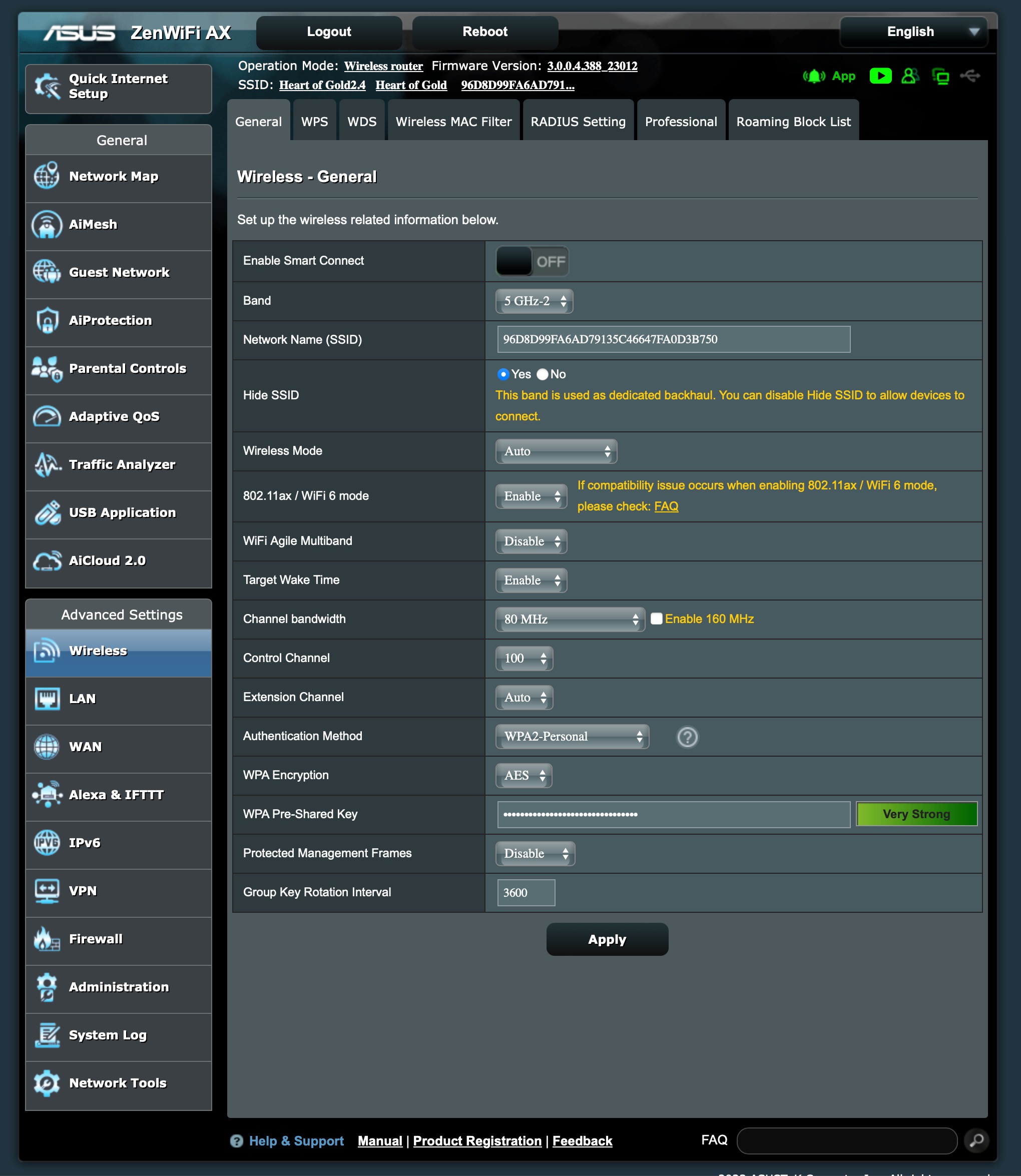
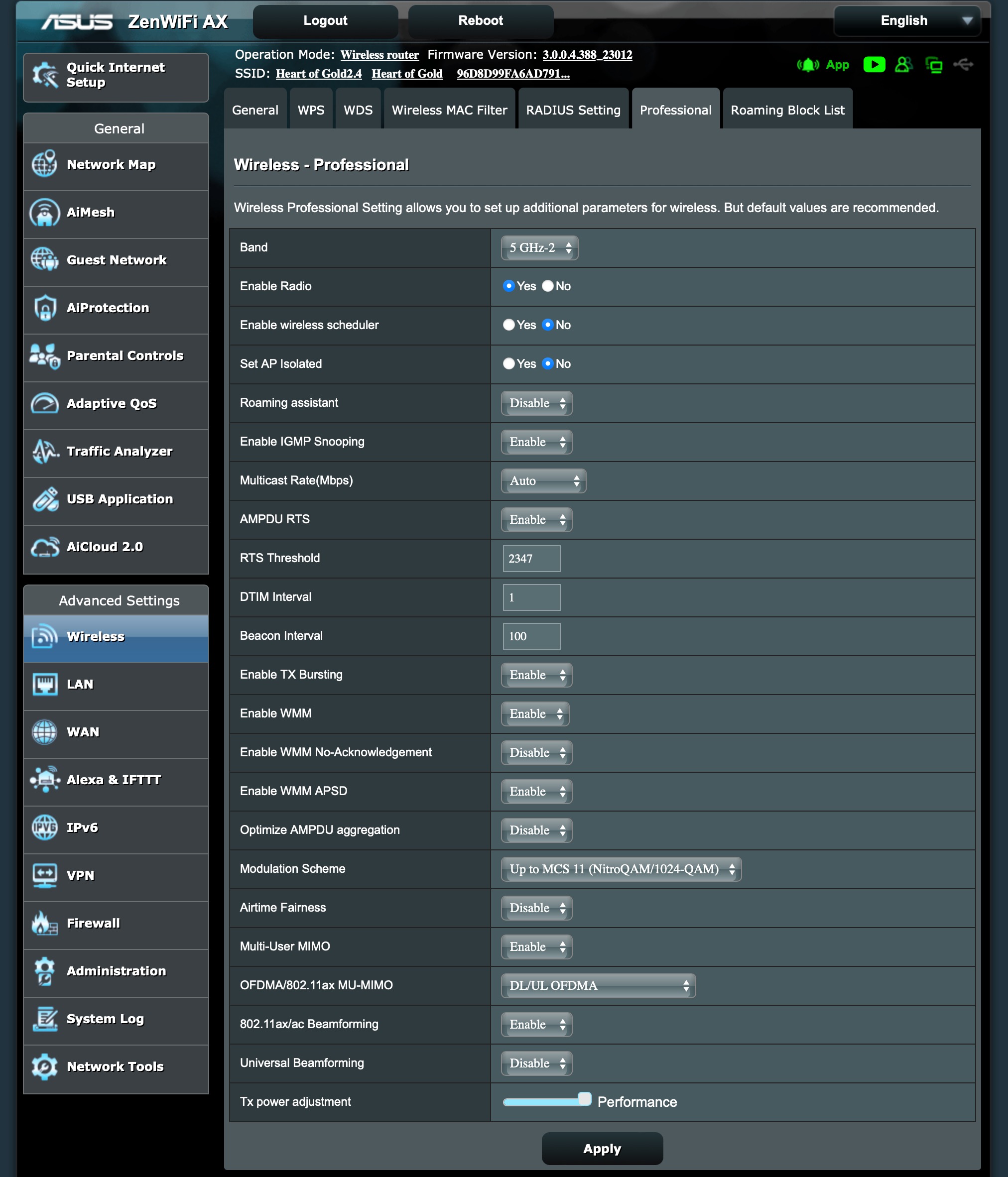
Here are some of my backhaul settings – if anyone spots something amiss, please let me know!
Attachments:
Liked by:
You need to login in order to vote
-
AuthorPosts