Forum Replies Created
-
AuthorPosts
-
3.0.0.4.388_21617 from Asus XT8 site
I’m sitting at 72 hours of up-time, 173MB free ram and no wireless backhaul disconnects.
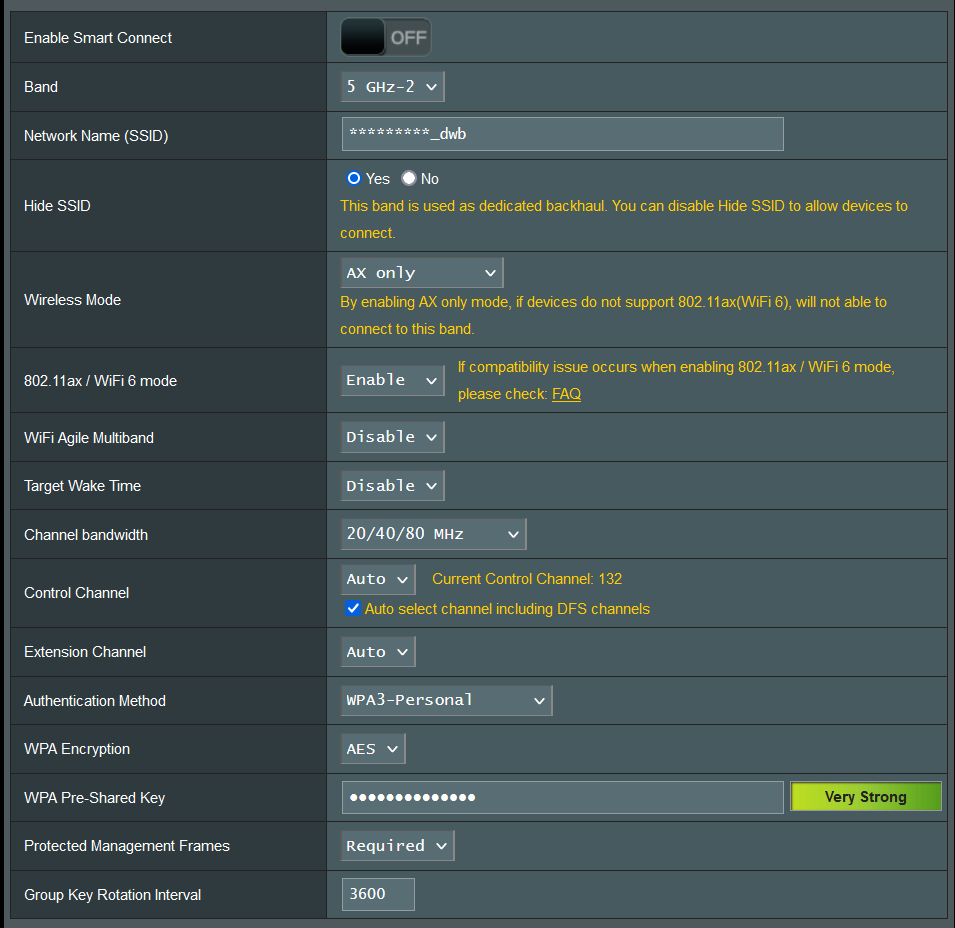
I’ve attached a screenshot of my backhaul setup. The only “controversial” setting may be channel bandwidth @20/40/80, but I’ve found since owning the XT8 that if you give it the opportunity to fall back to 20/40 if needed, it’ll never drop off 5G, that being said I’ve never actually noticed the backhaul drop below 80Mhz. When I had it locked to 80Mhz, it did fallback to 2.4 a few times on older fw.
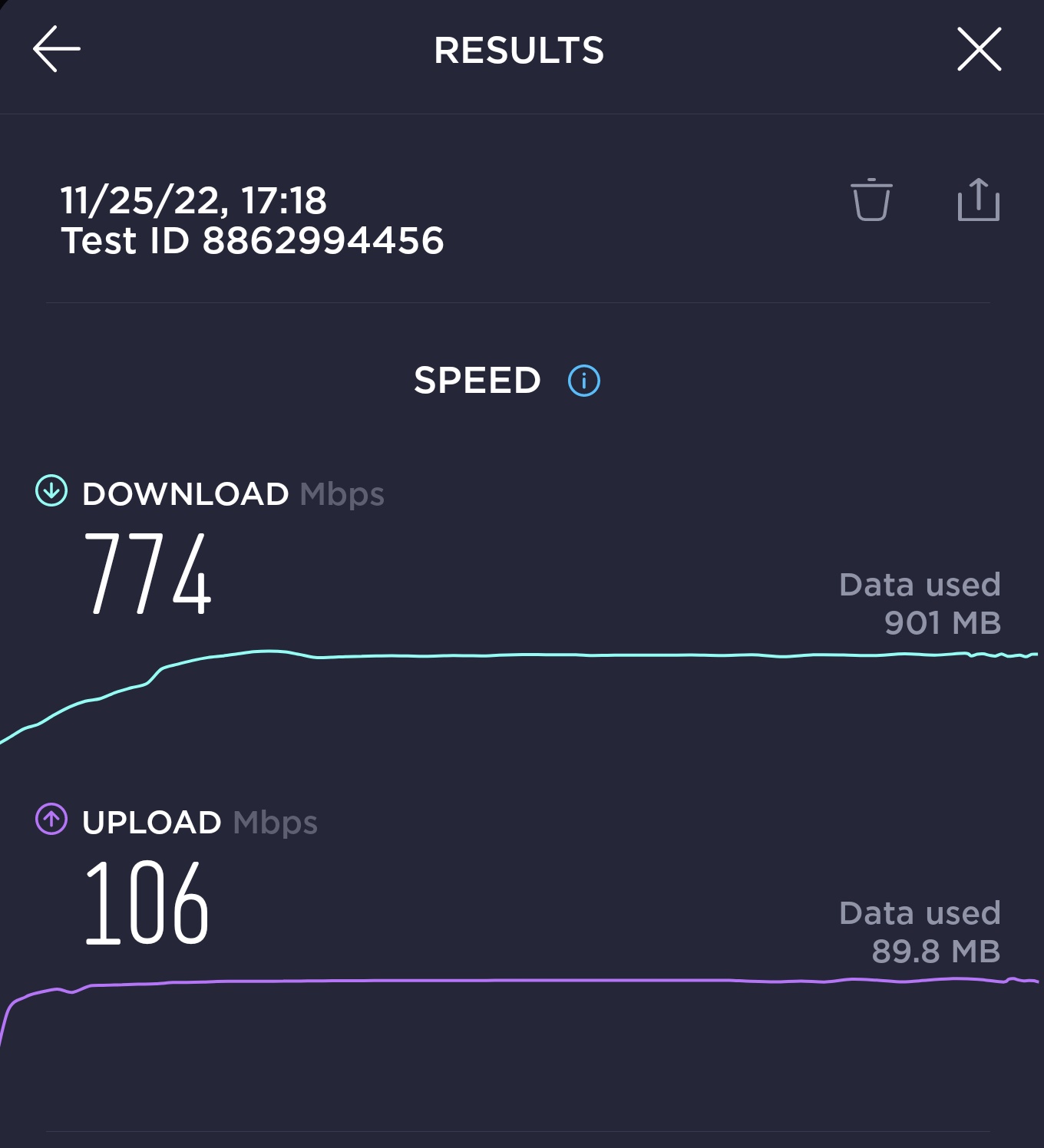
The router and node connections generally speed test above 700mbps on my 1000×100 connection.
Edit: attached current router and node speedtest results
Attachments:
You need to login in order to vote
Weird that the latest update isn’t shown when you check via the router interface, but is via the Asus app!
Same here (NA version 1) 9.0.0.4.388_21493 is still running smoothly for me, 140MB free, backhaul is at 385hrs connected and my TP-Link switches and plugs are at 384hrs Going to hold off on updating for a bit to see how 3.0.0.4388_21617 plays out.
Is your setup with 2 or 4 XT8’s? It seems that there are more issues on 21493 with 4 x XT8’s.
2 XT8s
3.0.0.4388_21617 is still not available via router gui, although it is via the app. Downloaded from Asus XT8 site and currently updating.
Liked by:
You need to login in order to vote
Weird that the latest update isn’t shown when you check via the router interface, but is via the Asus app!
Same here (NA version 1)
9.0.0.4.388_21493 is still running smoothly for me, 140MB free, backhaul is at 385hrs connected and my TP-Link switches and plugs are at 384hrs
Going to hold off on updating for a bit to see how 3.0.0.4388_21617 plays out.
Liked by:
You need to login in order to vote
My wireless backhaul up-time is now 205+ hours on 9.0.0.4.388_21493
Free RAM is 166MB with 18 active devices
2.4G TP-Link switches and plugs are rock solid at 204+ hours
5G Google/Nest devices seem to roam more than I’d expect, mostly sitting around 24+ hours
Liked by:
You need to login in order to vote
That sounds promising. Are you getting any 2.4 GHz disconnect issues?
I’m mostly using 2.4 for a half dozen TP-Link switches and they all show 104+ hours of access time on the network map.
Backhaul currently at 108+ hours.
You need to login in order to vote
Hi All, Newly arrived from SNB. 9.0.0.4.388_21493 is stable for me after 48 hours, although the router did crash and automatically recover Saturday afternoon. 19 devices connected with a mix of Windows computers, Android & IOS phones and IoT. Free ram is currently 185MB and tends to hover around 60-65% utilization. No issue with wireless backhaul, 50hr up-time, setup as AX only, WPA3, 80 Mhz connection Cheers, Rob
Now at 94+ hours up-time, 175MB free ram, and all good with wireless backhaul.
Wireless WAN to LAN speedtest off the node on a 1000x100mbps connection is around 800×100
Attachments:
Liked by:
You need to login in order to vote
Hi All,
Newly arrived from SNB.
9.0.0.4.388_21493 is stable for me after 48 hours, although the router did crash and automatically recover Saturday afternoon.
19 devices connected with a mix of Windows computers, Android & IOS phones and IoT. Free ram is currently 185MB and tends to hover around 60-65% utilization.
No issue with wireless backhaul, 50hr up-time, setup as AX only, WPA3, 80 Mhz connection
Cheers,
Rob
You need to login in order to vote
-
AuthorPosts