Forum Replies Created
-
AuthorPosts
-
UK Sentinel, Thanks for following up on this, much appreciated!
Cheers,
Rob
Liked by:
You need to login in order to vote
Just checking in. 3.0.0.4.388_23285 has been rock solid for me, with a 49 day up-time and an system log that spans 14 days, mostly just firmware update checks and device connect/disconnects. (Up-time would be longer but restart was due to power outage).
@UKSentinel any new firmware in the pipeline? It was a long time ago, June 19th, that Asus dropped their security advisory, which included XT8 and advised everyone to immediately update, but then they didn’t actually release the new firmware for XT8.
19 June 2023 – Asus Security Advisory
You need to login in order to vote
Judging by how quiet this thread has been lately, I guess 3.0.0.4.388.23285 has been working well for most folks.
I’ve had my main desktop connected the the MikroTik for the past couple of months, so I haven’t been paying as much attention to the XT8 network, but I logged in this morning and the up-time is 31+ days, with a system log dating back to June 2nd! CPU and memory look good as well. Seems like the most stable fw in quite some time.
Liked by:
You need to login in order to vote
I updated to 23012 on April 15 and no real issues so far. Up-time 12.5 days, free RAM 187MB and wireless backhaul looks good, no drops, steady at 80MHz
System log is showing 11+ days, normal Disassoc/ReAssoc entries, but nothing else of interest or concern.
You need to login in order to vote
Followup to Firewall configuration post, basic and advanced firewall setup and hardening from MikroTik Official (help.mikrotik.com)
You need to login in order to vote
IPv6 configuration (medo64.com)
Getting IPv6 Going on RouterOS 7.1
Change interface=bridge1 to your bridge name
Liked by:
You need to login in order to vote
VLAN Tutorials: The Network Berg is a conversational walk-through and NETVN82 is more watch, pause and follow the steps
(The Network Berg – YouTube)
Getting Started: MikroTik VLAN Configuration
(NETVN82 – YouTube)
MikroTik VLAN : Create and Configure ( VLAN, IP, DHCP, NAT )
A comprehensive user post on MikroTik VLANs, with sample configs (MikroTik Official: forum.mikrotik.com)
Using RouterOS to VLAN your network
Liked by:
You need to login in order to vote
DNS over HTTPS tutorial (jcutrer.com)
MikroTik Tutorial: How to enable DNS over HTTPS (DoH)
Updated URL for step 2. Download and Import root certificates:
/tool fetch url=https://curl.se/ca/cacert.pem
/certificate import file-name=cacert.pem passphrase=””CA cert info page (curl.se)
CA certificates extracted from Mozilla
Disable ISP DNS in Winbox:
IP/DHCP Client/, open configured DHCP Client and uncheck ‘Use Peer DNS’
PPPoE: PPP/, open configured PPoE Client and uncheck ‘Use Peer DNS’
You need to login in order to vote
Experiencing the same loss of connectivity as before with 3.0.0.4.388_22525
Very strange, I can access the router via IP address but not http://www.asusrouter.com
I can ping IP addresses from the router network tools, but cannot connect to any web pages from wired or wireless devices.
I can still surf normally through my connected VPN, but if I disconnect the VPN, it will not reconnect and if I disconnect from wired or wireless connection, devices will not reconnect.
Nothing unusual leading up to the loss of connectivity event.
It seems like DNS and DHCP are crashing, but nothing at all in the logs.
Power cycle resolves.
Liked by:
You need to login in order to vote
This process started with a search for a high powered wired router, which lead me to MikroTik and their RB5009UPr+S+IN which looks amazing. Cooler heads prevailed though and I decided to pick up a cheaper device to play around with.
I went back and forth between the hAP ax² and hAP ax³ and probably would have bought the hAP ax³ as a main device, but I’m still feeling like an RB5009 or successor is my end goal, so I settled on the hAP ax² as a good learn to use RouterOS device and potential backup/travel router, due to its modern specs and very small size.
Attachments:
Liked by:
You need to login in order to vote
Backhaul/Mesh was online according to the gui, 169hr and no drops in the logs, but no internet routing, and wifi was visible but wouldn’t connect on the router or node, very strange.
Liked by:
You need to login in order to vote
3.0.0.4.388_22525 went down this evening (PST) at 7 days and a few minutes of up time.
I could still connect to the gui via IP address, from ethernet connected computer, and there was nothing unusual in the logs (forgot to look at free ram
). According to Network Map page, WAN was up, and while WiFi was visible and mesh was connected, wireless devices dropped and couldn’t reconnect.Up until this happened, everything had been working normally, and after router/node manual reboot, all devices are back online.
Liked by:
You need to login in order to vote
dodgydrains wrote:
My setup is – ISP Router – XT8 router – XT8 Node 1 – XT8 Node 2 – XT8 Node 3 Wireless speedtest from device connected to Node 1 is basically full speed 750Mbps+. The one in my room is Node 2. From there I get 490Mbps with 160MHz and 340Mbps with 80MHz.Very interesting, with the network idling, I speedtest around 650-750, router and node: WPA3/AX Only/80Mhz/Auto
Attachments:
You need to login in order to vote
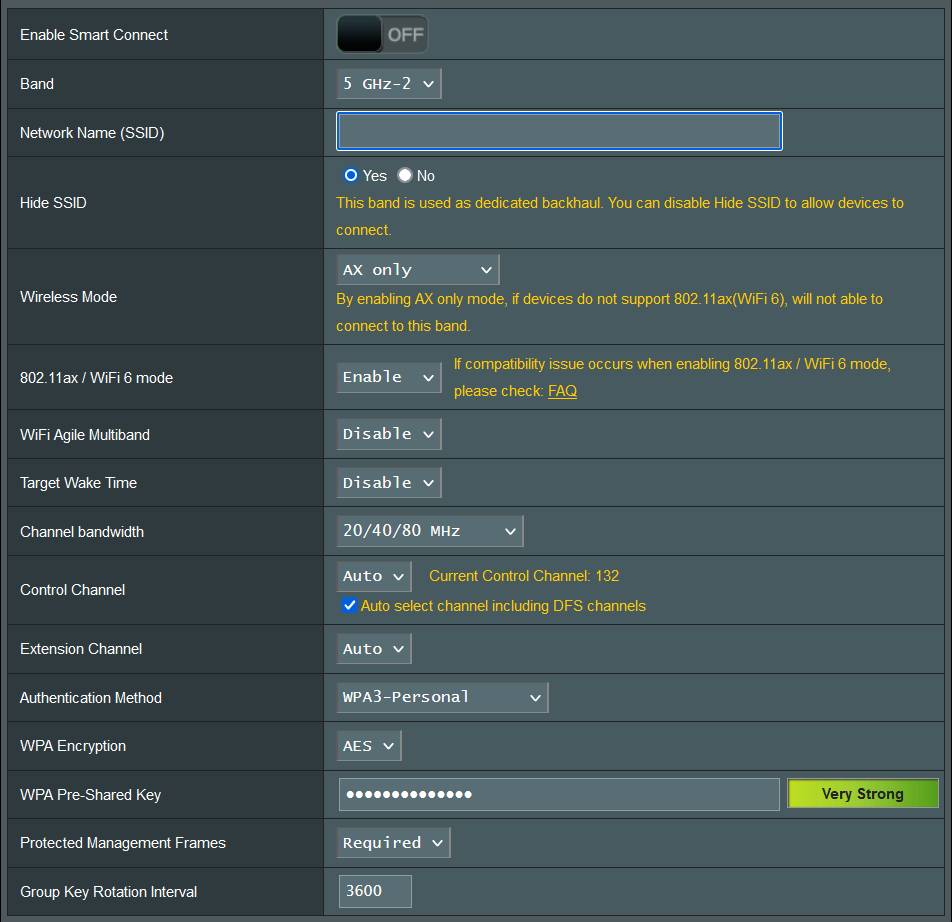
Nice to see folks trying 80Mhz backhaul. I haven’t had any issues with 3.0.0.4.388_22068
Current backhaul connect time 349 hours. WPA3/AX Only/80Mhz/Auto. Free ram 163 MB
Edit: As per screenshot, I have backhaul set to 20/40/80, so that device can respond to unexpected interference, but I have yet to see it drop off 80Mhz
Attachments:
You need to login in order to vote
I’m curious what everyone’s use case is for enabling 160Mhz, other than because you can. What WAN-LAN and LAN-LAN speeds are you seeing and are the higher speeds (1Gig+?) useful day-to-day outside of a speedtest environment?
160Mhz has potentially more opportunities for interference from neighbors and other external sources and while in theory it supports multigig wireless speeds, 80Mhz solidly supports 700-900+, which fully utilizes a gigabit class connection.
Cheers.
You need to login in order to vote
-
AuthorPosts


 ). According to Network Map page, WAN was up, and while WiFi was visible and mesh was connected, wireless devices dropped and couldn’t reconnect.