

› UKTH forums › 🛜 Wireless Routers & Modems › ASUS & Wireless › ASUS – DSL-AC88U / DSL-AC3100 Firmwares (beta's) etc. Looks like a new Beta Release for the DSL-AC88U is available, this version has Telnet enabled and improved 2.4GHz wifi (I believe). DSL-AC88U_v9.10.06_build581_debug.w.zip https://www.asuswebstorage.com/navigate/s/604D61534F2541D1B3CE1CC031A697E4Y UK Sentinel In a completely...
- This topic has 1,438 replies, 106 voices, and was last updated 6 months ago by
 alt.james.

- AuthorPosts
- October 25, 2018 at 8:22 am #1249
I am going to use a D-Link wifi mesh so will probably just turn off the wifi on this router. What’s the easiest way to do this?
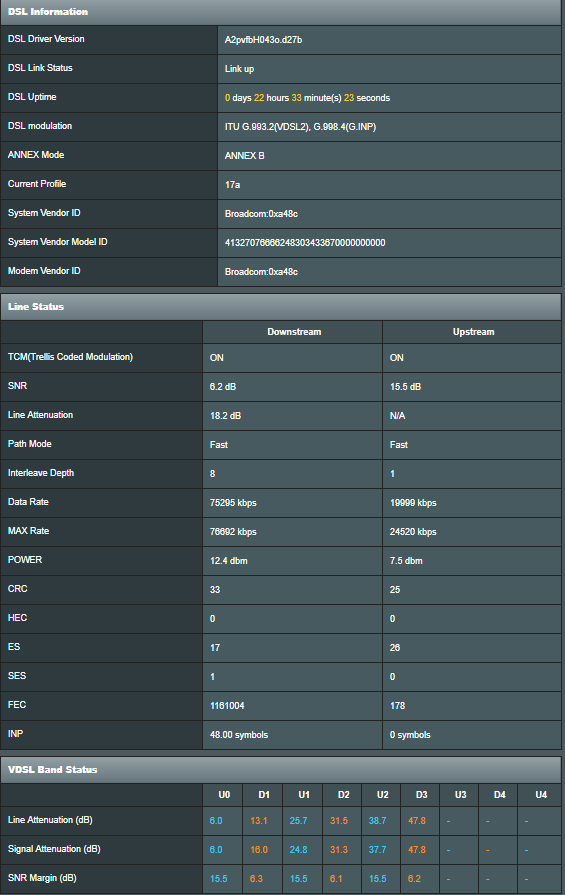
In 13 hours up-time I have 20 CRC, 17 ES, 1 SES and 761658 FEC. Does this look OK or bad? Just don’t want DLM to kick in and start doing it’s ‘optimisation’ again.
You need to login in order to vote
October 25, 2018 at 8:26 am #1251You said you had OPENREACH engineer visiting yesterday, did they find anything?
In a completely sane world, madness is the only freedom (J.G.Ballard).
You need to login in order to vote
October 25, 2018 at 8:51 am #1252He changed some wiring which apparently brought it ‘within tolerance’.
You need to login in order to vote
October 25, 2018 at 10:30 am #1253and did this change effect any values on the DSL Log page?
In a completely sane world, madness is the only freedom (J.G.Ballard).
You need to login in order to vote
October 25, 2018 at 10:56 am #1254This is the first time I am using the router on FTTC. Only bought it a couple of days ago. The HG633 does not have ability to display these errors.
You need to login in order to vote
October 25, 2018 at 11:47 am #1255Yesterday, you gave us a screen dump of your DSL Log page for the DSL-AC88U, can you do the same again when you plug back in the DSL-AC88U? (if not already) so we can compare the differences if any, after the OPENREACH Engineer had visited?
In a completely sane world, madness is the only freedom (J.G.Ballard).
You need to login in order to vote
October 25, 2018 at 5:56 pm #1259I was at work so couldn’t get a screenshot earlier. Updated DSL Log file attached.
Attachments:
You need to login in order to vote
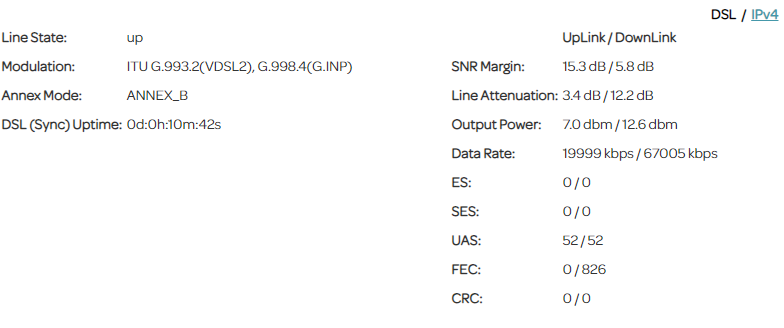
October 25, 2018 at 7:00 pm #1262These are the error recordings from the D-Link DSL3782 after 10 minutes. FEC errors do not go up as much as the AC88U.
Attachments:
You need to login in order to vote
October 25, 2018 at 7:10 pm #1264Looks like your Interleaving since the Openreach visit has improved, and is as I expect, you line still has to settle with Exchange, so give it a week and then the cabinet should decide what is best for you connection.
You have lost some synch speed, but best to leave alone for a week, to see if line/dslam cabinet settles.
Different DSL chipsets have different strengths and weaknesses, so it is a little like comparing apples to pears ;)
In a completely sane world, madness is the only freedom (J.G.Ballard).
You need to login in order to vote
October 25, 2018 at 10:22 pm #1265I will leave it and see what happens.
Are you currently using this model? Do you get any of these errors on your line?
You need to login in order to vote
October 26, 2018 at 6:48 am #1266I will leave it and see what happens. Are you currently using this model? Do you get any of these errors on your line?
I was using the DSL-AC88U until Tuesday, and FEC in large numbers is common with this Broadcom chipset, I had previously a DSL-AC68U had a Mediatek DSL chipset and was way way worse for FEC etc.
My favourite DSl chipset is Lantiq (now owned by INTEL) ;( and has great stability etc and lower FEC than say a typical Broadcom, but do not tend to synch as high as say Broadcom.
In a completely sane world, madness is the only freedom (J.G.Ballard).
You need to login in order to vote
October 27, 2018 at 1:15 am #1280Both of those models are non Broadcom DSL chipset, but yes do agree the variation does seem excessive.
Could it be that the DSL-AC88U is reporting my attenuation incorrectly? 18 dB would mean I am 1.3 km from the cabinet right? There is no way I could get over 75000 kbps sync if I was that far from the cabinet.
You need to login in order to vote
October 27, 2018 at 7:45 am #1281Have a look at below link, I am 440 Metres away from Exchange/DSLam and my downstream attenuation is 17dB, so in theory, you are around 469 Metres away ;)
https://uktechhub.com/forums/topic/fritzbox-3490-fritzos-7-01/ (post 1007)
In a completely sane world, madness is the only freedom (J.G.Ballard).
You need to login in order to vote
October 27, 2018 at 9:29 am #1282Thanks, yes I am about 450 metres away from the cabinet. I am new to this VDSL2, looks like the distance is measured differently to ADSL. Is there a VDSL2 table that shows attenuation v distance? The downstream SNR on your post shows as 4dB, was that set by the DSlam or did you ‘tweak’ it?
You need to login in order to vote
October 27, 2018 at 2:08 pm #1284Thanks, yes I am about 450 metres away from the cabinet. I am new to this VDSL2, looks like the distance is measured differently to ADSL. Is there a VDSL2 table that shows attenuation v distance? The downstream SNR on your post shows as 4dB, was that set by the DSlam or did you ‘tweak’ it?
I am sure there is chart online, never really looked, ‘job for you’ ;) – the pic is from my Fritz!Box when I plugged it in a couple of months ago, so at the time I had a good (low) SNR, not plugged it back in as to busy gaming with my DrayTeK 130 modem and Netgear XR500 ;)
In a completely sane world, madness is the only freedom (J.G.Ballard).
You need to login in order to vote
- AuthorPosts


- You must be logged in to reply to this topic.