

› UKTH forums › 🛜 Wireless Routers & Modems › ASUS & Wireless › ASUS – DSL-AC88U / DSL-AC3100 Firmwares (beta's) etc. Looks like a new Beta Release for the DSL-AC88U is available, this version has Telnet enabled and improved 2.4GHz wifi (I believe). DSL-AC88U_v9.10.06_build581_debug.w.zip https://www.asuswebstorage.com/navigate/s/604D61534F2541D1B3CE1CC031A697E4Y UK Sentinel In a completely...
- This topic has 1,438 replies, 106 voices, and was last updated 6 months ago by
 alt.james.

- AuthorPosts
- October 24, 2018 at 4:40 am #1227
Anyone know if there was or is issues with SIP passthrough or with VOIP?
Having few strange things happening on outgoing calls but aren’t consistant.
On build 460 for the moment with new modem.
You need to login in order to vote
October 24, 2018 at 6:56 am #1228anyone know if there was or is issues with SIP passthrough or with VOIP? Having few strange things happening on outgoing calls but aren’t consistant. On build 460 for the moment with new modem.
There is no issue with SIP on build 503. The only time I had an issue with SIP was beta 546.
Hope this helps.
You need to login in order to vote
October 24, 2018 at 7:22 am #1229Thanks a lot!
Spoke with ASUS and unfortunately they say they have removed host-uniq field from the next formal release (due next week) but will be included in a later beta, off record I am not aware of any releases where this option worked either but it is at least now on there priority list ;)
In a completely sane world, madness is the only freedom (J.G.Ballard).
You need to login in order to vote
October 24, 2018 at 11:32 am #1230Very sad news :( but anyway thanks again for your help and patience :)
You need to login in order to vote
October 24, 2018 at 12:41 pm #1231Hi UK Sentinel,
I remember you and babis3g from the now defunct Asus support forum. I searched your profile name and came across this forum. Great to see you are still around to help and advise.
I have now re-purchased the DSL-AC88U hoping the bug where the wifi died is now fixed. Had to return the original one due to so many bugs. I accepted some of it as an early adopter/guinea pig.
Are you able to let me know how to find out on this router whether I am connected to an ECI/Huawei cabinet? I am pretty sure it is Huawei.
You need to login in order to vote
October 24, 2018 at 1:03 pm #1232@dodgydrains, thank you and welcome, yes ASUS VIP was a great time and so sad regarding its demise.
With your DSL-AC88U, look under DSL LOG, Under DSL Information Section, there will be section called DSL Information and a category labelled something along the lines of DSL Exchange (DSLAM) which will identify the cabinet you are connecting to as either BROADCOM or INFINEON (or a derivative of that)
Huawei = Broadcom
ECI = INFINEON
Feel free to give us a screen dump of your DSL Log page, so we can all have a look.
Hope that helps?
In a completely sane world, madness is the only freedom (J.G.Ballard).
You need to login in order to vote
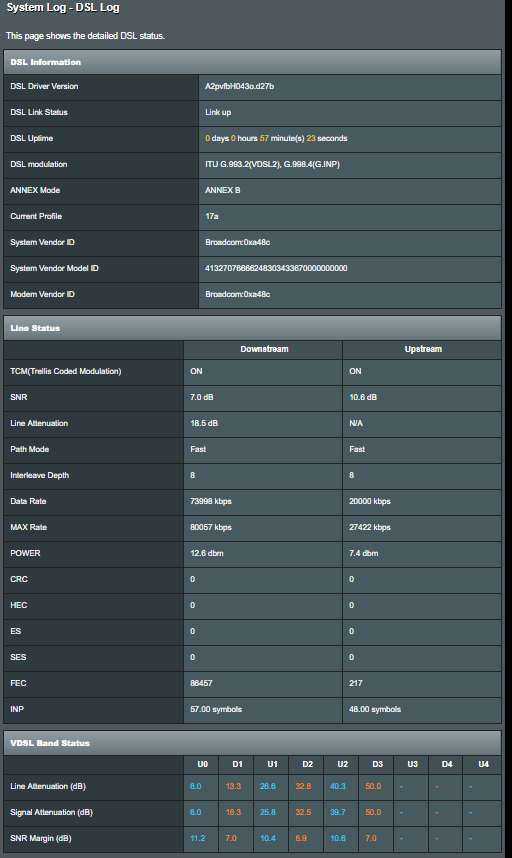
October 24, 2018 at 1:14 pm #1233Thanks @UK Sentinel, it’s Broadcom so looks like it is Huawei. Screenshot of DSL log attached. I have just connected the DSL AC88U. I am running the latest beta build585.
Not really sure the Line Attenuation is being reported correctly. On all the other modem/routers it is 12.5dB to 12.9dB. Am I right in saying this is reporting it as 18.5dB?
Attachments:
You need to login in order to vote
October 24, 2018 at 1:45 pm #1236Yes, yours is showing 18.5 dB for Attenuation for Downstream, I had a chat with both ASUS and Broadcom whilst Alpha testing this unit and Broadcom never shows Upstream Attenuation values, and never will for this chipset ;-(
What other devices are showing a lower Attenuation?
In a completely sane world, madness is the only freedom (J.G.Ballard).
You need to login in order to vote
October 24, 2018 at 1:49 pm #1238I have used the DSL3782 & HG633, both from TalkTalk. DSL3782 shows 12.5dB and HG633 shows 12.9dB. 18.5dB seems a bit high compared to the other 2.
The attached system info is with HG633
At the bottom of the Asus DSL log, what do the VDSL band status relate to?
Attachments:
You need to login in order to vote
October 24, 2018 at 2:08 pm #1240Both of those models are non Broadcom DSL chipset, but yes do agree the variation does seem excessive.
I did notice on your stats, you have the same Interleave Depth for Both Upstream and Downstream, G.INP is only applied in Downstream, so this is odd as is your slightly high Downstream SNR being higher than normal (ideal).
I would leave the unit plugged in for a few days with no reboots and see if the values change?
I also noticed when I had my DL-AC88U plugged in last week, my SNR was higher than expected, but assumed my line was settling in as I have just moved to BT .
Edit: just logged into my DrayTek 130 modem and SNR values are 1 – 2 lower than Broadcom, (DrayTeK 130 modem is Lantiq (Infineon) chipset. so ignore my comments regarding SNR
In a completely sane world, madness is the only freedom (J.G.Ballard).
You need to login in order to vote
October 24, 2018 at 3:57 pm #1241Thanks, I have an Openreach engineer who is currently checking the line and doing something.
Any ideas what the VDSL band status relates to?
You need to login in order to vote
October 24, 2018 at 4:14 pm #1243Thanks, I have an Openreach engineer who is currently checking the line and doing something. Any ideas what the VDSL band status relates to?
Take a look at below link:
In a completely sane world, madness is the only freedom (J.G.Ballard).
You need to login in order to vote
October 24, 2018 at 8:07 pm #1245Thanks again, very helpful as usual.
What is the difference between the Line Attenuation under the VDSL band status and the Line Attenuation under the Line status?
Also, are these temps in the attachment normal?
Attachments:
You need to login in order to vote
October 24, 2018 at 8:34 pm #1247Temps are fine, see link, people worry unnecessarily about these temps, unless you have located CPU on top of Radiator or are physically located in a hot country, Saudi / Australia etc, not to worry, these Chips are not fan cooled so rely of heat plates (conduction) etc.
5 GHz is higher than other values I have seen, but similar to link as below ?
I believe Line Status > Line Attenuation is a value/ratio of the three VDSL Band Status > Line Attenuation values (ish) ;)
In a completely sane world, madness is the only freedom (J.G.Ballard).
You need to login in order to vote
October 25, 2018 at 5:59 am #1248 - AuthorPosts





- You must be logged in to reply to this topic.