

› UKTH forums › 🛜 Wireless Routers & Modems › ASUS & Wireless › ASUS ZenWiFi AX Whole Home Tri-Band Mesh WiFi 6 System Not sure if this is the right place to ask…. I am thinking of upgrading my Google Mesh wifi to the above. Has anyone used this and does it...
- This topic has 1,419 replies, 25 voices, and was last updated 19 hours, 15 minutes ago by
 Jim W.

- AuthorPosts
- May 19, 2021 at 6:42 am #13394May 19, 2021 at 12:49 pm #13404
[quote quote=13388]
I’m the guy from the other forum! [/quote]
Good to see you here. UK Sentinel has been amazing with passing bugs over to Asus, which is why this site is always my go to.
One thing noticeable with the 43169/43170 firmware is that they are both far smaller than previous ones. Not sure whether features were removed or just better compressed.
You need to login in order to vote
May 19, 2021 at 3:47 pm #13410Usually features are implemented quick and dirty and over the time they improve code or remove unnacessary parts.
You need to login in order to vote
May 24, 2021 at 3:21 pm #13447Any ideas what PHY rate is and how it can be affected?
Sometimes these seem to fluctuate downwards but no idea why it does this.
Attachments:
You need to login in order to vote
May 24, 2021 at 3:26 pm #13450The physical layer (PHY) rate. It is the maximum speed that data can move across a wireless link between a wireless client and a wireless router. User activities like file transfer and web content browsing happen at the application layer.
What variations are you getting ?
Attachments:
You need to login in order to vote
May 24, 2021 at 5:32 pm #13454This is what it is now.
The ‘Transmit Rate’ on this node has been a lot higher. ‘Receive Rate’ was a little higher than the attached.
Don’t really know what makes if fluctuate.
This is with 160MHz on the 5GHz-2 backhaul
Attachments:
You need to login in order to vote
May 24, 2021 at 8:03 pm #13462I have just recently got the XT8 for my BT 900/100 FTTP connection and when it works, it’s great. When it does odd things that impact the service from the node, I feel like wanting to throw it out the window!
I have only used it with one firmware; the latest I got when setting up – 3.0.0.4.386_43170
Posts here and elsewhere do talk of some of these bugs, so I’d love to know if/when they’ll be fixed as the experience is tarnished by the following:
- Like the poster above, the PHY rate can fluctuate – a lot. Sure, there are various things that can cause Wi-Fi issues, but the range can be significant, and earlier today my son complained about the Internet being slow (slow with 900Mbps on tap?!) and despite the mobile and web app showing a good connection with circa 2600Mbps backhaul, a speed test from the node netted a throughput of 3Mbps down and 25Mbps up?!?! The node is about 10 metres away through one stud partition wall and a ceiling, and usually says excellent signal (5GHz). Here, it was still saying that – so it seems the real-time information isn’t even accurate.
- I have had some Radar incidents that has impacted the 160MHz connection, but even forcing 80MHz still causes issues from time to time where the throughput drops like a stone. It’s a shame, as 80MHz on the backhaul would likely be sufficient to offer near full-speed via the LAN ports.
- The node seems to like dropping to 2.4GHz and saying weak signal – even though the 5GHz signal is very strong (so strong that I could almost get away with just using the XT8 router on its own, if I didn’t mind losing the LAN ports upstairs). Rebooting the node doesn’t help. Optimising doesn’t help. Selecting to ‘reconnect node’ actually might, but sometimes it requires an actual power off/on to do anything, and then it’s back for a few days before it quietly drops back to 2.4GHz and stays there until further manual intervention.
As you can imagine, this is frustrating. I can accept signal blips, but I’d hope the Asus would self-heal and sort the problem out transparently (and by all means put it in the log or email me). My son could just power cycle the node, but I’d sooner he didn’t start doing that. When my wife is working from home, a drop to 2-3Mbps is going to impact her Teams chats.
I’ve read about rolling back firmware, but I’d really prefer to move forward to something that fixes these problems – which I’d hope that Asus could solve on a product that has been on the market for a year or more.
My earlier routers have been Asus and I’m impressed that they support hardware for many years, but they do sadly appear to still manage to release the odd update that probably shouldn’t reach the end user. I have run beta builds on older devices, but now I just want a final release, stable, firmware that I can trust.
You need to login in order to vote
May 24, 2021 at 10:26 pm #13465Under ‘Management’ – ‘Preferable Uplink AP’ have you tried manually selecting the nearest node?
I have done this myself and tried to make sure that no more than one node is connected to any one of them.
Pretty sure there is some firmware bug somewhere, also ‘Optimization’ is also pretty useless function.
Attachments:
You need to login in order to vote
May 25, 2021 at 5:38 am #13467I have, even though I only have one node and one router (just in case it was doing an unnecessary scan) so I think I can rule that out.
I also noticed that if you select the option it appears to be back to auto, so it either does this when you select the option or it isn’t actually remembering the setting (possibly a bug in itself).
I can see myself doing a full reset and starting over, just in case some settings have been corrupted, but I’d sooner wait as I’ve customised various settings that I could do with not having to do all over again!
You need to login in order to vote
May 25, 2021 at 6:32 am #13468[quote quote=13447]Any ideas what PHY rate is and how it can be affected? Sometimes these seem to fluctuate downwards but no idea why it does this.[/quote]
Do these values fluctuate during the day i.e. Morning time is higher than say the Evening, or when the house is more occupied or maybe more loading in the evening due to household on Facebook etc?
You need to login in order to vote
May 25, 2021 at 6:46 am #13469[quote quote=13462]
- The node seems to like dropping to 2.4GHz and saying weak signal – even though the 5GHz signal is very strong (so strong that I could almost get away with just using the XT8 router on its own, if I didn’t mind losing the LAN ports upstairs). Rebooting the node doesn’t help. Optimising doesn’t help. Selecting to ‘reconnect node’ actually might, but sometimes it requires an actual power off/on to do anything, and then it’s back for a few days before it quietly drops back to 2.4GHz and stays there until further manual intervention.
.[/quote]
A few of us have realised over the years sometimes with ASUS and there firmware, it is a case that you have to find a firmware release (older maybe) that works, rather than thinking the latest releases are better, ASUS firmware’s are buggy, sometimes.
I will check with ASUS as to the Status with firmware’s for the ZenWifi ?
You need to login in order to vote
May 25, 2021 at 11:50 am #13473[quote quote=13468]
Do these values fluctuate during the day i.e. Morning time is higher than say the Evening, or when the house is more occupied or maybe more loading in the evening due to household on Facebook etc?[/quote]
I set these up again making sure each node has one connected node through wifi backhaul. It seems to fluctuate throughout the day during same conditions. It has been more reliable since setting up again yesterday.
Attached is a recent test with DSLReports. Bufferbloat usually C or B over wifi.
Attachments:
You need to login in order to vote
May 25, 2021 at 6:03 pm #13479[quote quote=13465]Under ‘Management’ – ‘Preferable Uplink AP’ have you tried manually selecting the nearest node? I have done this myself and tried to make sure that no more than one node is connected to any one of them. Pretty sure there is some firmware bug somewhere, also ‘Optimization’ is also pretty useless function.[/quote]
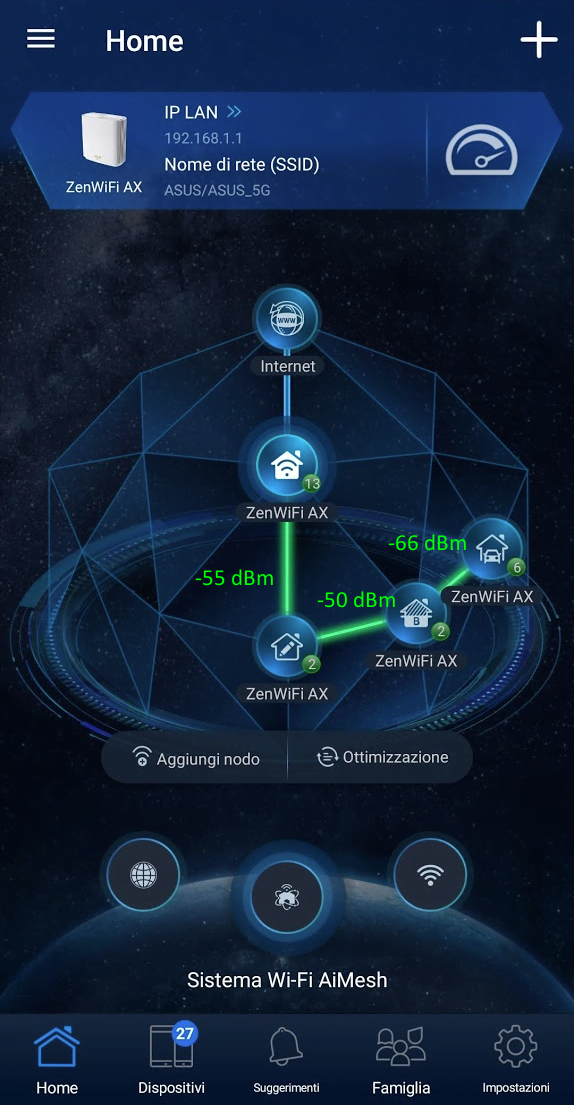
I’ve made exactly this step! I’ve set up all my 3 nodes to link to a specific node (as shown by the attached image… the -db level was addedd manually!)
Attachments:
You need to login in order to vote
May 25, 2021 at 7:02 pm #13481[quote quote=13479]
Under ‘Management’ – ‘Preferable Uplink AP’ have you tried manually selecting the nearest node? I have done this myself and tried to make sure that no more than one node is connected to any one of them. Pretty sure there is some firmware bug somewhere, also ‘Optimization’ is also pretty useless function.
I’ve made exactly this step! I’ve set up all my 3 nodes to link to a specific node (as shown by the attached image… the -db level was addedd manually!)[/quote]
Is your setup stable? Mine seems quite good for the last 2 days.
Where did you check to find the -db?
I think I saw somewhere there is a way to test the real world transfer rate over wifi between nodes using the PC (via terminal) and mobile phone (via an app). Cannot find it now, anyone know what I am talking about or know how to do it?
You need to login in order to vote
May 25, 2021 at 8:15 pm #13486Touch wood, since I posted the node hasn’t dropped to 2.4GHz and is showing PHY around 2550Mbps (give-or-take).
Liked by:You need to login in order to vote
- AuthorPosts





- You must be logged in to reply to this topic.