

› UKTH forums › 🛜 Wireless Routers & Modems › ASUS & Wireless › ASUS ZenWiFi AX Whole Home Tri-Band Mesh WiFi 6 System Not sure if this is the right place to ask…. I am thinking of upgrading my Google Mesh wifi to the above. Has anyone used this and does it...
- This topic has 1,416 replies, 25 voices, and was last updated 1 month, 1 week ago by
 UK Sentinel.

-
AuthorPosts
-
February 17, 2024 at 9:21 am #30739
There are some settings in the above posts, copy those for your XT8 5GHz-2 settings
In a completely sane world, madness is the only freedom (J.G.Ballard).
I tried duplicating the exact settings, but still the same result. My 5ghz 2 (backhaul) gets broken as long as the 160 bandwidth is turned on. I am resigned already to the fact that i can only reach upto 80ghz w/o breaking the connection of nodes/ and the backhaul speed.
You need to login in order to vote
February 17, 2024 at 9:27 am #30740If you want to start a new topic, I am sure we can work through a few options to see if we can manage to get 160 MHz back haul working for your XT8
In a completely sane world, madness is the only freedom (J.G.Ballard).
Liked by:
You need to login in order to vote
February 17, 2024 at 9:42 am #30741If you want to start a new topic, I am sure we can work through a few options to see if we can manage to get 160 MHz back haul working for your XT8
In a completely sane world, madness is the only freedom (J.G.Ballard).
Right now am pretty much satisfied with 80ghz. We only have a couple of iphones in our household that can handle 160ghz bandwidth anyway. So as for now, no need to really push/force use the 160ghz. It’s just hanging in my head why I couldn’t make it work. But Thanks again for the infos and suggestions. So appreciate them.
Liked by:
You need to login in order to vote
February 17, 2024 at 9:59 am #30742Right now am pretty much satisfied with 80ghz. We only have a couple of iphones in our household that can handle 160ghz bandwidth anyway. So as for now, no need to really push/force use the 160ghz. It’s just hanging in my head why I couldn’t make it work. But Thanks again for the infos and suggestions. So appreciate them.
In a completely sane world, madness is the only freedom (J.G.Ballard).
Liked by:
You need to login in order to vote
February 17, 2024 at 10:35 am #30743FWIW I run a wired backhaul, so your results may differ Jamie,
A quirk I found with my mesh.
If I run 5GHz-2 on Control Channel > Auto = Bandwidth defaults to 80 MHz
Run 5GHz-2 Control Channel > manual selected (any channel) = Bandwidth holds 160 MHz
(auto selects channel 100 = 80MHz / manual channel 100 = 160 GHz)
5GHz-1 dose not follow the same behaviour, if favours 160 MHz regardless of settings.
Tom…
Liked by:
You need to login in order to vote
February 17, 2024 at 10:53 am #30744FWIW I run a wired backhaul, so your results may differ Jamie,
A quirk I found with my mesh.
If I run 5GHz-2 on Control Channel > Auto = Bandwidth defaults to 80 MHz
Run 5GHz-2 Control Channel > manual selected (any channel) = Bandwidth holds 160 MHz
(auto selects channel 100 = 80MHz / manual channel 100 = 160 GHz)
5GHz-1 dose not follow the same behaviour, if favours 160 MHz regardless of settings.
Tom…
Interesting.
i might really have to tinker around some more with 5ghz 2 settings and do more comprehensive tests when my schedule permits.
thanks for sharing your info!
Liked by:
You need to login in order to vote
February 18, 2024 at 1:37 am #30763FWIW I run a wired backhaul, so your results may differ Jamie,
A quirk I found with my mesh.
If I run 5GHz-2 on Control Channel > Auto = Bandwidth defaults to 80 MHz
Run 5GHz-2 Control Channel > manual selected (any channel) = Bandwidth holds 160 MHz
(auto selects channel 100 = 80MHz / manual channel 100 = 160 GHz)
5GHz-1 dose not follow the same behaviour, if favours 160 MHz regardless of settings.
Tom…
Agreed it is worth a try, I used to also have to manually set channel bandwidth to 160MHz before. This was with previous old FW versions. Now I do not need to.
This might help too – For me, setting it to auto works fine but it does take upto 15 minutes to get to 160MHz backhaul and stabilise at that. I just leave it for 15-20 minutes as it always first shows as 2.4Ghz and then 15 minutes later 160Mhz comes up. It always first defaults the backhaul to 2.4Ghz for me for around 15 minutes. It may do the same for you even if you set it manually to 160Mhz.
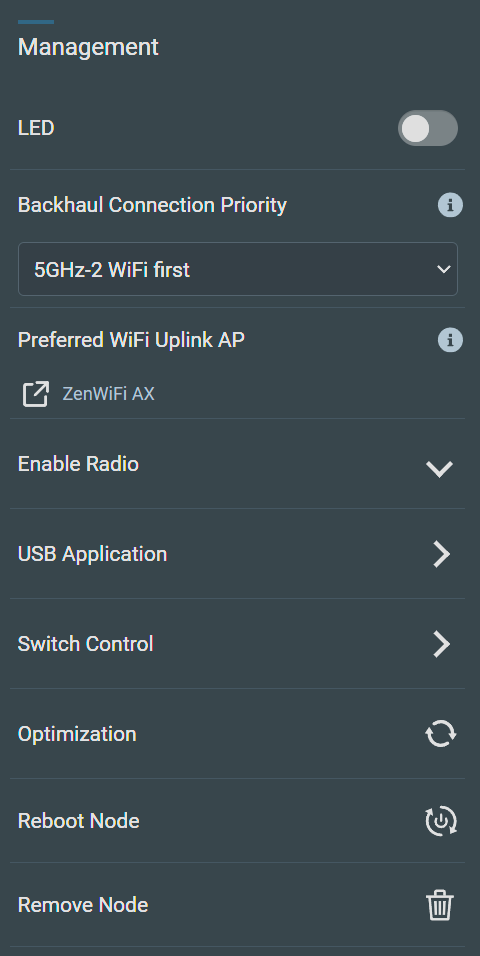
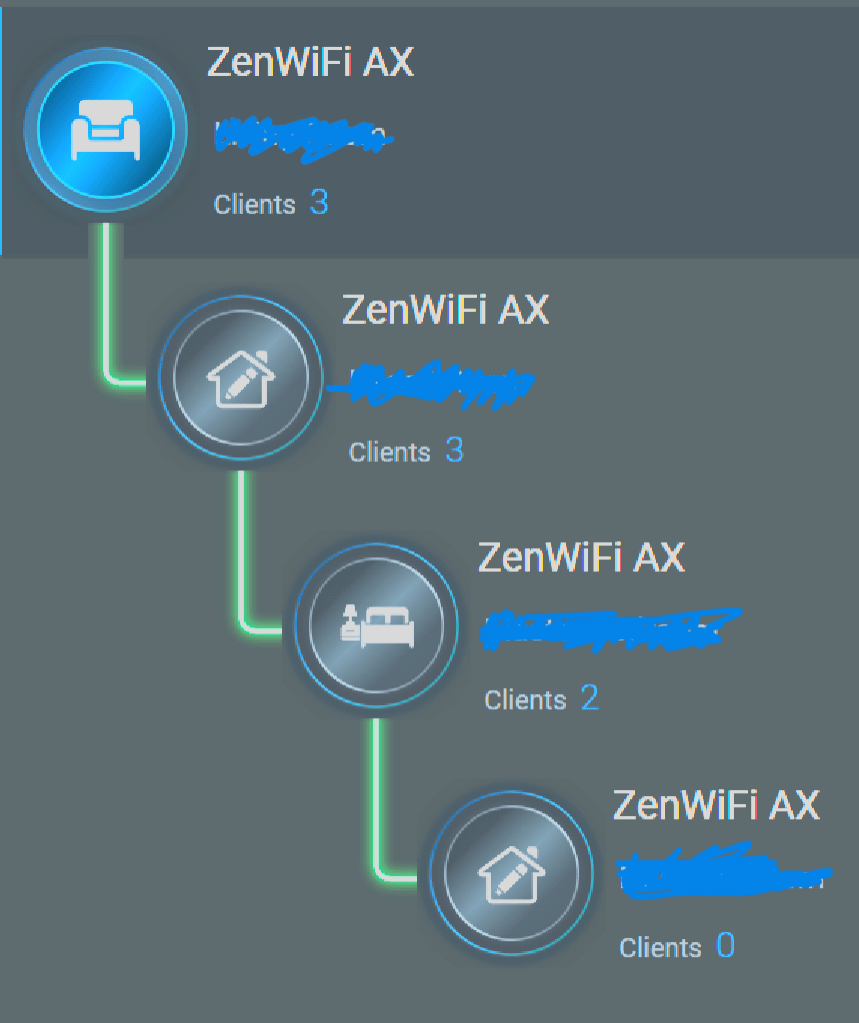
Also, under ‘AiMesh’ – ‘Management’ – I manually set ‘Backhaul Connection Priority’ to ‘5GHz-2 WiFi first’. As I have 4 units, I also manually set ‘Preferred WiFi Uplink AP’ to the nearest XT8 to the node.
Hope this helps. It took me a while and a lot of patience to get to understand the quirks on my setup.
Liked by:
You need to login in order to vote
February 18, 2024 at 1:40 am #30766Agreed it is worth a try, I used to also have to manually set channel bandwidth to 160MHz before. This was with previous old FW versions. Now I do not need to.
This might help too – For me, setting it to auto works fine but it does take upto 15 minutes to get to 160MHz backhaul and stabilise at that. I just leave it for 15-20 minutes as it always first shows as 2.4Ghz and then 15 minutes later 160Mhz comes up. It always first defaults the backhaul to 2.4Ghz for me for around 15 minutes. It may do the same for you even if you set it manually to 160Mhz.
Also, under ‘AiMesh’ – ‘Management’ – I manually set ‘Backhaul Connection Priority’ to ‘5GHz-2 WiFi first’. As I have 4 units, I also manually set ‘Preferred WiFi Uplink AP’ to the nearest XT8 to the node.
Hope this helps. It took me a while and a lot of patience to get to understand the quirks on my setup.
Thanks to you all for your suggestions.
Liked by:
You need to login in order to vote
February 18, 2024 at 2:11 am #30767Took the plunge again into the 160 bandwidth. This time i manually set the control to 100. Hoping it would stick, and backhaul won’t revert to 2.4ghz (yellow led).
thanks again guys!
You need to login in order to vote
February 18, 2024 at 3:01 am #30768Took the plunge again into the 160 bandwidth. This time i manually set the control to 100. Hoping it would stick, and backhaul won’t revert to 2.4ghz (yellow led).
thanks again guys!
Hope it works for you. People have had similar issues to you.
For me, it was horrendous with the early FW version updates. I helped Asus with a lot of beta FW testing on the XT8 and since then they fixed my issues, and most FW updates after that have mostly worked flawlessly for my use case.
I always try to factory reset after I have issues to eliminate any settings problems that remained from previous setup.
First I set up the router with all my settings that worked, including IPV6 settings. And then I add the node/s. Then under ‘AiMesh’ – ‘Management’ – I manually set ‘Backhaul Connection Priority’ to ‘5GHz-2 WiFi first’ and also set ‘Preferred WiFi Uplink AP’ to the nearest XT8 to the node.
Liked by:
You need to login in order to vote
February 18, 2024 at 3:45 am #30769Hope it works for you. People have had similar issues to you.
For me, it was horrendous with the early FW version updates. I helped Asus with a lot of beta FW testing on the XT8 and since then they fixed my issues, and most FW updates after that have mostly worked flawlessly for my use case.
I always try to factory reset after I have issues to eliminate any settings problems that remained from previous setup.
First I set up the router with all my settings that worked, including IPV6 settings. And then I add the node/s. Then under ‘AiMesh’ – ‘Management’ – I manually set ‘Backhaul Connection Priority’ to ‘5GHz-2 WiFi first’ and also set ‘Preferred WiFi Uplink AP’ to the nearest XT8 to the node.
Thanks for the tips!
You need to login in order to vote
February 18, 2024 at 8:28 am #307705GHz cant start with 160MHz bandwith as channels above 52 have to be screened for privileged users.
So you cant see 160MHz in the first 10 min. after activating WLAN.Liked by:
You need to login in order to vote
February 20, 2024 at 1:35 pm #30801So far so good. Duplicated dodgy’s settings and tomthumb’s tips. I unticked the CONTROL CHANNEL DFS option. Now the control channel sticks and stays at 100. Backhaul is stable so far!
thanks guys!
-
This reply was modified 2 years, 6 months ago by Jaime Salud Castillo.
Liked by:
You need to login in order to vote
February 20, 2024 at 4:12 pm #30805Great new in that the manual selected (any channel) tip seems to help with 160MHz backhaul stability for your AiMesh system
In a completely sane world, madness is the only freedom (J.G.Ballard).
Liked by:
You need to login in order to vote
February 23, 2024 at 2:00 pm #30827Great new in that the manual selected (any channel) tip seems to help with 160MHz backhaul stability for your AiMesh system
In a completely sane world, madness is the only freedom (J.G.Ballard).
Ok, spoke too soon. Backhaul reverted to 2.4ghz (yellow light). I guess I’m not meant to be using 160ghz. Anyways, I’m fine if I’ll be stuck at 80ghz… i still get the full speed of my internet and there weren’t really problems when i was at 80ghz anyway, so why fix something that isn’t broken.
Guys, thanks anyways for the tips, help and suggestions. At least I’ve exhausted all options. Maybe it’s a radar thing here in our area that keeps on shutting down the 160ghz. At least I know now, it just doesn’t work for me.
Thanks again!
Liked by:
You need to login in order to vote
-
This reply was modified 2 years, 6 months ago by
-
AuthorPosts




- You must be logged in to reply to this topic.