

› UKTH forums › 🛜 Wireless Routers & Modems › ASUS & Wireless › Latest Beta Firmwares for DSL-AC51 to DSL-N66U incl. DSL-AC750 Latest DSL ASUSWRT firmware v9.1.2.3_502-g2bdb05b now available. (latest firmware’s are at end of threads) For following ASUS DSL Modem Routers: DSL-AC51 DSL-AC52U DSL-AC55U DSL-AC56U DSL-AC750 DSL-N10-C1 – (extended beta support...
- This topic has 1,129 replies, 77 voices, and was last updated 1 year, 6 months ago by
 UK Sentinel.

- AuthorPosts
- March 24, 2022 at 11:32 am #18369
I contacted asus many times, but there were conversations such as giving very useless nonsense information or throwing fw. I tried all fw for asus ac51, even in stability, it takes a very ridiculous value when it is automatic. I got rid of my mistakes. I don’t understand what the Asus technical team is doing, there are chips related to the chip in the forums, but I think there is a software problem. Asus software works very badly and unstable. I solved my problems with Asus via the 2nd modem. Now I can use ac51 without any problems.
asus ile defalarca iletişime geçtim ama çok gereksiz saçma sapan bilgiler verip yada fw atma gibi konuşmalar oldu asus ac51 için tüm fw denedim kararlılık ta bile çok saçma bir değer alıyor otomatik olunca.Ben yine airties 5650 verdiği snr değere göre asus ac51 aynı snr değeri verince crc hatalarından kurtuldum. Asus teknik ekibi ne iş yapıyor anlamadım forumlarda çip ile alakalı diğenler dolu ama bence yazılımsal sorun var asus yazılımı çok kötü kararsız çalışıyor.Ben asus ile sorunlarımı 2. modem aracılığı ile çözdüm.Şuan sorunsuz ac51 kullanabiliyorum.
You need to login in order to vote
March 24, 2022 at 12:14 pm #18372With ASUS it depends who you speak to at Support, I will pass back your good advice to ASUS DSL Team (Taiwan)
In a completely sane world, madness is the only freedom (J.G.Ballard).
Liked by:You need to login in order to vote
March 24, 2022 at 3:55 pm #18381Asus turkey really can’t find a very bad solution as a team. I hope you do something. Especially the snr and mtu incident are very unstable, for your information. As an example, I would like to tell you an incident that happened to me. I set up the Asus ac51 modem with its original settings. Ps5 internet goes but I could not be online psn it doesn’t connect du mtu and mass settings I adjusted it to match 1452. Then I didn’t have any problems with my connection. But this time asus ac51 snr 18 automatically sets it as 1-2-3 steps up and down, but the crc’s flew in the air. Later on, with Airties 5650 I looked at the snr values, it works automatically between 26-26.1. I tried the same snr setting asus ac51 and this time my crc problem disappeared. I am now using an ac 51 without any problems, except wifi, of course.
asus türkiye gerçekten ekip olarak çok kötü çözüm hiçbir zaman bulamıyor.Umarım siz birşeyler yaparsınız.Özellikle snr ve mtu olayı çok kararsız bilginiz olsun.Örnek olarak başıma gelen bir olayı anlatmak isterim Asus ac51 modem orjinal ayarlarıyla kurdum.Ps5 internet gidiyor ama çevrim içi olamıyordum psn bağlanmıyor du mtu ve mass ayarları ile 1452 denk gelecek şekilde ayar yaptım.Daha sonra bağlantımda sorun yaşamadım.Ama bu sefer asus ac51 snr 18 olarak otomatik ayarlıyor 1-2-3 kademe aşağı yukarı yaptım ama crc ler havada uçuştu.Daha sonra Airties 5650 ile snr değerlerine baktım 26-26.1 arasında çalışıyor otomatik.Aynı snr ayarını asus ac51 denedim ve bu sefer crc sorunumda ortadan kalktı şuan sorunsuz bir ac 51 kullanıyorum wifi hariç tabi.
You need to login in order to vote
March 24, 2022 at 4:06 pm #18382it works automatically between 26-26.1. I tried the same snr setting asus ac51 and this time my crc problem disappeared. I am now using an ac 51 without any problems, except wifi, of course.
So DSL-AC51 with SNR 26 is good for your connection ?
Higher SNR means lower synch rate and I know ASUS have adjusted SNR for Turkey to 18 dB as default.
In a completely sane world, madness is the only freedom (J.G.Ballard).
You need to login in order to vote
March 24, 2022 at 9:11 pm #18384Dsl Ac51u works fine with Comnet in Turkey
I disabled “Stability Adjustment” in DSL settings. Everything seems good.You need to login in order to vote
March 24, 2022 at 9:14 pm #18386Dsl Ac51u works fine with Comnet in Turkey
In a completely sane world, madness is the only freedom (J.G.Ballard).
You need to login in order to vote
March 24, 2022 at 9:40 pm #18390Dsl Ac51u works fine with Comnet in Turkey
I disabled “Stability Adjustment” in DSL settings. Everything seems good.do you use Bitswap?
Half-Life 1 Server IP: hl.oyunsen.com:27015
We will re-write code of world…
You need to login in order to vote
March 24, 2022 at 9:48 pm #18391I am also having a problem. Within 1-2 days after installing the modem firmware, the Snr setting remains stable at the point I set stable, and then starts to drop. I reset the modem again, it is fixed again, but after 1-2 days the snr drops again. I give an example; The SNR I set to 4 is now fluctuating between 3 and 3.5. How can I fix this?
Attachments:
Half-Life 1 Server IP: hl.oyunsen.com:27015
We will re-write code of world…
You need to login in order to vote
March 24, 2022 at 9:49 pm #18393I added the image of my dsl settings.
Note: the SNR setting dropped even while taking the picture :)Attachments:
Half-Life 1 Server IP: hl.oyunsen.com:27015
We will re-write code of world…
You need to login in order to vote
March 24, 2022 at 9:58 pm #18395March 24, 2022 at 10:02 pm #183964db is too low. Your line stats seems bad. Snr stable value range is 10-13 db for better stability. Mediatek DSL chips needs more SNR Margin. Broadcom chips works well with 8-9 db. That’s real. But not a problem :)
You need to login in order to vote
March 24, 2022 at 10:06 pm #18397i dont live any problem at 4 snr. And my vdsl line new
Half-Life 1 Server IP: hl.oyunsen.com:27015
We will re-write code of world…
You need to login in order to vote
March 24, 2022 at 10:42 pm #18406March 25, 2022 at 6:25 am #18407I am also having a problem. Within 1-2 days after installing the modem firmware, the Snr setting remains stable at the point I set stable, and then starts to drop. I reset the modem again, it is fixed again, but after 1-2 days the snr drops again. I give an example; The SNR I set to 4 is now fluctuating between 3 and 3.5. How can I fix this?
SNR values will fluctuate a little during the day/night is common, as your variation is very small, unless it is causing you issues, nothing to worry about
In a completely sane world, madness is the only freedom (J.G.Ballard).
You need to login in order to vote
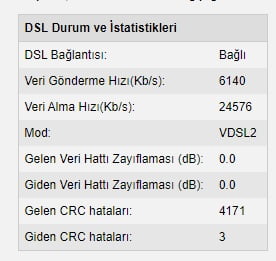
March 25, 2022 at 7:58 am #18409The internet I use is dsmart 24 mbps download 6 mbps upload, it may be related to the signal coming to me. I don’t know. Let me send you a photo from airties 5650 for example, and asus ac51. Since Snr Airties is much more stable, I’m adjusting asus accordingly.
Kullandığım internet dsmart 24 mbps download 6 mbps upload bana gelen sinyal ile alakalı da olabilir bilmiyorum size örnek airties 5650 den fotoğraf atayım birde asus ac51. Snr Airties çok daha kararlı olduğu için ona göre asus ayar çekiyorum.
Airties 5650 crc 4000 error working 13 days non-stop
13 gün aralıksız çalışan airties 5650 crc 4000 hata
You need to login in order to vote
- AuthorPosts






- You must be logged in to reply to this topic.