Forum Replies Created
-
AuthorPosts
-
October 12, 2022 at 9:56 am in reply to: Asus Lyra Beta firmware 386 base I found out that there is a newer beta firmware than the currently listed ones on the Asus Lyra page. Lyra support page latest firmware is 3.0.0.4.384.46630 https://www.asus.com/supportonly/Lyra/HelpDesk_BIOS/ The unreleased... #21209
It is bad news then.
I got the firmware from snbforums.
https://www.snbforums.com/threads/lyra-map-ac2200-aimesh-2-0-beta.72267/
I wish they continue updating the firmware on those devices ):.
You need to login in order to vote
Yeah, thanks for helping out and clarifying things. Asus faq site was misleading me.
Liked by:
You need to login in order to vote
Nope, I have to use NAT with ac68u with pppoe relay because, I need to identify the dsl interface using ac68u with Vlan ID because my ISP uses 802.1Q.
I have a rt-ac5300 behind dsl-ac68u and I cannot set Vlan ID with rt-ac5300. There is no 802.1Q setting on the ac5300 router.
Disabling NAT on the WAN/Internet Connections on AC68U doesn’t help either because I lose internet connection with NAT disabled.
Here is what I did.
On AC68U,
I enabled PPPoE relay.
Connected LAN 1 of AC68U to WAN of RT-AC5300
Changed the IP address of AC68U to 192.168.0.1 (using similar DHCP range)
On DHCP server I assigned a static IP to RT-AC5300 WAN MAC so it is easy to access.
AC68U WAN settings are attached.
I had to use automatic IP here but I don’t know how correct it is. Any idea?
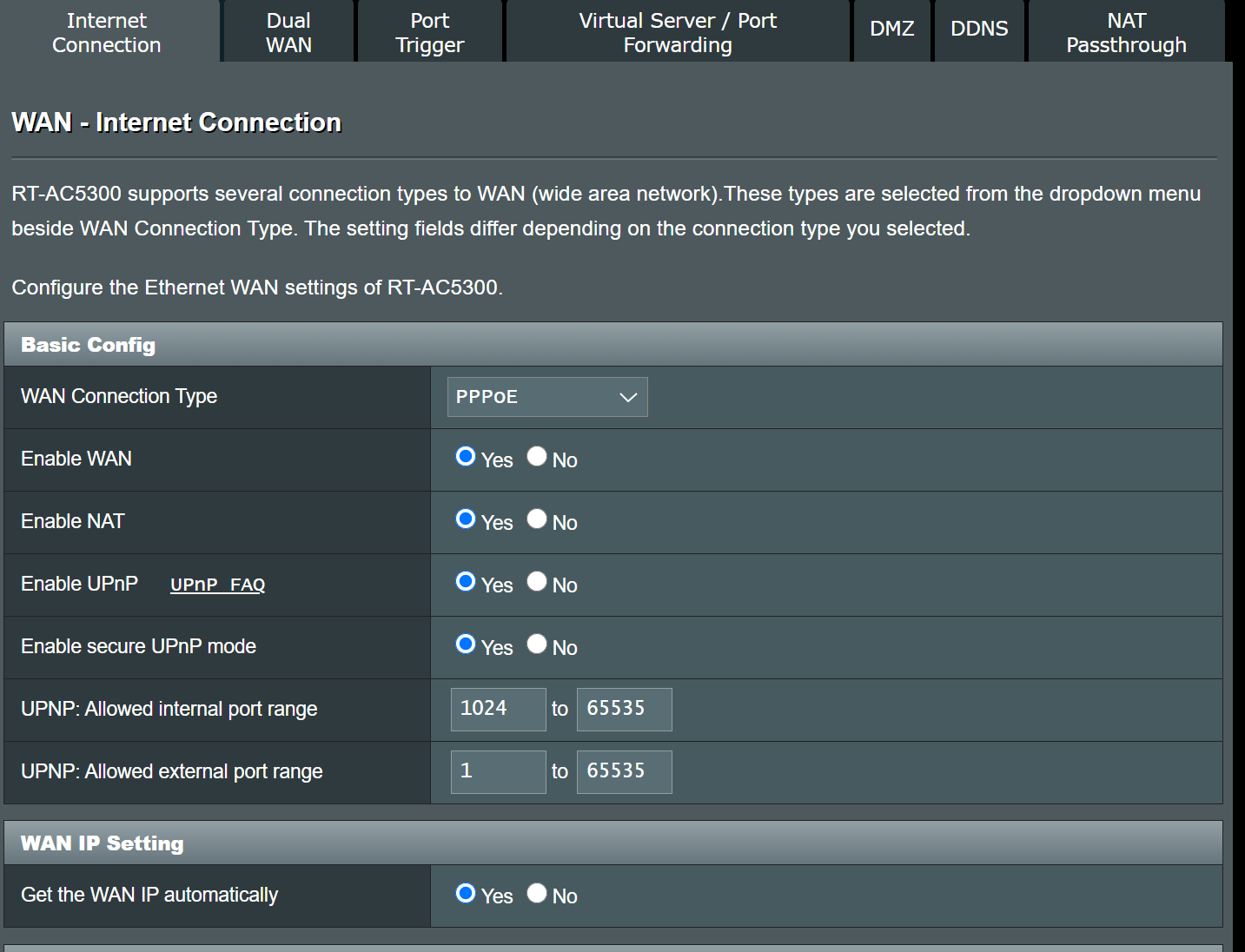
AC5300 WAN settings are attached.
According to logic I should be behind double NAT. However, I checked and apparently I am not. Well, at least I can access my devices just fine without any port forwarding on the ac68u.
Also, I get the attached warning message on the DSL-AC68U GUI with these settings.
“Your ISP’s DHCP does not function properly.”
Attachments:
Liked by:
You need to login in order to vote
Yeah, I will try that and see how it will handle it but without bridging dsl modem I would be a pride owner of shiny new double NAT.
I guess DMZing my router IP can fix that. Though, I am not sure what would be the implications.
You need to login in order to vote
Hmm, they still advertise this for dsl-ac68u on their support page.
https://www.asus.com/support/FAQ/1015722/
My ISP doesn’t let me connect with more than 1 client. So relay is out of question.
I have found another workaround though. It just is not ideal and I don’t want to use it.
In IPTV settings you can strip vlan tag with that checkbox “Remove VLAN tag from WAN” then select a port. Connect your router to that port. Then create a bridge IPTV connection from WAN, internet connection. Remove the internet connection such that only bridge IPTV remains.
After that, your router takes it over. But it just is not transparent enough for me to see what is going on. So, I cannot trust it.
You need to login in order to vote
Sorry for reviving this old thread. I tried to put my DSL-AC68U to bridge mode. However, the option is not there.
I can only create a bridge for IPTV.
But not for the internet connection where the client does the pppoe authentication.
Can anyone confirm this?
You need to login in order to vote
Thanks, at least we got a general idea of how this stuff will work.
You need to login in order to vote
Flashed with the DSL-AC68U_9.0.0.4_384_81451-g2429703.trx.zip succesfully.
Added as a aimesh node succesfully.
Adjusted the priority to the ethernet.
Made a LAN to LAN connection (LAN Port 1 of DSL-AC68U)
But no matter what I did, it didnt switch to the ethernet backhaul.
I think ASUS disabled this feature in the firmware considering there is no WAN port.
You need to login in order to vote
Main is RT-AC5300 and I flashed DSL-AC68U with RT firmware some time ago to run it as aimesh node. If the official firmware works well, I will try to get the original firmware on the DSL unit.
You need to login in order to vote
When you make LAN to LAN connection instead of LAN to WAN, client list is duplicated. You see the same clients appear both on main and the child. That is why I am curious how is this beta DSL-AC68U firmware handling it considering there is no WAN port.
You need to login in order to vote
One question ,
Does this firmware uses LAN interface for wired backhaul?
or when you activate the child node mode it converts LAN 1 port to WAN port?
I have confirmed that using LAN to LAN connection to set up aimesh works, however, “client list” information is wrong all the time.
Anybody tested this yet?
You need to login in order to vote
-
AuthorPosts