Forum Replies Created
-
AuthorPosts
-
Long story short, Asus have done a buy back which is they purchase the router back at the price I paid for it, not including import or shipping.
This has to be to a U S address and made payable to a person living at that address, this takes up to 30 days to processIn the mean time I bought another router same model with 15% off with a 3 yr warranty bought in uk so had £60 off
Also latest router is a 2022 version B2 whereas my 2020 model was A1 2020 and the other version I sent back was a 2021 model lso a B2 model
You need to login in order to vote
Yea I wasn’t really happy with their offer, as I would have to swap out the synology nas sfp+ adapter and the transfer speeds would plummet from 400mb ish to 100mb transfer rate and I do transfer large file sizes.
Anyway not sure if this is a standard reply from Asus but here it is in full.
We are contacting you in regards to your RMA that is currently being serviced by our repair center. However at this time, we would like to offer a replacement to a different model as your original model is not available at this time. The replacement is a fully-tested recertified unit that meets ASUS quality standard. The manufacturer’s warranty will transfer to the replacement product from your original unit. Please keep in mind that receiving a replacement will not extend your warranty.
Problem found with original unit: <<parts shortage>>
Replacement Model Specifications:
Please see attached specifications of your original model for comparison and different upgraded model(s) side by side you can choose one of them as replacement and let us know which one you want by replying back to this e-mail.
However, if part(s) become available while a replacement product is being processed, your original unit may be repaired and shipped instead of the replacement. This replacement is final, it is not a loaner and data will not be transferred to the replacement unit. If you wish to accept, please reply back to this email to accept or decline the offer. Please note that if you decline this offer and you wish for us to complete the repairs necessary on your unit, there could be longer wait times to receive the needed parts and make the necessary repairs.
You need to login in order to vote
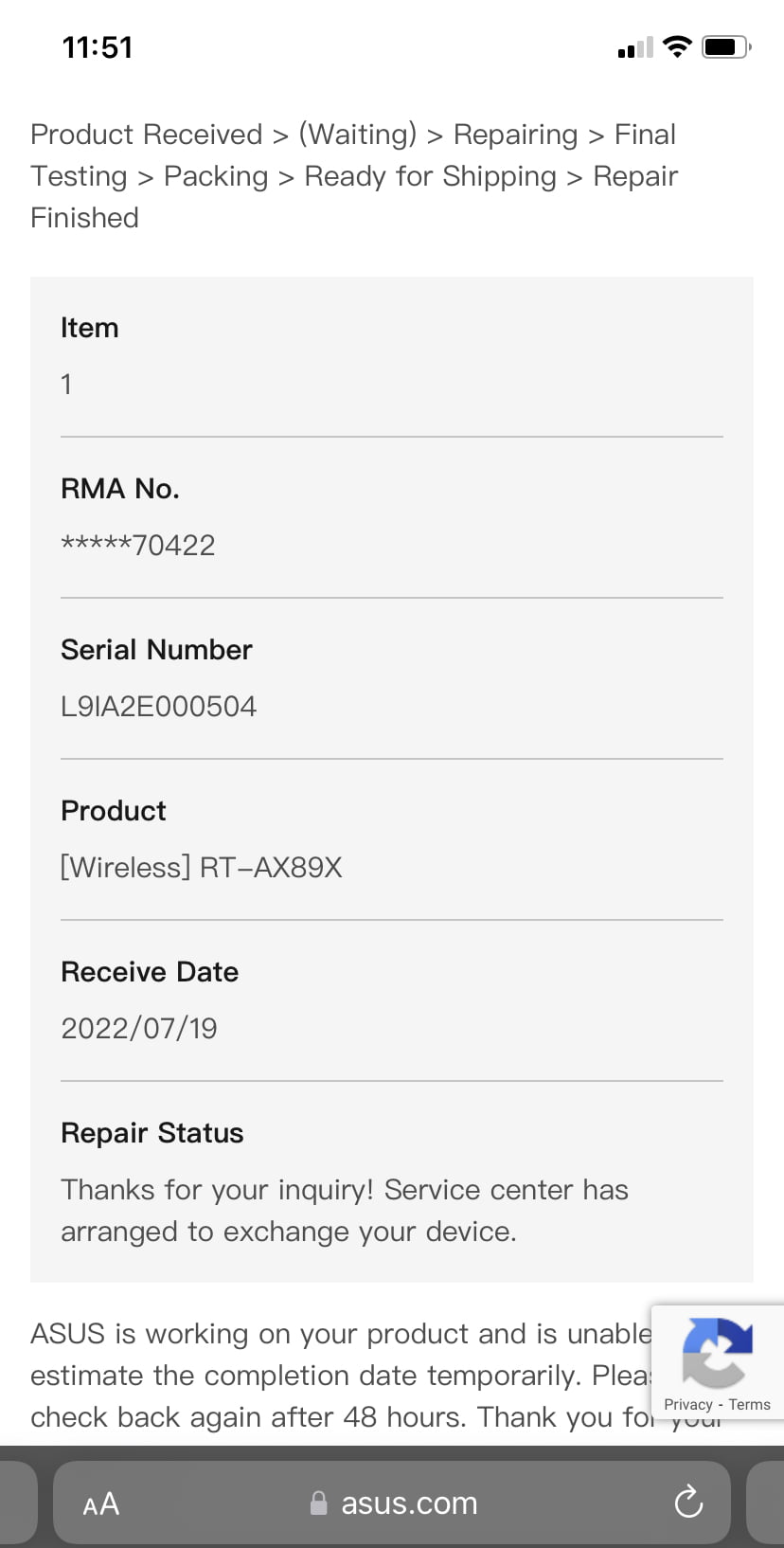
After a couple of calls to Asus I got a reply last night saying that they don’t have the parts to currently fix my Asus crab BUT they offered me an upgrade to an Asus GT-AX 11000, see attached pic
Not sure on upgrade as it doesn’t have any 10g connectors spf+ and 10g tbase connectors
If I refuse the swap I may have to wait weeks, they didn’t contact me and I had to contact them at least 3 times as they kept saying it may take 48 to 72 hrs and I told them I wasn’t happy so they raised it to correct department
The other crab I bought was shipped back as I had 30 days to return
Attachments:
You need to login in order to vote
I will see if they will let me know what the problem is with it or a copy of the report the company did for Asus.
I assume that Asus is aware now and will ship out a replacement either refurbished or a new unit, but won’t know that until I find out the new serial number.
You need to login in order to vote
Yep I did look at it but wasn’t sure if your supposed to set it up before the red WAN issue, see attached pic showing Lan1 listed.
Another option I did think about was trying to use a saved backup from the new crab to the damaged crab and see if it work but was hesitant in case I corrupted the old crab which is a risk considering it’s still under warranty.
Anyway just an update, they received the Router on Monday and have done a diagnostic on it and whatever else they do and yesterday they concluded it’s dead and Unrepairable and are now sorting a replacement to ship out, not sure if it will be new or a refurbished unit.
Also got to check the warranty on this new unit as the old crab had 5 months warranty left, not sure if they will carry this over to the new crab or will it get its own new warranty ….
So of your router goes pop and you get a constant red WAN then you know this isn’t just a resistor popping it’s something on the main board itself .
Liked by:
You need to login in order to vote
I managed to get shipping for £38.00 to Newark in California, that’s the repair centre for Asus, with Fed Ex through a company called trans global who are brokers
So shipping back will be around the same and can prove the repair so won’t have to pay customs fees etc
I was reading something about Dual WAN and should have tried it, but it was collected this morning and didn’t want to unpack it all, but something to remember as a possible get around if the main WAN port won’t work like mine, possible that the LAN port may make it work
Copied and pasted this so it should be easy to understand
The RT-AX89X features WAN Link Aggregation, where you can combine its WAN port and another LAN port into a 2Gbps WAN connection when working with a supported modem. Like most Asus routers, the RT-AX89X’s Gigabit ports feature Dual-WAN and Link Aggregation
You need to login in order to vote
Sorry for late reply but wanted to be sure before posting.
I bought a uk spec model from box uk, this now comes with a 3 year warranty and says so on the box
I unpacked it and quickly set it up in QIS it worked straight from the off, I was gonna reply when I got it but wanted to be sure and didn’t want to jinx it
After a week it has been solid like the other 1.
Now as for the old 1 I finally sorted something out today after contacting Asus in the states and speaking with customer service.
The problem was it’s was purchased in the states and the serial number confirms this, so they agreed it is a hardware fault and accepted a RMA but I have to ship it to Asus in the states, who will repair it BUT it has to be shipped back to an address in the United States.
Fortunately I have an ex who lives in New Jersey and she offered to accept it, then I have to ship it to me in the U.K
Now realistically I’m just gonna keep the new 1 then if the same thing happens to the new 1 I’m covered and won’t have to pay to ship it as I bought in UK and is covered by UK warranty.
I’m estimating around £140 to ship both ways, I shouldn’t have a customs charge as it is RMA direct to Asus their, and the return I can prove it was RMA to customs (I usually prove with receipt and a tracking number of the parcel going into the United States which will show it was shipped to Asus in the United States for repair)
Or option B is to find someone in the UK who can repair it and after that sell it on.
I’m not sure which way to go yet but open for opinions.
You need to login in order to vote
Spoke with Amazon and they refused to honour the 2 year warranty as I bought it from Amazon com and not Amazon uk Basically I imported it from the states from Amazon
Finally got an email back from ASUS that I sent before joint this forum, so they won’t be aware yet of the problem I have with Amazon
Took a pic of it as it would take too long to write 😂
Posted pic here https://ibb.co/nLXDFVm as the pic is too big to attach and can’t downsize it enough
On the plus side I bought another from a uk website which should be here today
You need to login in order to vote
I just spoke with ASUS and they have said they don’t repair the routers and I will need to send it back to Amazon after getting a RMA from them and then I can either be refunded or a replacement shipped
What I didn’t mention on here was I heard a single faint pop noise Saturday couldn’t detect where it came from just that it was in the room, but I expect this is the root cause of the WAN problem.
So I decided to use box uk and purchased another AX89x unit so this will also have a 2 year warranty at least then when Amazon are sorting the return I can get things up and running again, plus I will quickly know if the new unit I’m buying has an issue from the start, plus always good to be 100% knowing the unit is dead, it’s a shame because I looked after it and looks new still
I would just like to thank you for taking the time to go through everything with me, and helping me attempt to recover the router and pointing me on the right direction of Asus
They knew the machine was purchased in the states as soon as I gave them the serial number and they confirmed it is a 2 Year warranty on the Asus crab, up until Saturday I never had an issue with it hence buying another with a fresh warranty in case
Have also book marked this website as it has been very useful and would be good to go through the site and if I can help anyone in return that’s a bonus for you instead of doing a disappearing act now this isssue is almost concluded
You need to login in order to vote
I’m just downloading the latest firmware now, will see if that works
UPDATE updated the firmware without an issue and settings look good in the DNS see pic
I have had the machine for 18 months and the box says 2 year guarantee but this was from Amazon in United States not the co.uk so not sure they will except it back as it’s well over the 30 days and not sure how ASUS work in the uk, but I’m not hopeful because they still haven’t gotten back to me when I raised the issue on there email service
You need to login in order to vote
Just changed the WAN DNS settings see pic
Machine rebooted when I pressed apply usual far right white light flashes then the far left flashes as well then the whole panel then goes blank then the right side light flashes on followed by the red WAN then the others see pic
You need to login in order to vote
Also I’m unsure about the following 2 settings I have attached below, I think it’s the 2nd pic as i used the Vigor 130 as a modem for the internet and then I connect the Vigor to the Asus router into the WAN port
You need to login in order to vote
<p style=”text-align: center;”>just used the QIS and tried with advanced settings and used the middle Choose Operation Mode tab and the next page I picked wireless router mode (Default) machine rebooted and same issue with the WAN light red on the Asus</p>
When I start the QIS again I pick Create A new Network, I get a please plug in the cable to the WAN port, system will connect your network setting automatically and WAN flashes on the screen for a minute, then it’s the WAN and USB, only option then are previous or manual settings.I choose manual settings and then I get 3 options
WAN port
10G Ethernet. (This is what I used to connect router to base unit)
10G SFP+ (This I use to connect Synology NAS to router)
Not sure where the DNS needs to be changed though?
You need to login in order to vote
I managed to get into my router account by using another base unit that uses the 10G base Connector to the router and i used the 192.168.50.1 to login to Firefox browser</p>
I have just taken another pic if you look at Ethernet Ports it’s all showing unplugged except the 10G base-T which is what I’m using to connect to the router, with base unit.The sfp+ connects directly to the Synology nas server and I’m watching a film and can access the whole server no problem but the system says it is unplugged?
You need to login in order to vote
On the above link it shows the WAN has an up address
Above link is of my LAN
Also tried a couple of other Ethernet cables and same results
That’s when I connect to the router with it’s Wi-Fi, if I use the talk talk OEM router it won’t work and just spins the wheel, but as mentioned I have to check how to disable the router part and just use as a modem
It’s a SageMCom fast 5364
You need to login in order to vote
-
AuthorPosts