
Forum Replies Created
-
AuthorPosts
-
A single ping lost every now and then is not significant (it could be more a problem of distance beetween router and node)… with the issue of newer firmwares could have to observe about 10/20 seconds of ping failed (that cause problems to video-calls)…
ps: if you are now with 42095, theoretically you shouldn’t have any problems
You need to login in order to vote
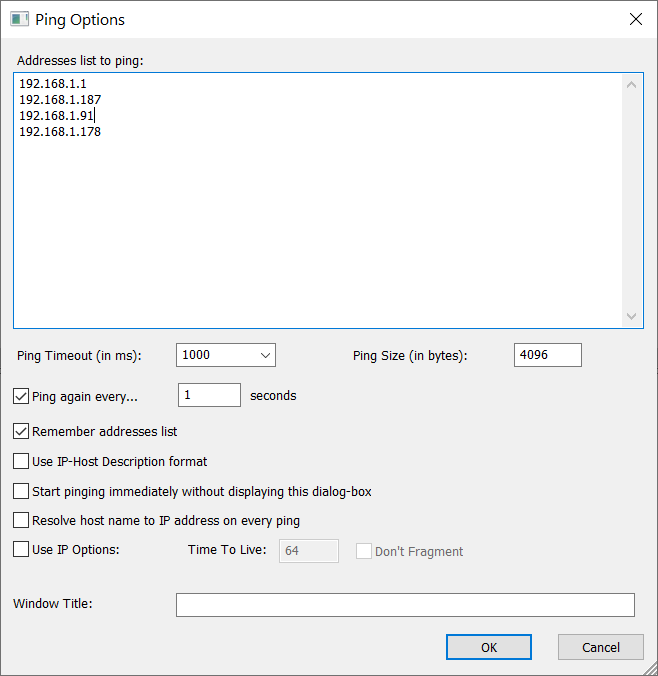
You simply have to add the IPs of your router and nodes and then press ok… ;)
Look at my configAttachments:
You need to login in order to vote
I tested 43169 and 43170… some users (in other forums) have tested 43181 (and so dodgydrains) and it has the issue too… So the problem appears to begin from the 43169 firmware (and is present in the following)… with the older 42095 all ok!
You need to login in order to vote
[quote quote=14067]Sort this mess out Asus!!!!!!![/quote]
All XT8’s owners have those issues with firmware from 43169 and above, but simply not all users are aware of it (because the problem affects the nodes, not the main router, and there are no logs!)
If you do a continuos ping test beetwen the nodes (I use “pinginfo” to trace the connection of my 3 nodes + 1 router) you will note that the nodes will lose the connection for about 10-20 seconds every then and now (someone says at regular interval, but I didn’t tested it)… but strangely there are NO log messages and NO aimesh disconnections! So it “seems” all ok, but with videocalls or video streaming (from clients connected to the nodes, not to the main router!) you will notice immediately when you have connection problems.
A very strange problem… I suspect than even Asus doesn’t know this issue…
You need to login in order to vote
[quote quote=13481]
Is your setup stable? Mine seems quite good for the last 2 days. Where did you check to find the -db? I think I saw somewhere there is a way to test the real world transfer rate over wifi between nodes using the PC (via terminal) and mobile phone (via an app). Cannot find it now, anyone know what I am talking about or know how to do it?[/quote]
With firmware 42095 I’m rock solid…
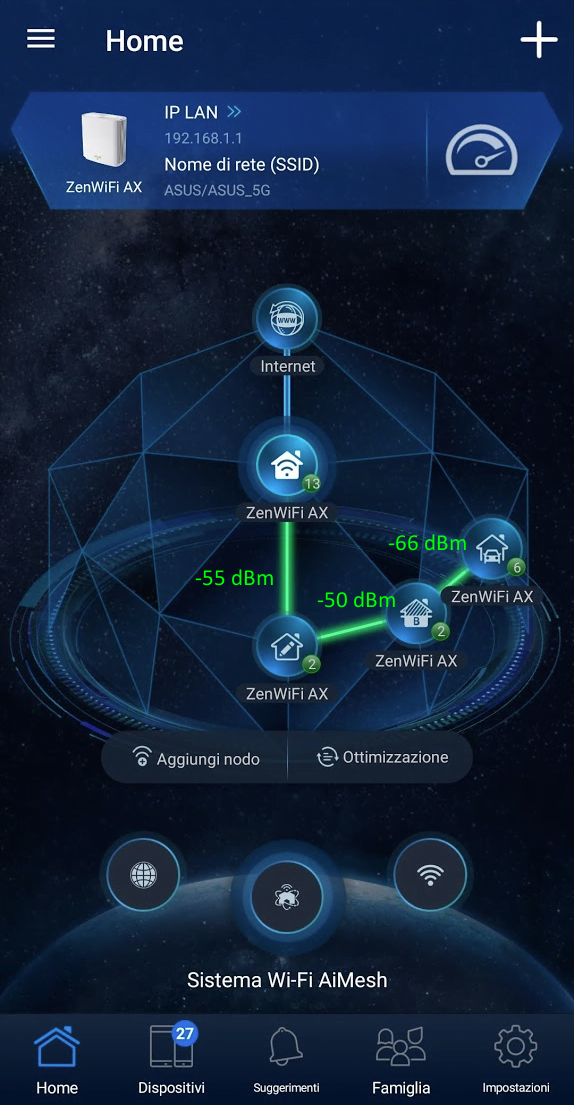
You will find the node’s connection’s strenght in the app, by tapping over the nodes (it gives the information right over the name)
Liked by:
You need to login in order to vote
[quote quote=13465]Under ‘Management’ – ‘Preferable Uplink AP’ have you tried manually selecting the nearest node? I have done this myself and tried to make sure that no more than one node is connected to any one of them. Pretty sure there is some firmware bug somewhere, also ‘Optimization’ is also pretty useless function.[/quote]
I’ve made exactly this step! I’ve set up all my 3 nodes to link to a specific node (as shown by the attached image… the -db level was addedd manually!)
Attachments:
You need to login in order to vote
Oh, another issue was the free RAM: with 43169/43170 I had 99-100mb of free RAM.
With 42095 I obtain 145-150 mb
You need to login in order to vote
[quote quote=13319]Hopefully just a one of, but will be interesting if others have a simular experience ? ———– Test conducted with latest official version, encryption is not Open System. Remains to be WPA/WPA2. No issue. ———-[/quote]
I’m the guy from the other forum! :-p
I’ve had the same issue with my 4 XT8 and firmware 42095 (initial set-up made after an hard reset)… 5GHz-2 was open, visibile and with a strange SSID (“ASUS F0” or something similar)I simply changed the values… no problems at all…
By the way: reverted to 42095… 43169 and 43170 have several bugs:
– issue with re-keying for backhaul (each “Group Key Rotation Interval” seconds, by default once an hour) – traffic between node and main router is lost for 10-15 seconds. I did a long-run ping session on all my nodes simultaneously (with pinginfo free program) and I found this: the nodes lost ping for about 10 second consecutively, after a period of time, then ping return ok… and so on…
– node reconnection: after 1 day the third node of mine was connected to home-router with 2.4ghz instead of using 5Ghz with the second node
– 2.4Ghz issues… not for me, but several users have issues with older smartphones or eith vacuum cleeners or with others domotical things…with 42095 I’m perfectly solid now… no ping lost anymore and no mesh-node’s reconnection
ps: I feedback the first issue with the web gui…
You need to login in order to vote
[quote quote=13055]Hopefully somebody else can advise on how good ASUS ZenWiFi AX really is ?[/quote]
I’ve bought four XT 8 (2×2 packs). I come from many years of experience with asus routers (I also helped the technical support in the field tests of their first modems with mediatek chipset, as the asus n55u), so I wanted to stay with them … Before this XT8 system I had 4 dsl-ac68u configured in mesh system. Unfortunately, the stability of the network was not optimal at all, with continuous disconnections of the nodes as soon as the network was “loaded” too much … With 4 XT8 devices I finally found “peace of mind”! I have an old house that develops in length and with thick walls, so the signal, in order to run the whole area, needs 3 repeaters (in addition to the router). The signal strength is almost identical to the dsl-ac68u (obviously there are legal limits), but the stability of the mesh network is not comparable, I think because the Zenfiwi AX system uses a specific band dedicated to backhaul. The network manages about 20/30 wifi devices, including home automation, video surveillance system, etc. without ever making a turn. The web interface is the usual (very complete) WRT from Asus and the app is really comfortable and well done … Yeah, I know that spending on 4 devices is crazy … but it is also true that the more you spend, the more you have …
You can see my network in the attacched image
ps: excuse my bad english!
You need to login in order to vote
September 4, 2020 at 5:59 pm in reply to: DSL-AC68U New Firmware Version 3.0.0.4.386_39648 Yay new firmware – hopefully its a good stable build Version 3.0.0.4.386_396482020/09/0242.45 MBytes ASUS DSL-AC68U Firmware version 3.0.0.4.386_39648 (This product supports both Annex A and Annex B) Security Fix... #9543[quote quote=9539]
1 master and 3 nodes, all dsl-ac68u
Wifi or LAN backhaul to the nodes?[/quote]
All WiFi
You need to login in order to vote
September 4, 2020 at 12:51 pm in reply to: DSL-AC68U New Firmware Version 3.0.0.4.386_39648 Yay new firmware – hopefully its a good stable build Version 3.0.0.4.386_396482020/09/0242.45 MBytes ASUS DSL-AC68U Firmware version 3.0.0.4.386_39648 (This product supports both Annex A and Annex B) Security Fix... #9537Installed… I don’t see any issue, for now… I don’t even use any “advanced features”, but my aimesh network (1 master and 3 nodes, all dsl-ac68u) works flawlessly!…
Liked by:
You need to login in order to vote
Thanx!
I’ve a network made of 3 dsl-ac68u (1 primary and 2 nodes)… I confirm that with latest firmware the nodes are broken, but is sufficient to revert to the previous version only the nodes… the “master” can use latest version…Liked by:
You need to login in order to vote
-
AuthorPosts