

› UKTH forums › 🛜 Wireless Routers & Modems › ASUS & Wireless › ASUS ZenWiFi AX Whole Home Tri-Band Mesh WiFi 6 System Not sure if this is the right place to ask…. I am thinking of upgrading my Google Mesh wifi to the above. Has anyone used this and does it...
- This topic has 1,411 replies, 25 voices, and was last updated 2 months, 1 week ago by
 UK Sentinel.

-
AuthorPosts
-
June 26, 2021 at 7:35 am #14084
Sort this mess out Asus!!!!!!!
All XT8’s owners have those issues with firmware from 43169 and above, but simply not all users are aware of it (because the problem affects the nodes, not the main router, and there are no logs!)
If you do a continuos ping test beetwen the nodes (I use “pinginfo” to trace the connection of my 3 nodes + 1 router) you will note that the nodes will lose the connection for about 10-20 seconds every then and now (someone says at regular interval, but I didn’t tested it)… but strangely there are NO log messages and NO aimesh disconnections! So it “seems” all ok, but with videocalls or video streaming (from clients connected to the nodes, not to the main router!) you will notice immediately when you have connection problems.
A very strange problem… I suspect than even Asus doesn’t know this issue…
You need to login in order to vote
June 26, 2021 at 8:21 am #14085Interesting and very useful, if this helps, once yourself and @dodgydrains conclude which firmwares are at fault and the issues, I am happy to speak with the Engineer at ASUS to get this fixed
In a completely sane world, madness is the only freedom (J.G.Ballard).
You need to login in order to vote
June 26, 2021 at 9:08 am #14086I tested 43169 and 43170… some users (in other forums) have tested 43181 (and so dodgydrains) and it has the issue too… So the problem appears to begin from the 43169 firmware (and is present in the following)… with the older 42095 all ok!
You need to login in order to vote
June 26, 2021 at 9:13 am #14087Good to know, @dodgydrains is conducting some more testing with newer firmware release next week, so will be good to hear his findings also
In a completely sane world, madness is the only freedom (J.G.Ballard).
You need to login in order to vote
June 26, 2021 at 9:36 am #14088Good to know, @dodgydrains is conducting some more testing with newer firmware release next week, so will be good to hear his findings also
I’ll let you know early next week regarding Microsoft Teams on 43181 with the settings I used on 42095. I have no idea how to run PingInfo, downloaded it but not sure what I am testing or to look for:
https://www.nirsoft.net/utils/multiple_ping_tool.html
Liked by:
You need to login in order to vote
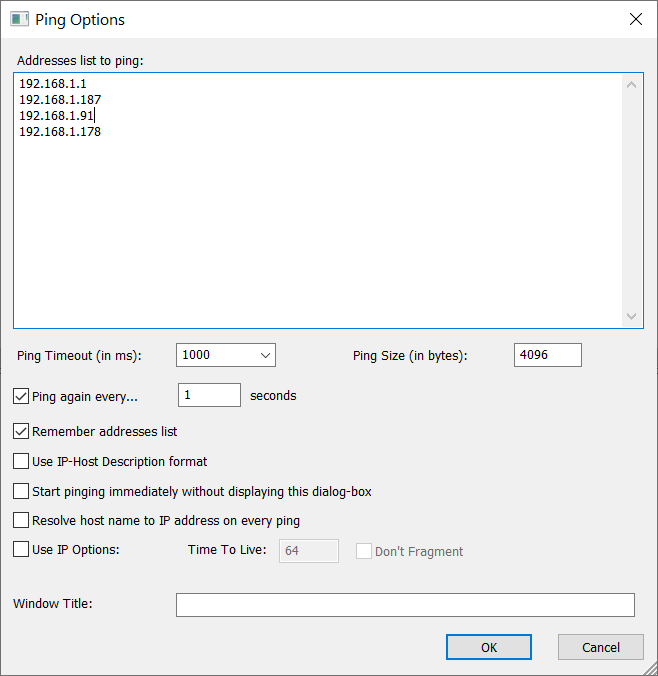
June 26, 2021 at 10:24 am #14092You simply have to add the IPs of your router and nodes and then press ok… ;)
Look at my configAttachments:
You need to login in order to vote
June 26, 2021 at 10:53 am #14095You simply have to add the IPs of your router and nodes and then press ok… ;) Look at my config
Thanks, I managed to work it out but what should I look out for? Failed count?
You need to login in order to vote
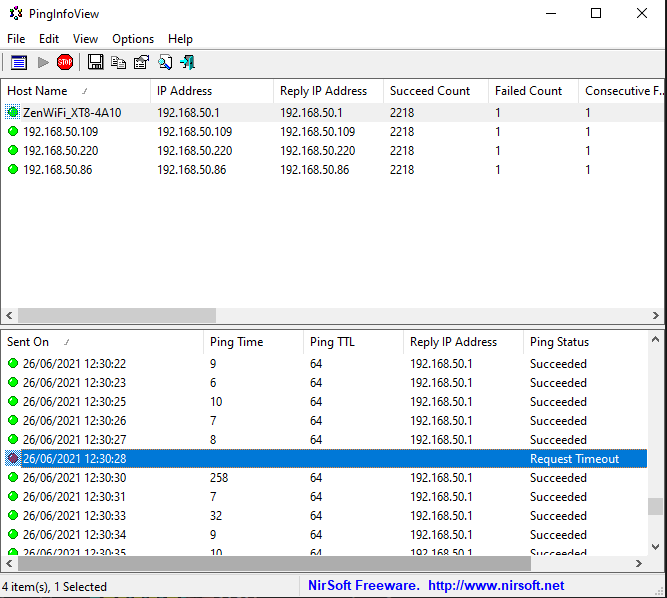
June 26, 2021 at 11:41 am #14097Started PingInfo test at 11:51 AM and got first failed count at 12.30PM. Is this what others were seeing and could this be what is causing my Microsoft Teams issues?
Attachments:
You need to login in order to vote
June 26, 2021 at 11:59 am #14099A single ping lost every now and then is not significant (it could be more a problem of distance beetween router and node)… with the issue of newer firmwares could have to observe about 10/20 seconds of ping failed (that cause problems to video-calls)…
ps: if you are now with 42095, theoretically you shouldn’t have any problems
You need to login in order to vote
June 26, 2021 at 12:21 pm #14101I am now on 43181. The only problem I have on this firmware is dropped Microsoft Teams calls.
I am checking with following settings on 43181 which Teams worked for me on 42095:
Wireless mode: AX Only
Channel bandwidth: 160MHz
Control channel: 124
Straight away backhaul changed to 160MHz
You need to login in order to vote
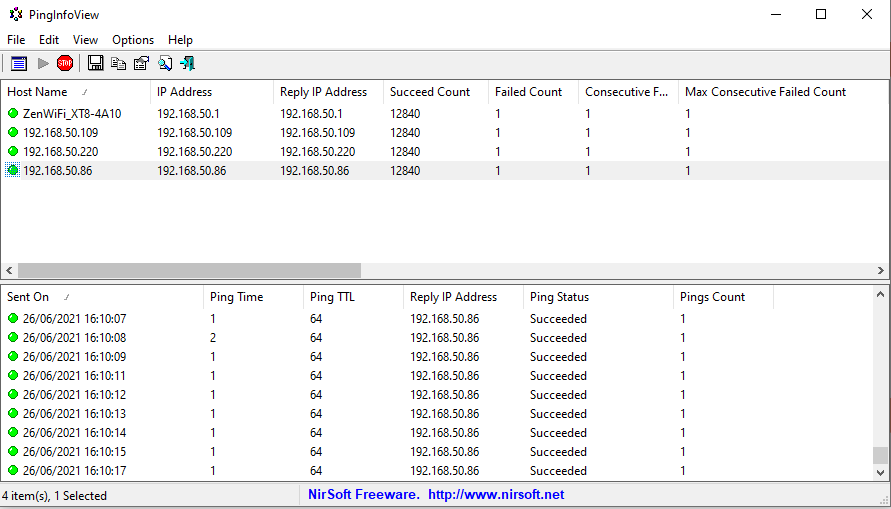
June 26, 2021 at 3:15 pm #14105After 4 hours only one ping lost? Does that mean my new settings is not not experiencing the problems like others? Hopefully it resolves the Teams issue next week and this will do for me.
Attachments:
You need to login in order to vote
June 26, 2021 at 3:30 pm #14110After 4 hours only one ping lost? Does that mean my new settings is not not experiencing the problems like others? Hopefully it resolves the Teams issue next week and this will do for me.
Testing is the only way to prove the new Firmware and settings work with your Teams calls next week
In a completely sane world, madness is the only freedom (J.G.Ballard).
You need to login in order to vote
June 26, 2021 at 9:10 pm #14111Sure I will let you know how Teams test goes next week.
Any ideas what this means?
Channel Information
—————————————-
Channel 100 A Band, RADAR Sensitive
Channel 104 A Band, RADAR Sensitive
Channel 108 A Band, RADAR Sensitive
Channel 112 A Band, RADAR Sensitive
Channel 116 A Band, RADAR Sensitive
Channel 120 A Band, RADAR Sensitive
Channel 124 A Band, RADAR Sensitive
Channel 128 A Band, RADAR Sensitive
Channel 132 A Band, RADAR Sensitive, Passive
Channel 136 A Band, RADAR Sensitive, Passive
Channel 140 A Band, RADAR Sensitive, PassiveWhat, if anything, is there a difference between RADAR Sensitive and RADAR Sensitive, Passive?
You need to login in order to vote
June 27, 2021 at 6:33 am #14115These are 5GHz – DFS Channels
—–
Dynamic Frequency Selection (DFS) is a channel allocation scheme specified for wireless LAN, commonly known as Wi-Fi. It is designed to prevent electromagnetic interference with other usages of the C band frequency band that had predated Wi-Fi, such as military radar, satellite communication, and weather radar.
—–
In a completely sane world, madness is the only freedom (J.G.Ballard).
You need to login in order to vote
June 28, 2021 at 8:05 pm #14134Testing is the only way to prove the new Firmware and settings work with your Teams calls next week
Same problem on 43181 with Teams as before, looks like firmware related? I’ll go back to 42095
You need to login in order to vote
-
AuthorPosts




- You must be logged in to reply to this topic.