Forum Replies Created
-
AuthorPosts
-
Im not sure what G.inp is Im afraid. I have left the AX82U in “standard” settings, but was getting lag spikes when playing on the PS4 via wifi. Any suggestions on settings to prevent it?
You need to login in order to vote
Decided to buy the DSL-AX82u (delivered today from Amazon) as a future-proof.
Connection speed has jumped 12mb+.
Really pleased.
Upstream now has a lot of noise and has dropped by 4mb, but not noticeable.
Attachments:
You need to login in order to vote
Router: OK
Macbook: No luck Im afraid. Is it simpler to do it from a Win10 PC? I can do that a little less easily than my MacBook.
You need to login in order to vote
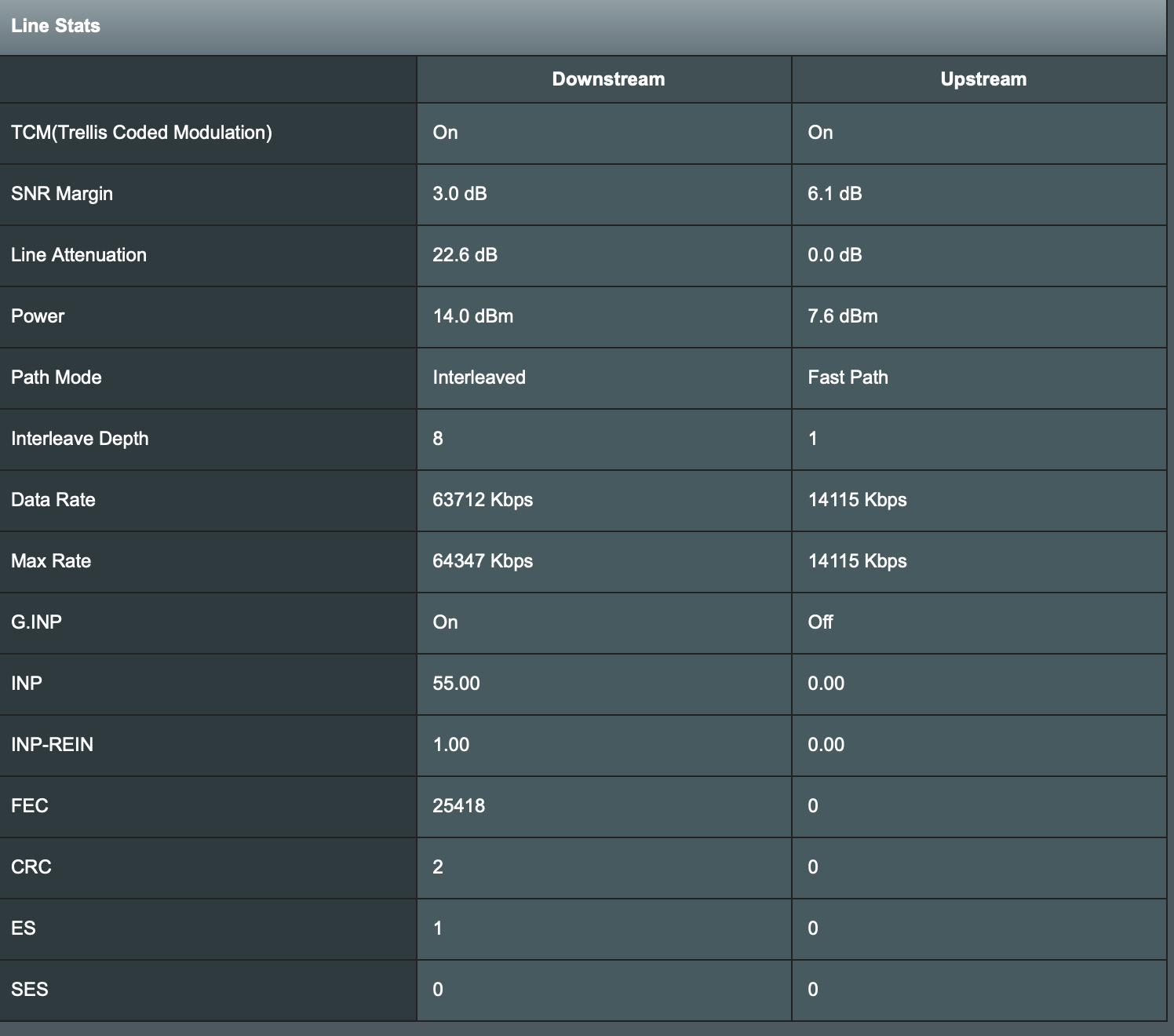
I have had a good look through the Asus menus but still cannot see an FEC field. The screenshots in my earlier post are from the DSL Log. There is something called CEC, but I google it and it appears that that is for ethernet.
I have also had a google for FECs with Asus routers and, whilst people acknowledge problems and their logs, they do not state where the information is found!
Regarding telnet, I am on a MacBook, and when I googled how to do it, reports suggested that telnet capability was removed from MacBooks due to security vulnerabilities?
You need to login in order to vote
I have had a look through the router GUI and a quick google, but I am not sure what FEC is. Is it a menu within the router GUI?
You need to login in order to vote
I am on the 63MBPS package. I live on a new build estate of only 14 houses, and several of the houses achieve/exceed 60mbps with their internet providers.
You need to login in order to vote
Hi. I attach some pictures below. I am only using the DSL-AC68U for internet connectivity. I changed some of the connection settings to ensure it connected to the Vodafone network (PPPoE, etc.) and basic items such as Wifi 2.4 and 5ghz channels, but not much else.
Attachments:
You need to login in order to vote
-
AuthorPosts