

› UKTH forums › 🛜 Wireless Routers & Modems › ASUS & Wireless › ASUS – DSL-AC88U / DSL-AC3100 Firmwares (beta's) etc. Looks like a new Beta Release for the DSL-AC88U is available, this version has Telnet enabled and improved 2.4GHz wifi (I believe). DSL-AC88U_v9.10.06_build581_debug.w.zip https://www.asuswebstorage.com/navigate/s/604D61534F2541D1B3CE1CC031A697E4Y UK Sentinel
- This topic has 1,438 replies, 106 voices, and was last updated 6 months, 3 weeks ago by
 alt.james.

-
AuthorPosts
-
January 30, 2019 at 6:29 am #2098
[quote quote=2095]Edit; Does not Version 1.10.06 Build 591 (stock) support Wifi Schedule disabling?[/quote]
Sorry, I don’t understand the question.
To disable wifi scheduling, I simply set to “no”. This is available in all firmware versions.
Only newly introduced to 591 was the ability to create a customised schedule for each day (this was the reason I decided to upgrade from 502 firmware). Previously, the schedule could only be set for weekdays and weekends.
You need to login in order to vote
January 30, 2019 at 6:48 am #2100[quote quote=2094]
An update regarding disabling wifi scheduling – it makes no difference to the memory leak. [/quote]
I see, I misread what you wrote, I thought you meant, ‘Any update’ time for a coffee I think ;-)
You need to login in order to vote
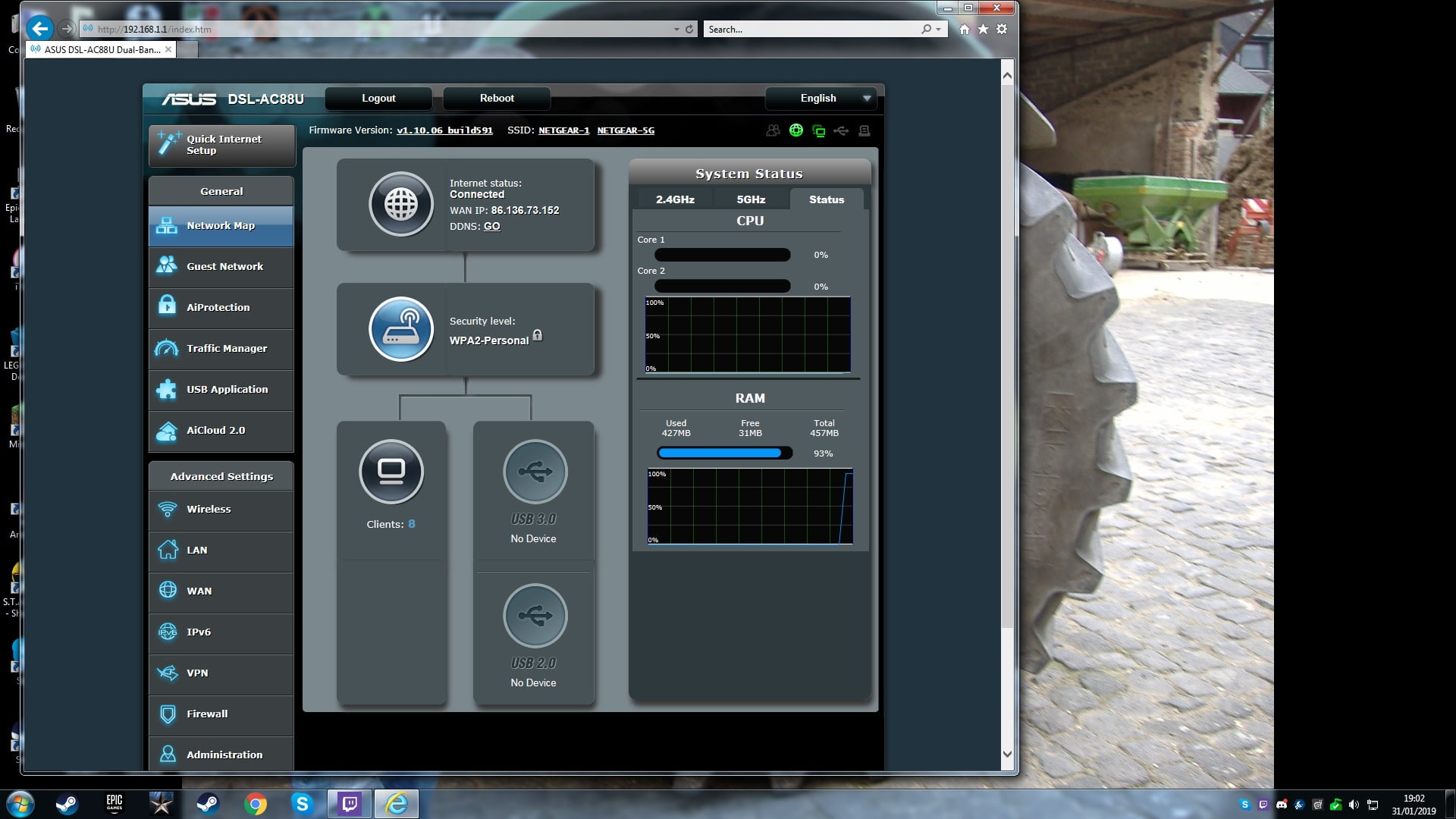
January 31, 2019 at 7:25 pm #2103Hi, my ram memory is now at 93%, up time is almost 40 days, getting close to the 95% mark so may be a couple of days will do? It looks like it increases 1% in about 24 hrs? I have 32mb left. Will keep you posted.
You need to login in order to vote
January 31, 2019 at 7:56 pm #2105[quote quote=2103]Hi, my ram memory is now at 93%, up time is almost 40 days, getting close to the 95% mark so may be a couple of days will do? It looks like it increases 1% in about 24 hrs? I have 32mb left. Will keep you posted.[/quote]
I am surprised it is still up and working @ 93%, by Saturday we should hit the 95% ;-)
You need to login in order to vote
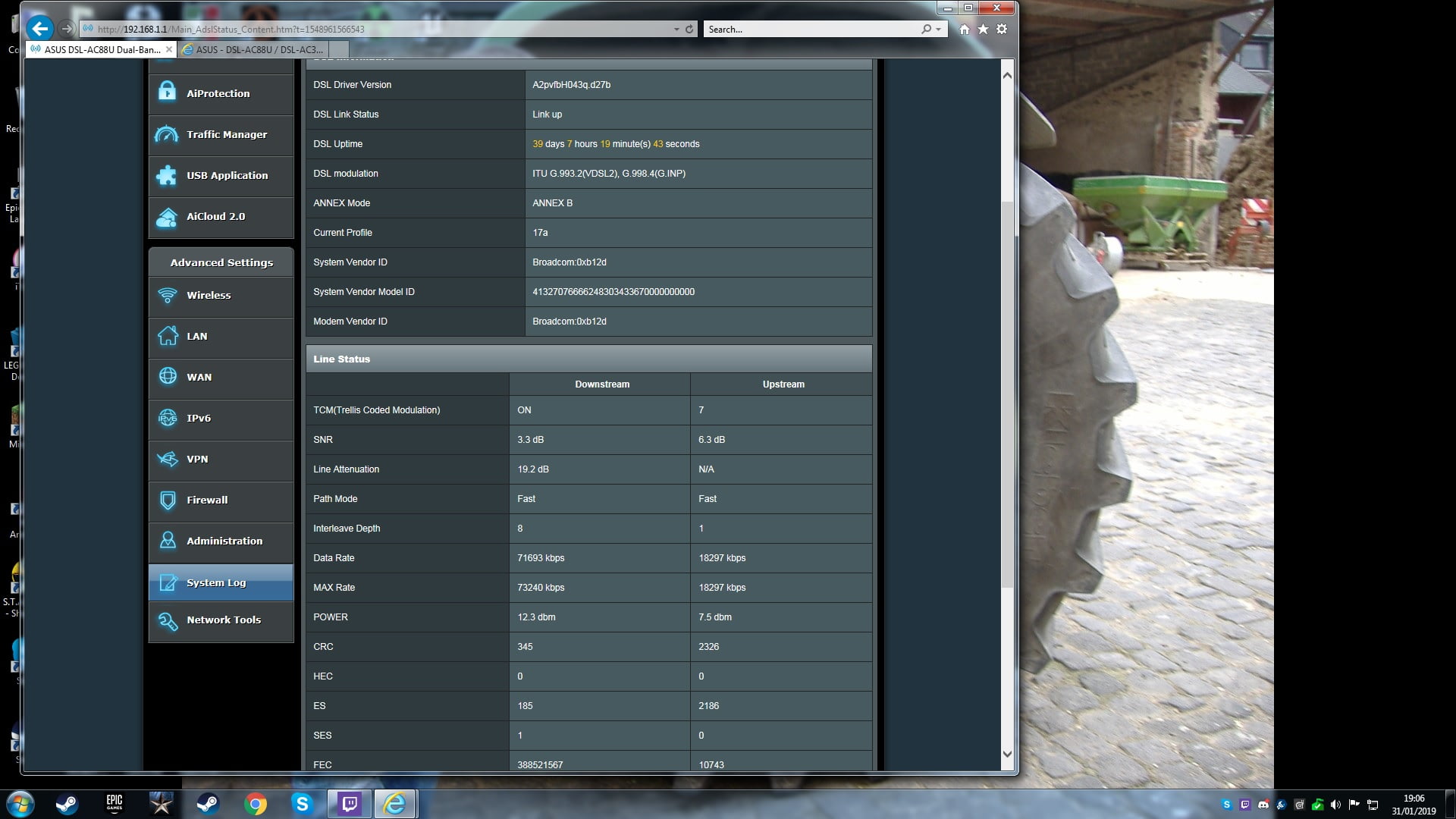
January 31, 2019 at 8:08 pm #2106January 31, 2019 at 8:35 pm #2109You have a good DSL line from you stats, I think I will drop ASUS and email tonight, with your screen dumps, just before they have there Chinese New Year
Thanks and let us know if your each 95% ?
You need to login in order to vote
January 31, 2019 at 8:59 pm #2110Thanks, took ages for BT to finally sort my line out with faults etc, with Speedtest I usually get 62 meg download and 17 upload.
i sure will let you know when it reaches 95%.
You need to login in order to vote
January 31, 2019 at 9:07 pm #211131 days up, two HDDs plugged in, 3 wifi devices, 2 wired, VPN server running and Download Master seeding 17 torrents. I’m at 50% RAM used which is what it’s sat at for the last couple of weeks more or less. It really is the luck of the draw as to the state this router boots into.
You need to login in order to vote
January 31, 2019 at 9:21 pm #2112Are Torrents via wifi, ? as 3 wifi clients is a low number, which hopefully explains why your RAM usage is steady, if not then I give up ;-)
You need to login in order to vote
January 31, 2019 at 10:19 pm #2113February 1, 2019 at 1:32 am #2114February 1, 2019 at 9:07 am #2116[quote quote=2114]Under upstream TCM is it normal for it to display a number? What does the number mean?[/quote]
TCM (Trellis Code Modulation) is another modulation scheme that sends information with high efficiency (wiki).
I have had a look thru post and users back in Sept, showed TCM ON for both Downstream and Upstream, others show Only Downstrean ON and Upstream Off, I assume this higher the value (number) the further you are away from TCM being enabled, which would give you slightly higher synch, in an Ideal world?
Alas, never really studied TCM, so just working on pre perceived concepts ;-)
You need to login in order to vote
February 2, 2019 at 9:30 am #2117I previously suspected wifi to be the cause of the memory leaks. Now I’m beginning to see a pattern regarding the memory usage based on user reports.
Jsteptoe and myself – have regular memory leaks and have reach > 90% used – we both have many wifi clients
pavlf – has a lesser memory leak issue – but has only 3 wifi clients
dodgydrains – has no memory leaks – does not use wifi
I think it’s fairly safe to say the more wifi clients you have, the more memory it leaks each day.
Perhaps the QA team at Asus are only testing with only a few wifi clients connected and need to test with many more.
I personally have a pool of around 30 devices, but on average at least 10 wifi clients connected at anyone time.
You need to login in order to vote
February 2, 2019 at 9:51 am #2118@jetspeed – That is exactly what I have passed back to ASUS on Thursday, I also felt 2 or 3 wifi clients did not present any ‘noticeable’ RAM/Memory increases, Services such as AiProtection, wifi schedule etc made no real noticeable difference, but when users have say 11 clients +, then this is the trigger.
ASUS did say yesterday, they will start to conduct a ‘Long Term Stability’ wifi test for the DSL-AC88U.
Alas they are closed next week due to Chinese New year. but I am sure in a months or so we should have feedback.
I am currently working with them on the IPv6 issues, so will keep those interested updated also?
Such fun!
You need to login in order to vote
February 2, 2019 at 6:25 pm #2120Hi all
update on my memory, it has now reached 96%, uptime 41 days and 6 hrs. At present time I have 11 WiFi connected and 2 lan connections. Wife noticed that her iPad was slower al loading eBay and Facebook this morning but no issue streaming a movie, not even buffering? It is looking like a WiFi memory issue?
You need to login in order to vote
-
AuthorPosts



- You must be logged in to reply to this topic.