

› UKTH forums › 🛜 Wireless Routers & Modems › ASUS & Wireless › ASUS – DSL-AC88U / DSL-AC3100 Firmwares (beta's) etc. Looks like a new Beta Release for the DSL-AC88U is available, this version has Telnet enabled and improved 2.4GHz wifi (I believe). DSL-AC88U_v9.10.06_build581_debug.w.zip https://www.asuswebstorage.com/navigate/s/604D61534F2541D1B3CE1CC031A697E4Y UK Sentinel In a completely...
- This topic has 1,438 replies, 106 voices, and was last updated 6 months, 1 week ago by
 alt.james.

- AuthorPosts
- August 30, 2021 at 8:05 am #14968
I have had feedback from ASUS and No Telnet (debugging) firmware version is available for the latest DSL-AC88U firmware release
In a completely sane world, madness is the only freedom (J.G.Ballard).
You need to login in order to vote
August 30, 2021 at 8:53 am #14969I have had feedback from ASUS and No Telnet (debugging) firmware version is available for the latest DSL-AC88U firmware release
<noscript>I’m really disappointed with Asus, they want the end of this device.
Thanks anyway for your interest.
ByeLiked by:You need to login in order to vote
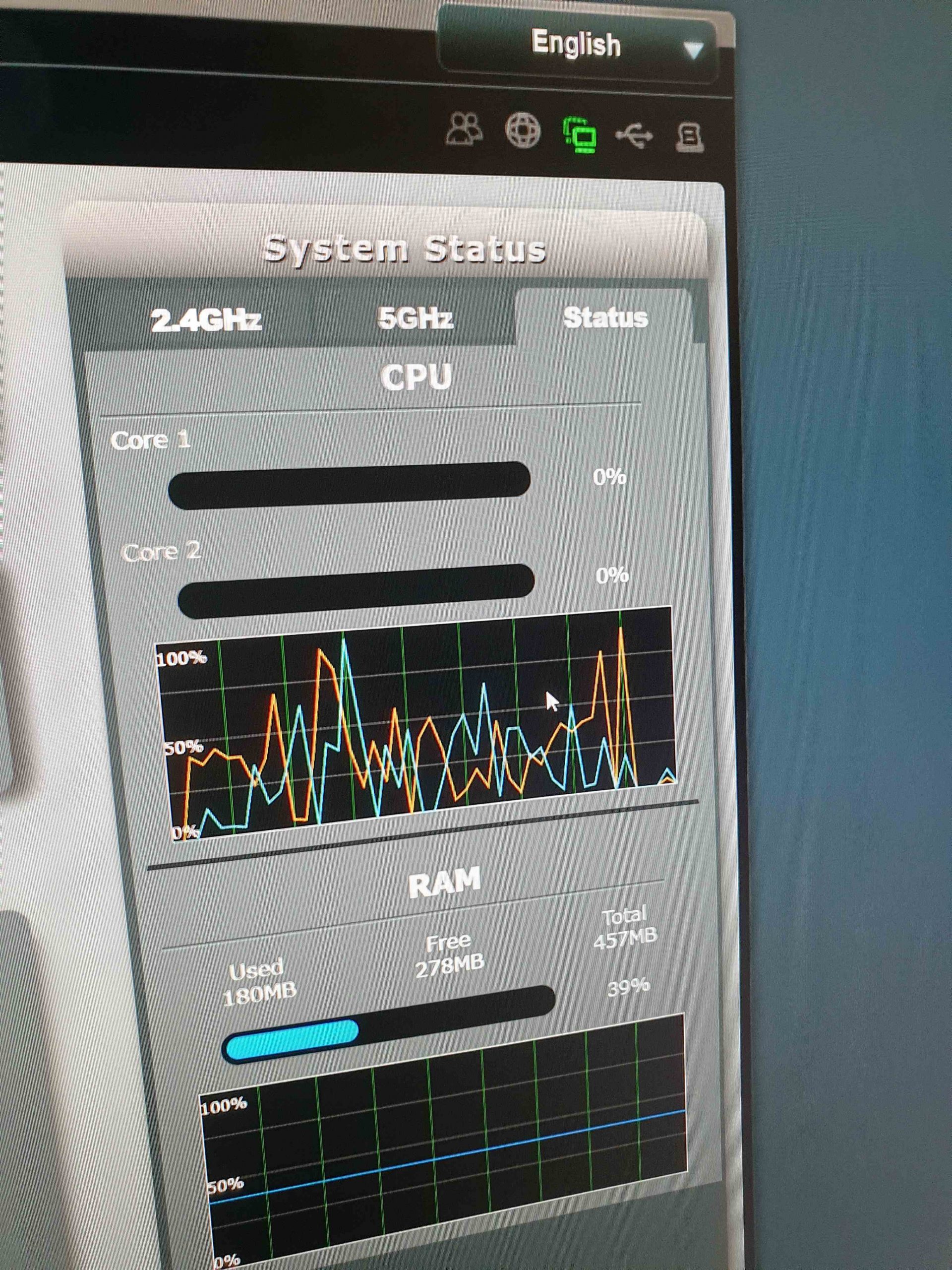
November 9, 2021 at 5:10 pm #16111I’ve recently moved home and now using virgin with my DSL ac88u. I am noticing high cpu usage and wondering if it’s normal.
I do gaming and have been noticing occasional ping spikes. I have checked and there is no other routers on the WiFi channel. I know ethernet it’s best but it’s not an option.
You need to login in order to vote
November 9, 2021 at 5:21 pm #16112Welcome, what is CPU usage now and before Virgin – what ISP was you with ?
Edit: ping spikes could be because of your new home location
In a completely sane world, madness is the only freedom (J.G.Ballard).
You need to login in order to vote
November 9, 2021 at 5:35 pm #16113I was with post office/shell before. I didn’t look at cpu usage before.
Cpu can regularly go up to 80% or even 100%. Most of the time it looks like 1 core at a time doing this. But looking at the graph there does seem to be high cpu usage on both cores also
You need to login in order to vote
November 9, 2021 at 5:37 pm #16114November 9, 2021 at 5:44 pm #16116Agreed, very high CPU usage – when you switched ISP, did you factory reset DSL-AC88U and use the QIS ?
If not try that and configure from scratch, not use backup
In a completely sane world, madness is the only freedom (J.G.Ballard).
You need to login in order to vote
November 9, 2021 at 5:49 pm #16117I didn’t factory reset. I just changed to ethernet wan. Wan connection type automatic IP.
I did try setting up QoS although I don’t think this router has many options to do this properly. I turned it off again but the CPU usage is the same.
I do use a dynamic DNS although I don’t think this is the cause either.
I will try resetting it tomorrow
You need to login in order to vote
November 9, 2021 at 5:59 pm #16120Worth a try, what firmware version are you currently using ?
Not sure if you are aware, but the DSL-AC88U is no longer supported, so the last update was security related and the DSL-AC88U does have a few outstanding issues ?
In a completely sane world, madness is the only freedom (J.G.Ballard).
You need to login in order to vote
November 9, 2021 at 6:08 pm #16122<p style=”text-align: left;”>v1.10.06 build591</p>
I’m aware Asus struggled the fix this router and was unable to bring features that they said they would.
You need to login in order to vote
November 9, 2021 at 6:43 pm #16124ASUS did release Version 1.10.08_Build593 which was a just a security update but is worth the upgrade before you factory reset
In a completely sane world, madness is the only freedom (J.G.Ballard).
You need to login in order to vote
November 10, 2021 at 12:10 pm #16127I’ve updated and done a factory reset. Cpu still seems to be going high.
Attachments:
You need to login in order to vote
November 10, 2021 at 12:58 pm #16129Can you possible disable Dynamic DNS just to see if that helps ?
In a completely sane world, madness is the only freedom (J.G.Ballard).
You need to login in order to vote
November 10, 2021 at 1:46 pm #16130It hasn’t helped. On overwatch currently, both cores are mainly jumping to 50%. It is sometimes jumping to 100% too.
Im not sure that I’m seeing any performance issues though.
Its just I don’t know why it goes to 100% like that
You need to login in order to vote
November 10, 2021 at 2:31 pm #16131It is strange, usually a service like wifi / DDNS can cause the cpu to have high usage as well as poor coding etc.
You could try an older version firmware (v1.10.05 build503) to see if this helps, alas as your ISP is SKY and no new updates will be released, it is case of finding a firmware version that works best.
Sky is the only variable that you have changed, so maybe the DSL-AC88U does not work well with that ISP ?
Try v1.10.05 build503 and if that does not help, we may need to look more closely at the logs / settings incase there are any clues ?
In a completely sane world, madness is the only freedom (J.G.Ballard).
You need to login in order to vote
- AuthorPosts




- You must be logged in to reply to this topic.