

› UKTH forums › 🛜 Wireless Routers & Modems › ASUS & Wireless › ASUS New DSL-AX82U Modem Router Combo – Wifi 6 ASUS New DSL-AX82U Modem Router Combo / Wifi 6 At long last I am now able to (officially) confirm that ASUS are in the process of releasing there latest addition...
- This topic has 711 replies, 37 voices, and was last updated 1 month, 1 week ago by
 El3rt1cal.

-
AuthorPosts
-
April 29, 2021 at 6:33 pm #13014
hmm few issues it seems with he AX82U, is this still the recommended router you think or should I look at a different model? What made me choose it was the inbuilt modem was a plus and the WAN port if it I do ever upgrade to FTTP, I can still use this router and not another :) My other option was the AX86U but need a draytek modem and bit of a issue with sockets where its based so hence decision to go AX82U. Seem no one in UK has any at present last I checked. Almost seems liek the AX82U could of done with 1Gb ram as looks to be running pretty high considering.
Kev
You need to login in order to vote
April 29, 2021 at 7:02 pm #13015[quote quote=13014]hmm few issues it seems with he AX82U, is this still the recommended router you think or should I look at a different model? What made me choose it was the inbuilt modem was a plus and the WAN port if it I do ever upgrade to FTTP, I can still use this router and not another :) My other option was the AX86U but need a draytek modem and bit of a issue with sockets where its based so hence decision to go AX82U. Seem no one in UK has any at present last I checked. Almost seems liek the AX82U could of done with 1Gb ram as looks to be running pretty high considering. Kev[/quote]
Early days yet for the DSL-AX82U and its firmware, give it six months and should be working well, or as per your other thread, go for separate modem and router (AX82U) and job done (extra power socket required on your house)
You need to login in order to vote
April 29, 2021 at 7:30 pm #13016Thanks, hmm yeah… i’ve been noticing from BT router that my internet goes down approx. every 1.5hours…. its stable and on from around 2-5/6am approx and from then on every 1.5hrs, it drops… and reconnects again after a coupe of minutes… very annoying…
Been holding out for the AX82U but may need to go with the AX86U & separate modem….. hmmmm have to see, might give it another 3 or 4 weeks and see if any supplies start to come through… I can prob go without the AI Protect etc, just use it as a straight forward router for a while until it gets issues sorted and then update / turn on extra features.. just looking for a stable connection atm… its ok when at work but sometimes WFH and can be annoying keep loosing connection.
Thanks
Kev
Liked by:
You need to login in order to vote
April 29, 2021 at 9:06 pm #13017[quote quote=13006]
[/quote]
Yes, when I shut down AiProtection, I followed it for a while, the usage rate remained at 60%. When I activate it again later, the RAM usage increases
You need to login in order to vote
April 30, 2021 at 6:09 am #13019[quote quote=13017]
Yes, when I shut down AiProtection, I followed it for a while, the usage rate remained at 60%. When I activate it again later, the RAM usage increases
[/quote]Good that we have found the problem with your DSL-AX82U – It maybe just a bad firmware Flash, but will ask ASUS to add it to there list, just to make sure
You need to login in order to vote
May 1, 2021 at 8:56 pm #13035Can confirm that there may be some memory leaks on this model. After 6 days of being powered on, memory usage is now 81%. As @UK Sentinel states, early days on this model.
As for the UPNP status under AI Protection, it shows correctly once I disable it. All of the checks on my side are green.
So far after 1 week, not even a single drop, something that my previous DSL-AC68U was not delivering anymore. Hopefully I get the download modulation reverted back to FastPath soon.
Liked by:
You need to login in order to vote
May 2, 2021 at 5:48 am #13036[quote quote=13035]Can confirm that there may be some memory leaks on this model. After 6 days of being powered on, memory usage is now 81%. As @UK Sentinel states, early days on this model. As for the UPNP status under AI Protection, it shows correctly once I disable it. All of the checks on my side are green. So far after 1 week, not even a single drop, something that my previous DSL-AC68U was not delivering anymore. Hopefully I get the download modulation reverted back to FastPath soon.[/quote]
Let us know by the end of this week if the Memory usage increases again, as this will be interesting, are you getting many errors on you DSL line (Downstream) and good news the connection is rock solid
You need to login in order to vote
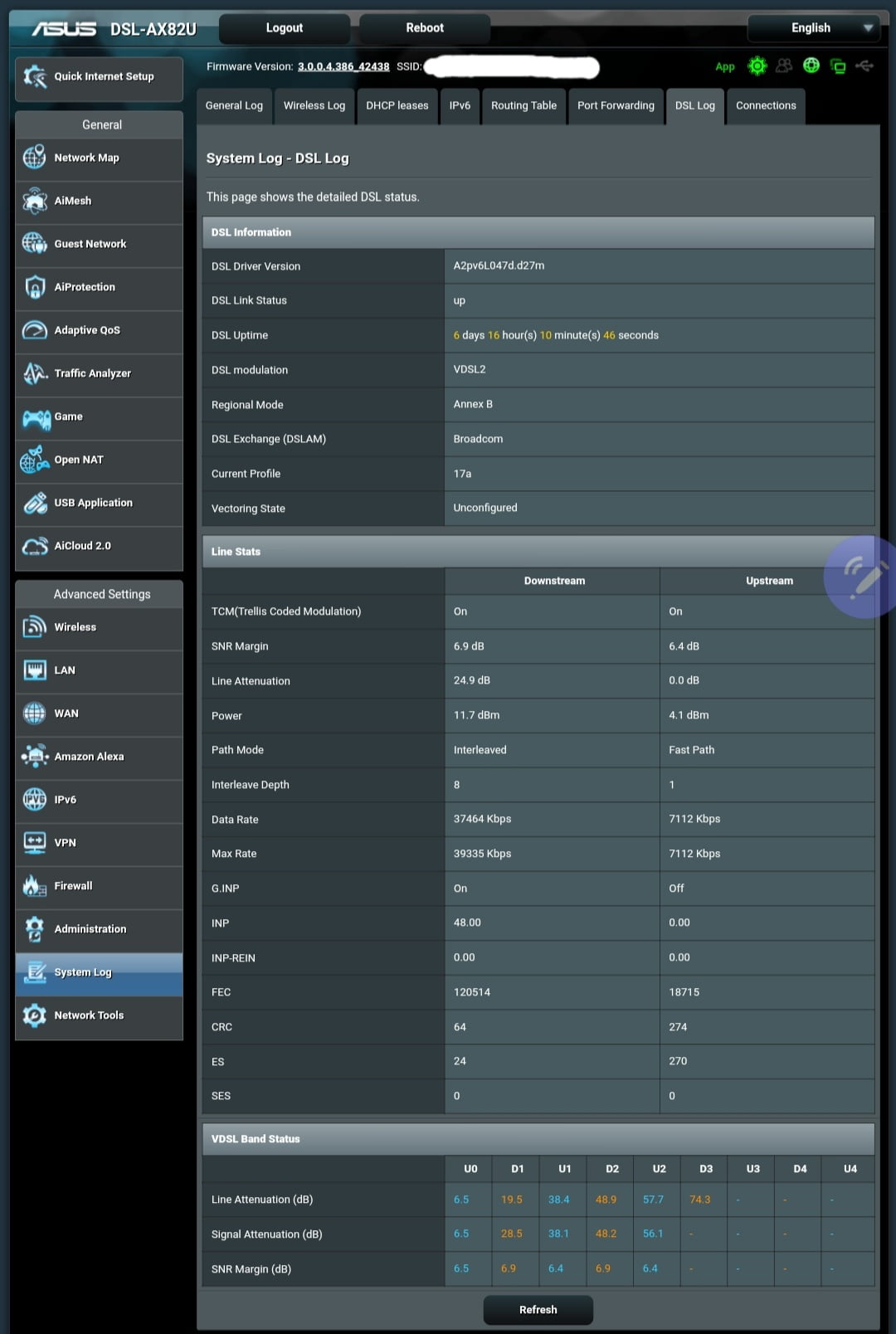
May 2, 2021 at 9:03 am #13043Will do @UK Sentinel . Adding current screens so that we can compare by end of the week.
Download CRC Errors: 64
(Attached image contains all the details)
Attachments:
You need to login in order to vote
May 2, 2021 at 10:10 am #13049Well jut checked again and it is showing UPNP as off.
Is there more than one menu where you have to turn it off ??
Been through it all and I can only see one menu that lists UPNP !!
But still showing Orange on mine
You need to login in order to vote
May 2, 2021 at 10:38 am #13050[quote quote=13049]Well jut checked again and it is showing UPNP as off. Is there more than one menu where you have to turn it off ?? Been through it all and I can only see one menu that lists UPNP !! But still showing Orange on mine[/quote]
No other place where UPnP can be disabled, Most likely a bug, I have informed ASUS in my weekly report I send them
You need to login in order to vote
May 2, 2021 at 10:41 am #13051[quote quote=13043]Will do @UK Sentinel . Adding current screens so that we can compare by end of the week. Download CRC Errors: 64 (Attached image contains all the details)[/quote]
You need to login in order to vote
May 3, 2021 at 10:09 pm #13083Hi,
Aiprotection is disabled, the amount of free memory is very low, only 28 MB free
Only USB flash drive is inserted in the device (media server) and ipv6 is active. I did not activate any other feature. 6 devices are connected wirelessly.
Attachments:
You need to login in order to vote
May 4, 2021 at 4:44 am #13086[quote quote=13083]Hi, Aiprotection is disabled, the amount of free memory is very low, only 28 MB free Only USB flash drive is inserted in the device (media server) and ipv6 is active. I did not activate any other feature. 6 devices are connected wirelessly.[/quote]
Can you send a feedback form to ASUS and explain the problem, mention UK Sentinel at the beginning of message and I will ask ASUS to look into issue
You need to login in order to vote
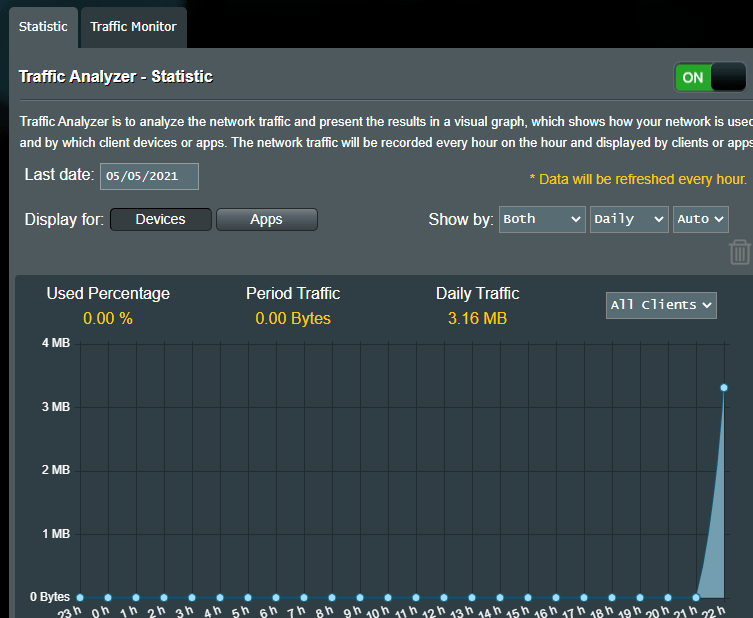
May 5, 2021 at 7:23 pm #13122Is it possible to get per connected device ul/dl traffic at all from the ax82u or is it only per interface still like the 88u? (with stock firmware), it’s a feature I missed from the old ac68u.
You need to login in order to vote
May 5, 2021 at 7:31 pm #13123 -
AuthorPosts






- You must be logged in to reply to this topic.