

› UKTH forums › 🛜 Wireless Routers & Modems › ASUS & Wireless › ASUS New DSL-AX82U Modem Router Combo – Wifi 6 ASUS New DSL-AX82U Modem Router Combo / Wifi 6 At long last I am now able to (officially) confirm that ASUS are in the process of releasing there latest addition...
- This topic has 711 replies, 37 voices, and was last updated 1 month, 1 week ago by
 El3rt1cal.

- AuthorPosts
- August 17, 2023 at 9:33 am #26458
Does anyone know if it’s possible to use the built in VPN Fusion function in conjunction with ipv6? Currently if I enable ipv6 (as Sky offers ipv6 support) then nothing will forward through the connection configured in vpn fusion. I know NordVPN do offer a handful of ipv6 servers now that can be configured.
You need to login in order to vote
August 17, 2023 at 10:44 am #26459I know vpn fusion never used to work back in 2021 with IPV6, but not sure if any progress has been made in this area.
I will drop ASUS a message and ask
You need to login in order to vote
August 17, 2023 at 11:32 am #26460Does anyone know if it’s possible to use the built in VPN Fusion function in conjunction with ipv6? Currently if I enable ipv6 (as Sky offers ipv6 support) then nothing will forward through the connection configured in vpn fusion. I know NordVPN do offer a handful of ipv6 servers now that can be configured.
Regarding the subject, Asus had last written this to me in April.
1. VPN Fusion not support IPv6 currently. So the IPv6 traffic of LAN devices will not be forwarded to VPN tunnel. No matter what kind of VPN.
2. WireGuard client may connect to the remote endpoint over IPv4 or IPv6 if the domain name of endpoint could be resolved to both IPv4 and IPv6 address. It just choose the first record in the DNS reponse. If you would like to connect to remote endpoint over IPv6 only, you have to set IPv6 address instead of domain name.Liked by:You need to login in order to vote
August 17, 2023 at 9:13 pm #26465Thanks for letting us know, shame ASUS still have not got IPV6 working with VPN Fusion currently for the DSL-AX82U it seems
You need to login in order to vote
August 18, 2023 at 4:58 am #26468So ASUS have come back to me for the IPV6 working with VPN Fusion….
———-
IPv6 traffic will forward to VPN tunnel if it is set as Default Connection.
———–
Attachments:
You need to login in order to vote
August 18, 2023 at 9:06 am #26472Interesting. how does the default setting affect things if you only have the vpn connection in fusion set up so a couple of devices use it? At the moment ‘wan’ is the default for me (which it should be for most devices to not use vpn)
You need to login in order to vote
August 18, 2023 at 10:11 am #26473would be interesting, ‘for testing purposes’ to see if changing the default connection will support IPv6 ?
Then If this does work, maybe an option to look at switching to @GNUton build which uses ASUSWRT-Merlin to provide better VPN options maybe ?
You need to login in order to vote
August 19, 2023 at 12:15 am #26475@uk-sentinel Thank you, I’ve checked now and I saw that it’s operating as v6.
Attachments:
You need to login in order to vote
August 19, 2023 at 6:37 am #26477@black-bird – Great news, good to see IPV6 working with VPN Fusion at last.
I do not have my ASUS router plugged in at the moment, is there any way to only allow a couple of clients to use VPN and others have direct access only to internet ?
You need to login in order to vote
August 19, 2023 at 11:36 am #26486I tried some combinations, and v4 configures the way I want, but v6 always routes through VPN. Even if I change the default profile, when the VPN is active, it still provides IPv6 over VPN.
Liked by:You need to login in order to vote
August 19, 2023 at 12:00 pm #26487Thank you for trying, shame all IPv6 clients route via VPN. I wonder if this is something ASUSWRT-Merlin overcomes.
Did you happen to see if a client that was only IPv4 (not dual stack IPv4 / IPv6), did they route via VPN or Internet ?
As maybe an option that IPv4 clients are Internet and IPv6 clients are VPN
You need to login in order to vote
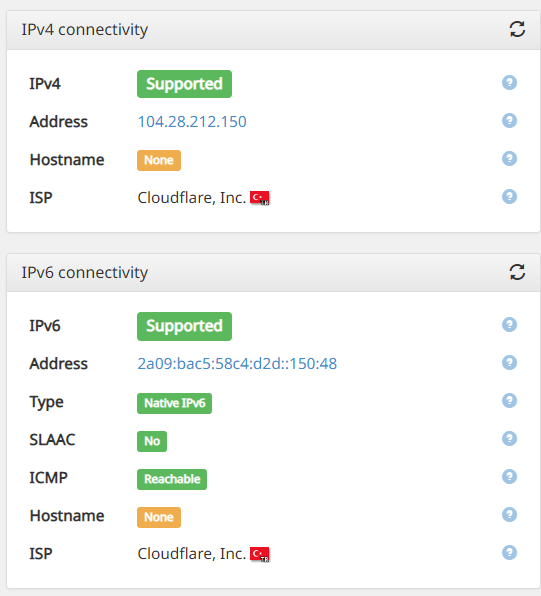
August 19, 2023 at 4:50 pm #26490Unfortunately there is no such option, which is why it’s directing the IPv6 connection through the VPN. While conducting these tests, I individually verified whether the IP addresses belong to my internet service provider or to Cloudflare.
Device 1: Routed through VPN
IPv4: VPN IP
IPv6: VPN IPDevice 2: Routed through the default internet connection.
IPv4: ISP IP
IPv6: VPN IPI changed the default internet profile, but the result remained as mentioned above.
Liked by:You need to login in order to vote
August 19, 2023 at 8:40 pm #26492Interesting and as you detailed, seems IPv6 always obtains IP via VPN, even if Default Connection is not VPN for yourself.
Would be interesting to hear how @superhands is finding this way of working ?
You need to login in order to vote
August 21, 2023 at 1:22 am #26522There is a certain user group, like myself, that uses the DSL AX82U solely as a router. When the DSL port is not used, it remains active, consuming energy. Could Asus add an automatic or manual option, perhaps through a confirmation box, to disable the DSL functionality when the DSL WAN is not in use? Otherwise, energy is being consumed to constantly search for a signal on an unused DSL port.
You need to login in order to vote
August 21, 2023 at 11:00 am #26527That would be a good idea, maybe not realistic for a consumer grade router, can I suggest you send a feedback form and request this and I will mention this to ASUS also
You need to login in order to vote
- AuthorPosts





- You must be logged in to reply to this topic.