Forum Replies Created
-
AuthorPosts
-
Hi guys,
It’s about time to post another update.First thing first. Your question, Sentinel.
I don’t know.. I don’t know how did he know, but he was right? Maybe he just guessed? I really don’t know.
Anyway, after the event I reported about a couple weeks ago, I started to investigate all cabling in my household. I went to a demarcation point in my basement with my modem to plug in to find out better line stats. So I decided to replace the whole length of the cable.
I bought several meters of good quality CAT 6 UTP cable from a reliable retailer and with it, I made new cabling going up from the basement.
The speed improved enough to be safe from dropping the connection again.
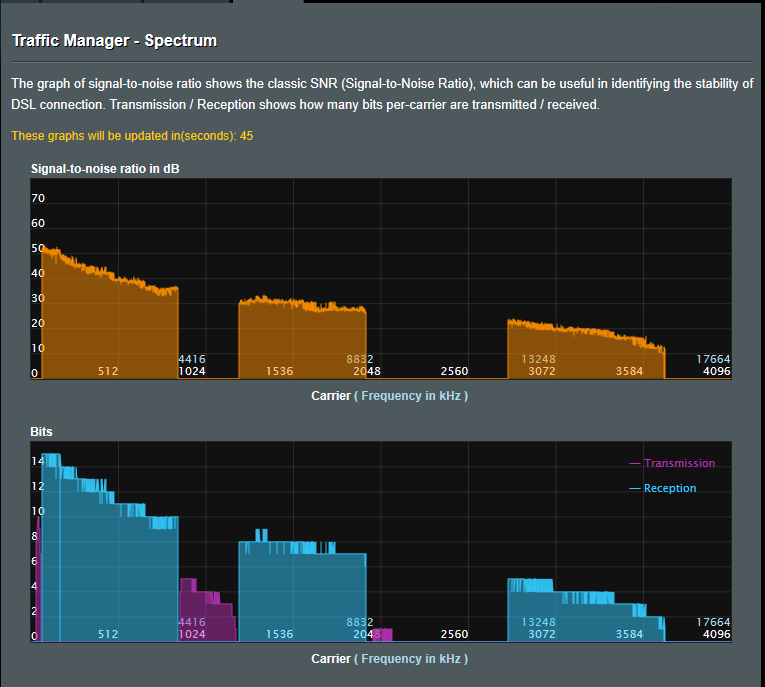
I attached screenshots for comparison. You can navigate among them by their naming.In the end, I am happy with the result. In a certain degree.
Attachments:
You need to login in order to vote
Hi guys,
so how this all ended up?As I contacted my ISP on 29 of July in the morning they contacted me back in the afternoon informing me that they noticed problems with the line and they send out a technician to check the line in person at the location the next day.
On the 30th of July, I got a call from the technician which was inspecting the line that the line (wires leading to my household) is bad and that they will need to dig them up. As they were busy at other places at the moment they were supposed to show no early than on Friday (2nd of August). Later on that day, I received another call with him stating that the line is not THAT bad and if he could stop by and check the cables in my household.
When he showed up he found out that one of my cables was faulty and when we replaced it, the connection got better in terms of stability. He also noticed some sort of electrical noise present in my house and stating that it could be caused by some electrical device. And then he left.
In the next two days, I was able to find out that a LED Driver powering my LED strips in my kitchen was the cause of the noise. As I swapped it with replacement one the noise got mostly away. At that stage, I was able to sync up to 56/10 Mbit with my old modem (DSL-AC55U) stable enough for the line to not drop out anymore.
At this point, I thought that it’s all solved, but I received a call on Monday (5th of August) that there might be interruptions of the internet connection as they will be digging and replacing some part of the line in the street. When they finished they told me that one of the underground joints was fried by a lightning strike in a recent thunderstorm.
And at this point, I am back at 56/10 Mbit with a 2-3 dB SNR and without dropping the connection again which is the most important thing to me.
Attachments:
Liked by:
You need to login in order to vote
Pretty much. There is just one-hour disparity because yesterday I disconnected the line in the afternoon to relocate a cable. I contacted my ISP in the morning and they told me that they will monitor the line during the next couple of hours.
System Uptime : 0 days 23 hours 52 minute(s) 14 seconds
DSL Uptime : 0 days 22 hours 41 minute(s) 30 seconds
You need to login in order to vote
I didn’t touch anything. The router did not reboot. The sync persisted.
I just noticed increased ping and packet loss. So I opened the DSL log page and noticed a huge accumulation of errors.
Here is a screenshot taken this morning.Attachments:
You need to login in order to vote
Seems like my line just hit today’s weak spot just now. It doesn’t look good at all.
I might try contacting my ISP when I’ll have time for it.
Attachments:
You need to login in order to vote
Hi,
as the line got fairly stable at the start of the year I let it stay at 57/10 Mbit sync speed with G.INP enabled. It managed to stay synced at that speed even for 30 days straight without any dropouts.However, during last month I started having problems with the line. Modem losing sync fairly often leading me to switch back to the interleaved path with turning G.INP off to get it back up running. But as I mentioned before my line maxes up at 45/4 with G.INP off and that’s a no go for me.
So I lost my nerves and bought an ASUS DSL-AC68VG (Broadcom?) modem to try it out and return it later (within 14 days). As the modem has Broadcom chipset, at least that’s what I think (I could not find anything anywhere) I am not able to tweak SNR Margin any longer leading to an automatic sync-up at 45/4 Mbit. Right now I am not able to sync up with G.INP enabled.
Here is a screenshot of a DSL log from DSL-AC68VG. I would be glad if you would look at it and told me what you think. Thank you.
Attachments:
You need to login in order to vote
Hey,
I bought a modem TP-Link W9980B (~54£) yesterday. The reason was particularly to try out some cheapish modem with a different chipset.
I never thought that it is so hard to find a good quality modem here in the Czech Republic. I think the reason for it might be that local DSL infrastructure works with a greater part on Annex B and as Annex B is almost unique just to the Czech Republic it is not a good reason for many manufacturers to make many models or none at all.
As the TP-Link W9980B uses a Lantiq chipset it should be better than Broadcom on a long line. It happens in my case to be at one. The technician told me that it might be approximately 700 meters.
And it appears to be a bit better. It synced at the same speed as my ASUS DSL-AC55U but with a better SNR Margin. But as I am able to tweak SNR on AC55U I am able to attain a little greater speed on the AC55U.
DSL-AC55U 57 Mbit 3dB SNR Margin
W9980B 57 Mbit 6db SNR Margin
But apart what I mentioned.
From my point of view, the TP-LINK has a TERRIBLE INTERFACE. It was very difficult for me to navigate around and finally, when I reached the DSL settings I found out that there is pretty much nothing. You can choose between VDSL and ADSL. And that’s all. And apart from that, the modem comes with a factory firmware with no available updates for ANNEX B version. I looked up that last firmware for a different ANNEX version is dated back to 2015. Awful.
Thank god we have ASUS.
And TP-Link? I am going to return it on Thursday…
You need to login in order to vote
Hey Pavel,
I would be glad if you reported your experience with the latest beta after a few days of use. I am thinking of buying this router more than ever, but you know, it’s kinda expensive. Thanks.
Damis
You need to login in order to vote
November 4, 2018 at 10:21 pm in reply to: Latest Beta Firmwares for DSL-AC51 to DSL-N66U incl. DSL-AC750 Latest DSL ASUSWRT firmware v9.1.2.3_502-g2bdb05b now available. (latest firmware’s are at end of threads) For following ASUS DSL Modem Routers: DSL-AC51 DSL-AC52U DSL-AC55U DSL-AC56U DSL-AC750 DSL-N10-C1 – (extended beta support... #1358I proceeded with a router reboot and System Log is working correctly now. Sorry to bother you.
You need to login in order to vote
November 4, 2018 at 2:42 pm in reply to: Latest Beta Firmwares for DSL-AC51 to DSL-N66U incl. DSL-AC750 Latest DSL ASUSWRT firmware v9.1.2.3_502-g2bdb05b now available. (latest firmware’s are at end of threads) For following ASUS DSL Modem Routers: DSL-AC51 DSL-AC52U DSL-AC55U DSL-AC56U DSL-AC750 DSL-N10-C1 – (extended beta support... #1352DSL-AC55U
I checked it again. The scrollbar at the side isn’t present at all and the mouse wheel also doesn´t work. The separate log lines get pushed up by new ones and when they go beyond the frame you can’t scroll up to view them.
PS: I did not make a factory reset this time, but I don’t think this could have any relation to it
You need to login in order to vote
November 4, 2018 at 10:58 am in reply to: Latest Beta Firmwares for DSL-AC51 to DSL-N66U incl. DSL-AC750 Latest DSL ASUSWRT firmware v9.1.2.3_502-g2bdb05b now available. (latest firmware’s are at end of threads) For following ASUS DSL Modem Routers: DSL-AC51 DSL-AC52U DSL-AC55U DSL-AC56U DSL-AC750 DSL-N10-C1 – (extended beta support... #1349I am curious about the changelog.
I had issues with strange dropouts of LAN ports with previous firmware. It appears it’s gone now, but I can’t confirm it because it seems that I can’t scroll up in System Log (go back in time)? I suppose that’s a bug?
Current firmware: v9.1.2.3_605-gca8dee5
Previous firmware: v9.1.2.3_576-gebbda6c
You need to login in order to vote
I’ve just found out that CETIN uses DSLAM equipment from Alcatel and Lucent in newly installed cabinets. Is that information anyhow useful?
You need to login in order to vote
rakimbadu wrote:
Thanks a lot!
Spoke with ASUS and unfortunately they say they have removed host-uniq field from the next formal release (due next week) but will be included in a later beta, off record I am not aware of any releases where this option worked either but it is at least now on there priority list 😉This is meant for Annex A version so I suppose there is a chance that firmware for Annex B could come with it this week (written on Monday)
You need to login in order to vote
October 22, 2018 at 10:35 pm in reply to: ASUS – DSL-AC88U / DSL-AC3100 Firmwares (beta's) etc. Looks like a new Beta Release for the DSL-AC88U is available, this version has Telnet enabled and improved 2.4GHz wifi (I believe). DSL-AC88U_v9.10.06_build581_debug.w.zip https://www.asuswebstorage.com/navigate/s/604D61534F2541D1B3CE1CC031A697E4Y UK Sentinel In a completely... #1205Hey Sentinel,
you mentioned that DSL-AC88U doesn´t support MU-MIMO yet. Does it mean that ASUS is planning to integrate that technology into this router? Thanks.
You need to login in order to vote
Thanks for the info.
I have managed to dig up a documentation about parameters of the physical layer made by CETIN.
Under Profile 35b there is a table which marks speed rates corresponding to the loop distance which goes down to 500 metres and 80 Mbits. So it is certainly possible that profile 35b could be used for 100 Mbits. But I have no confirmation.
I attached a screenshot. (Labels are in Czech, sorry! )
Attachments:
You need to login in order to vote
-
AuthorPosts